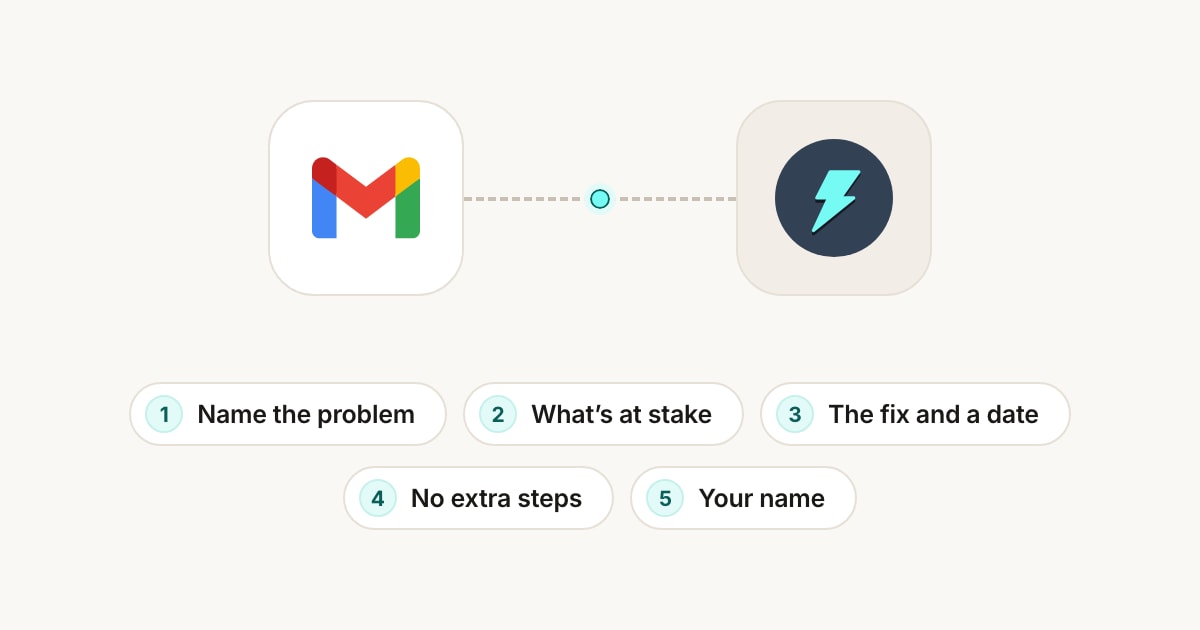
To respond to a customer complaint email, reply the same day. Say sorry and name the problem, show you understand what's at stake for them, give the fix and when it will happen, say what they don't need to do, and sign with your own name. Keep it short and calm, and don't argue or blame anyone.
Jetwriter AI can write that reply for you in Gmail. Open the complaint, click AI Reply, and type the fix in a few words, such as "Apologize and replace them by express." Jetwriter AI reads the customer's email and writes the reply. With Files and links, it takes the details from your own shipping or returns page. You read the reply and send it yourself.
Example: Nine Broken Glasses, a Week Before Opening
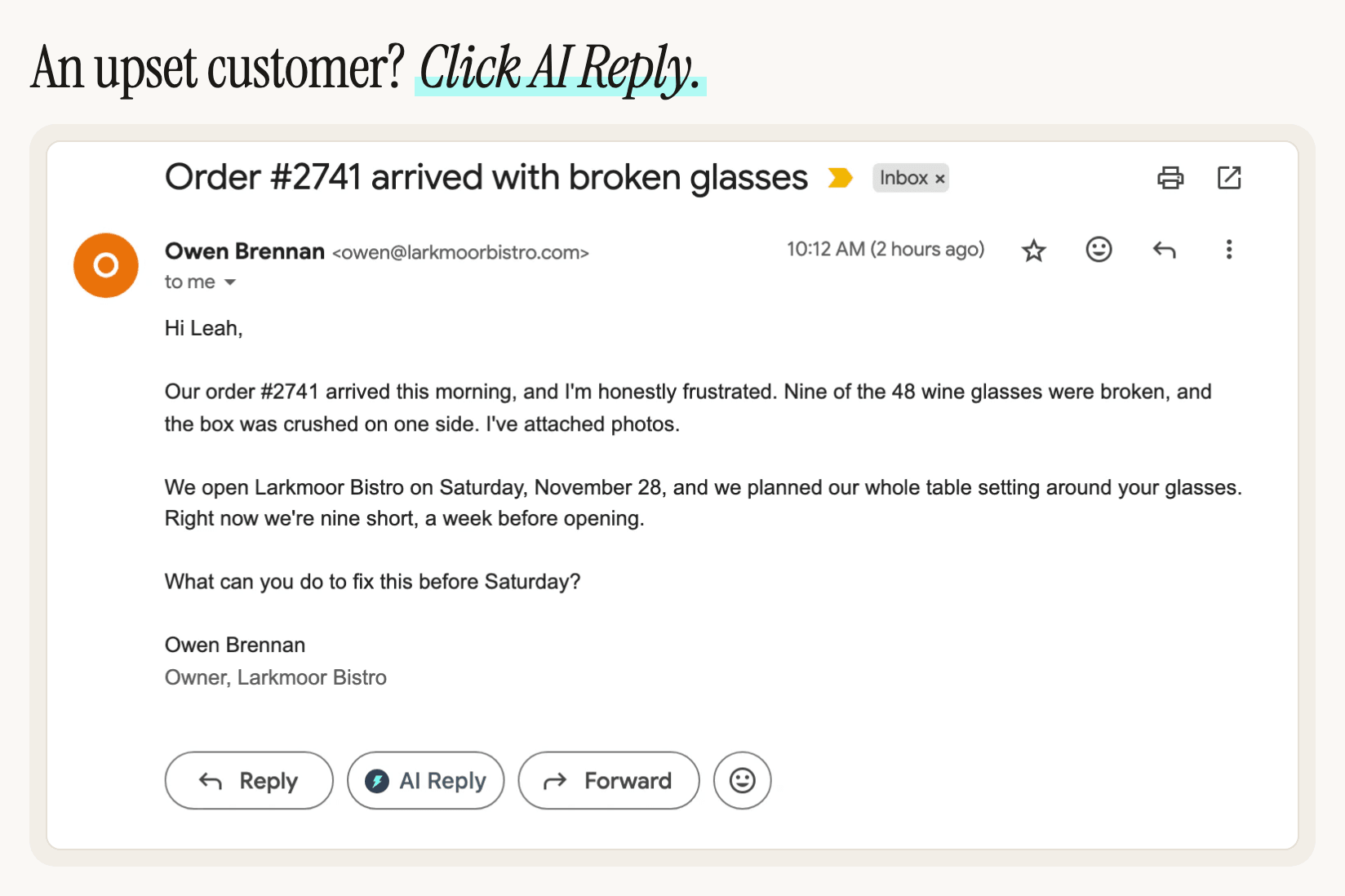
Leah owns Halvorn Glass, a small studio that makes hand-blown drinking glasses and sells them to restaurants and bars. On Thursday morning, Owen, who is about to open a restaurant, emails her with the subject "Order #2741 arrived with broken glasses":
Hi Leah,
Our order #2741 arrived this morning, and I'm honestly frustrated. Nine of the 48 wine glasses were broken, and the box was crushed on one side. I've attached photos.
We open Larkmoor Bistro on Saturday, November 28, and we planned our whole table setting around your glasses. Right now we're nine short, a week before opening.
What can you do to fix this before Saturday?
Owen Brennan
Owner, Larkmoor Bistro
Owen is upset, he has a deadline, and he asks a direct question. A good reply answers all three.
The 5 Parts of a Good Complaint Reply
Here is the reply Leah sent, with its five parts numbered. Jetwriter AI wrote all of it except her name, from six words she typed in Gmail.
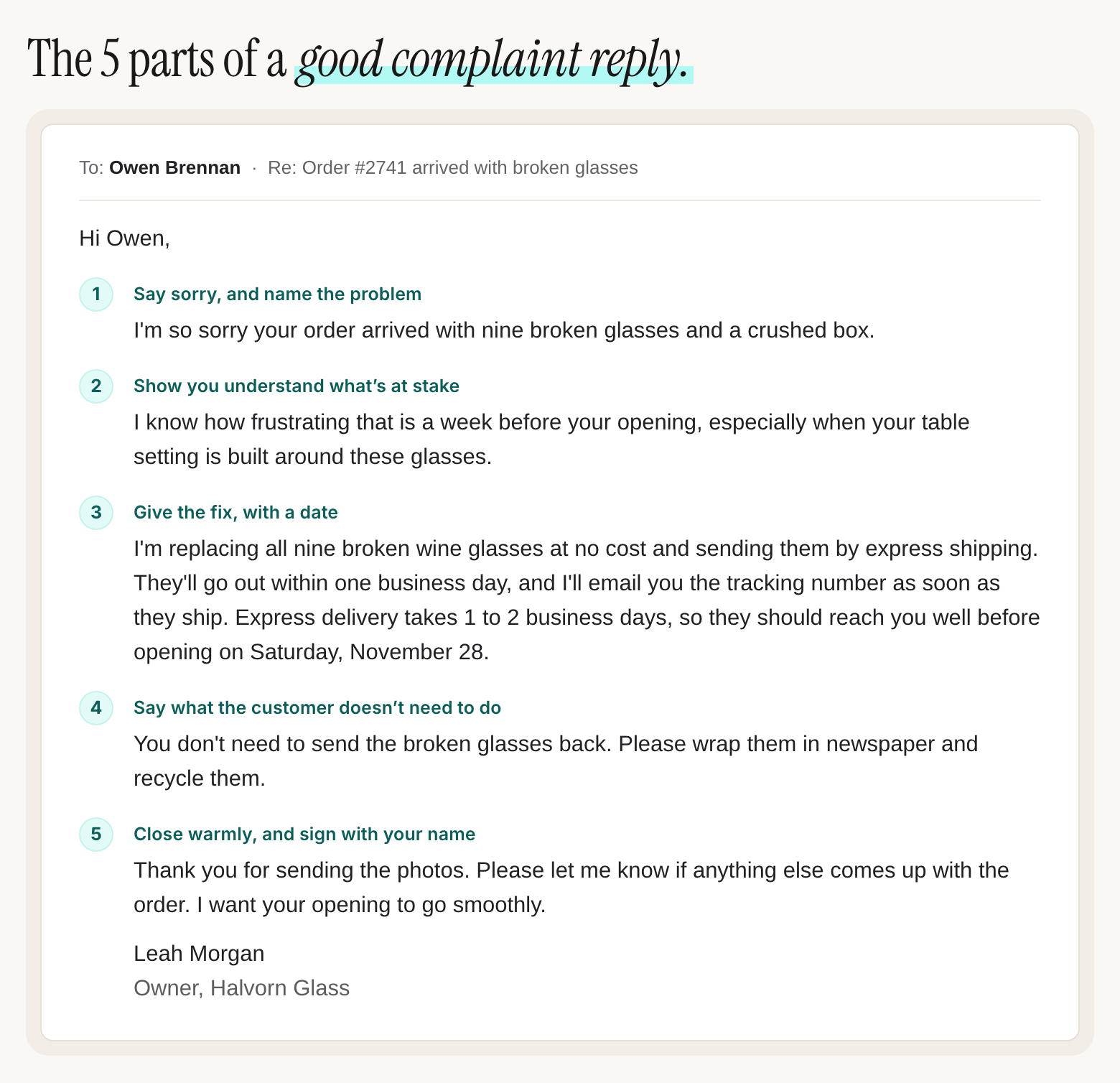
- Say sorry, and name the problem. "I'm so sorry your order arrived with nine broken glasses and a crushed box." Use the customer's own details, so they know you read their email. One clear apology is enough. "We apologize for any inconvenience" says nothing.
- Show you understand what's at stake. "I know how frustrating that is a week before your opening, especially when your table setting is built around these glasses." Owen's real problem isn't nine glasses, it's his opening day. Say it in a sentence.
- Give the fix, with a date. "I'm replacing all nine broken wine glasses at no cost and sending them by express shipping." Say what you'll do, when it will happen and how the customer will know, like the tracking number Leah promises. "We'll look into it" isn't a fix.
- Say what the customer doesn't need to do. "You don't need to send the broken glasses back." Remove every step you can: a return, a form, a second email to ask what happens next.
- Close warmly, and sign with your name. "Please let me know if anything else comes up with the order. I want your opening to go smoothly." Then your name and role. An email from a person tells the customer someone is on it. One from "The Customer Service Team" doesn't.
How to Write the Reply with AI Reply in Gmail
Leah didn't type that reply. She asked Jetwriter AI for it, in Gmail:
- In Gmail, open the customer's email.
- Click AI Reply, under the email next to Gmail's Reply and Forward buttons. Gmail's reply box opens, and so does the Jetwriter AI window.
- In the box that says "Tell AI what to write (e.g., 'Politely decline')", type the fix in a few words, and press Enter.
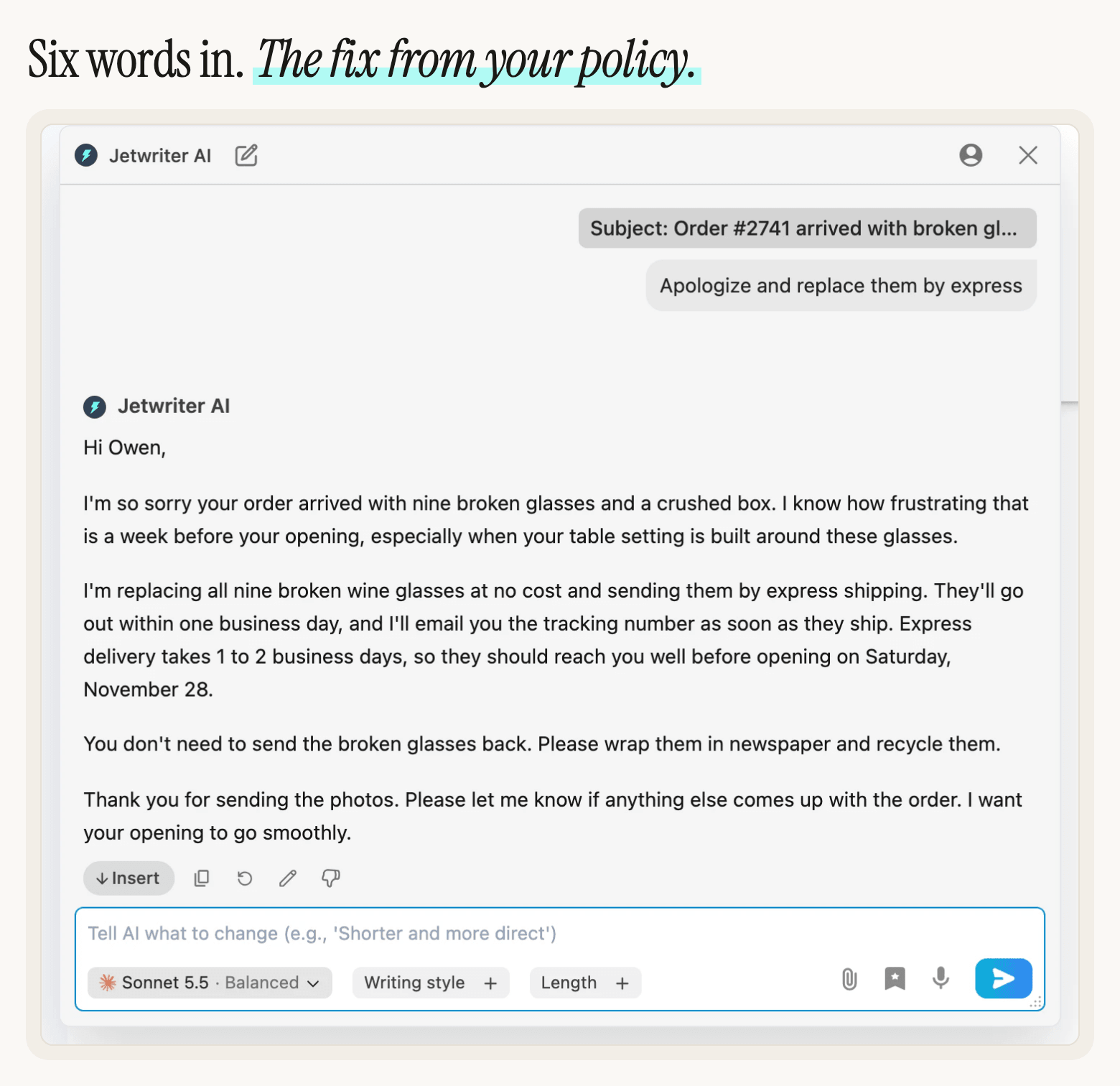
What Leah typed
Apologize and replace them by express
What Jetwriter AI wrote
Hi Owen,
I'm so sorry your order arrived with nine broken glasses and a crushed box. I know how frustrating that is a week before your opening, especially when your table setting is built around these glasses.
I'm replacing all nine broken wine glasses at no cost and sending them by express shipping. They'll go out within one business day, and I'll email you the tracking number as soon as they ship. Express delivery takes 1 to 2 business days, so they should reach you well before opening on Saturday, November 28.
You don't need to send the broken glasses back. Please wrap them in newspaper and recycle them.
Thank you for sending the photos. Please let me know if anything else comes up with the order. I want your opening to go smoothly.
Where each fact came from
- Owen's email: the nine broken wine glasses, the crushed box, the photos, and the opening on Saturday, November 28.
- Leah's request: say sorry, and replace the glasses by express.
- Leah's shipping page, in Files and links: free replacements, sent within one business day, express delivery in 1 to 2 business days, the tracking email, and that broken glass doesn't need to go back: wrap it in newspaper and recycle it.
Jetwriter AI also worked out that, at those speeds, the glasses reach Owen well before Saturday, November 28. Check dates like these before you send.
Click Insert to put the reply in Gmail's reply box. AI Reply doesn't add a sign-off or your name, so type them, or let Gmail add your signature, and click Send. To change the reply first, type what to change in the box under it, such as "Make it shorter", and press Enter.
This reply was written by Jetwriter AI with Sonnet 5.5, the default model on paid plans. On the Free plan's default model, Haiku 5.5, with the facts typed into the request, the replies had the same parts. The people and companies are made up.
Let Jetwriter AI Check Your Policy with Files and Links
The fix is where complaint replies go wrong: a delivery time you can't keep, a refund your policy doesn't allow, a return the customer didn't need to make. Files and links solves that. Add your shipping, returns or refund page once, and every reply takes those facts from it instead of guessing.
- Open Personalize AI settings. Log in if Jetwriter AI asks you to.
- Turn on the switch next to Personalize Your AI, if it's off.
- Click the Files and links tab.
- Paste the address of your shipping or returns page into the box and click Add link. To add a document, click Add file and choose a PDF, Word, Excel (.xlsx) or text file of up to 10 MB.
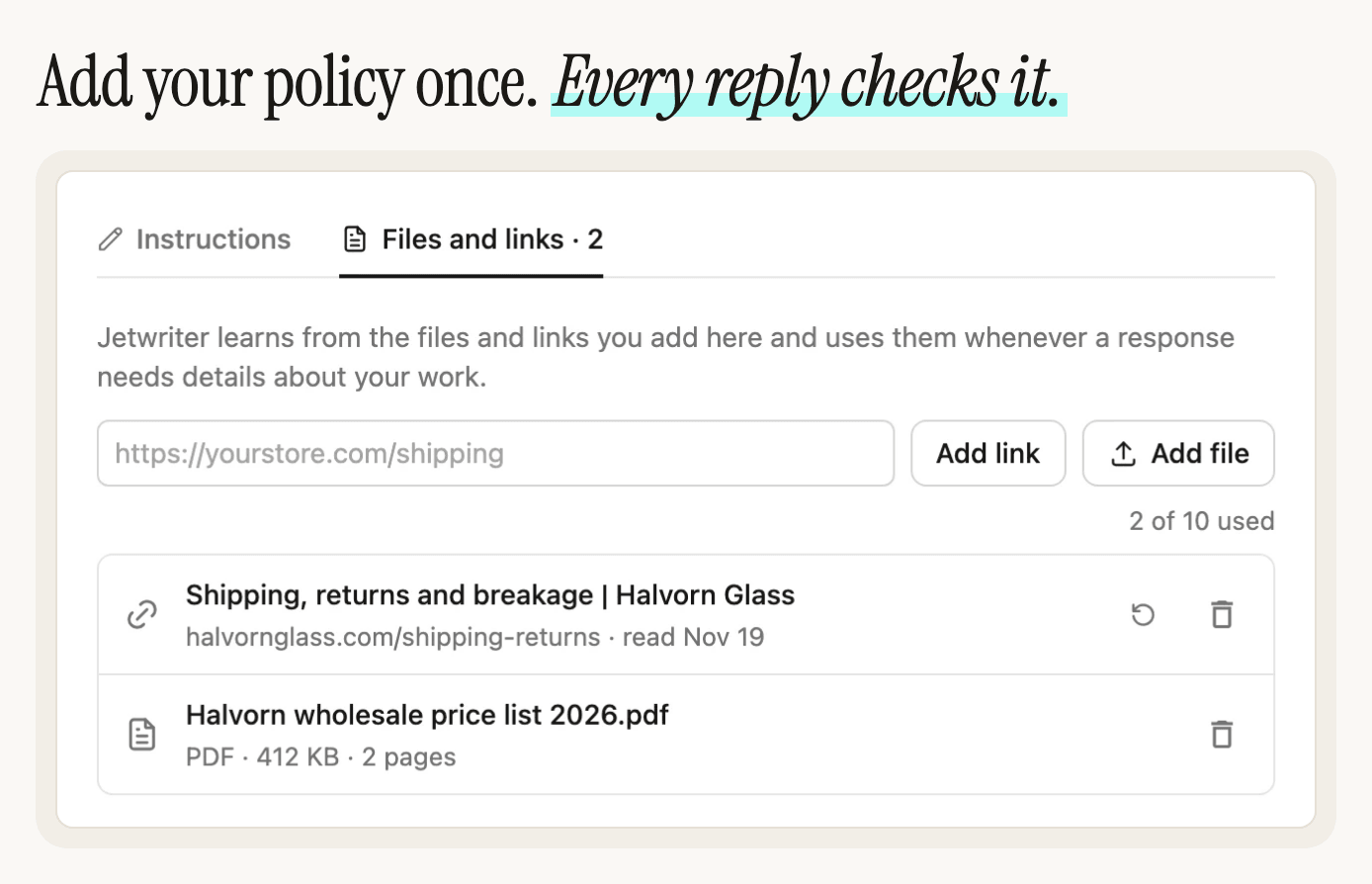
Files and links are on every paid plan, up to 10 files and links in all. Replies in the extension use them while Personalize AI is on in that browser, which it is unless you've turned it off. For everything they can hold, see Jetwriter AI Can Now Check Your Files and Links Before It Replies.
On the Free plan, put the facts in your request instead: "Apologize. Free replacements by express, 1 to 2 business days. No need to send the broken ones back."
What Not to Write
A few common phrases make an upset customer angrier. Here's what to write instead:
| Instead of | Write |
|---|---|
| "We apologize for any inconvenience." | "I'm sorry nine of your glasses arrived broken." |
| "The courier must have dropped the box." | "I'm sending nine replacements by express." |
| "We'll look into it and get back to you." | "They'll reach you in 1 to 2 business days." |
| "Per our returns policy, broken items don't need to be returned." | "You don't need to send the broken glasses back." |
| "Calm down, we'll sort it out." | "I understand why you're frustrated." |
| "Unfortunately, there's nothing we can do before Saturday." | "Here's what I can do before Saturday." |
If you'd like Jetwriter AI to steer clear of phrases like these in every reply, tell it once, in How should AI respond to you? on the Instructions tab of Personalize AI. See Tell Jetwriter about you, and how to reply (Personalize AI).
When the Customer Is Angry
- Answer the problem, not the tone. Don't match their anger, and don't point it out.
- Fix first, explain later. Whose fault it was can wait for a second email, if the customer asks.
- Keep it short. Set Length to Short, at the bottom of the box where you type, and Jetwriter AI keeps the reply brief.
- Offer a call for big problems. Add it to your request, such as "Apologize and offer a call today."
- Correct a mistake gently, and only once. If the customer has a fact wrong, say what's right in one sentence, after the fix.
Customers who write on WhatsApp get the same kind of reply: see How to Reply to Customers on WhatsApp with AI: 5 Examples.
Where Else It Works
AI Reply works the same way wherever complaints reach you: Gmail, Outlook on the web, Zoho Mail, Zendesk, Freshdesk, WhatsApp Web, LinkedIn, Slack and X. Your files and links answer in all of them. For the full list, see Where Jetwriter works: browsers, sites and devices.
On paid plans, Auto-Drafts can have a reply waiting in Gmail's drafts before you even open the complaint, written from your files and links too. See Set up Auto-Drafts.
Try It on the Next Complaint
Open the next complaint in Gmail, click AI Reply under it, and type the fix in a few words.
New to Jetwriter AI? Add the free extension, open Gmail, and sign in, or create a free account. It works in Gmail on a computer, in Chrome, Edge, Brave, Opera or Vivaldi. For every setting in the window, see Reply to an email in Gmail with AI Reply.
Frequently Asked Questions (FAQ)
How quickly should you respond to a customer complaint email?
The same day, and within one business day at the latest. If the fix takes longer, reply now anyway: say sorry, say what you're doing, and say when you'll write again.
Should you apologize if it wasn't your fault?
Yes. Apologize for what happened to the customer, such as a broken order, without blaming the courier, a colleague or the customer. If the customer asks why it happened, explain in a later email, once the problem is fixed.
What should you not say in a complaint reply?
Leave out generic apologies like "We apologize for any inconvenience", blame, vague promises like "We'll look into it", and policy quoted at the customer. Say what you'll do, when, and what it means for them.
How do you reply to an angry customer email?
Stay calm and answer the problem, not the tone. Apologize once, give the fix and a date, and keep it short. For a big problem, offer a call. Don't argue in the first reply: fix first, explain later.
Can AI write a reply to a customer complaint?
Yes. With Jetwriter AI in Gmail, click AI Reply under the complaint and type the fix in a few words. Jetwriter AI reads the customer's email and writes the reply, taking facts from your files and links on paid plans. It doesn't send anything: you read the reply, add your name, and send it yourself.
Does Jetwriter AI know my refund or returns policy?
Only once you add it. On a paid plan, add your returns, refund or shipping page under Files and links in Personalize AI, and replies take the facts from it. On the Free plan, type the facts into your request.
Is it free?
AI Reply works on every Jetwriter AI plan, including the Free plan, which includes 15 AI responses a month. Each reply uses one. Files and links are on paid plans. The plans are on the pricing page.