Jetwriter AI can now check your own files and links before it replies. Add your price list, FAQ, policies or product pages once, under Files and links, a new tab in Personalize AI. When a reply needs a price, a delivery time or a policy, Jetwriter AI takes the fact from them instead of guessing.
It works wherever you reply with Jetwriter AI: emails in Gmail and Outlook, messages in WhatsApp and LinkedIn, chats in the web app, and Auto-Drafts in Gmail. Files and links are available now on every paid plan.
What's New in Personalize AI
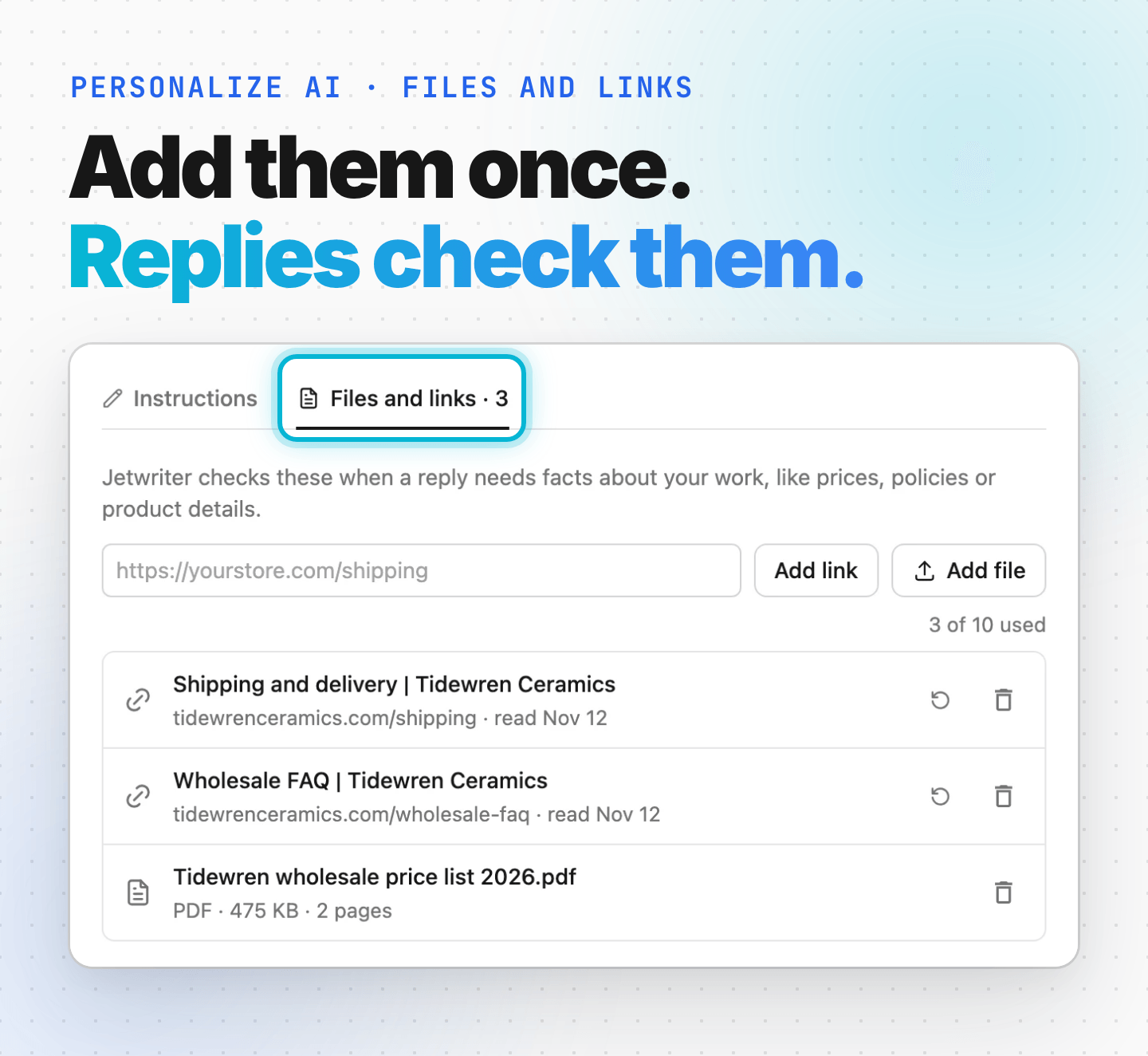
Personalize AI now has two tabs. Instructions keeps the two boxes where you tell Jetwriter AI about you and how to write. Files and links is new: it holds the documents and pages Jetwriter AI checks when a reply needs facts about your work, like prices, policies or product details.
- Add a link to any public page, such as your shipping page or your FAQ.
- Add a file: a PDF, Word, Excel or text file of up to 10 MB.
- Add up to 10 files and links, counted together.
Why We Built It
An AI writing tool knows a lot about writing and nothing about your business. Ask it to answer "How much is shipping to Toronto?" and it can only guess, leave a blank for you to fill in, or say it doesn't know. So you open your price list, find the number and type it into your request, for every reply.
With Files and links, you give Jetwriter AI those documents once. Each time you ask for a reply, it searches them for the parts that fit the message you're answering, and writes the reply from those facts.
See It in Action: A Wholesale Quote in Gmail
The situation: Nora runs a small pottery studio in Portland, Oregon. She has added three things to Files and links: her wholesale price list (a PDF), her shipping page and her wholesale FAQ page. Marcus, who owns a café in Toronto, emails her to ask for a quote.
The email Nora received
Hi Nora,
We're opening our second Kettlewick Café in Toronto this February, and we'd love to serve on your plates and mugs there.
We'd need 48 dinner plates and 60 mugs, all in Sea glass. Could you let me know the wholesale price for that, how long it would take to make, and what shipping to Toronto would cost?
Best regards,
Marcus Webb
Owner, Kettlewick Café
What Nora types into Jetwriter AI
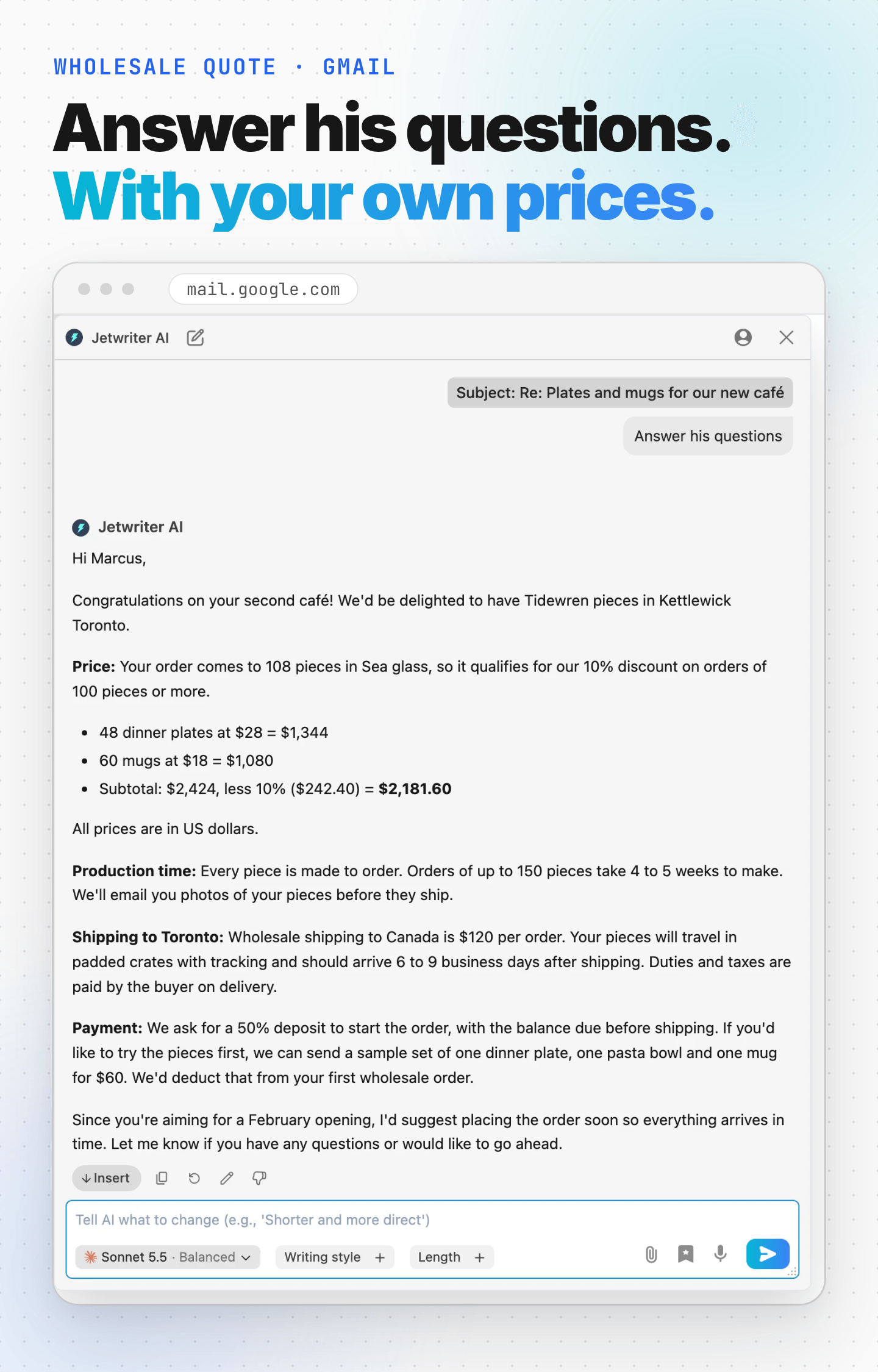
She opens the email in Gmail, clicks AI Reply under it, types three words and presses Enter:
“Answer his questions”
Jetwriter AI's reply
Hi Marcus,
Congratulations on your second café! We'd be delighted to have Tidewren pieces in Kettlewick Toronto.
Price: Your order comes to 108 pieces in Sea glass, so it qualifies for our 10% discount on orders of 100 pieces or more.
- 48 dinner plates at $28 = $1,344
- 60 mugs at $18 = $1,080
- Subtotal: $2,424, less 10% ($242.40) = $2,181.60
All prices are in US dollars.
Production time: Every piece is made to order. Orders of up to 150 pieces take 4 to 5 weeks to make. We'll email you photos of your pieces before they ship.
Shipping to Toronto: Wholesale shipping to Canada is $120 per order. Your pieces will travel in padded crates with tracking and should arrive 6 to 9 business days after shipping. Duties and taxes are paid by the buyer on delivery.
Payment: We ask for a 50% deposit to start the order, with the balance due before shipping. If you'd like to try the pieces first, we can send a sample set of one dinner plate, one pasta bowl and one mug for $60. We'd deduct that from your first wholesale order.
Since you're aiming for a February opening, I'd suggest placing the order soon so everything arrives in time. Let me know if you have any questions or would like to go ahead.
Where each fact came from
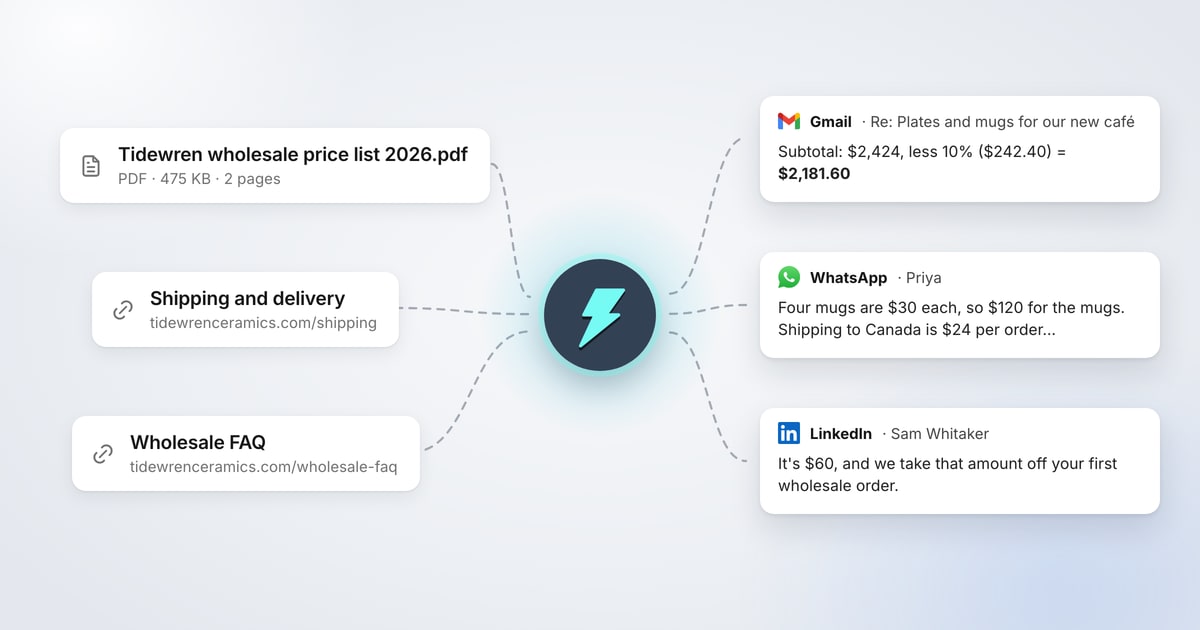
- The price list (PDF): $28 per dinner plate, $18 per mug, 10% off orders of 100 pieces or more, and the 50% deposit.
- The wholesale FAQ page: 4 to 5 weeks to make, photos before shipping, and the $60 sample set.
- The shipping page: $120 to Canada, 6 to 9 business days, and duties paid on delivery.
Nora didn't type a single number. Jetwriter AI found each fact in her files, worked out the totals, and saw that 108 pieces qualify for the discount. She reads the reply, clicks Insert to put it in Gmail's reply box, and sends it.
The Same Files Answer Every Reply
Files and links aren't only for email. The same three files answer Nora's WhatsApp and LinkedIn messages too.
A shop customer on WhatsApp
Priya's messages
Hi! I bought one of your Sea glass mugs at the Portland market and I love it
Do you ship to Vancouver? How much would 4 more mugs be, with shipping?
What Nora types: “Answer her”
Jetwriter AI's reply
Hi Priya! Thank you so much, I'm so glad you love your Sea glass mug! 😊
Yes, we ship to Canada. Four mugs are $30 each, so $120 for the mugs. Shipping to Canada is $24 per order, which brings your total to $144. Delivery usually takes 7 to 10 business days.
Just so you know, if you meant Vancouver, Washington, that's in the US. In that case shipping would be free, since your order is over $80, so your total would be $120. Delivery would take 3 to 5 business days.
Let me know which Vancouver you're in and whether you'd like the same Sea glass glaze, and I'll get your order set up!
This time Jetwriter AI took the shop price ($30 a mug) and shop shipping from the same price list and shipping page, not the wholesale ones it used for Marcus. It also noticed that Vancouver could be in Canada or the US, and answered both from Nora's shipping page.
A restaurant buyer on LinkedIn
Sam Whitaker's message
Hi Nora, I run purchasing for a group of three restaurants in Seattle, and we're choosing new plates and bowls for our spring menu. Do you offer samples before a larger order? And will your pieces hold up in a commercial dishwasher?
What Nora types: “Answer him”
Jetwriter AI's reply
Hi Sam,
Thanks for reaching out, and it's great to hear about your spring menu plans.
Yes, we do offer samples. A sample set includes one dinner plate, one pasta bowl and one mug in the glaze of your choice. It's $60, and we take that amount off your first wholesale order.
Our pieces will also hold up in a commercial dishwasher. Our stoneware is fired to cone 6, and every glaze is food safe and dishwasher safe, including commercial machines. The pieces are microwave safe too.
For timing, every piece is made to order. Orders of up to 150 pieces take 4 to 5 weeks, and larger orders take 6 to 8 weeks. Since you're planning for spring, it would be worth starting with samples soon. If your order across the three restaurants reaches 200 pieces or more, we can also develop a custom glaze for you.
Which glaze would you like for your sample set? If you tell me the pieces you're considering, I can help you plan the order.
Every fact in it comes from Nora's wholesale FAQ page: the $60 sample set, the commercial dishwasher answer, the lead times and the custom glaze.
These three replies were written by Jetwriter AI with Sonnet 5.5, the default model on paid plans, from the same three files. The studio, its files, the customers and their companies are made up.
How to Add Your Files and Links
You add files and links in the Jetwriter AI web app. Replies in the extension use them too, so you add them once.
- Open Personalize AI settings. Log in if Jetwriter AI asks you to.
- Turn on the switch next to Personalize Your AI, if it's off.
- Click the Files and links tab.
- Paste the address of a page into the box and click Add link. To add a document, click Add file and choose a PDF, Word, Excel or text file of up to 10 MB.
Each file or link shows up in the list with Adding… until Jetwriter AI has read it. A page or a short file takes a few seconds, a long PDF a minute or more. There's nothing to save: files and links are kept as soon as they're added.
If a file or link can't be added, its row says why in red. For every message and what to do about it, see Tell Jetwriter about you, and how to reply (Personalize AI).
What to Add
Add what you look up most often when you answer people:
- Prices: your price list, rate card or packages.
- Shipping and returns: your delivery, shipping and returns pages.
- Answers you give every week: your FAQ, policies and terms.
- Products: a catalog or product pages with sizes, materials and specs.
- Your work, if you don't run a business: your company's product pages, a team handbook, a class policy or your resume.
A few things to know:
- One link is one page. Add your shipping page and your FAQ page separately, not only your home page.
- Links must be public. Jetwriter AI can only read pages anyone can open without signing in. For a private document, add it as a file.
Where It Works
Your files and links are used everywhere you reply with Jetwriter AI:
- The Jetwriter AI extension: AI Reply and the Jetwriter AI window in Gmail, Outlook, WhatsApp Web, LinkedIn and other sites, while Personalize AI is on in that browser. It's on unless you've turned it off.
- The web app: chats at jetwriter.ai/app, while Personalize AI is on.
- Auto-Drafts in Gmail: the drafts that Auto-Drafts write for you use your files and links too.
The built-in quick actions, such as Fix spelling & grammar and Summarize, don't use them, because they only change the text you selected. Replies don't use them when you use your own API key.
Your Files Give Facts, Not Instructions
Jetwriter AI takes facts from your files and links, not instructions. If your staff handbook says "sign every email with…" or "add #yourbrand to every post", replies don't follow it. They also keep the format of the place you write in, such as a plain-text WhatsApp message.
To tell Jetwriter AI how to write, use How should AI respond to you? on the Instructions tab, next to Files and links. If a reply needs a detail your files don't have, add it to your request, or to a file.
Try It Today
Think of the questions you answer every week: what something costs, how long it takes, what shipping is. Open Personalize AI settings, click Files and links, and add the file or page that answers them. Then click AI Reply on the next email or message that asks.
New to Jetwriter AI? Add the free extension, then pick a plan on the pricing page.
Frequently Asked Questions (FAQ)
Can AI replies use my own documents?
Yes. In Jetwriter AI, add your documents and web pages under Files and links in Personalize AI. When a reply needs a fact from them, such as a price or a delivery time, Jetwriter AI looks it up there and uses it instead of guessing. It works in Gmail, Outlook, WhatsApp Web, LinkedIn, the web app and Auto-Drafts in Gmail, on paid plans.
Does it work in WhatsApp and LinkedIn?
Yes. Replies in WhatsApp Web, LinkedIn and the other sites where Jetwriter AI writes use your files and links, the same as replies in Gmail and Outlook. You add them once, in the web app.
Is Files and links free?
No. Files and links are on every paid plan. On the Free plan, including a free Elite trial, the Files and links tab says "Files and links are on paid plans". The plans are on the pricing page.
How many files and links can I add?
10 on every paid plan, files and links counted together. A file can be a PDF, Word, Excel or text file of up to 10 MB. Files also count toward the monthly limit on attached files.
Can Jetwriter AI read a page that needs a login?
No. It reads pages anyone can open without signing in. For a private page or a shared document, save it as a PDF, Word or text file and add the file instead.
What happens when my prices change?
Jetwriter AI reads a page when you add it, and again when you click Read again, the round arrow next to it. So after you update a page, click Read again. For a file, remove the old one with the trash icon and add the new one. Replies stop using a removed file or link right away.
Should I check a reply before I send it?
Yes, as with any AI reply. Jetwriter AI takes the facts from your files, but totals it works out, like a discount, are worth a quick look before you click Send.