To upgrade, downgrade or switch between monthly and yearly billing, go to jetwriter.ai/pricing while signed in and click the button on the plan you want, such as Upgrade to Ultra or Switch to yearly billing. If you already pay, the change applies as soon as you click: you're charged the difference for the rest of your billing period, or credited it toward your next payments if the new plan costs less. The billing page that Manage Billing opens can't change plans.
Upgrade from the Free plan
- Go to jetwriter.ai/pricing and sign in.
- Under Billing, choose Monthly, or Yearly, which shows how much you save.
- Click Upgrade to Elite or Upgrade to Ultra. Stripe's checkout opens. Stripe is the company that handles our payments.
- Enter your card and billing address, and pay. Your bank may ask you to confirm the payment.
- Back on Jetwriter, "Activating your account" shows for a few seconds, then "Activation Successful".
If you see "Activation Failed" instead, see You paid, but your account still shows Free.
Change a plan you already pay for
- Go to jetwriter.ai/pricing, signed in with the account you pay with. From your account page, the Pricing link in the side menu goes there too. Your plan is marked Current plan.
- To switch between monthly and yearly billing, choose the other option under Billing, such as Yearly (1).
- Click the button on the plan you want:
- Upgrade to Ultra (3) for a bigger plan;
- Downgrade to Elite for a smaller one;
- Switch to yearly billing (2) or Switch to monthly billing to keep your plan and change how often you pay.
- When "Subscription Updated!" appears, click Continue. Your new plan works right away.
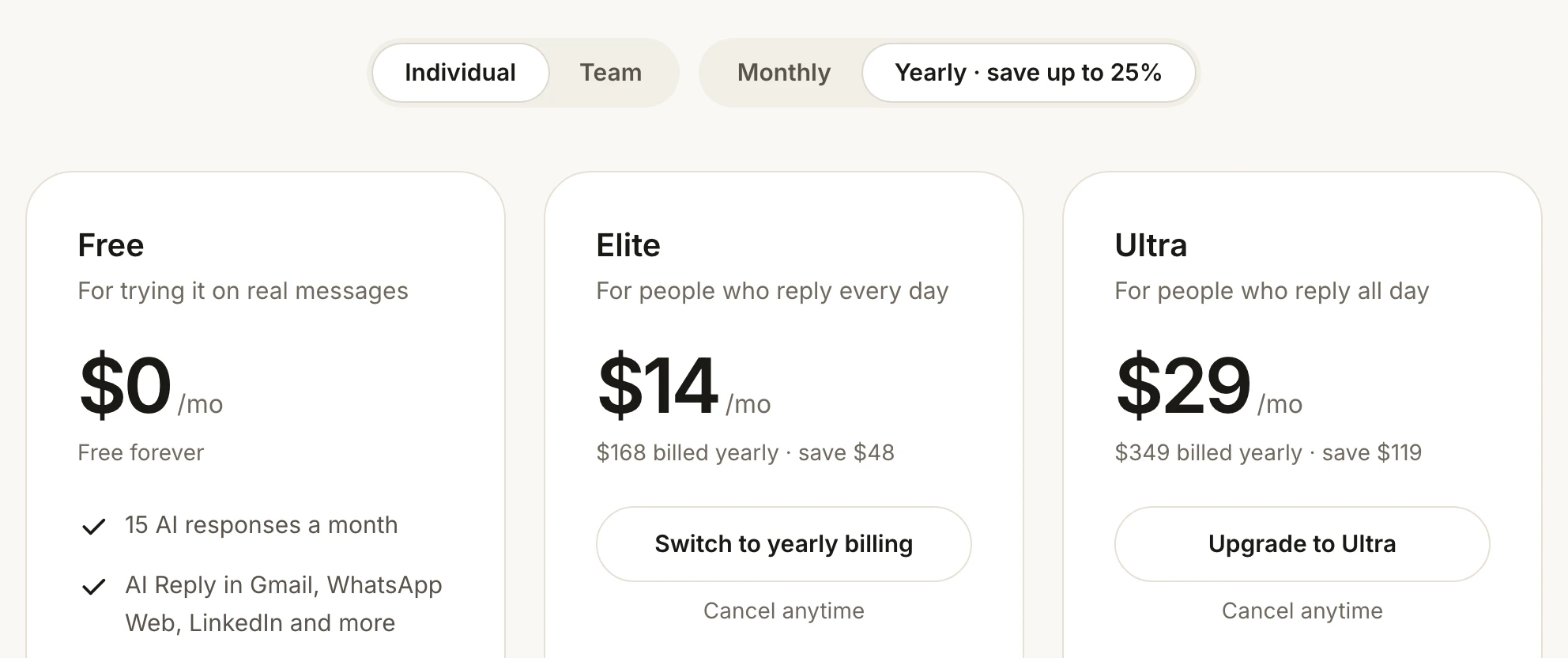
With yearly billing picked, your own plan's button switches billing and the bigger plan's button upgrades.
- Yearly
- Switch to yearly billing
- Upgrade to Ultra
If your bank needs to confirm the payment, "Payment Confirmation Required" appears instead, with "Please complete your payment to update your subscription." Click Visit Payment Page and confirm the payment on Stripe's page. Until it's paid, you stay on your current plan.
What you pay when you change plans
- Upgrading to a bigger plan: you're charged at once for the new plan for the rest of your current period, minus the unused part of what you already paid. Your renewal date stays the same.
- Downgrading to a smaller plan: the unused part of your old plan, minus the smaller plan's cost for the rest of the period, is kept as credit on your account and taken off your next payments. It isn't paid back to your card.
- Switching from monthly to yearly: yearly billing starts that day. You pay the yearly price minus the unused part of your current month, and the plan renews a year later.
- Switching from yearly to monthly: monthly billing starts that day. The unused part of your year becomes credit that pays your monthly renewals until it runs out.
Each charge and credit shows on your invoices: see Get invoices and receipts, and add company details.
Downgrade to the Free plan
There's no button for moving to Free: cancel your subscription instead. Your plan keeps working until the end of the period you've paid for, then your account moves to Free. See Cancel your Jetwriter AI subscription.
Team plans
- Only the team's owner can change a team plan. Members see the button grayed out, with "Only the team owner can change the plan. Please contact your team owner or leave this team to make changes."
- Team plans are priced per member. The team pays its plan's price for every member, including people invited who haven't accepted yet.
- To see the team plans, choose Team next to Plans for at the top of the pricing page.
- If you pay for your own plan and want a team, click Create a team on a team plan. The team takes over your plan, with you as its owner. Each member you add afterwards is charged for the rest of the current period.
- A team's owner can't move to an individual plan while the team exists: the individual plans say "Delete your team to switch to an individual plan."
If you're on the Pro plan
Pro is kept only for people who already have it. You can switch it between monthly and yearly billing, or upgrade to Ultra. Once you leave Pro, you can't go back to it.
If something goes wrong
- "Uh oh! Something went wrong!": reload the pricing page. If the plan you wanted isn't marked Current plan, try again.
- A card issued in India: after an upgrade, your bank may ask you to approve the first renewal at the new price. See Pay in Indian rupees.
- The payment failed: see Your payment failed or is past due.