
At Jetwriter AI, our mission has always been to make professional communication feel like second nature. While the last few months were about building a solid foundation, March was all about depth and reach.
We know that great writing isn't just about perfect grammar - it’s about context. It’s about knowing your business, your history, and your unique voice. This month, we’ve rolled out a suite of powerful updates designed to turn Jetwriter AI from a simple writing assistant into a true "knowledge partner" that lives exactly where you work.
From deeper integrations with your existing knowledge bases to expanded support for the platforms you use every day, here is a look at how we’re supercharging your workflow this month.
Smarter Customer Support
Great support is about giving the right answer fast. Sometimes, that answer is hidden on your website or help center. Instead of you digging through pages and copy-pasting text, Jetwriter AI now does the heavy lifting for you.
With our new Knowledge Base URL feature, the AI can read your public web pages to answer customer questions perfectly. It knows your exact shipping times, return policies, or tech steps because it reads them directly from the source.
There are two easy ways to use this:
-
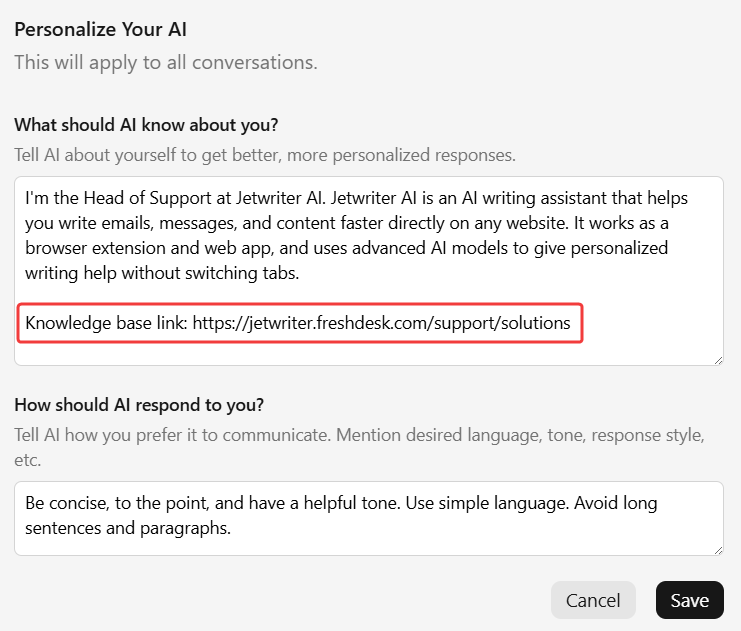
The Pro Way (Personalize AI): You can add your website or help center link directly into your “Personalize AI” settings. Jetwriter AI will remember this link every time you write. Whenever a customer question comes in, the AI automatically checks your docs to give a 100% accurate reply.
-
The Quick Way (In the prompt): If you just need to use a link once, just paste it into your command. For example, you can say: "Reply to this customer using the info on this page: [Your Link]."
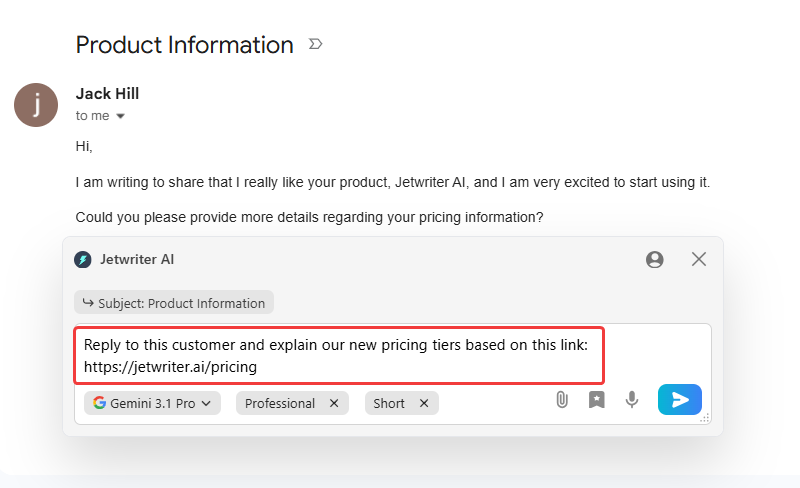
This is a huge time-saver for support teams using Gmail, Freshdesk, or Zendesk. It’s also great for busy founders who need to send accurate replies without double-checking their own site every five minutes.
Live Web Access
Sometimes, the information you need isn't in your knowledge bases - it’s happening right now. To bridge that gap, Jetwriter AI can now browse the live web to inject real-time facts into your drafts.
The tool is intuitive: it automatically detects when a prompt requires a quick Google search to be accurate. However, you can also take the lead with specific commands:
- "Search the web for the latest news about [Company Name] and write an email mentioning their recent milestone."
- "Read this URL [Link] and draft an email explaining why our features are a better fit for this customer."
- "Search for today's exchange rate and update the pricing in this draft."
By syncing your writing with the outside world, you ensure every message you send is relevant, informed, and up-to-the-date.
Smarter, Personalized Gmail Replies
Your past emails are full of the answers your customers need. To save you from digging through old threads, Jetwriter AI can now securely learn from your last one year of emails.
It doesn't just copy your tone; it learns the actual facts of your business. It works like an assistant with a perfect memory. For example, if a lead asks about a special price you offered months ago, the AI remembers how you explained it then and drafts a matching reply now.
Instead of searching your inbox for "that one email from last summer," you get a draft that already knows the facts. You stay consistent and save time by letting your past work power your future replies.
To learn more, read our detailed blog on How to connect Jetwriter AI with Gmail to draft personalized responses.
New Slack Integration
Staring at a blinking cursor while your team waits for an answer is a thing of the past. We’ve brought Jetwriter AI directly into Slack to help you maintain your momentum without the typing fatigue.
Think of it as your new AI teammate that lives right inside your message box. Whether you're coordinating with your boss or catching up with your "work besties," you can now draft high-quality replies without ever switching tabs.
- Context-Aware Replies: Because Jetwriter AI "reads" the active conversation, it understands the context. If your manager asks for a status update, you can simply type "tell them the slides are ready" and let the AI create a professional, polished response in seconds.
- Total Tone Control: You’re always in the driver’s seat. Use one-click buttons to change your tone from Formal to Friendly, or adjust the length if a message feels too wordy.
- Personalize AI and Custom Writing Styles: You can create custom writing styles (like "Chill & Friendly" or "Concise & Direct"), and set up a Personal AI Profile so the AI learns your specific job role and vocabulary. It sounds like you, just faster.
To learn more, read our detailed blog on How Jetwriter AI works inside Slack.
Upgraded to Claude 4.6 Sonnet
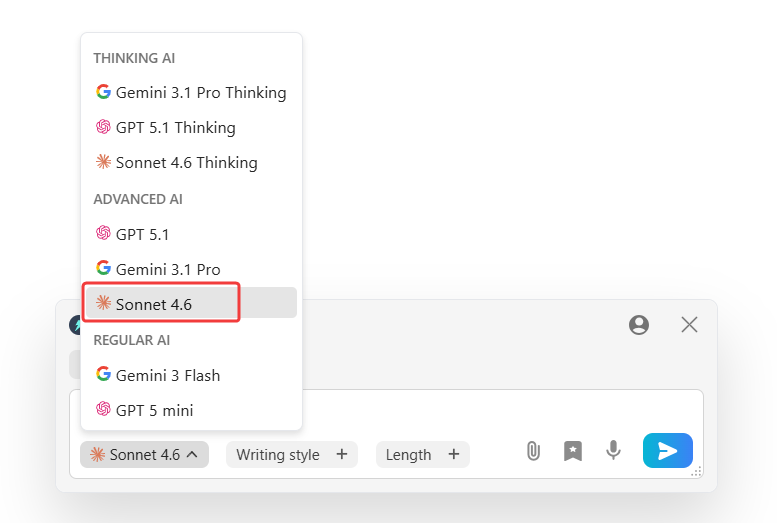
We’ve officially boosted our engine from version 4.5 to the newly released Claude 4.6 Sonnet. This upgrade means Jetwriter AI is now significantly faster and sharper at handling complex tasks. Whether you are drafting a detailed proposal or a quick reply, you’ll notice improved reasoning and a more natural flow in every response. By staying on the cutting edge of AI, we ensure your writing assistant remains the smartest tool in your browser.
Performance & Bug Fixes
We’ve polished the experience across all your favorite platforms to make sure Jetwriter AI runs smoothly every time you type:
- Faster Web App: We rolled out speed improvements to the Jetwriter Web App for a much better experience on both your computer and your phone.
- WhatsApp Formatting: We fixed a bug in WhatsApp Web, so your AI-generated replies now have perfect spacing and line breaks.
- Zoho Mail Fix: We fixed a bug where the Jetwriter AI button wasn't showing up for Zoho Mail users.
What is Coming Soon
We are already working on the next updates for Jetwriter AI. Here is a look at what we are building right now:
- Gmail Auto-Drafts: Soon, you can let Jetwriter AI write draft replies for you the second a new email arrives. This means when you check your phone while you are out, a smart reply will already be waiting for you. You just need to read it, make any quick edits, and hit send!
- Gmail Auto-Labeling: We are also making a new feature to help keep your inbox neat. The AI will automatically read and sort your incoming emails into the right labels so you stay organized effortlessly.
Try It Today
We are very excited for you to use all these new features. We built them to save you time and make your work easier, whether you are helping customers or chatting with your team on Slack.
If you already have Jetwriter AI, you can start using these new features right away. If you are new here, you can install the Jetwriter AI extension from the website for free today.