Have you ever read an email written by an AI and thought it sounded nothing like you? Most AI tools use big words that you would never use in real life. If you send these messages to your boss or friends, they might wonder if a robot took over your computer. It is not a great feeling to sound like a machine when you are trying to be yourself.
It is also very hard to tell an AI how you want to sound. You might try to tell it to be "friendly and smart." But then it writes a confusing sentence that again doesn’t sound like you. You then have to spend a lot of time correcting the sentence. It is annoying to do all that work yourself when the AI was supposed to help you. It can make you want to just give up on using AI at all.
Jetwriter AI has a new way to fix this. It does not just ask you how you write. Instead, it looks at your emails in Gmail to learn your style. It sees the words you like to use and how you say hello and goodbye to people. Now, the AI can learn your real voice just by looking at what you have already written in the past. It is much easier and much faster for everyone.
What is the “Connect Gmail” Feature?
You can now connect Jetwriter AI directly to your Gmail account. Before, you had to type in a lot of details to tell the tool who you are and how you write. Now, you just link your Gmail and the tool does the hard work for you.
Once you connect, Jetwriter AI looks at the emails you have already sent. It reads your old emails to see what kind of words you like to use. It checks to see if you like to write very short notes or if you like to write longer ones. It even looks at how you say goodbye at the end of an email. Do you say "Thanks" or "Best"? It picks up on all those small things that make you sound like you.
The main goal is to help the AI learn your real voice. When the tool writes a draft for you, it should sound like you wrote it yourself. It will use your favorite words and your way of writing. This means you do not have to change much when the AI is done. It saves you a lot of time and makes your emails look great every single time.
How It Works?
Connecting Gmail to Jetwriter AI is very easy. You can set it up in just three simple steps.
First, go into your Gmail and launch the Jetwriter AI extension. Look for the button that says "Connect Gmail" and click it. Connecting Gmail to Jetwriter AI allows read-only access to your past emails to help AI learn your unique style.
Once connected, Jetwriter AI looks at your old emails to see how you write. It checks to see if you like to use emojis or not. It looks to see if you write short notes or if you like to use long lists with bullet points. It even checks how you sign your name, example do you like to say "Cheers," or do you prefer to say "Best"? The tool learns all of this so it does not have to guess.
The next time you need to send an email, the tool will do the work for you automatically. When you ask it to write a draft, it uses everything it learned from your old emails. It will use your favorite words and your style. You just look at the draft, hit send, and you are done. It is that simple.
Why This Helps Professionals?
Connecting Gmail with Jetwriter AI helps you get more work done. You don’t have to sit down and fill out long forms about yourself and how you write. You won't have to type in your job title or list the things you do at work. The tool just learns while you do your regular tasks. It saves you a lot of time that you can use for something else.
This feature also allows Jetwriter AI understand how you write to different people. For example, you might be very friendly with your work friends but more serious with a customer. The tool sees how you talked to them in the past. It knows when to be nice or when to be professional depending on who gets the email.
Your emails will also stay the same every time you write. Some days you might be very tired or in a big hurry. On those days, it is easy to make mistakes or sound a bit differently. But this feature allows Jetwriter AI to always write in your style. Even if you are sleepy or busy, your emails will still sound like you wrote them on your very best day. It is a great way to make sure your work always looks great.
Disconnecting Gmail from Jetwriter AI
If you ever want to stop using this feature, it is very easy to turn off. You are always in control of your Gmail. You can stop the tool from reading your emails at any time. It only takes a few seconds to do.
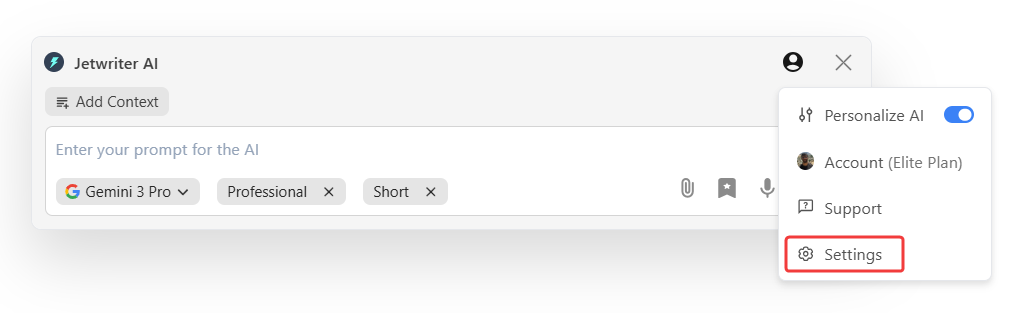
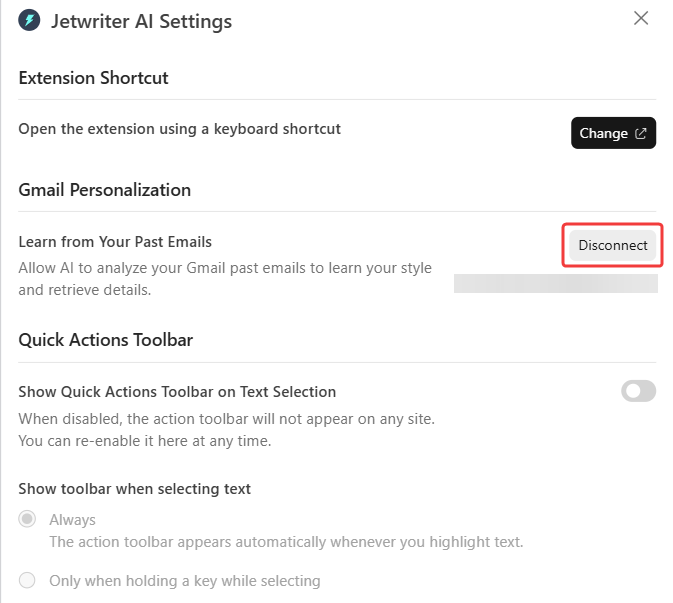
Just go to your Jetwriter AI settings page. Look for the part that says "Gmail Personalization." You will see a button that says "Disconnect." Once you click it, the tool will stop looking at your emails right away. You can always turn it back on later if you change your mind.
Privacy: Keeping Your Emails Safe
This is the most important promise we make. We want to be very clear about it. Your emails belong to you. When you use this feature, you allow read-only access to your past emails to help AI learn your unique style. The tool only looks at your past emails to help you write better drafts.
We never use your information to train any AI models. We also do not sell your data to anyone, ever. We use industry-standard encryption to keep all your information safe and locked up. Your private notes will always stay private. No one else will ever see your emails.

Conclusion
Writing emails can be a real chore. They need not sound like a robot. The main idea of using AI is not to take your place, but to help you sound like the best version of yourself. You are still the boss of every word you send.
Try connecting your Gmail with Jetwriter AI, and see the difference for yourself. It is the best way to write fast emails that still sound like they came from you. You can save a lot of time and finally stop staring at a blank screen. Give it a try today!
Frequently Asked Questions (FAQ)
Will the AI keep learning from the new emails I send today?
Yes! The AI does not just look at your old notes. It keeps watching as you write new messages. This is great because our writing styles can change over time. If you start using new words or a new way to say hello, the AI will notice. It stays up to date so it always sounds just like you.
Can the AI learn my style if I write in a different language?
Yes, it can. Jetwriter AI is very smart and understands many different languages. If you write your emails in Spanish, French, or other languages, it will still work. It looks at how you use those specific words to learn your voice. You do not have to stick to just English to see the magic happen.
What happens to my data if I decide to delete my account?
If you decide to leave, your data goes with you. When you delete your account, we also delete the information the AI learned about your style. We do not keep your private details or your old messages once you are gone. We want you to feel safe knowing that you are always in charge of your own information.