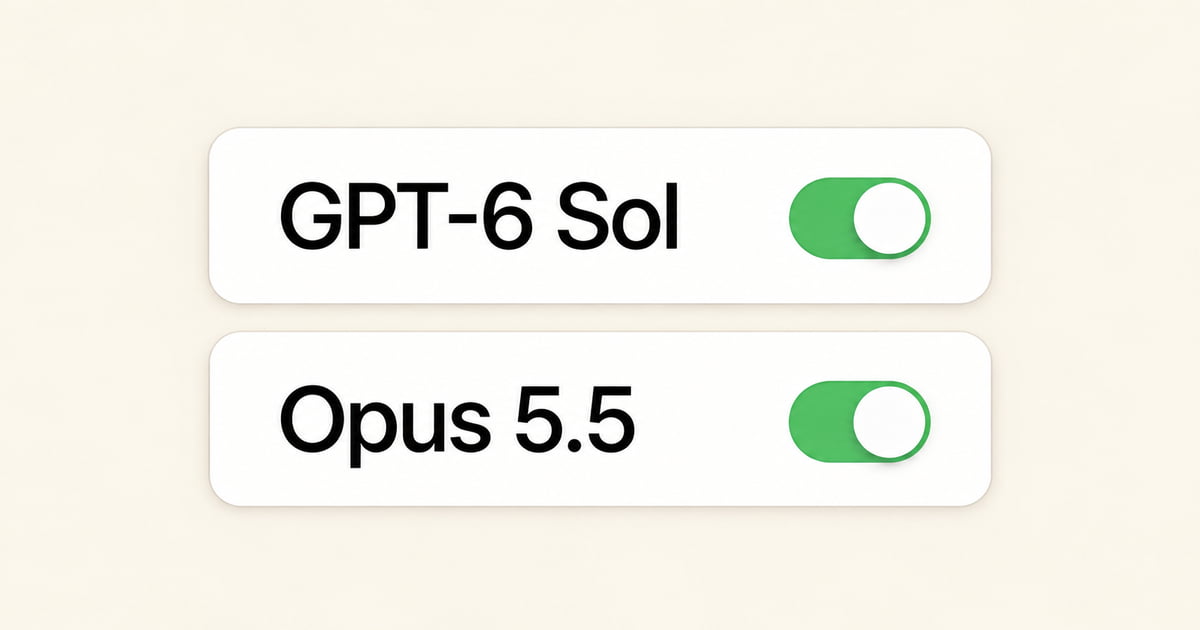
We are excited to announce that Jetwriter AI now has two of the newest and smartest AI models: Claude Opus 5.5 and OpenAI GPT-6 Sol.
These updates bring the best AI directly to your daily work. Whether you are writing a tricky email, reading a long report, or fixing your grammar, these new models understand what you mean better than ever before.
What does this mean for you? It means you get better results with less work.
For example, if a client sends you a hard question, you do not need to write a long instruction to the AI. You can just select the text and type, "Write a polite reply saying we cannot do this right now." The new models will understand exactly what to say. They will skip the stiff, robot-sounding words. Instead, they will write a clear, friendly email that sounds like a real person.
And the best part is that you do not have to leave your screen or open a new tab. They are ready to help you right now inside Gmail, LinkedIn, and the other sites you already use.
What is Claude Opus 5.5?
Claude Opus 5.5 is a big step up from the older Opus 5. It is smarter, safer, and 30% faster. The older model sometimes used too many words or added extra fluff. Opus 5.5 is different. It is much better at keeping things short and clear. It puts the most important facts right at the top. This means the emails and messages it writes for you are very easy to read and understand.
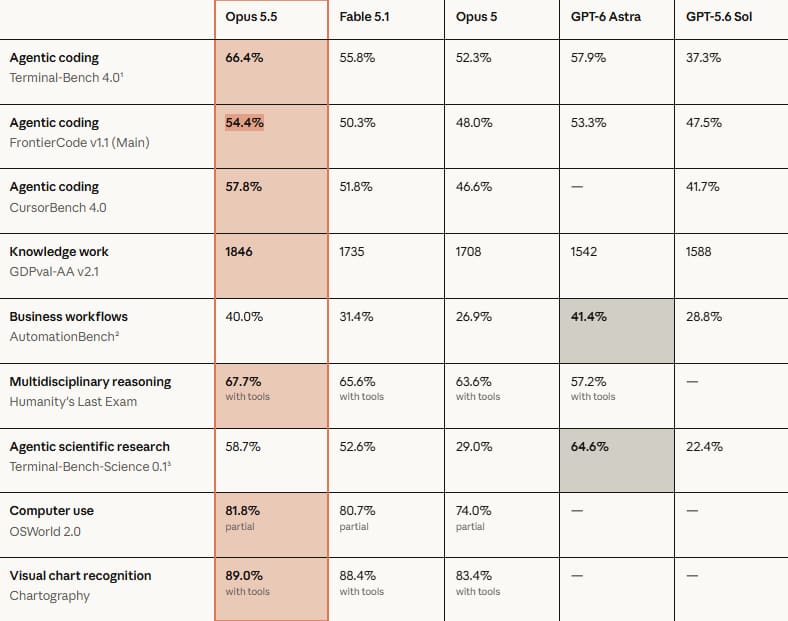
How Claude Opus 5.5 Helps You
- Writing Hard Emails: Sometimes you have to write an email that is tricky, like pointing out a mistake or asking for a refund. Opus 5.5 is great at finding the right words so you do not sound angry or rude. For example, if you tell Jetwriter, "Tell the seller this item is broken and I want my money back," the AI will write a clear, polite note. It keeps things professional and helps you get a helpful answer back.
- Reading Long Email Threads: Older AI could summarize emails, but it sometimes missed small details or got confused by very long chats. Opus 5.5 is much better at this. If you have an email chain with 20 messages, Opus 5.5 reads it perfectly. It pulls out exactly what you need to know without making up facts or missing hidden details.
- Reading Big Files: If someone sends you a very long report or a big PDF, you do not have to read every page. You can chat with the file using Opus 5.5. Because this new model is so smart, it can look through huge amounts of text to find the exact answer you need. For example, you can ask, "How much money did the company make in July?" and it will look through all the pages and find the right number for you in seconds.
What is OpenAI GPT-6 Sol?
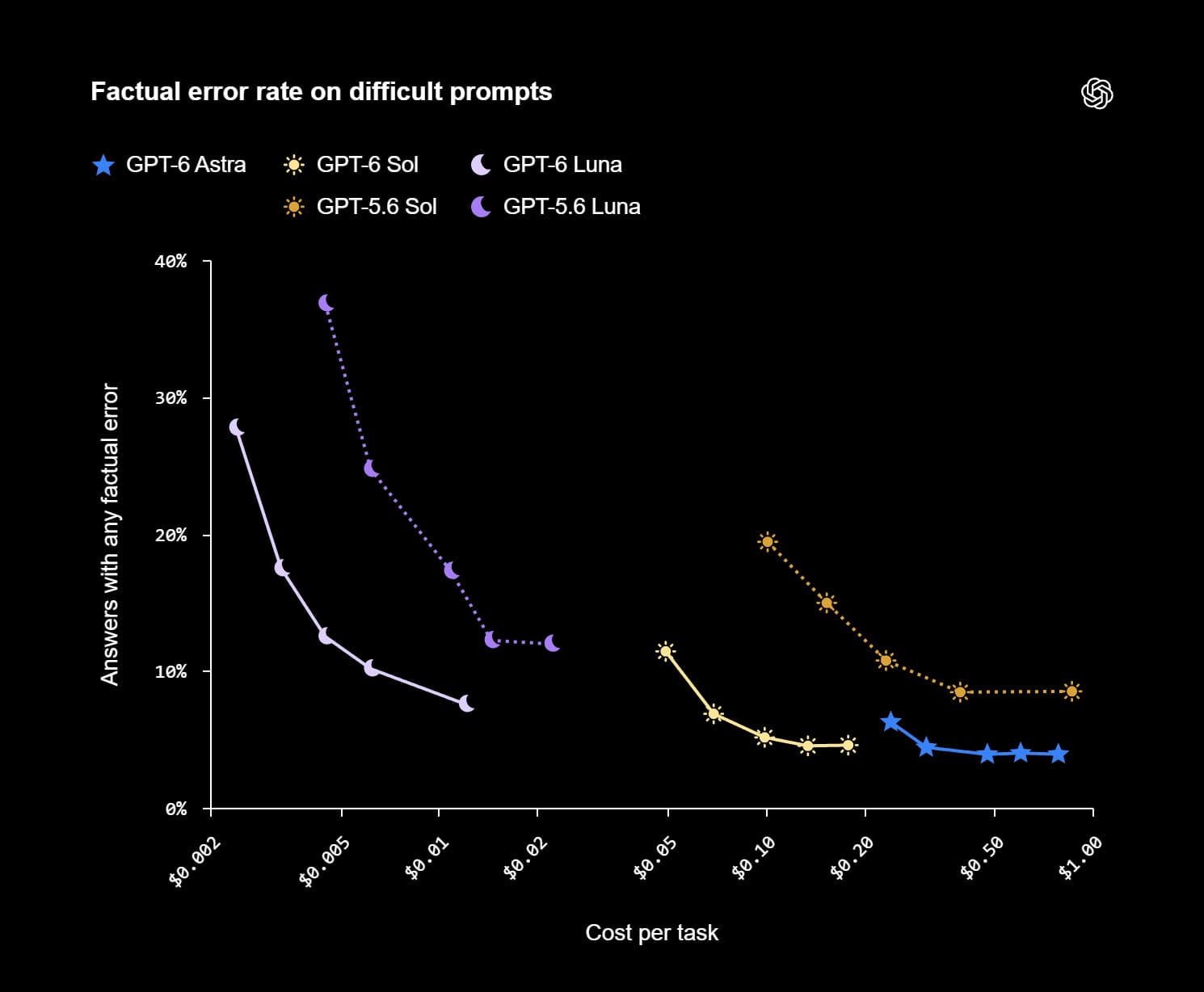
OpenAI GPT-6 Sol takes the top-level intelligence of the flagship GPT-6 model. How does it beat its predecessor, GPT-5.6 Sol? It improves in two key ways: accuracy and communication style.
First, it gets the facts right. When you ask it hard questions, GPT-6 Sol makes about half as many mistakes as the older model. Second, it does not waste your time. The older AI could sometimes give you long, wordy answers with extra fluff. GPT-6 Sol is trained to write punchy, clear text. It gives you shorter answers that get straight to the point without losing any of the important details.
How OpenAI GPT-6 Sol Helps You
- Fast Business Replies: When you get an urgent message on LinkedIn or a work email, you need a professional answer right away. Older models could do this, but they often added "AI clichés" or extra sentences you had to delete. GPT-6 Sol is much sharper. If you type, "Tell them I can meet on Friday," the AI writes a clean, direct note offering your time, with zero fluff.
- Real-Time Web & Live Research: Jetwriter AI lets you search the web and read live pages to get up-to-date answers. GPT-6 Sol is built for this. Because it makes half as many factual mistakes, you can trust it to pull accurate information from the live web. Whether you are researching a company on LinkedIn or pulling stats from a news article, it gives you correct, reliable answers instantly.
How to Access Claude Opus 5.5 and OpenAI GPT-6 Sol
Switching to these new models is simple and takes just a second right inside your current workflow.
Here is how you can use them:
- Open Jetwriter AI: Launch Jetwriter AI extension or the webapp.
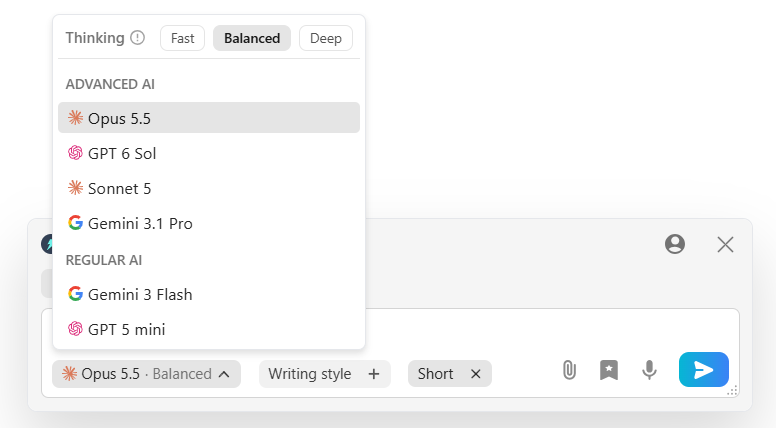
- Find Model: Click on the model dropdown menu where you pick the AI model.
- Select Your Model: Pick either Claude Opus 5.5 or OpenAI GPT-6 Sol from the list to start using it right away.
Plan Availability
- Claude Opus 5.5: Because this model is built for heavy-duty tasks, it is available exclusively on the Ultra plan.
- OpenAI GPT-6 Sol: This model is available to users on both the Ultra and Elite plans.
Bring Your Own Key (BYOK)
If you prefer to use your own API accounts, you can also access these models using Jetwriter AI’s BYOK feature:
- Simply add your own Anthropic API key to use Claude Opus 5.5.
- Add your own OpenAI API key to use GPT-6 Sol.
This lets you use these powerful new models right where you work, even if you are on the free plan.
Conclusion
With Claude Opus 5.5 and OpenAI GPT-6 Sol inside Jetwriter AI, writing good emails and messages is easier than ever. You do not have to choose between fast answers or natural-sounding text. You get both, right where you already work.
Whether you need Opus 5.5 to write a warm, careful reply to a client or GPT-6 Sol to send a fast, accurate note, you now have the best tools ready in your browser.
Open Jetwriter AI today, choose your new model, and try it on your next email!
Frequently Asked Questions (FAQ)
Does Jetwriter AI use my private emails to train these new AI models?
No, we never use your private emails to train any AI models. Your data is kept completely safe and private. We do not sell or share your information with anyone else.
How do I get an API key from OpenAI or Anthropic to use the BYOK feature?
To get an API key, first sign up for a developer account on the OpenAI Platform or the Anthropic Console. Next, navigate to the billing section on either dashboard to add prepaid credits or a valid payment method. Finally, go to the API keys menu, create a new secret key, copy it, and paste into your Jetwriter AI settings.
Do I have to pay OpenAI or Anthropic if I already pay for the Jetwriter AI Ultra plan?
No, you do not have to pay anything extra if you already have the Ultra plan. Access to the models is included in your Jetwriter AI subscription.
Is there a limit to how many times I can use Claude Opus 5.5 each day?
You do not have a daily limit for using the AI. Instead, you get a monthly limit that starts fresh every time your new billing month begins. The number of times you can use it depends on factors such as how long your messages are or if you upload big files etc.
Can I use these new models on the Jetwriter AI mobile app?
Yes, you can use these new models right on your phone! You can open Jetwriter AI in your phone's web browser. If you have an Android phone, you can also use them directly inside our mobile app.