We are very happy to share that Claude Opus 5 is now inside Jetwriter AI. You can access it right now inside your browser extension and on the web app.
What makes Claude Opus 5 so good? It thinks about what you want to say much more carefully than older versions did. It gets things right on the first try and makes far fewer mistakes than you might be used to seeing with other AI models. For example, if you are trying to write a hard email to a customer and your rough notes are just a few quick words, you can ask Claude Opus 5 to fix it. It will read your short notes and turn them into a clear, polite message.
The best part is that you do not have to leave your screen to use it. You do not need to open a new tab or go to a different website. Because you already use Jetwriter AI, this new AI is right there wherever you are working. Whether you are answering an email in your Gmail inbox, talking to your team on Slack, or writing a post on LinkedIn, Claude Opus 5 is ready to help you write better and faster.
What is Claude Opus 5?
Claude Opus 5 is the smartest and fastest AI model you can use today. It beats all the older AI models because it thinks better and works much quicker at the same time. Other AI models might give you a fast answer that is wrong, or take a long time to give you a good answer. Claude Opus 5 gives you the right answer right away.
It is built to handle very hard work without getting confused. If you ask it to solve a tricky problem, it acts like a careful helper who checks its work before showing it to you. For example, if you ask it to find a mistake in a long list of numbers or facts, it will spot tiny errors that other models miss and fix them for you.
Because it is so smart, you do not have to give it long instructions. You can just ask for what you need in a few simple words, like "make this message sound friendly." It understands what you mean instantly. If you want the strongest and most helpful AI for your daily tasks, this is the best one to pick.
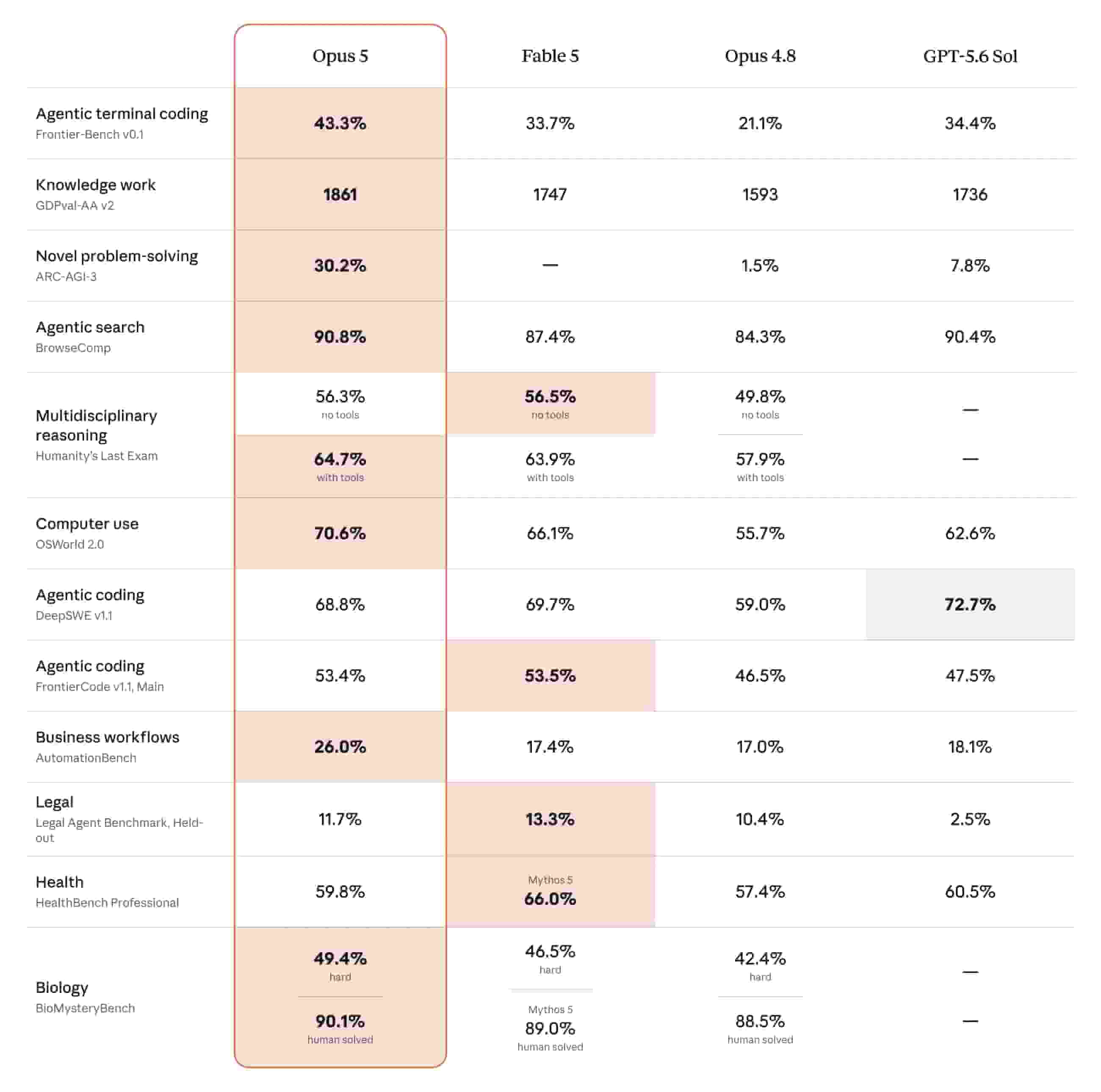
Deep Reasoning for Complex Tasks
Reading Big Files: When you have a big job to do, Claude Opus 5 is ready to help. Our Chat with Doc feature is now much better. You can upload large files, like a long book or a big report. Because this AI is so smart, it can read the whole thing and remember all the details. If you ask, "What are the three main rules in this document?", it will find the exact answer right away. It does not get confused, even if the file is very long.
Writing Better Emails: It also makes writing emails much easier. When Jetwriter AI is connected to your Gmail, the AI looks at your Inbox to learn how you write. With Claude Opus 5, it understands the story behind your emails even better than before. For example, if someone asks a hard question about an old project, the AI looks at your past emails in your Inbox. Then, it writes a reply that sounds just like you and has the right facts. It handles the hard work so you do not have to.
Lightning-Fast Everyday Productivity
Efficiency Meets Quality: Claude Opus 5 is built for the work you do every single day. Even though it gives you answers in a split second, it does not lose any of its high quality. You get quick results that still sound clean, smart, and polite. For example, if you need to send a quick update to a coworker on WhatsApp or Slack, you get a great response right away so you do not lose any time waiting around.
Real-Time Web & Live Research: Sometimes you need to write about something that is happening right now. When you use Live Web Access in Jetwriter AI, Claude Opus 5 searches live websites to find the newest facts for you. For example, if you are writing an email about a company event that happened earlier today, the AI reads current web pages, grabs the right facts, and adds them directly into your message.
Keeping Your Data Safe and Private
Your Data Stays Yours: We know privacy is very important to you. Even when you use a smart AI like Claude Opus 5, your information stays yours. We keep your data totally private and never sell it to anyone. For example, if you are writing an email about a secret work project, nobody else will ever see what you wrote.
No AI Training: We promise that we never use your private data to teach or train AI models. When you upload files to Chat with Docs or let Jetwriter AI help with your emails, that information is only used to help you right then. Your personal chats and work details are never used to make the AI smarter for other people.
Strong Security: We use very strong locks to keep your data safe when it travels over the internet. We use industry-standard encryption (TLS 1.2 and higher). You can always feel safe using Jetwriter AI for your most important work.
How to Access Claude Opus 5
Only on the Ultra Plan: Claude Opus 5 is the most powerful AI model yet, so it is only available for users on our Ultra plan. If you need the strongest AI to help with your biggest daily tasks, upgrading to the Ultra plan will give you full access right away.
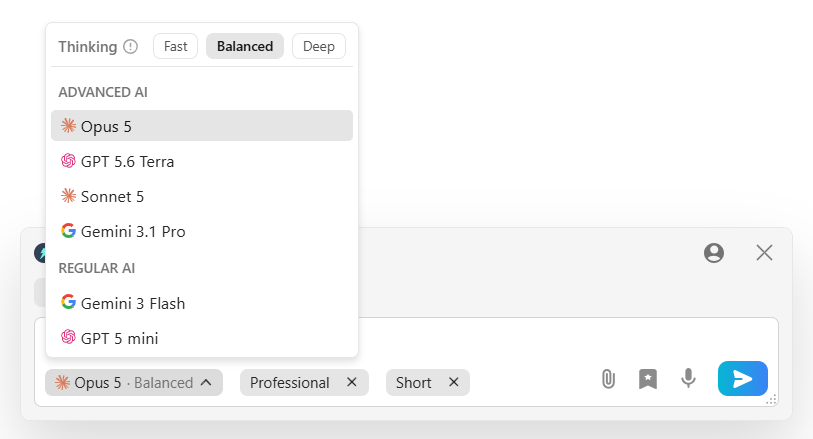
Easy to Turn On: It is very simple to switch to the new model. Just launch Jetwriter AI extension or the webApp. Look for the dropdown where you pick your AI model. Click it, and pick Opus 5 from the list. After that, your next messages and tasks will use the new AI model.
Bring Your Own Key: Are you on our Free plan? You can still use Claude Opus 5! If you have your own Claude API key from Anthropic, you can plug it right into Jetwriter AI. This lets you use Claude Opus 5 to write emails, chat with pages, and more using your own access.
Conclusion
Adding Claude Opus 5 to Jetwriter AI gives you the best of both worlds. You get one of the smartest AI models ever built, right where you already do your daily work. You do not need to copy and paste text back and forth between different tabs or apps. Everything happens right inside your Gmail inbox, Slack, or web browser.
Already on our Ultra plan? Just launch Jetwriter AI and choose Claude Opus 5 from the menu to see how much faster and easier your work becomes. If you are using our Free or Elite plan, upgrade your account today so you can start working with our smartest helper yet.
Frequently Asked Questions (FAQ)
Do I need to create a separate Anthropic account to use Claude Opus 5 if I am already on the Ultra plan?
No, you do not need an Anthropic account. The Ultra plan gives you full access to Claude Opus 5 directly inside Jetwriter AI.
Are there any daily usage limits when using Claude Opus 5 on the Ultra plan?
There are no daily limits on how much you can use the AI. Instead, your account comes with a monthly limit that resets at the start of every billing cycle. The exact number of responses you can generate depends on how long your messages are, or whether you attach files etc.
Can I still switch back to other models like GPT or Gemini if I prefer them for certain tasks?
Yes, you can swap between models whenever you want. Just open the model menu in Jetwriter AI and pick the one you prefer, like GPT-5.6 Terra or Gemini 3.1 Pro.
Can I access Opus 5 on my mobile phone using the Jetwriter AI app?
Yes, you can use Claude Opus 5 on your phone. You can access it through your mobile web browser, or directly inside the app if you use an Android device.