We are thrilled to bring Claude Opus 4.8 - Anthropic’s smartest model - straight into Jetwriter AI. You can access it right now inside your browser extension and on the web app.
This changes the AI from a tool that just types fast into a careful partner. Instead of spitting out the first words that come to mind, Claude Opus 4.8 stops to check its own work. It actually catches its own mistakes and fixes them before you ever see the output.
This makes a huge difference when you are doing serious work inside your workspaces. For example, it can sort through five long articles at once to gather exact facts, or help you write a calm reply to an upset customer. Because it refuses to guess or make things up, you can send big sales emails without worrying that a fake number will cost you the deal.
What is Claude Opus 4.8?
Claude Opus 4.8 is a new kind of AI. Older AI programs just tried to read and write as fast as possible, but they often guessed wrong or made up facts when they did not know the answer. Opus 4.8 is built to stop doing that. It actually thinks through problems, checks its own work, and fixes its mistakes before it speaks.
Radical Honesty over Artificial Confidence: Most AI tries too hard to sound polite and almost never says "I don't know." If an old AI does not know a fact or a number, it just invents one. Opus 4.8 does the opposite. If it is not sure about something, it speaks up and says so. In tests, it catches its own errors four times better than older versions. For example, if it writes a piece of computer code and sees a line that might break later, it will add a note saying, "I am not 100% sure this line will work," instead of pretending it is perfect.
High-Autonomy Workflows: This model can finish big jobs all by itself without needing a human to give it new instructions every five minutes. If a project has ten different steps, Opus 4.8 looks at the whole list, figures out which step has to happen first, and gets to work. For example, if it is building a list of websites and hits a broken link on step three, it does not just freeze and give up. It finds a different working link on its own and keeps moving until the whole job is done.
Performance and Speed Scaling: Usually, when a computer program has to do very hard thinking, it gets slow. Opus 4.8 separates the hard thinking from the typing. This allows it to run a special fast mode that works 2.5 times quicker than older models. For example, if someone asks it to sort through fifty long business emails and make a neat timeline of events, it does the heavy counting instantly in the background, and then types out the timeline without making the screen sit and load.
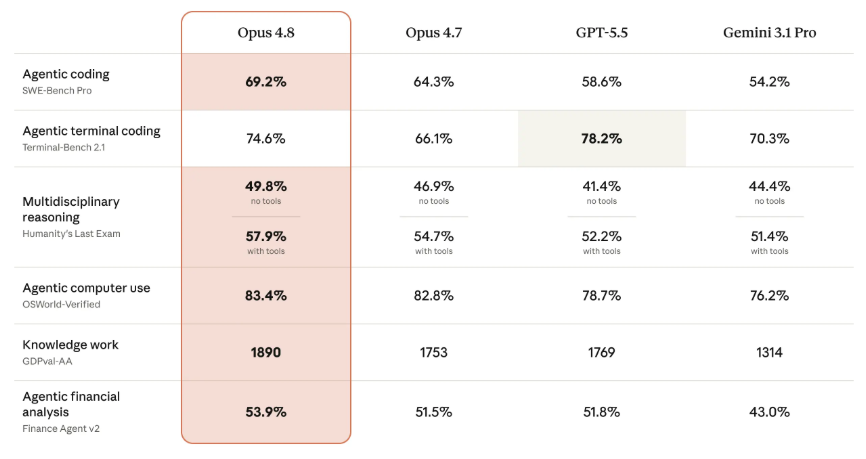
How Claude Opus 4.8 Supercharges Jetwriter AI
Putting Claude Opus 4.8 right inside Jetwriter AI makes the app work much better. Jetwriter AI sits on top of all your favorite websites, and now it has an AI that checks its own thinking. This means the app stops being just a simple typing tool and becomes a truly smart helper that understands exactly what is happening on your screen.
Grounded Email Diagnostics: This tool works directly inside your Gmail inbox, and its honesty makes it great at writing emails. Old AI tools usually write things that sound fake and stiff, like "Please accept our warmest greetings on this fine day." Claude Opus 4.8 reads your emails like a real person. For example, if a client is secretly upset in an email thread, or if a coworker sends a tricky note, the AI catches those tiny details. Instead of writing fake, polite words, it helps you write a real, honest reply - whether you are signing a big contract or fixing a major mistake.
Intelligent Document Synthesis: The AI is also great at reading long files. Most regular AI tools just summarize by picking a few random sentences. But Opus 4.8 reads the whole thing very carefully. For example, if you upload a giant, 100-page instruction manual or a complicated bank report, it can spot tiny mistakes that do not match up. It can look at a sentence on page 5, connect it to a math chart on page 80, and explain a hard topic using very simple words.
Intent-Driven Execution: In the past, using AI was annoying because you had to type super long, perfect instructions just to get a good answer. With Opus 4.8, you do not have to hold the AI's hand anymore because it already knows what you want. It looks at the webpage you are currently using to figure out your goal. For example, if you just highlight a messy sentence and type a short command like "make this sound better," the AI knows exactly what you mean and gets it right on the first try. This cuts your editing time in half.
Get Started with Claude Opus 4.8
You can easily switch to Claude Opus 4.8 immediately within your current workflow.
Instructions
- Launch Jetwriter AI: Open the Jetwriter AI extension.
- Find Model Settings: Click on the drop-down menu that lists the AI models. It usually shows the name of the last model used.
- Select Claude Opus 4.8: Look through the list of choices and click on Claude Opus 4.8. This turns on the Claude Opus 4.8 model.
- Start Writing: Once chosen, the new chats will use the Claude Opus 4.8 model automatically.
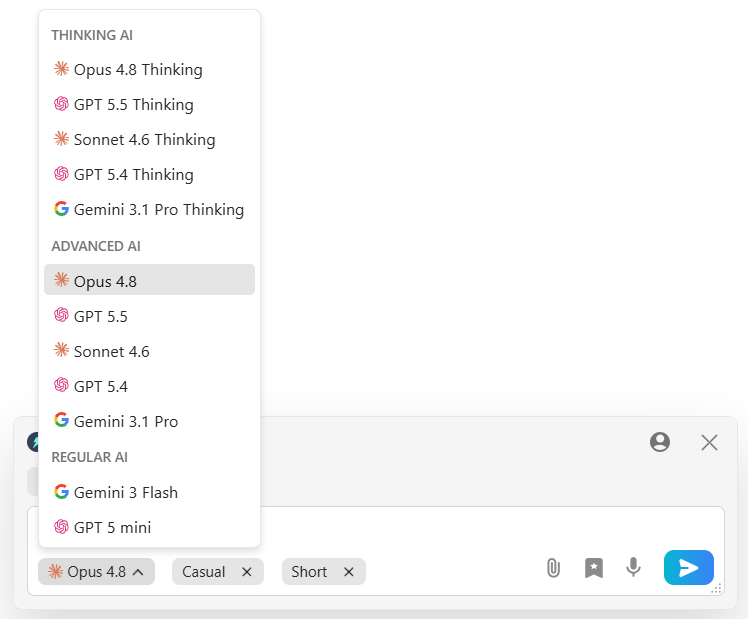
Right now, Opus 4.8 is only available for users on the Ultra plan. Anyone using a Free plan or an Elite plan can simply upgrade to the Ultra plan to get access to Claude Opus 4.8 model.
Conclusion
Adding Claude Opus 4.8 to Jetwriter AI gives you something very rare: an AI that actually cares about getting the facts right. Older AI tools just tried to fill up the screen with words as fast as possible. This new setup acts like a careful helper. It checks its own math, reads long files from start to finish, and tells you the plain truth when it does not know an answer.
This means you spend less time fixing silly mistakes, and you no longer have to write out long, perfect instructions just to get a helpful reply. Whether you are answering a delicate client email or sorting through a giant business report, Opus 4.8 does the heavy thinking so you can finish your tasks much faster.
If you are on the Ultra plan, launch Jetwriter AI today and pick Claude Opus 4.8 from the menu to test it out. If you are on a Free or Elite plan, upgrade your account today to put our smartest helper to work.
Frequently Asked Questions (FAQ)
I already pay for Claude on their official website. Why should I use it inside Jetwriter AI instead?
When you use the main Claude website, you have to constantly copy text from your work, switch tabs, paste it into the AI, copy the answer, and carry it back. Jetwriter AI puts Claude directly inside your Gmail, Slack, or Google Doc so it can read the page you are already sitting on.
Can I plug in my own Anthropic API key to use Opus 4.8 on the Free plan?
Yes! If you already have your own API key from Anthropic, you can paste it into Jetwriter’s "Bring Your Own Key" settings. This lets you use Claude Opus 4.8 on any Jetwriter AI’s plan you want.
How do I know when to use Opus 4.8 versus the quicker, everyday AI models?
Think of Opus 4.8 as your "heavy lifter." Use the normal, quicker models for easy things like fixing a single spelling mistake. Switch your menu to Opus 4.8 when a job is messy - like answering an angry customer or analyzing long files.