Research takes a lot of time. It can also be really boring.
Think about your last big project. You sit at your computer. You need to find some facts. Five minutes later, you have 20 tabs open on your screen. You even forget what you were looking for. We all do this.
This blog is for you if you read a lot for your work or school. Maybe you are a student. Maybe you are a writer, a marketer, or an entrepreneur. Going through long documents is hard. It takes hours to find the exact fact you are looking for.
But it does not have to be this way. AI can do the hard work for you. You just need the right tool.
Today, we will look at 8 top AI tools built just for research. They help you find answers fast. They read long documents and tell you what they mean in simple words.
Want to save hours of reading every week? Let's look at the list.
The Top 8 AI Tools for Research
Jetwriter AI
Jetwriter AI is a great tool for anyone who needs to research and write every day. It is built to help you find facts fast. It lives right inside your web browser as a handy extension. This means you get instant help while you are reading your favorite websites. It is like having a smart friend right there on the page with you.
Top Features
-
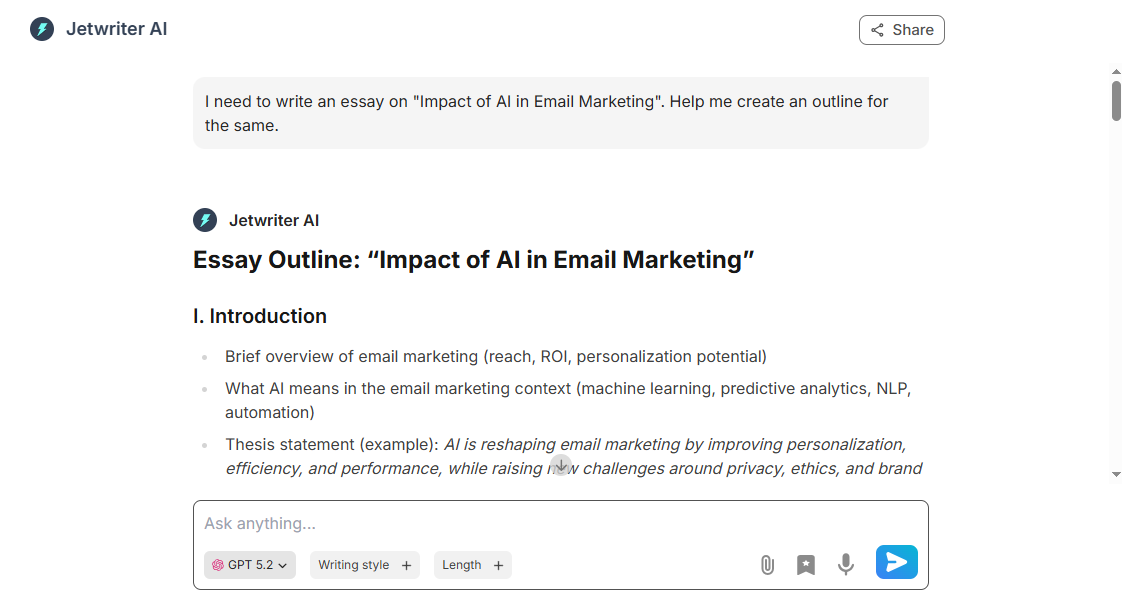
Full Web Application: Jetwriter AI works as a complete web application. It is perfect when you need to start a new project from scratch. Jetwriter AI gives you creative ideas for your next social media content, blog, or project. It also searches the live web to research and find up-to-date facts. You can ask it to look up recent news or latest studies to get the best answers.
-
Chat with Page: Sometimes you just do not have the time or energy to read a long 20-page article. With this useful feature, you can chat directly with any webpage on your screen. Just ask Jetwriter AI to give you a quick summary, list the key points, or find a specific fact. It reads the whole page instantly and gives you the exact answer you need. This saves so much time every single day.
-
Chat with Documents: Jetwriter AI lets you attach your own files right into the chat window. You can upload large PDFs or word documents. Once your file is added, you can just ask it questions like you are talking to a human assistant. It scans the entire document to pull out the hidden answers you want. You never have to scroll through hundreds of pages of text by yourself again.
-
Instant Document Summarization: This tool uses the smart Quick Actions feature to instantly simplify long and complex research. If you are looking at a hard report or a deep study, you do not need to panic. You can highlight the text and get a clear summary in seconds. It breaks down heavy text into short, easy words that anyone can understand. It makes learning new things feel fast and effortless.
-
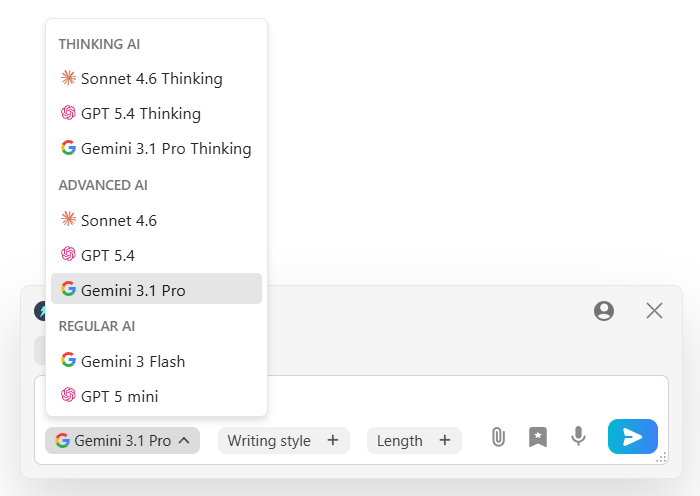
Multi-model, Lightweight and Private: This tool lets you choose from different smart models like ChatGPT, Claude, or Gemini. The extension is super light (at less than 1MB), so it will never slow down your computer. Best of all, it keeps your data totally safe. Your private info stays with you and is never used to teach the AI models. You can do your daily research with complete peace of mind.
Pricing
You can start using Jetwriter AI for free. If you find yourself using it all the time for your research, there are affordable paid plans. There is also an option where you can plug in your own API key.
NotebookLM
NotebookLM is a smart tool built by Google. Think of it as a personal notebook that talks back to you. You upload your own notes, books, and PDFs. Then, it becomes a total expert on your files. It is perfect if you want an AI that only focuses on your specific work.
Top Features
-
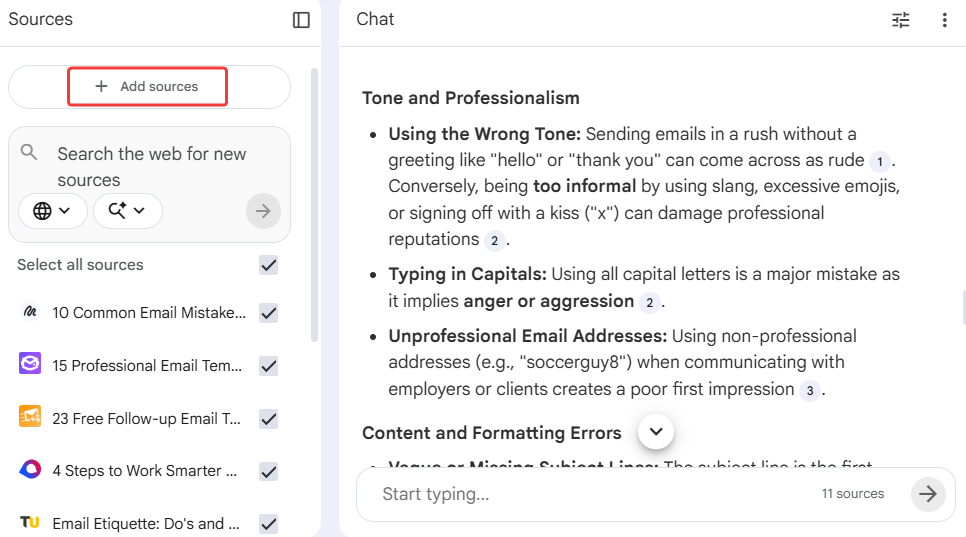
Sticks to the Facts: NotebookLM only uses the files you upload into it. It does not guess answers from the wild internet. It never makes things up. If the exact answer is not in your document, it simply tells you. This means you can trust what it says completely. You never have to worry about fake facts ruining your hard work.
-
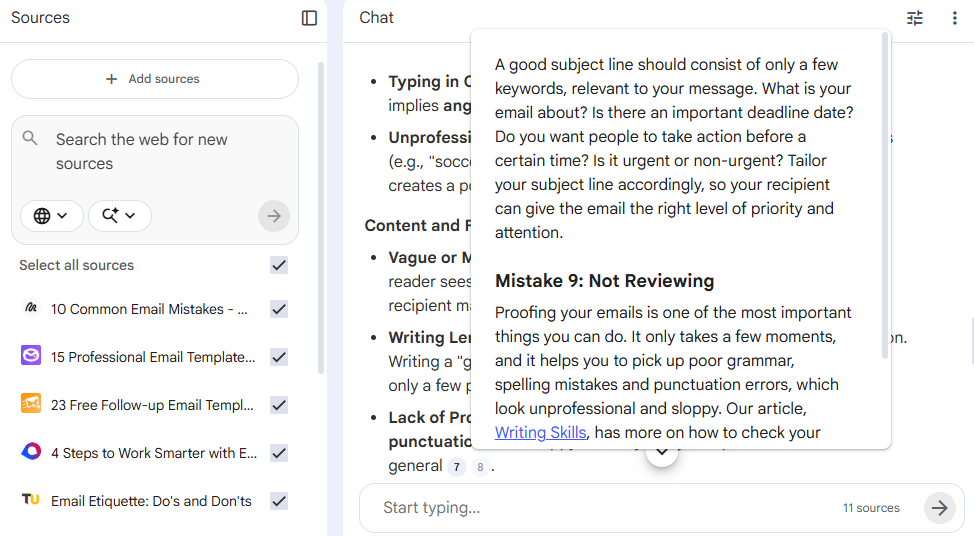
Clear Proof: Every time NotebookLM answers a question, it shows you exactly where it got the information. It gives you a little number to click. When you click it, it jumps right to the exact page and line in your uploaded file. It is just like having a smart tutor point right at the correct textbook page.
-
Audio Podcasts: Do you hate reading long, boring reports? This feature is for you. It can turn your dry text files into a fun, lively audio podcast. Two AI voices will actually chat about your notes. They joke around and explain complex topics in very simple words. You can listen and learn while you walk the dog.
Pricing
NotebookLM offers a very generous free version. It gives you full access to its best features for your daily research. If you are a heavy user, there are paid plans that start at $19.99 per month.
Consensus
Consensus is a smart search engine built just for science and academic work. It does not search the whole wild internet. Instead, it only looks through millions of real, peer-reviewed science papers. It is perfect when you need hard facts, not just random opinions. Think of it as a super-smart librarian for your biggest projects.
Top Features
-
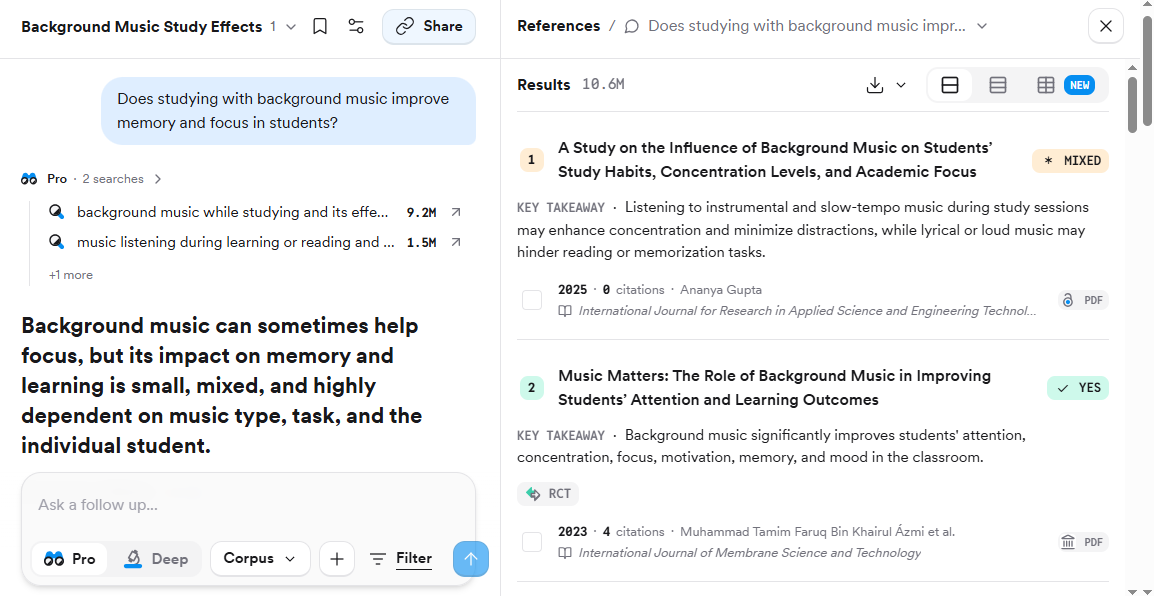
Academic Search: Consensus searches across millions of real science studies to find answers. When you ask it a question, it finds the best papers to match your exact need. You never have to worry about fake news or made-up facts. Every single answer it gives you comes from a real expert. It is built to keep your research safe, true, and highly accurate every single time you use it.
-
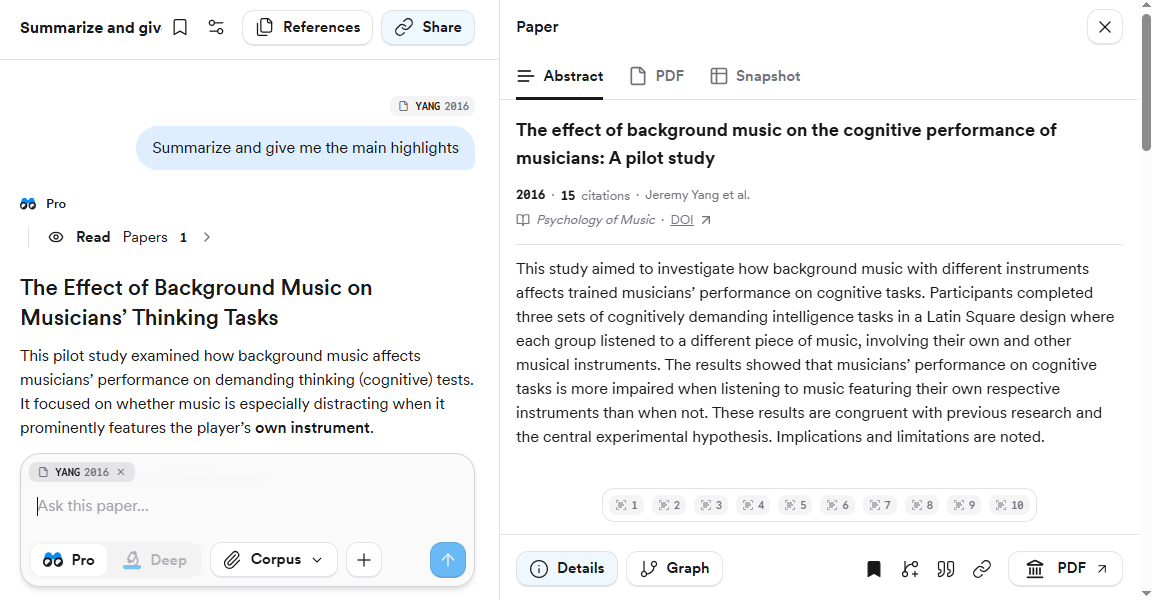
Quick Summaries: Reading long science papers can take forever. They often use big, confusing words that make your head spin. This tool fixes that problem instantly. It reads the top papers for you and gives you a simple summary. It tells you exactly what the experts agree on in plain English. You get the main point in just a few seconds without all the usual headache.
-
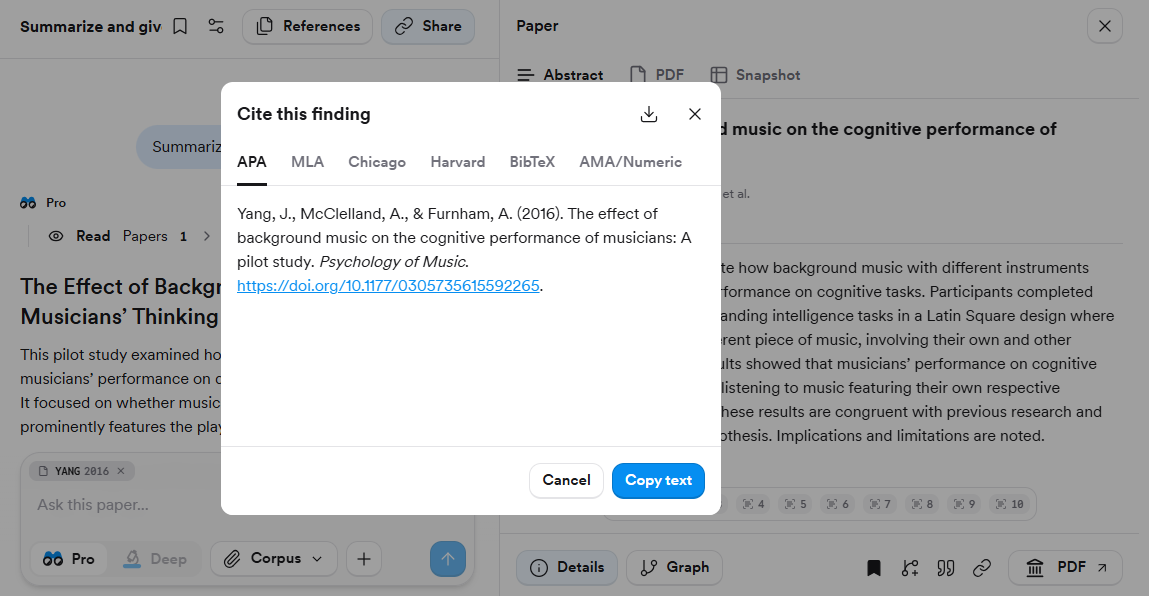
Easy Citations: Do you hate writing out citations for your school or work projects? Consensus makes this boring chore so easy. Every answer it gives you comes with a clear link directly to the real study. You can just click and copy the exact source you need. It proves your facts are right without any extra hard work. This keeps your paper looking very professional.
Pricing
You can start using Consensus for free right away to test it out. If you find yourself doing a lot of heavy research, they have great upgrade options. Their paid plans start at just $10 per month to give you full access to their best tools.
Scholarcy
Scholarcy is a great tool for students and researchers. It takes long, hard papers and breaks them down into small, easy pieces. It is like having a smart tutor who reads the whole book first and tells you exactly what you need to know. You will never have to stare at a blank screen wondering what a complex article means. It makes reading fast and simple.
Top Features
-
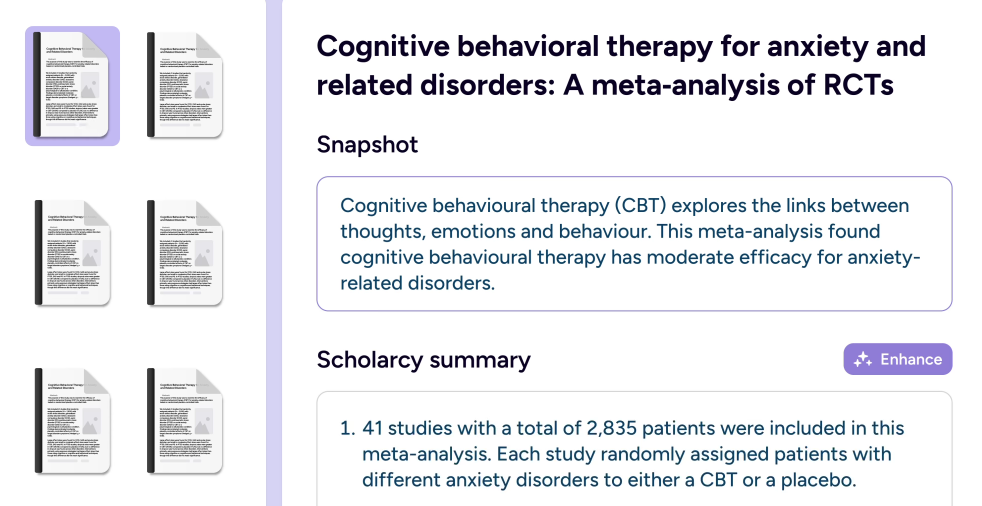
Instant Flashcards: Scholarcy turns dense, multi-page documents into interactive summary flashcards. Instead of reading a big 50-page paper, you get neat little cards that highlight the main points, methods, and results. It puts the most important information right at your fingertips. You can learn fast and easily review key ideas before a big meeting or a test.
-
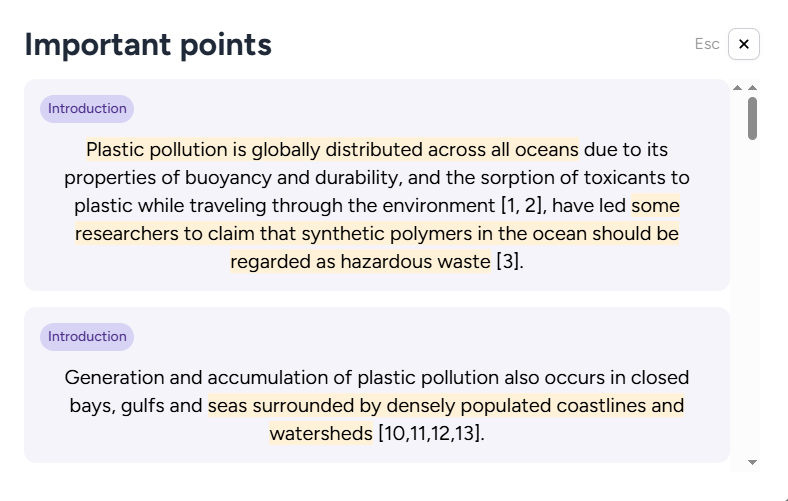
Smart Highlighting: Reading long science papers can make your eyes hurt. This tool uses smart highlighting to guide you to the exact sentences that matter most. It automatically finds the big claims, the main goals, and the final conclusions. It paints the important text for you, so you do not have to guess what the author meant. It saves hours of boring reading.
-
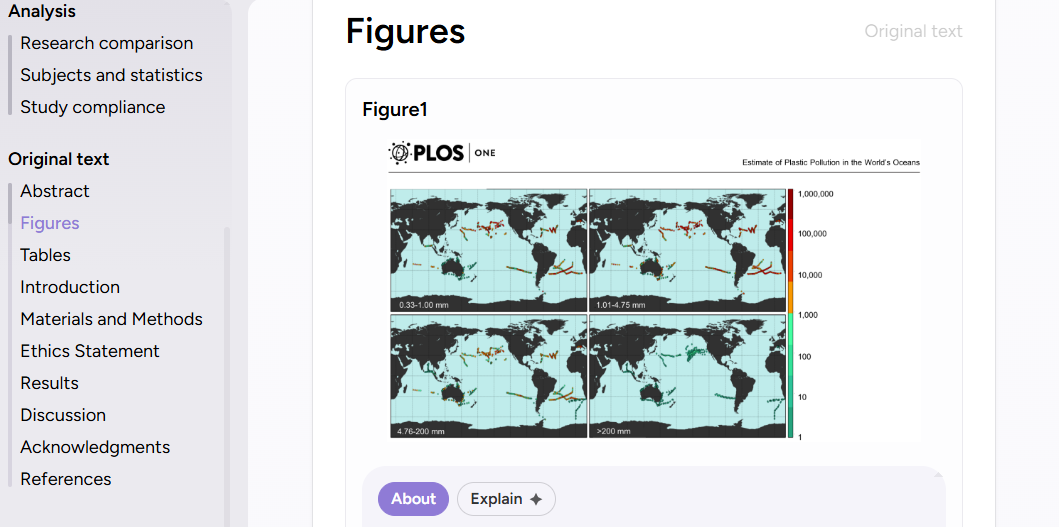
Finds Facts and Tables: Sometimes you just need to see the raw data. Scholarcy pulls out all the hidden tables, charts, and figures from a long research paper. It puts them in one easy-to-read spot for you. You do not have to scroll past pages of text just to find a single number. It makes complex data very simple to understand when you need to write a fast report.
Pricing
Scholarcy has a very generous free version that gives you access to its best features for everyday research. If you are a heavy power user and need higher limits, the paid plans start at $4.99 per month.
Recall
Recall is like a second brain that never forgets anything. We all consume a ton of information every day. We read articles, watch YouTube videos, and listen to podcasts. But how much of it do we actually remember a week later? Probably very little. Recall is built to fix this exact problem. It saves, simplifies, and connects everything you learn in one neat place.
Top Features
-
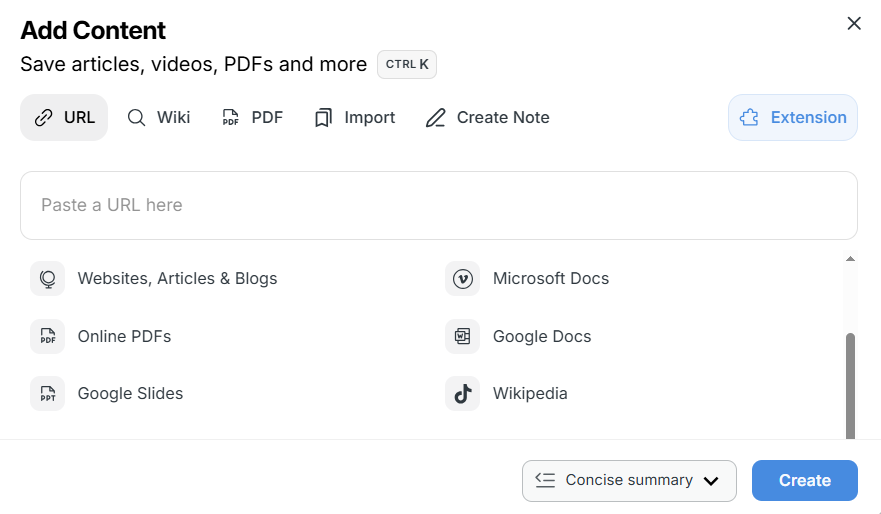
Summarizes Everything: Recall does not just work on boring text files. It can summarize almost any digital content you throw at it. You can save long web articles, hours of YouTube videos, or deep podcasts. It instantly breaks them down into short, easy-to-read notes. You get the most important points without having to watch or read the whole thing.
-
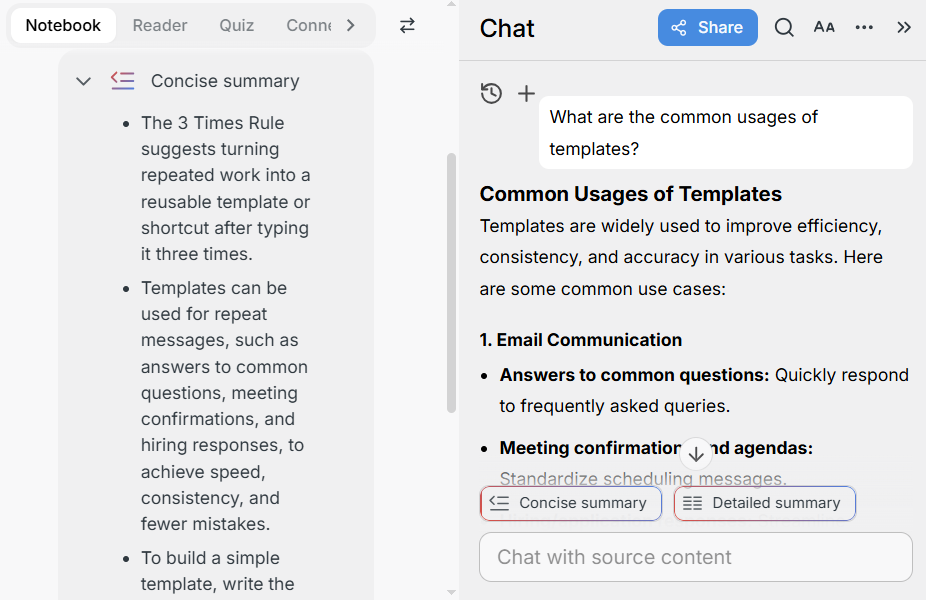
Chat With Your Brain: This is where Recall gets really cool. Instead of just searching your notes, you can chat with them. You can ask it questions about a video you saved last month or an article you read last week. The AI answers you by looking only at your saved items. It is like having a personal tutor who has read everything you have ever saved.
-
Auto-Organizes: Do you hate spending time putting notes into the right folders? Recall does all the heavy lifting for you. Every time you save something new, the smart AI automatically tags it. It also builds a visual map that links related topics together. You can clearly see how a new study connects to an old article you saved months ago.
Pricing
Recall offers a free plan that gives you 10 free summaries to test it out. If you want to save unlimited notes and summaries, their paid plans start at $10 per month.
Scite
Scite is an amazing tool for checking facts. It does not just show you how many people read a paper. It actually reads the text to see if other experts agree or disagree. This is perfect when you need to know if a study is still true today. It is like having a lie detector for your research.
Top Features
-
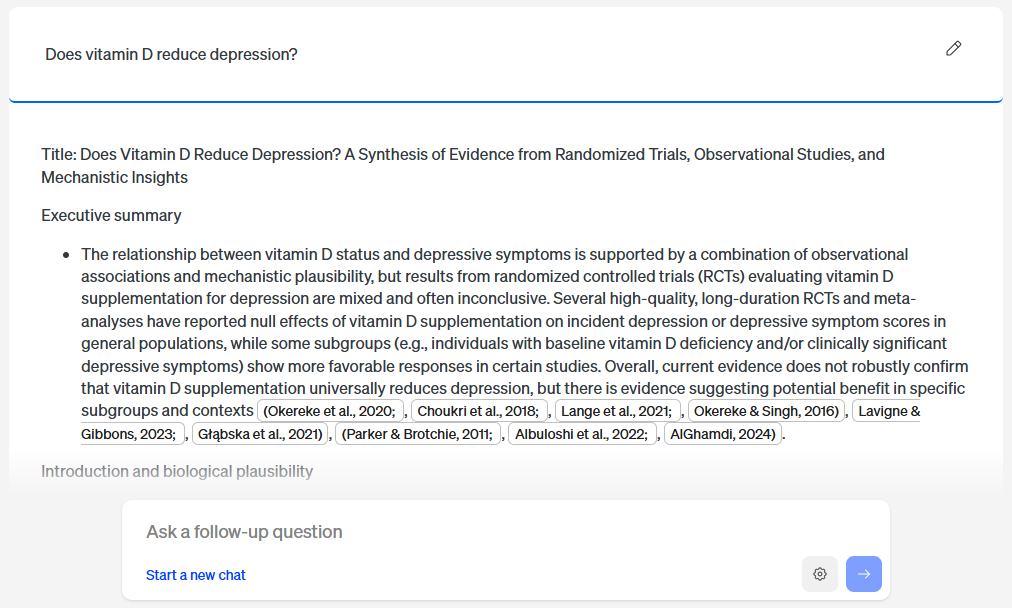
Smart Citations: Scite is very smart. It does not just count how many times a paper was used. It tells you exactly how it was used. It shows you if other experts supported the study, argued against it, or just mentioned it. This helps you quickly see if a paper is really trusted by the science world.
-
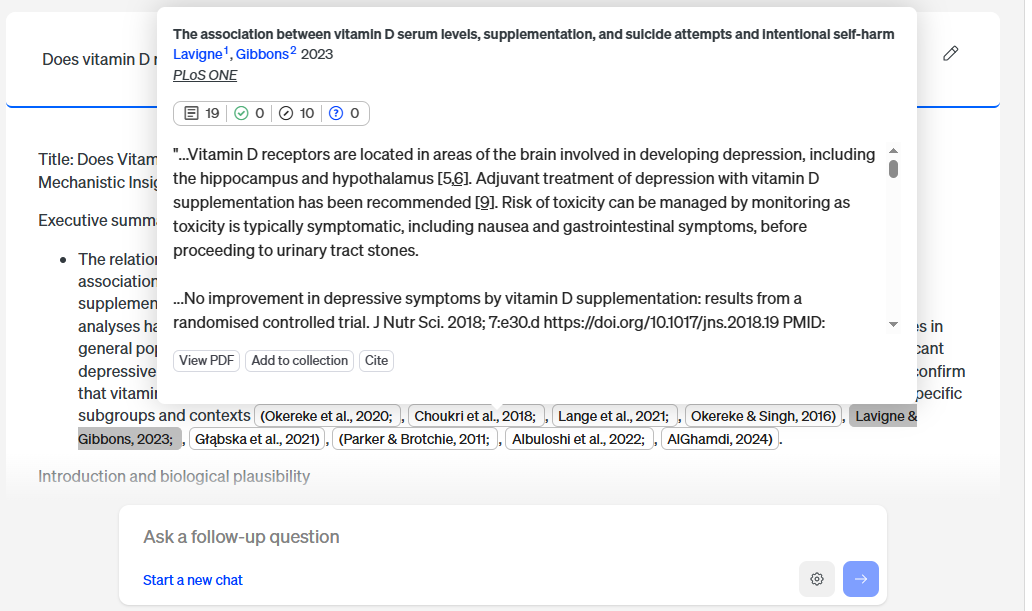
Citation Context: This tool saves you so much time. You do not have to open a huge paper just to see what it says. Scite shows you the exact small piece of text where the citation happened. You can read how the experts talked about the study right there on your screen. It makes checking facts fast and easy.
-
Custom Dashboards: If you do a lot of research over time, this is for you. You can build your own custom dashboards. It lets you easily track and follow specific groups of authors or papers. You can see how ideas change over the years. It is like having a personal control room for your favorite research topics.
Pricing
Scite offers a 7-day trial to let you test out the tool. If you are a heavy power user and need full access, the paid plans start at $12 per month.
ResearchRabbit
ResearchRabbit is often called the Spotify of research. It is a smart app that helps you discover new academic papers very fast. Instead of giving you long boring lists to read, it builds fun visual maps. These interactive maps show you exactly how different authors and studies connect. It makes finding new ideas feel like an easy game.
Top Features
-
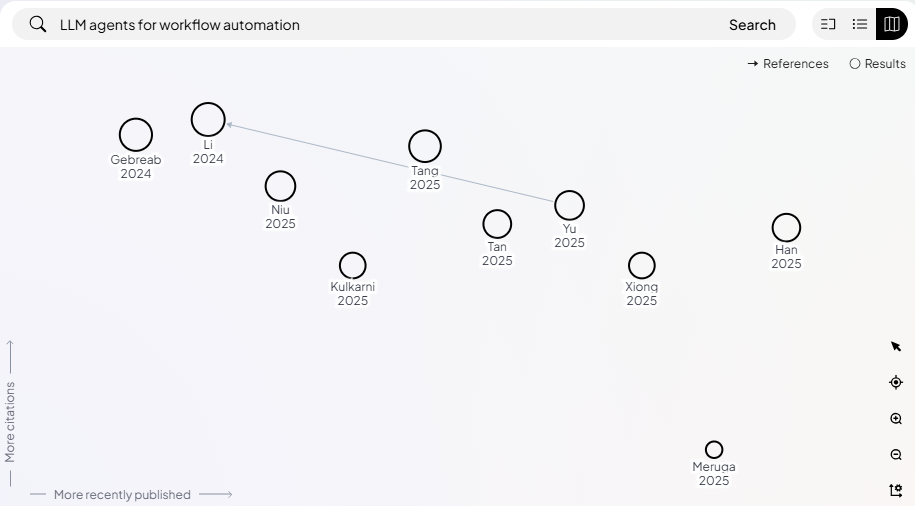
Visual Network Mapping: Reading lists of papers is boring. This tool builds interactive visual graphs for you. It draws clear lines between papers, authors, and citations. You can clearly see how one small idea branches out into many different studies. It looks like a cool family tree for your research.
-
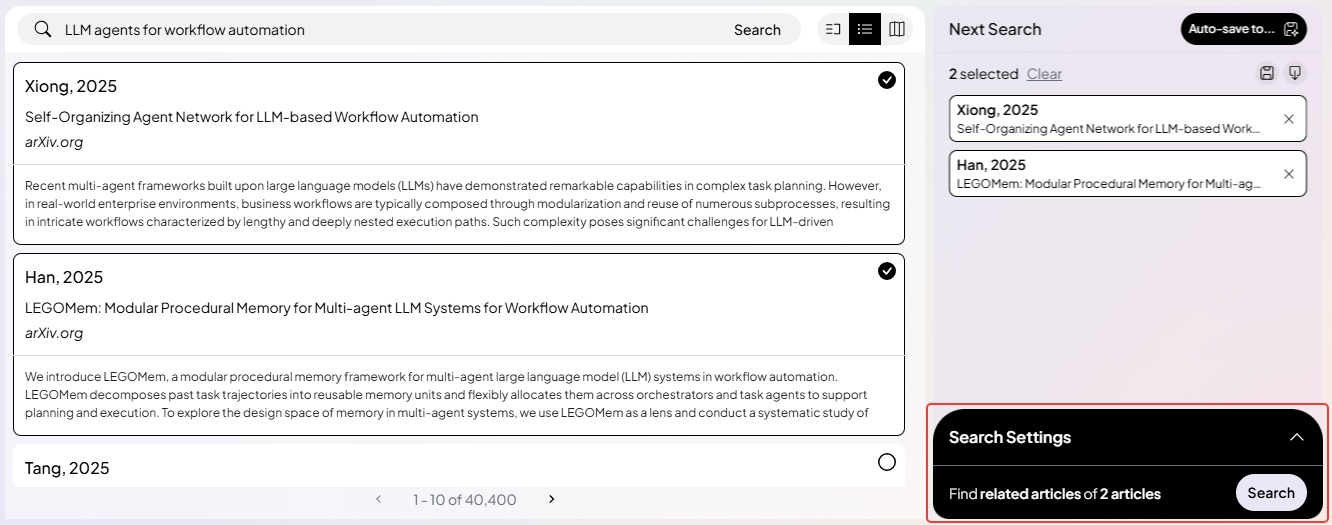
Personalized Discovery: This app learns what you like. When you add a paper to your collection, the smart AI takes notes. It then works in the background to recommend highly relevant new literature just for you. It is just like getting a perfect music playlist, but for science papers.
-
Collaborative Collections: Working on a big project with a team can be messy. This feature lets you share your research maps and reading lists directly with your friends or co-authors. Everyone stays on the exact same page. You can stop emailing links back and forth and just get to work together.
Pricing
ResearchRabbit has a very generous free version that gives you access to its best features for everyday research. If you are a heavy power user and need higher limits, the paid plans start at $10 per month.
Elicit
Elicit is a smart AI assistant built for deep research. If you have to read many long studies to find specific numbers, this tool is for you. It reads piles of papers at once and pulls out exactly what you need. Think of it as a super-fast research helper that builds neat tables for you.
Top Features
-
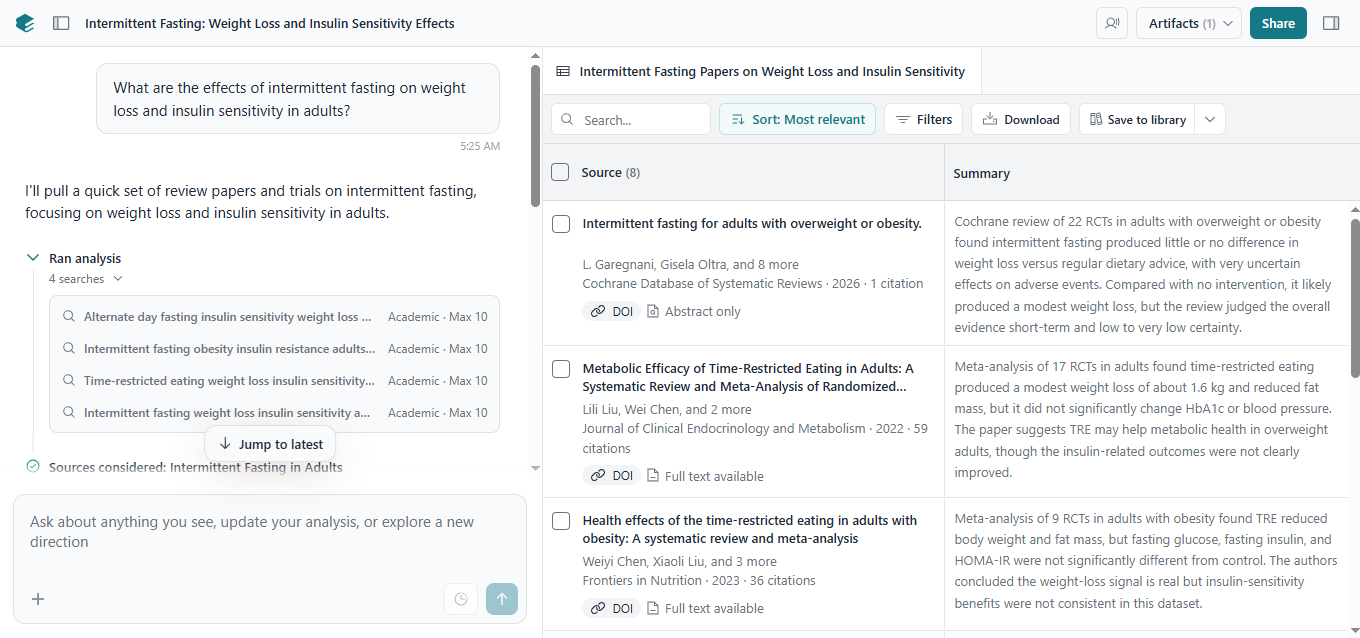
Automated Data Extraction: Finding specific facts in a 50-page PDF is hard. Elicit does this boring work for you. It pulls out exact details like the number of people in a study or the final results. Then, it organizes all these facts into a clear, neat table. You get all the raw data you need without reading every single page.
-
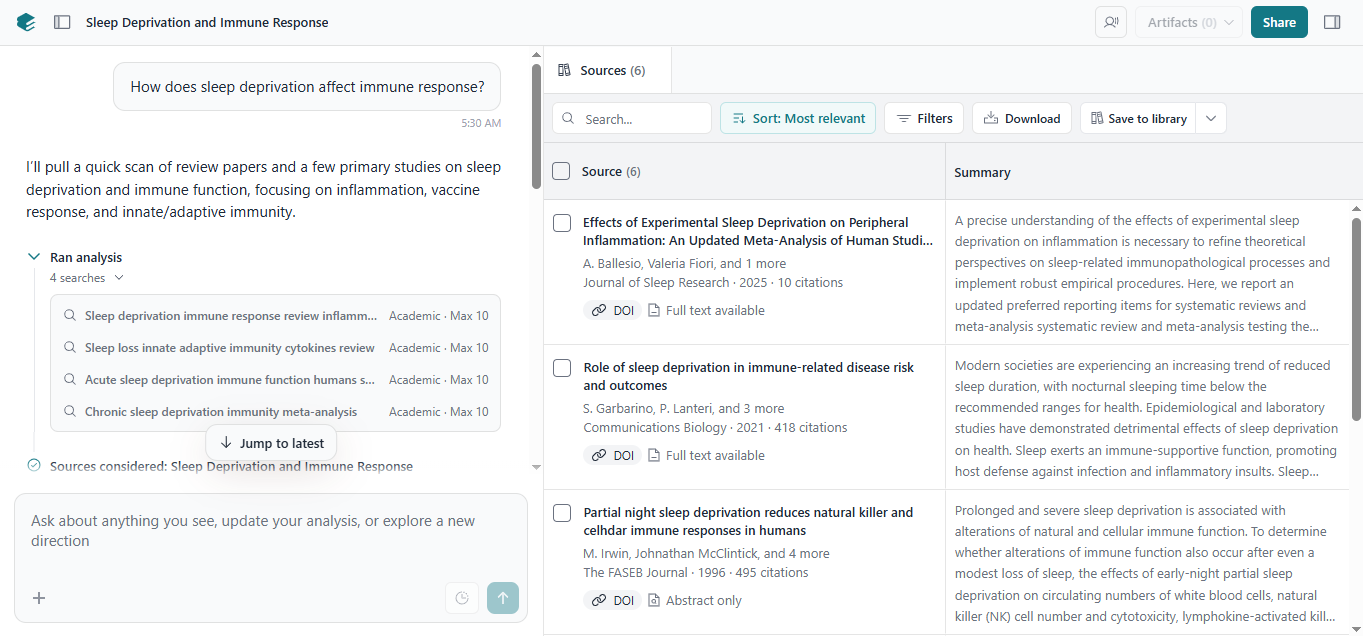
Natural Language Discovery: Sometimes you know what you want to find, but you do not know the exact keywords to search. This tool fixes that. You can just ask a question like you are talking to a human. The smart AI looks for the real meaning behind your words. It finds the best papers for you, even if they use totally different words.
-
Side-by-Side Comparison: Reading one study is fine. But what if you have ten studies to read? Elicit can look at all your uploaded files at the same time. It instantly compares the results across all the different papers. It shows you how they agree or disagree side-by-side. It saves you hours of trying to connect the dots yourself.
Pricing
Elicit has a free version that gives you basic access to its features for your everyday research. If you are a heavy power user and need higher limits, the paid plans start at $7 per month.
How to Choose the Right Tool for You
Choosing the right tool depends on what kind of work you do every day. Here is a quick guide to help you decide:
- For everyday work and live web searches: Jetwriter AI. It lives right in your browser, looks up fresh facts from today's web, and helps you write or summarize fast while you work.
- For deep-dive science and academic literature: Consensus, Scite, and Elicit. These are perfect when you need hard, peer-reviewed facts and want to know if a study is trusted by other experts.
- For organizing and retaining your knowledge: NotebookLM, Scholarcy, and Recall. They read long papers, turn dry text into easy summary cards or audio podcasts, and help you remember what you learn.
- For discovering new resources: ResearchRabbit. It builds amazing visual maps to help you track down new papers you might have missed.
Conclusion
Research can feel like a heavy chore, but it does not have to be that way.
The goal of AI is not to take over your job or replace your brain. The real power of these tools is that they remove the boring part of research. They stop you from spending hours scrolling through huge documents just to find one simple number. They take away the friction of manual data sorting so you can focus on the fun part: learning, writing, and creating.
Now it is your turn to make your daily work easier. Pick one or two tools from this list that match your workflow. Head over to their websites and start a free trial today. You will be amazed at how much time you save every single week!
Frequently Asked Questions (FAQ)
Are AI research tools actually accurate?
Most of the time, yes! But they are not perfect. Tools like Consensus and Scite are very safe. Why? Because they give you a clear link right to the real science paper. Still, you should always click the link to check the facts yourself. Do not just blindly trust the AI!
Is it cheating to use AI for my school or work research?
Not at all. It is only cheating if you ask the AI to write your whole paper and pretend you did it. Using AI to find papers, organize messy notes, or summarize long text is just working smart. Think of it like using a calculator for a math problem.
Will these AI tools steal my private files?
This is a big worry for many people. Thankfully, most top tools are very safe. For example, Jetwriter AI keeps your data totally private. It never uses your personal files to train its big brain. But remember, always check a tool's privacy settings before you upload secret work data.
Can I use more than one AI tool at the same time?
Yes! This is actually the very best way to work. You might use ResearchRabbit to find cool new papers. Then, you can use Scholarcy to read them fast. Finally, you can use Jetwriter AI to help you draft your notes in an email. Mix and match them to build your perfect digital team.