
If you are a lawyer or legal professional, you probably spend hours every day just doing paperwork. Your day is usually full of repetitive tasks. You draft long contracts. You research old laws. You also answer endless client emails.
Accuracy is critical in legal work. One tiny mistake can lose a case. But doing the same tasks every day takes up too much of your time.
This is where AI tools come in. AI will not replace lawyers. But it can do the boring work for you.
For example, imagine you get a 100-page contract. You do not have to read every single word right away. An AI tool can read it and give you a short summary in seconds. Or, imagine a client emails you with a tough question. An AI tool can write a clear, polite reply for you instantly.
In this blog, we will look at 8 great AI tools. They will help you draft clear legal documents and research court cases quickly. You can also use them to manage your firm's daily schedule and summarize long text. Let's look at the tools.
The Top AI Tools for Lawyers and Legal Professionals
Jetwriter AI
Jetwriter AI is the ultimate daily writing and research assistant for legal drafting and secure client communication. It works right inside your web browser so you do not have to open a separate website to use it. It sits quietly on your page to help you write briefs, review files, and reply to clients instantly. Most importantly, it features a strict "no-training" data policy and client-side encryption. These security measures protect your files and ensure total data privacy, which are critical for maintaining attorney-client privilege.
Key Features
-
Write Emails Faster: Answering clients takes up a lot of time. Jetwriter reads your email threads and drafts clear replies in seconds. If a client asks for a case update, you can tell Jetwriter to say yes to a meeting. It writes a polite response instantly. You can change the tone with one click to make it formal. This saves hours of typing every week.
-
Seamless Team and Client Messaging: Many lawyers use chat apps to talk to teams and clients. Jetwriter works directly inside Slack and WhatsApp Web. You can draft quick updates or reply to messages without leaving your chat window. It eliminates the need to switch between tabs. You can fix typos, polish your text, or change the writing style right where you are working.
-
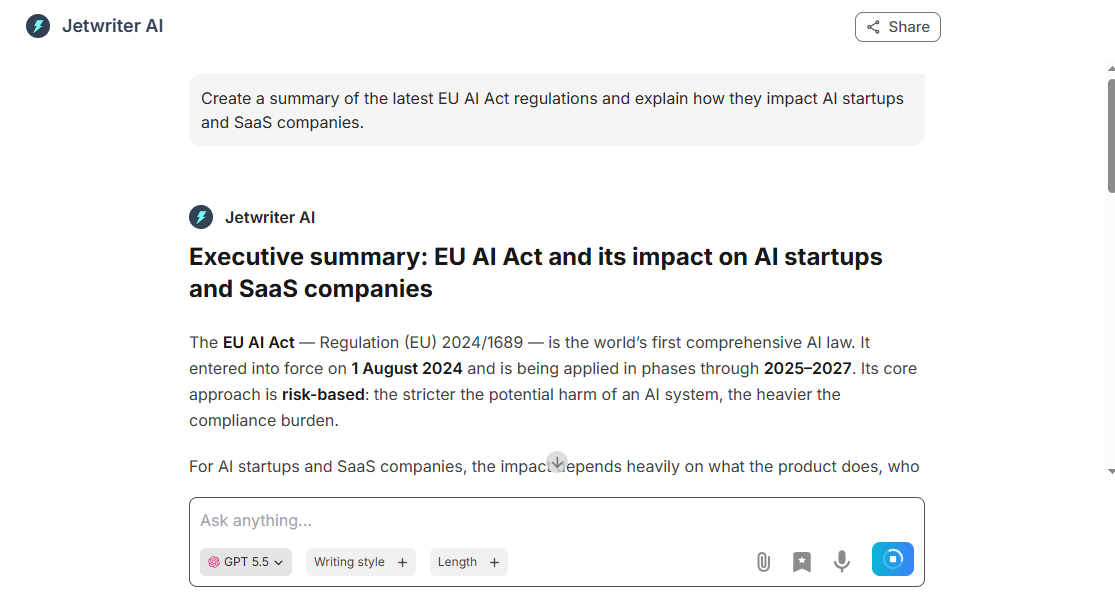
Full Web App for Legal Research: Jetwriter also works as a standalone web app for longer writing tasks. It can search the live web to find real-time facts and public laws. If you need to check a new regulation or a public link, the tool pulls up-to-date data instantly. This ensures your legal summaries and case notes are accurate and based on the latest information.
-
Chat with Webpages and Articles: You do not always have the time or energy to read a twenty-page article or a massive online report. With this feature, you can chat directly with any webpage. Just ask Jetwriter to give you a summary, list the main arguments, or find a specific fact. It reads the whole page instantly and gives you the exact answer you need without any fluff.
-
Chat with Complex Legal Documents: Reading huge contracts or case files is exhausting. Jetwriter lets you attach your files right into the chat. Once uploaded, you can ask the AI specific questions about the document. You can tell it to find hidden clauses, list key dates, or summarize the main arguments. It reads the entire file and gives you a clear response in a few seconds.
-
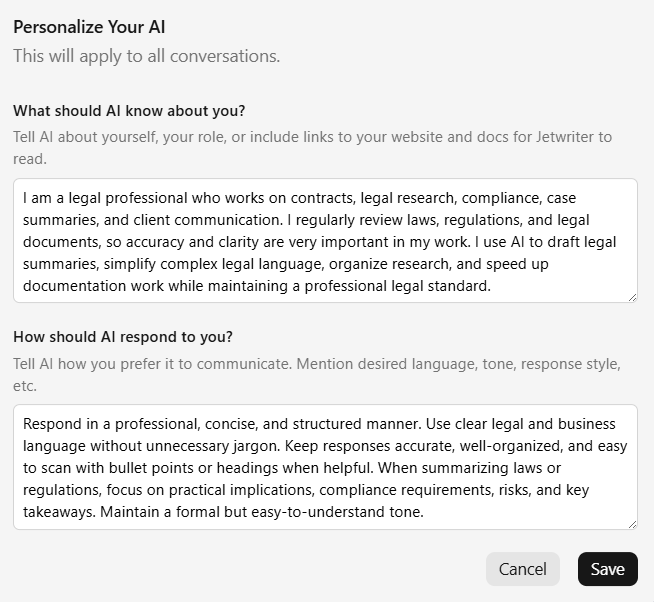
Personalize Your AI Profile: You can teach Jetwriter exactly who you are and what you do. For example, you can tell it your specific job title and firm type. It remembers these details every time it writes for you. This means the AI stops sounding like a generic robot. It drafts answers that match your actual professional background and specific role perfectly.
-
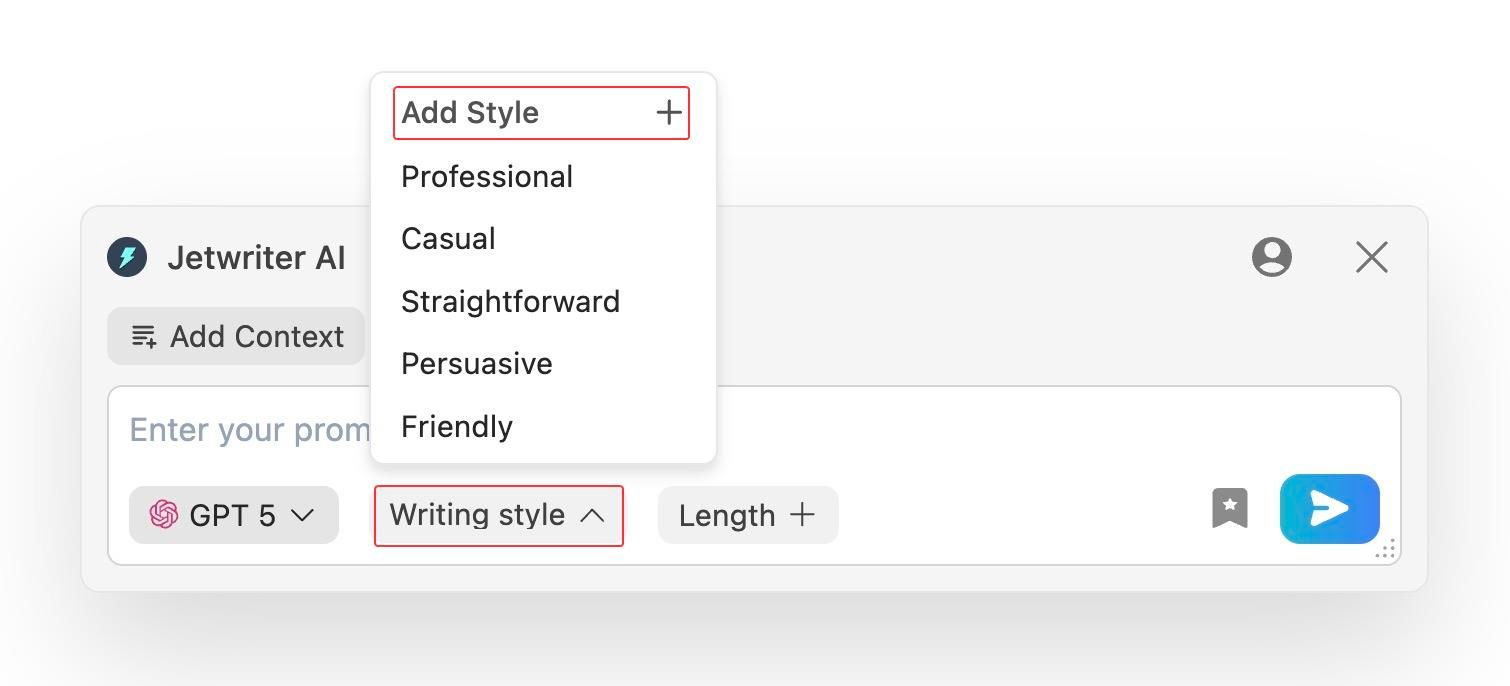
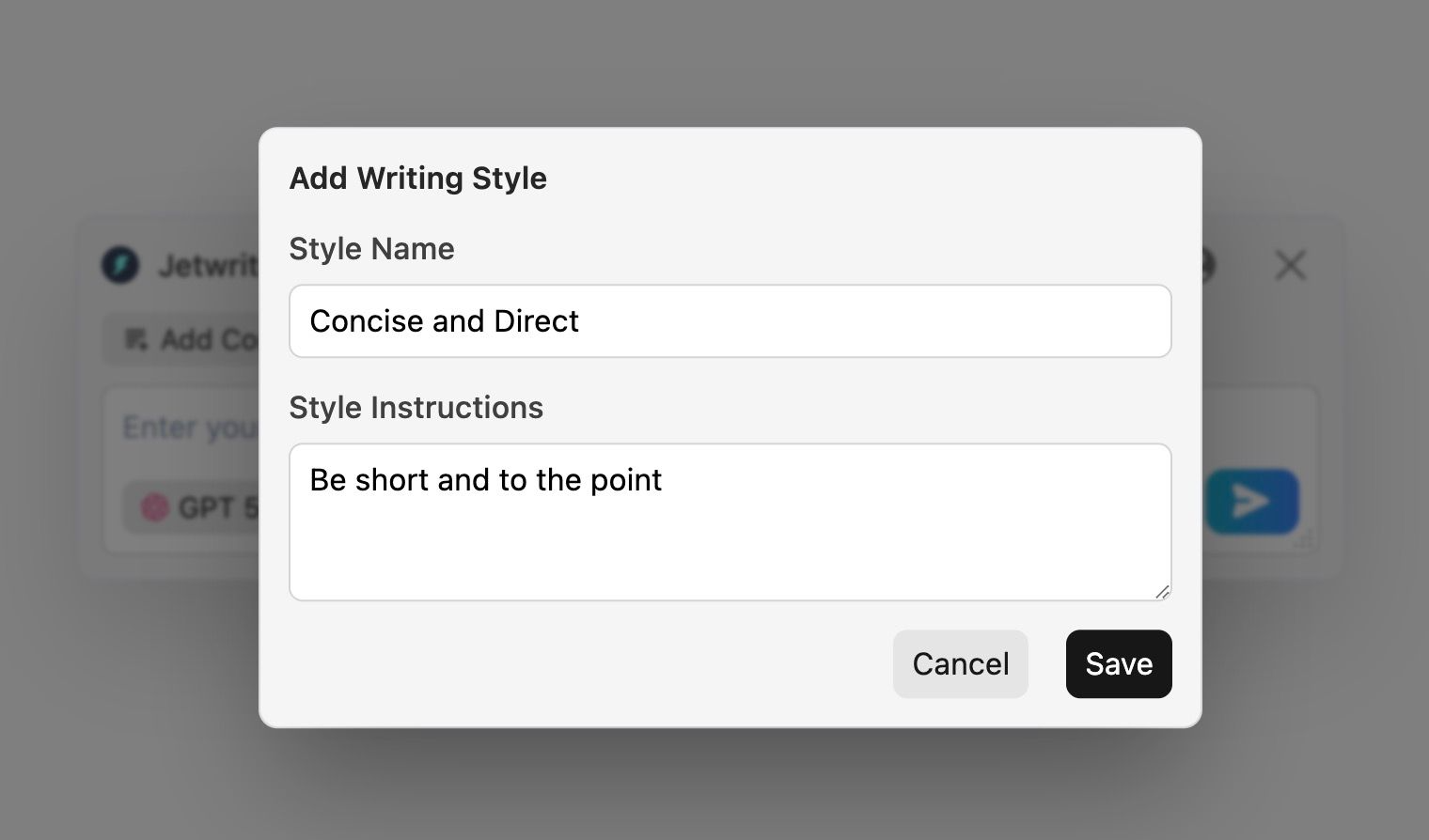
Create Custom Writing Styles: You do not talk to a judge the same way you talk to a coworker. This feature lets you create and save your own special tones. You can make a “Concise & Direct” style for your team, or a highly formal tone for opposing counsel. You can switch between these styles with one click. You do not have to type long instructions every time you write.
-
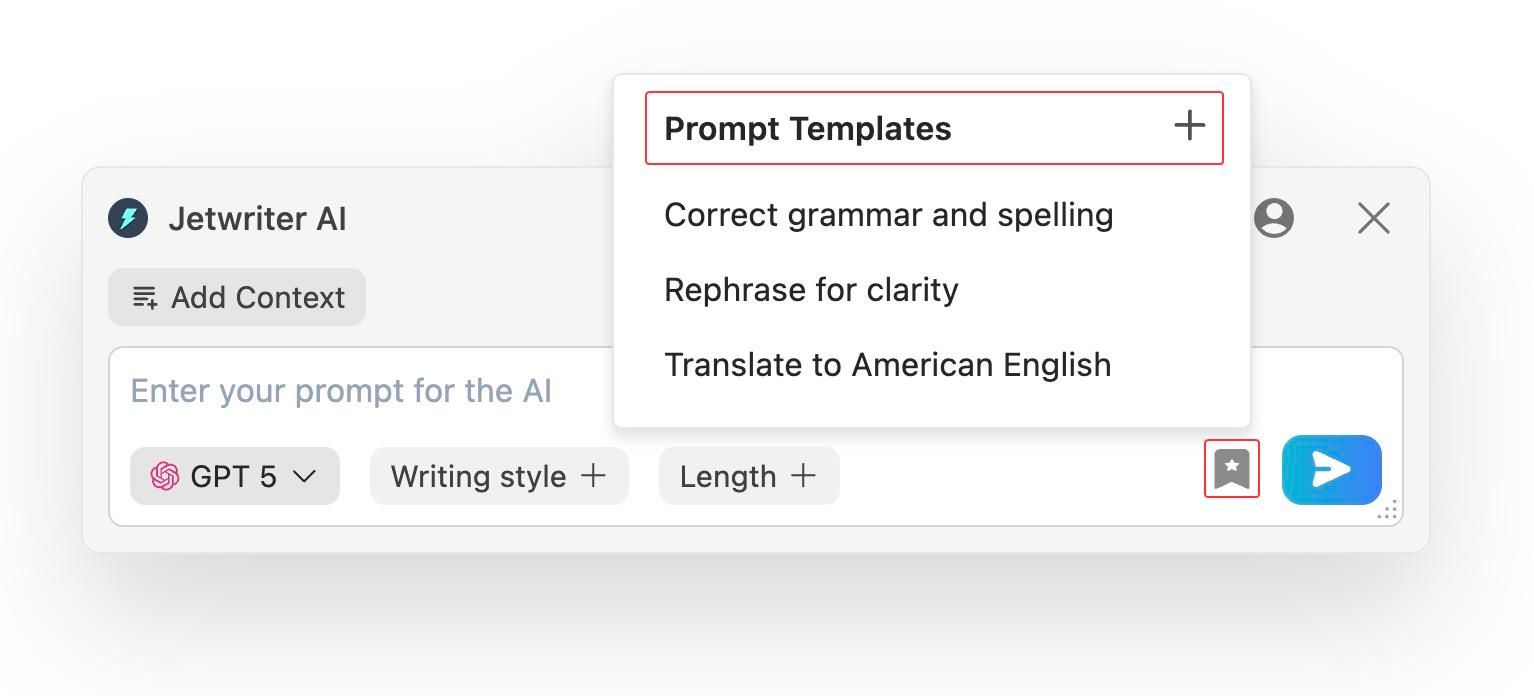
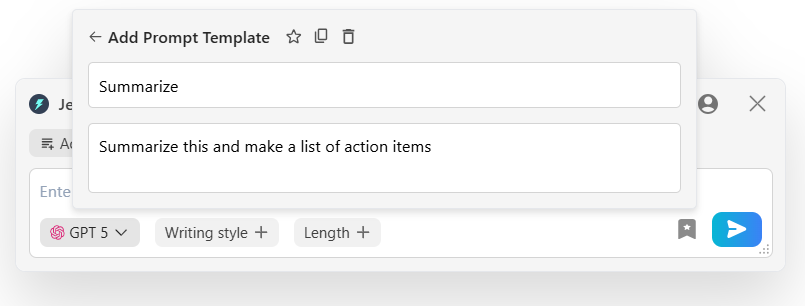
Save Prompt Templates: Do you type the same commands every single day? Maybe you ask the AI to rewrite a draft or summarize notes five times a day. Jetwriter lets you save these frequent commands as quick templates. Next time you need to use them, you just click the template button, and the whole prompt is written for you. It saves you hours of repetitive typing.
-
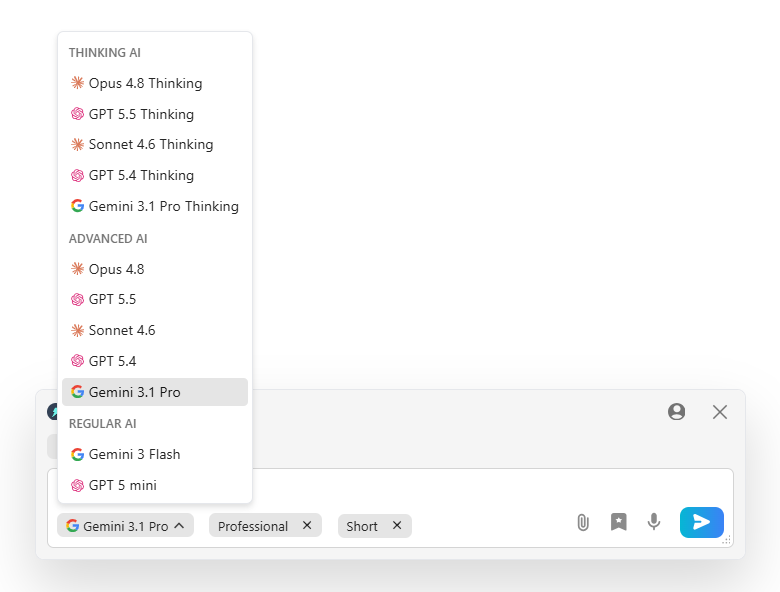
Multi-Model, Lightweight, and Private: You get full control and can switch between top models like ChatGPT, Claude, and Gemini instantly. The browser tool is under 1MB, so it will never slow down your computer. Most importantly, it keeps your data safe. Your private client information stays secure with you. Your text is never used to teach or train the AI models.
Pricing
You can start using Jetwriter AI for free. If you use it often, there are affordable paid plans available. If you do not want a paid plan, you can also use your own API keys. This lets you connect your own OpenAI, Google, or Anthropic account, which makes heavy use much cheaper.
Fathom
Fathom is a smart meeting assistant that records and takes notes for you. It joins your client calls and team meetings automatically. You never have to scramble to write down what someone said. It lets you focus completely on the conversation. It is a great tool for lawyers who spend hours on the phone or video calls every day.
Key Features
-
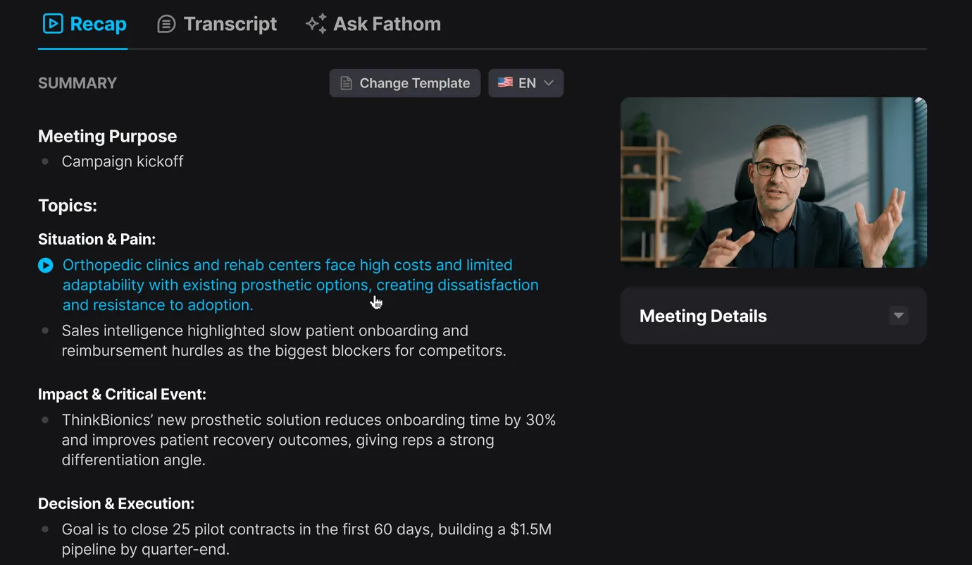
Auto-Transcription and Instant Summaries: Taking notes during a client call is hard. You might miss important details, or spill coffee on your notepad. Fathom listens to your call and types out every word. When the meeting ends, it gives you a short summary instantly. It highlights the main facts and lists your next steps. You can save this straight to your case file without typing.
-
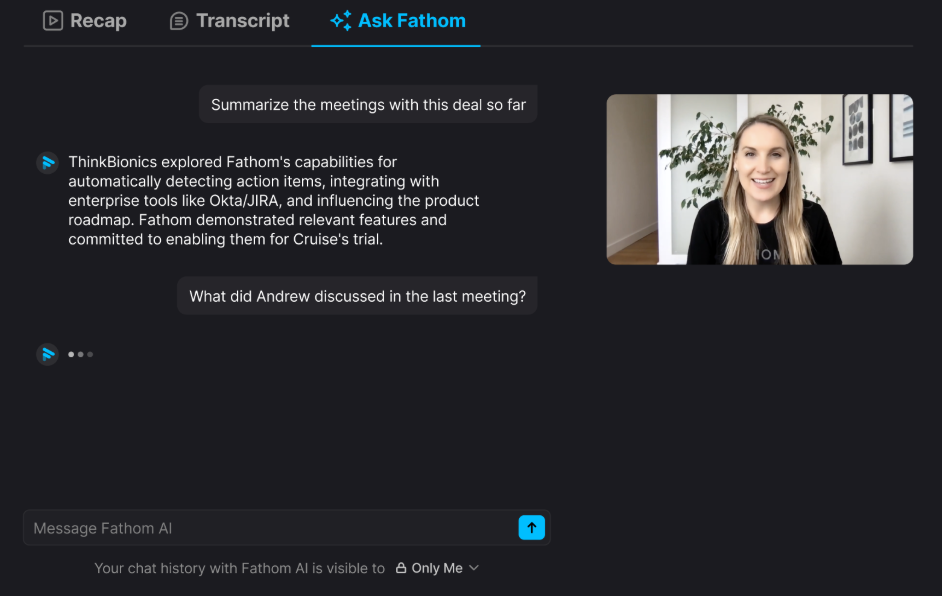
Ask Fathom: Sometimes you forget what a client said on a call last month. We will not tell anyone. Fathom has a chat box for your past meetings. You can ask it questions like, "What did the client say about the settlement date?" It searches your old calls and gives you the exact answer. You do not have to watch a boring hour-long video to find one fact.
-
CRM Integration: Moving notes from your calls to your firm's client system is a chore. Fathom connects directly to your firm's software, like HubSpot or Salesforce. It pushes your call summaries and notes to the right client record automatically. This keeps your files updated without any manual typing. You finally get to skip the annoying copy and paste work.
Pricing
Fathom offers a very generous free plan. The free version lets you record and transcribe unlimited calls. If you want more features, like shared team folders or advanced search, paid plans start at $15 per month per user.
Spellbook
Spellbook is an AI tool for lawyers who write and review contracts. It works right inside Microsoft Word. You do not have to learn a new software program. You just open your document, and Spellbook is ready to help you catch mistakes and draft new clauses.
Key Features
-
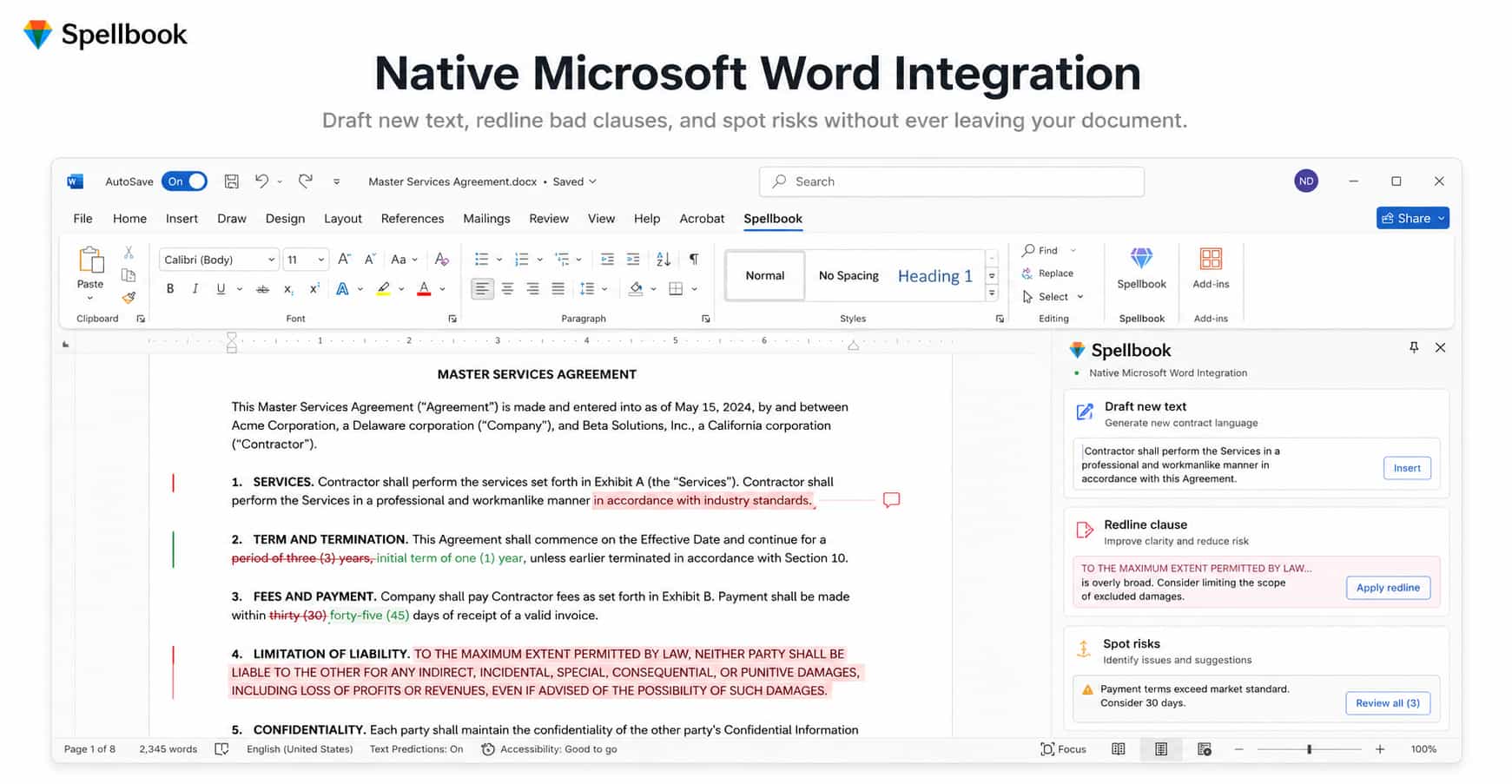
Native Microsoft Word Integration: You spend most of your day in Microsoft Word. We know you probably have a love-hate relationship with it. Switching to a different app to use AI is annoying. Spellbook works directly inside Word. You can draft new text, redline bad clauses, and spot risks without ever leaving your document. You skip the endless copy-and-paste routine.
-
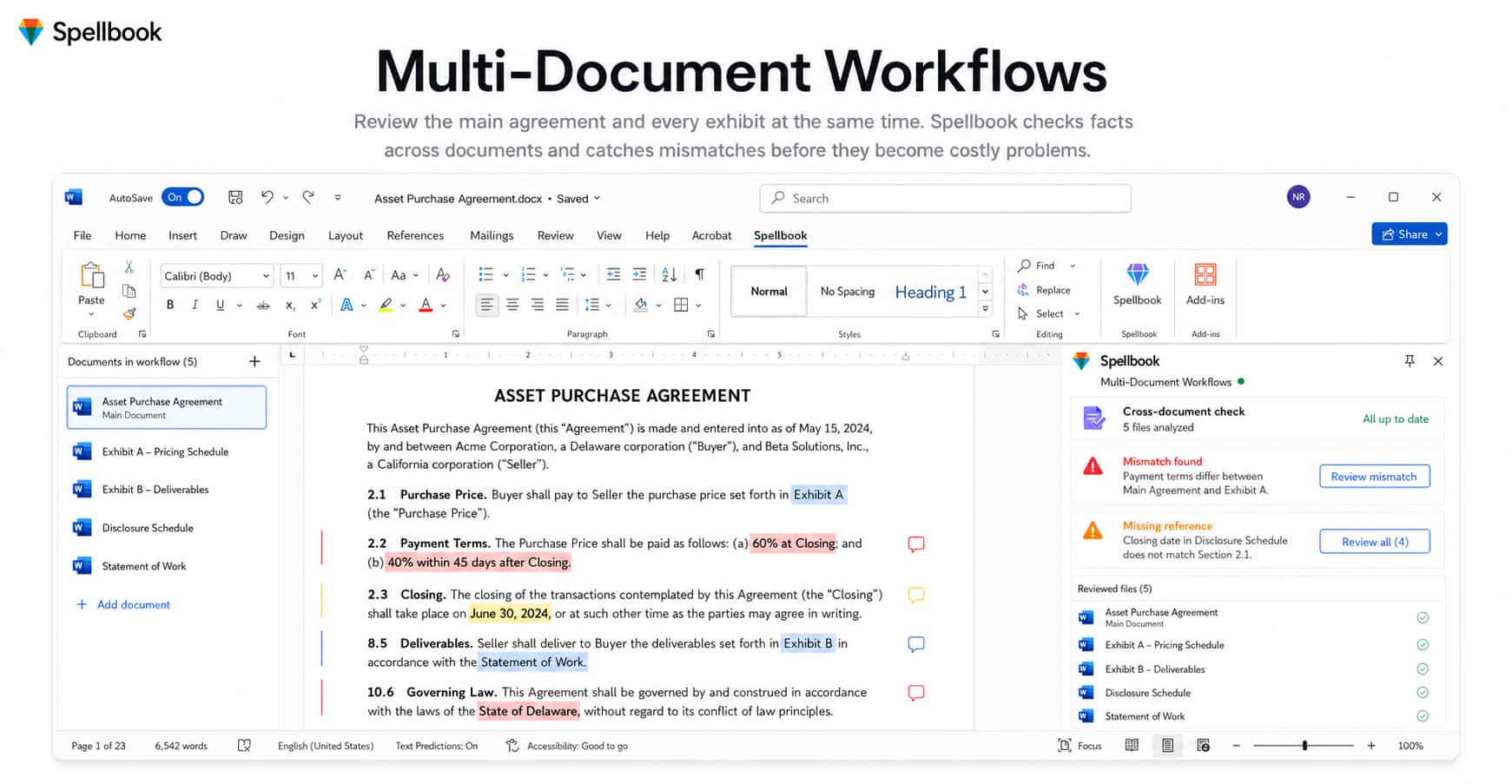
Multi-Document Workflows: Big deals involve many different files. You might have a main agreement and five extra exhibits to review. Spellbook can look at all of them at the same time. It checks to make sure all the facts match across every file. It catches errors before they become huge problems.
-
Market Benchmarking: Sometimes you wonder if a contract term is fair. Spellbook compares your document to thousands of other standard contracts. It tells you if a clause is normal or if it is a bad deal for your client. You get real data to back up your arguments. It helps you negotiate better terms fast.
Pricing
You can try Spellbook for free to see how it works. It offers flexible pricing plans designed for different team sizes.
Paxton AI
Paxton AI is a smart tool built just for legal research and reading heavy documents. It has a massive library of US laws and court cases. You do not have to spend hours digging through old books or clunky websites. You just ask Paxton a question, and it finds the exact law you need. It is perfect for lawyers who do a lot of research.
Key Features
-
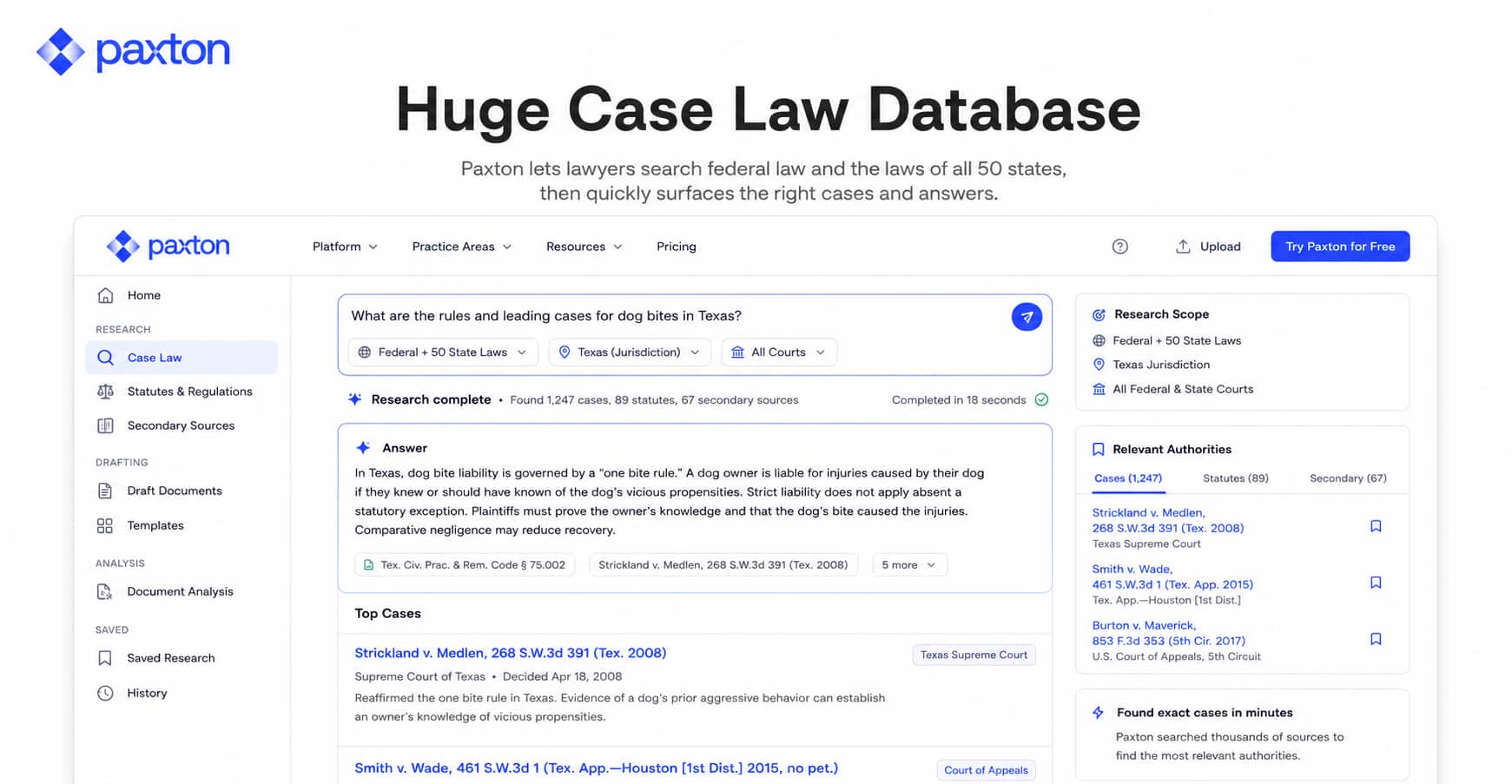
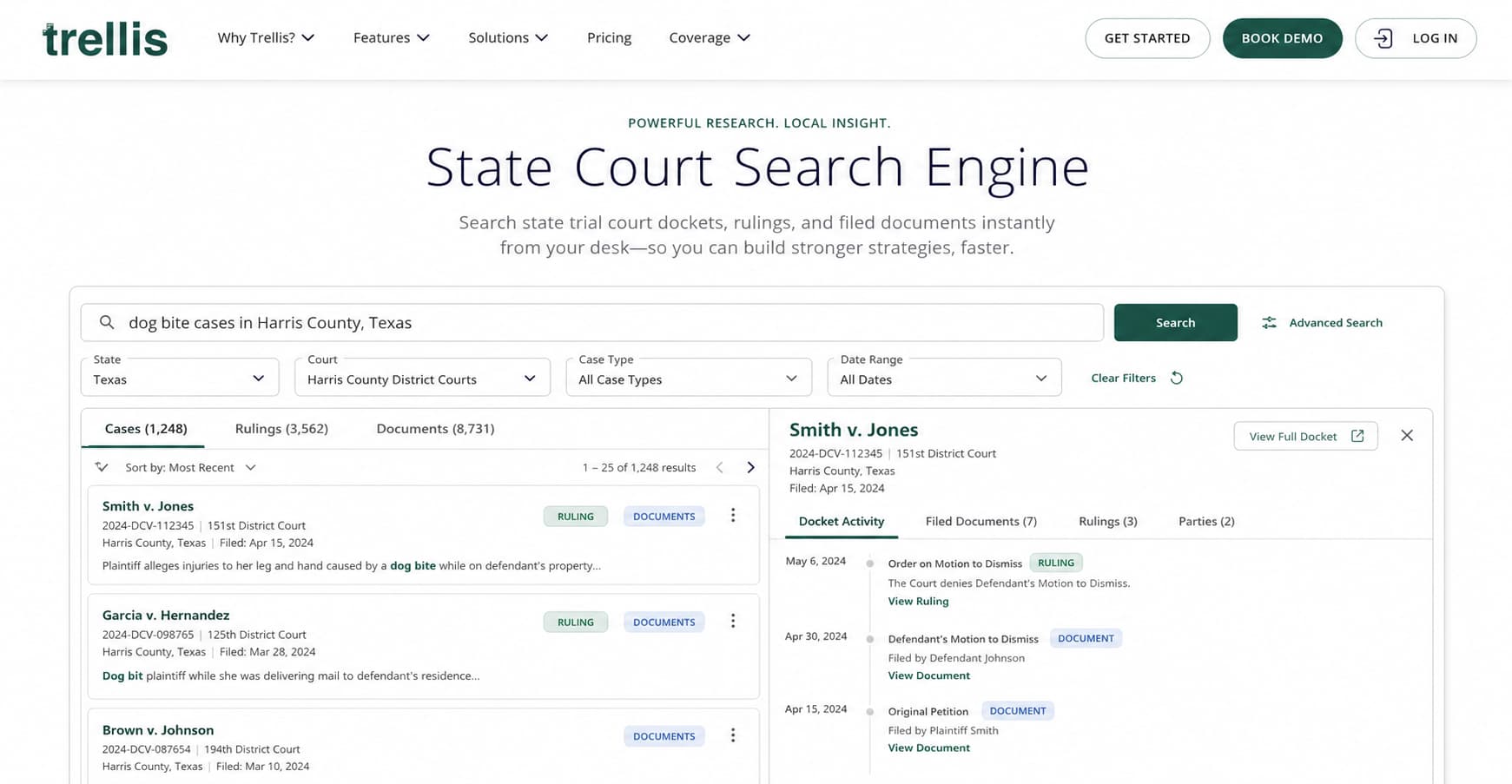
Huge Case Law Database: Finding the right case takes forever. Paxton has the federal laws and state laws for all 50 states. You just type what you are looking for. For example, you can ask for rules about dog bites in Texas. Paxton searches its giant database and gives you the exact cases. You get your answer in minutes, not days.
-
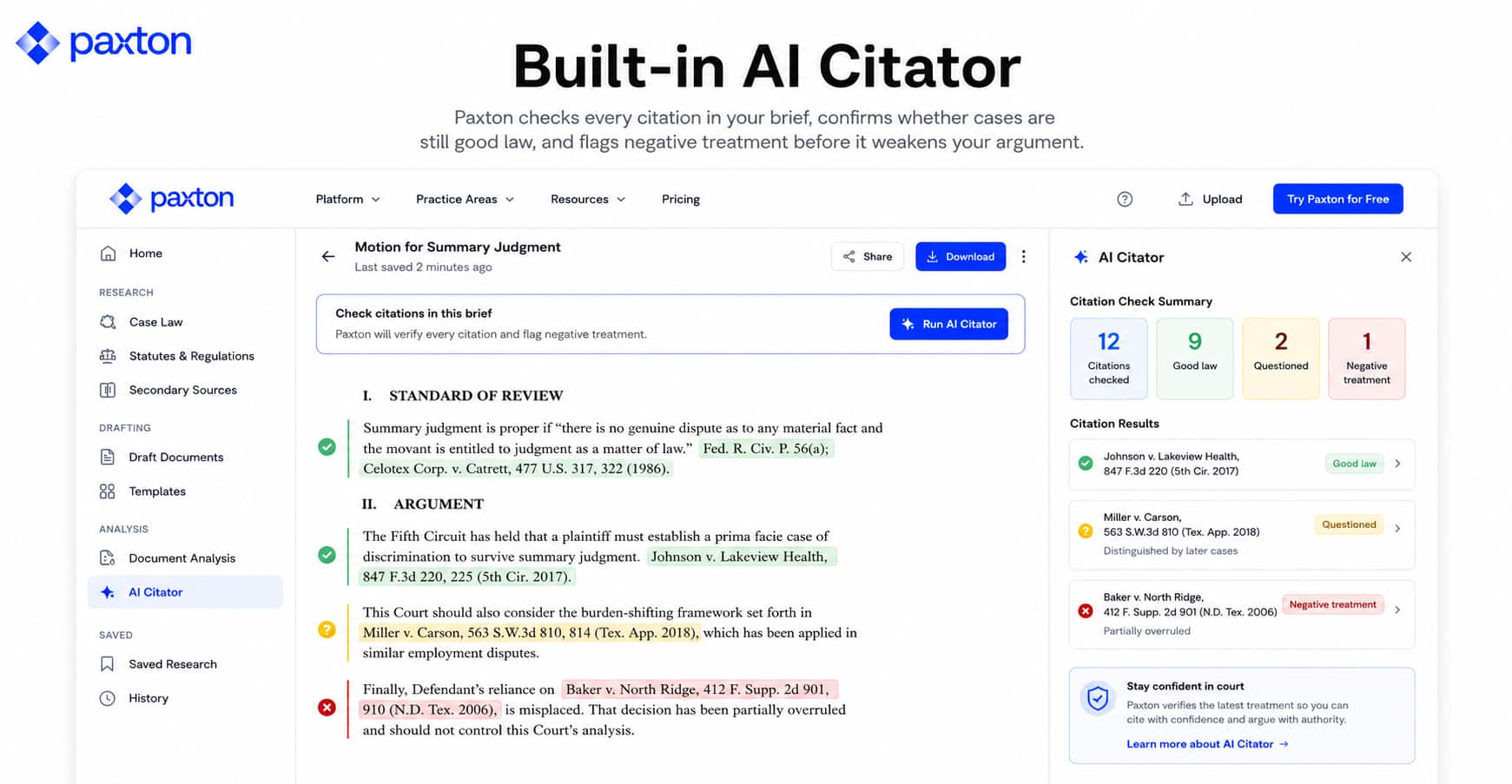
Built-in AI Citator: You never want to quote a bad law in front of a judge. That is a nightmare. Paxton checks your work for you. It looks at the cases you use and tells you if they are still good law. It makes sure no new court has changed the rules. This keeps your arguments strong and saves you from looking silly in court.
-
Automatic Law Alerts: Laws change all the time. Keeping up with them is hard. Paxton watches the rules for you. If a new law passes that affects your client, Paxton sends you an alert. For example, if a new tax rule comes out, Paxton tells you right away. You stay updated without having to read the news every single morning.
Pricing
Paxton AI offers a trial so you can test it out. After that, their paid plans start at $2999 per user each year.
Clio
Clio is the biggest name in law practice management software. Almost everyone knows it. They recently added a powerful AI assistant to their platform. Instead of just storing your files, Clio's AI actively helps you manage your firm. If you already use Clio to run your daily operations, adding their AI is a no-brainer.
Key Features
-
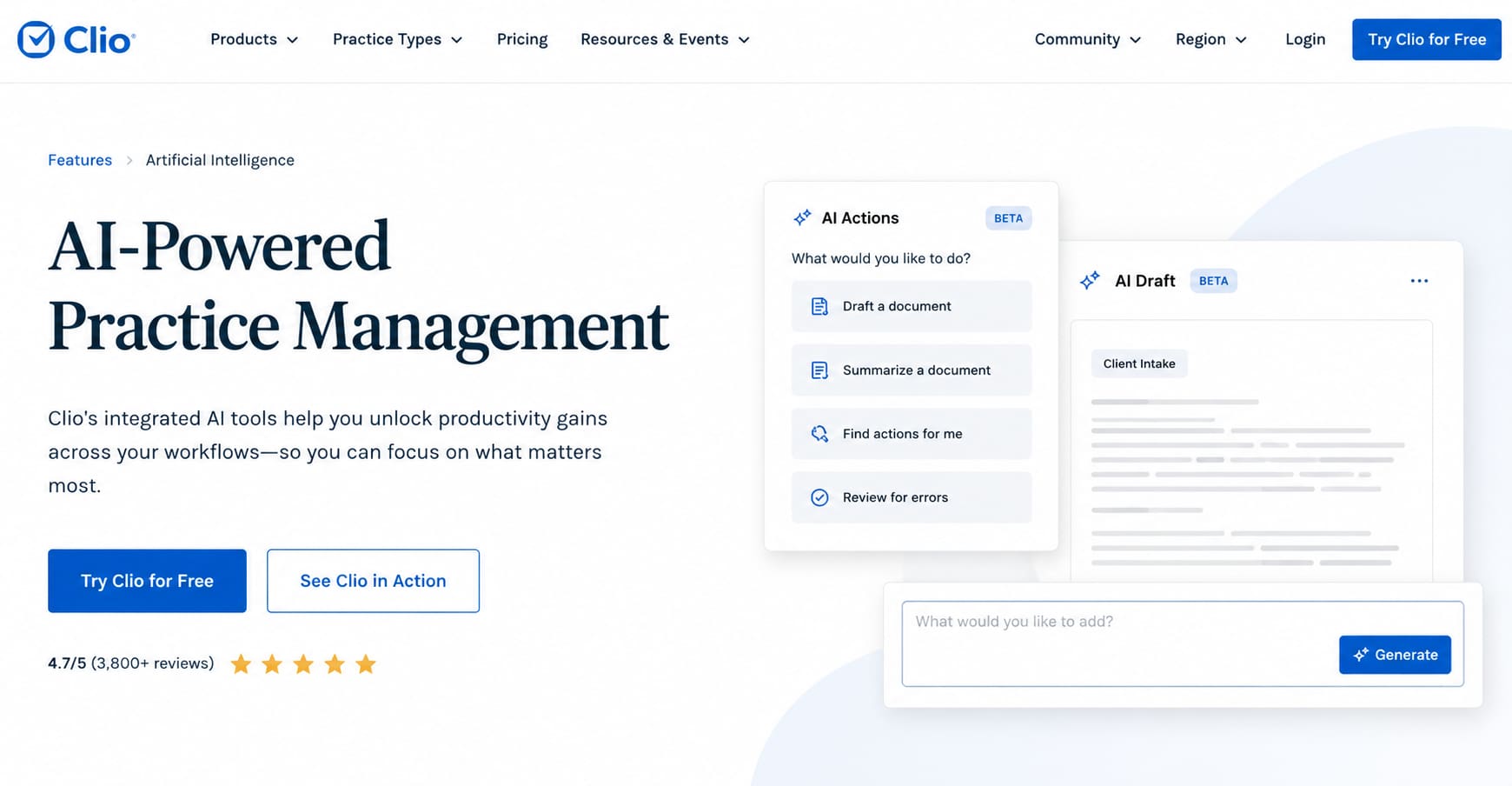
AI-Powered Practice Management: Searching through old cases or billing records takes time. With Clio's AI, you just type a question. You can ask, "What is the trust balance for the Smith case?" or "Show me my tasks for today." The AI pulls up the exact answers instantly. It is like having a firm manager available 24/7.
-
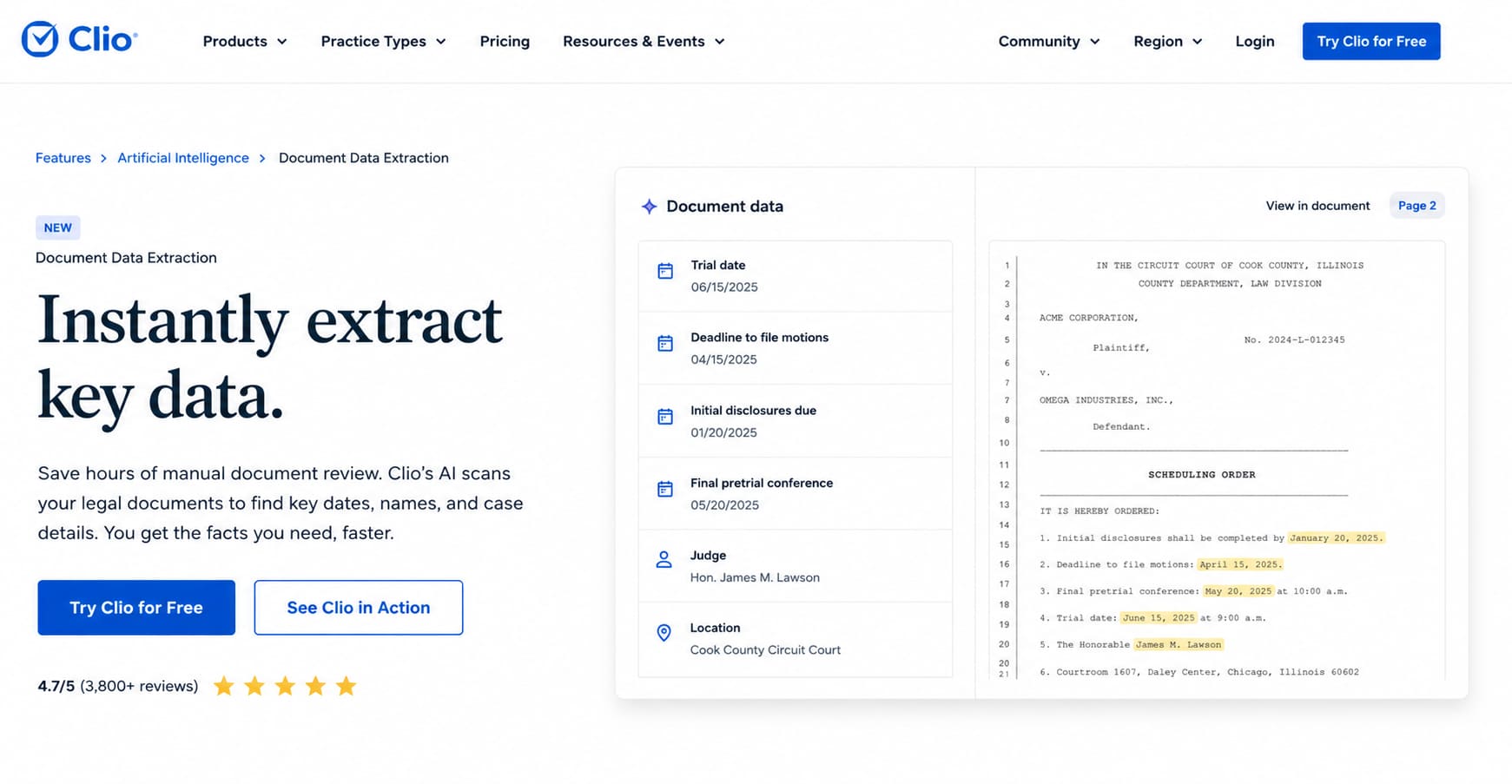
Document Data Extraction: You upload a massive court document, like a scheduling order. Instead of reading it line by line to find the deadlines, Clio's AI does it for you. It pulls out the key dates and creates calendar events automatically. It even shows you the exact source page so you can double-check the facts before saving it.
-
Automated Workflow Generation: Nobody went to law school to do admin work. Clio's AI looks at your recent matter activity and drafts client updates for you. It also automatically generates draft bills by pulling from your time records and expense receipts. It turns hours of boring admin tasks into a quick five-minute review.
Pricing
Clio has different pricing plans. The base plans start at $49 per user per month. The newer AI tools are offered as an add-on or built into their premium tiers, giving you the flexibility to choose the right level of support for your firm's budget.
Trellis AI
Trellis AI is a search engine built just for state trial courts. Most legal research tools focus on big federal cases. But what if your case is in a local state court? Finding records there is usually a nightmare. Trellis AI fixes this. It gathers all the messy local court data and makes it easy to search.
Key Features
-
State Court Search Engine: Finding local court documents is hard. Sometimes you have to visit the actual courthouse. Trellis puts state court records online. You can search for local dockets, rulings, and filed documents right from your desk. You just type what you need into the search bar. You get the documents instantly.
-
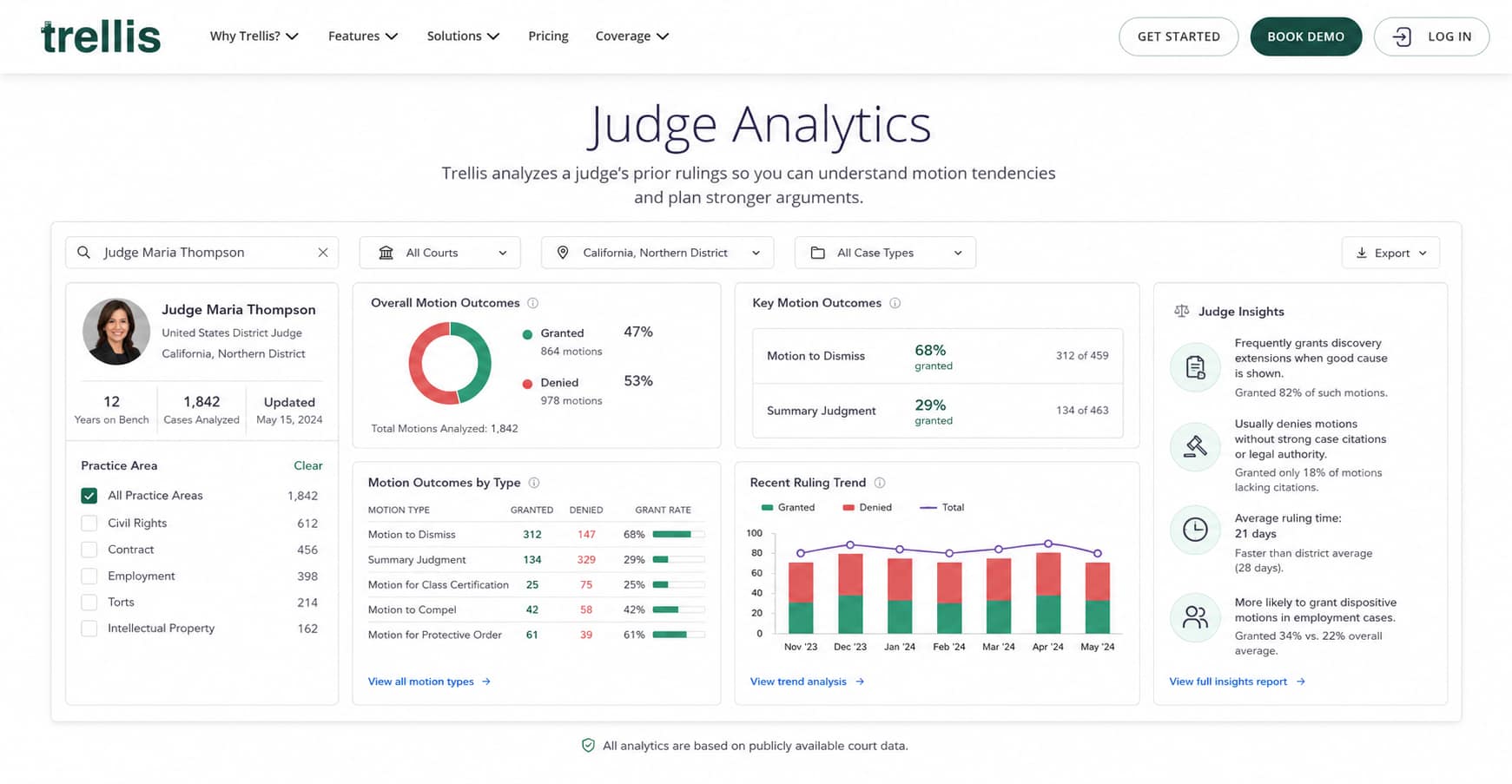
Judge Analytics: Knowing your judge is half the battle. Trellis looks at how your specific judge ruled in the past. It shows you their habits. For example, it will tell you if your judge usually says yes or no to a certain motion. This helps you plan your argument. You know exactly what the judge wants to hear before you step into the courtroom.
-
Docket Tracking and Alerts: Keeping up with case updates takes too much time. Trellis watches your cases for you. If something new happens, it sends you an email alert right away. You also get alerts if a rival law firm files a new document. You never miss an important update. You can stop hitting the refresh button on the court website.
Pricing
Trellis offers different subscription plans. Their basic plans start at around $92 per month. They also offer a free trial so you can test their state court search engine before you buy it.
MyCase
MyCase is a popular system that holds all your case files, calendars, and billing. Now, they have added a new AI tool called MyCase IQ. It works right inside your main dashboard. You do not have to buy a separate AI tool.
Key Features
-
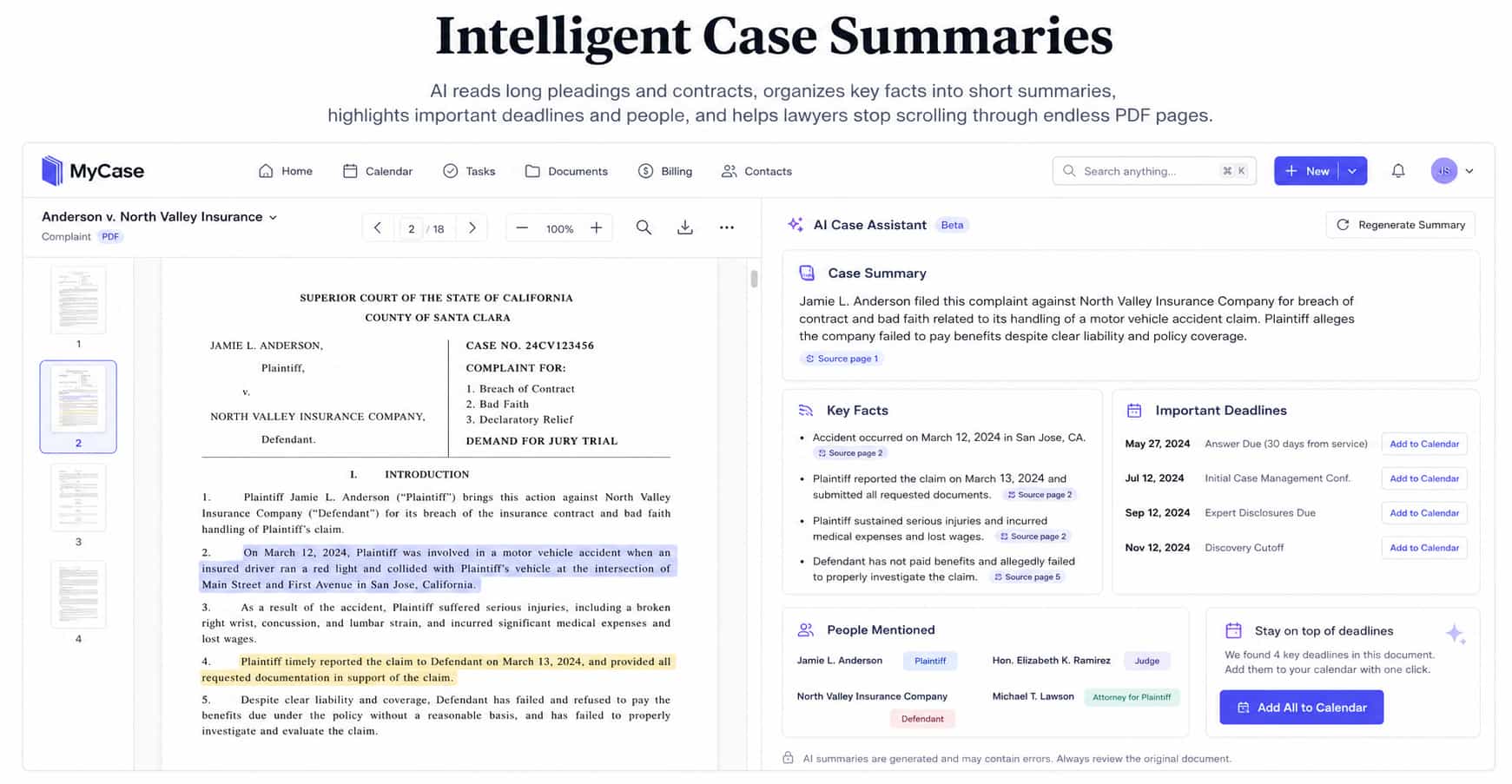
Intelligent Case Summaries: Reading through massive case files takes forever. The AI case assistant reads your long pleadings and contracts for you. It organizes the key facts into short summaries. It highlights important deadlines and people. You get the whole picture in seconds. You can finally stop scrolling through endless PDF pages.
-
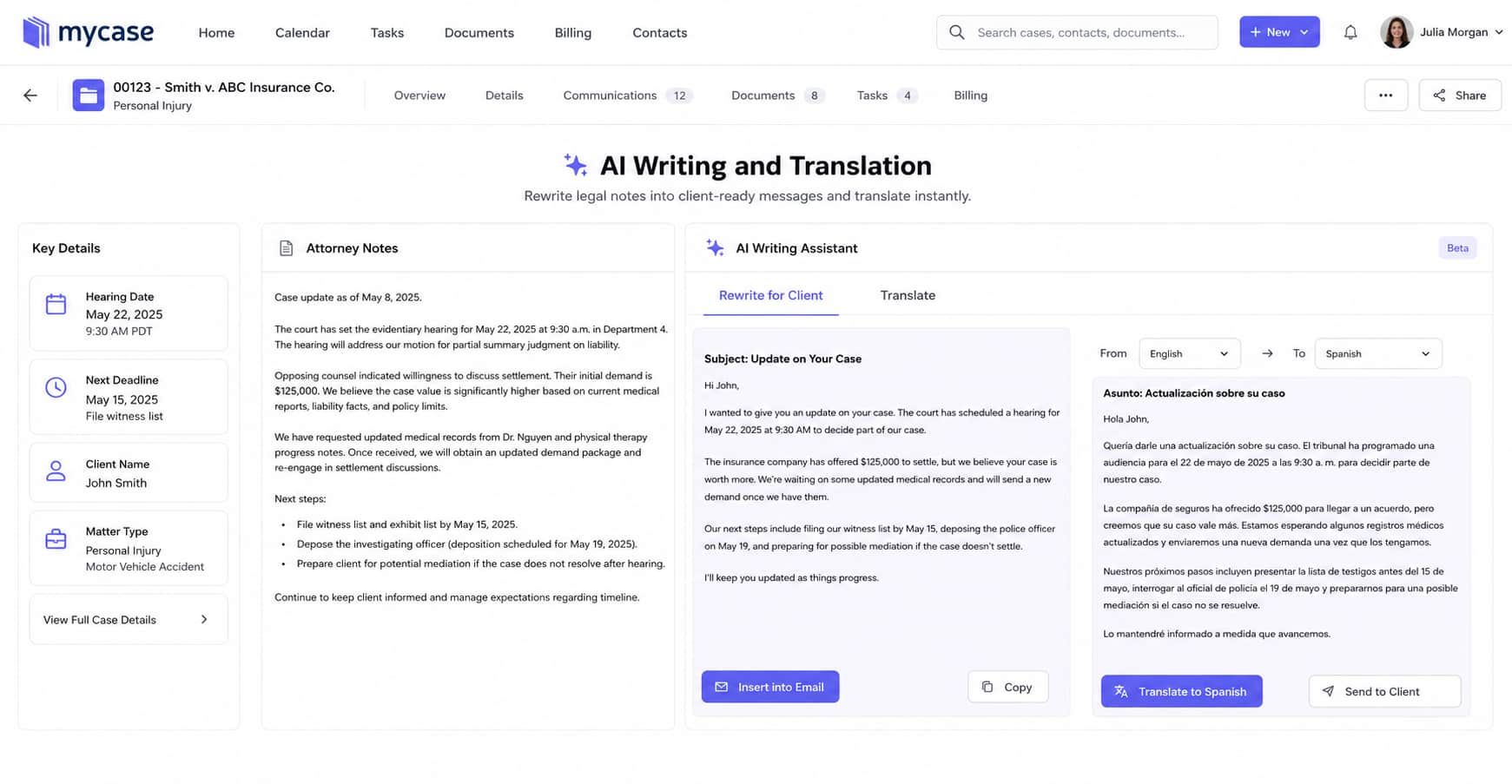
AI Writing and Translation: Legal writing can be dense. Your clients usually just want the simple version. The writing assistant takes your heavy legal notes and rewrites them into simple, client-ready emails. It also translates your text. If you have a client who speaks Spanish, you can translate your messages instantly. This helps you communicate clearly with everyone.
-
Cross-Case Fact Finding: Sometimes you forget a tiny detail from a case you handled last year. We will not tell anyone. Instead of digging through old folders, you just ask the AI. It searches across all your notes, filings, and messages. It finds the exact fact you need. It even shows you the source document so you can verify it.
Pricing
MyCase has different pricing tiers. The base software starts at $39 per user per month. To get the new AI features, you need their premium plans. The Advanced plan costs $109 per user per month. They also offer a free trial.
Vera
Vera is an AI tool built to handle massive legal documents. It reads your long case files and pulls out exactly what you need. It turns hours of boring document review into a quick five-minute job. It is perfect for lawyers who deal with giant stacks of paper, like depositions or medical records.
Key Features
-
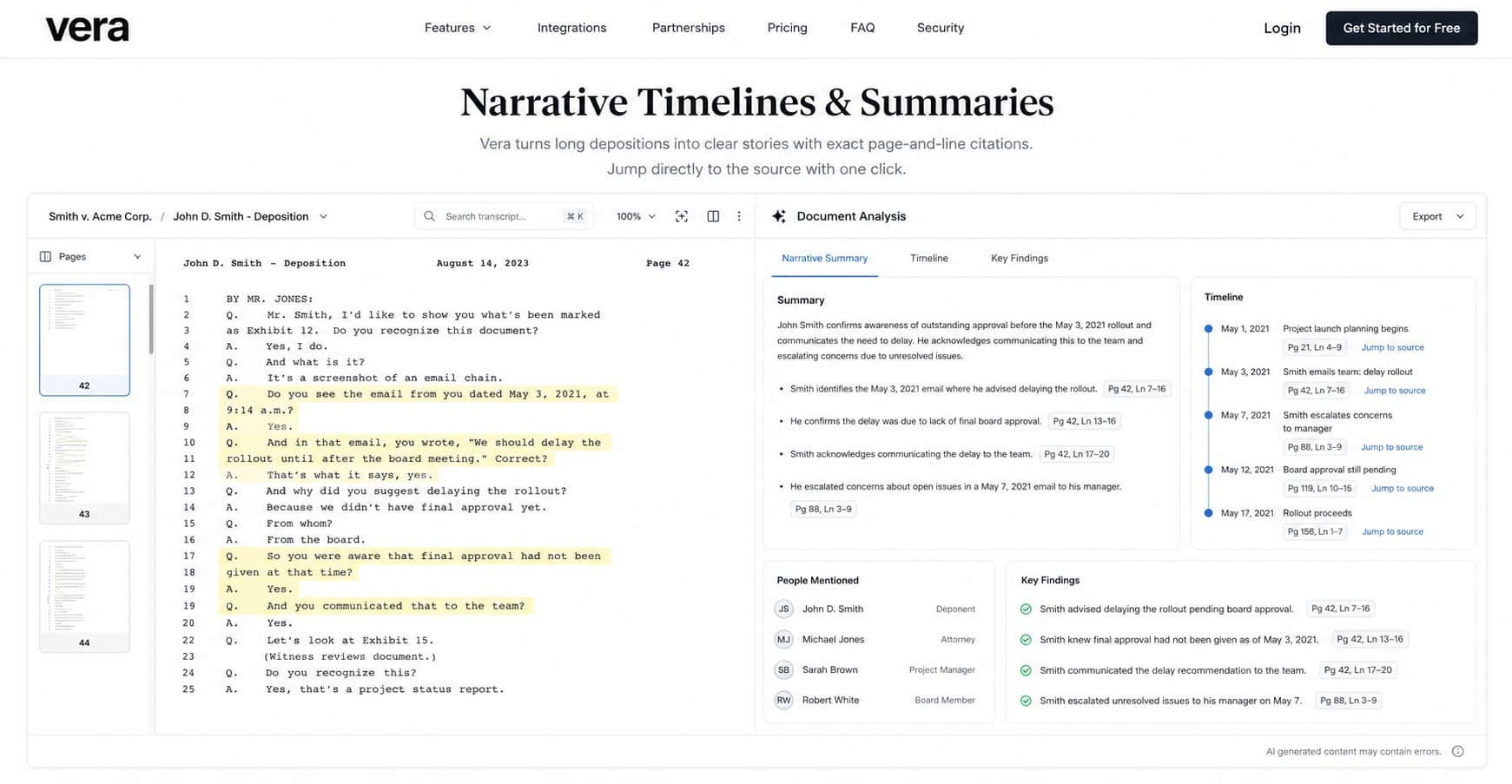
Narrative Timelines & Summaries: Reading a 200-page deposition is exhausting. Vera turns those huge transcripts into short, clear stories. It tells you exactly who said what and when it happened. Best of all, it gives you exact page-and-line citations. You can click the summary and jump right to the exact page in the original document. You can verify every single fact instantly.
-
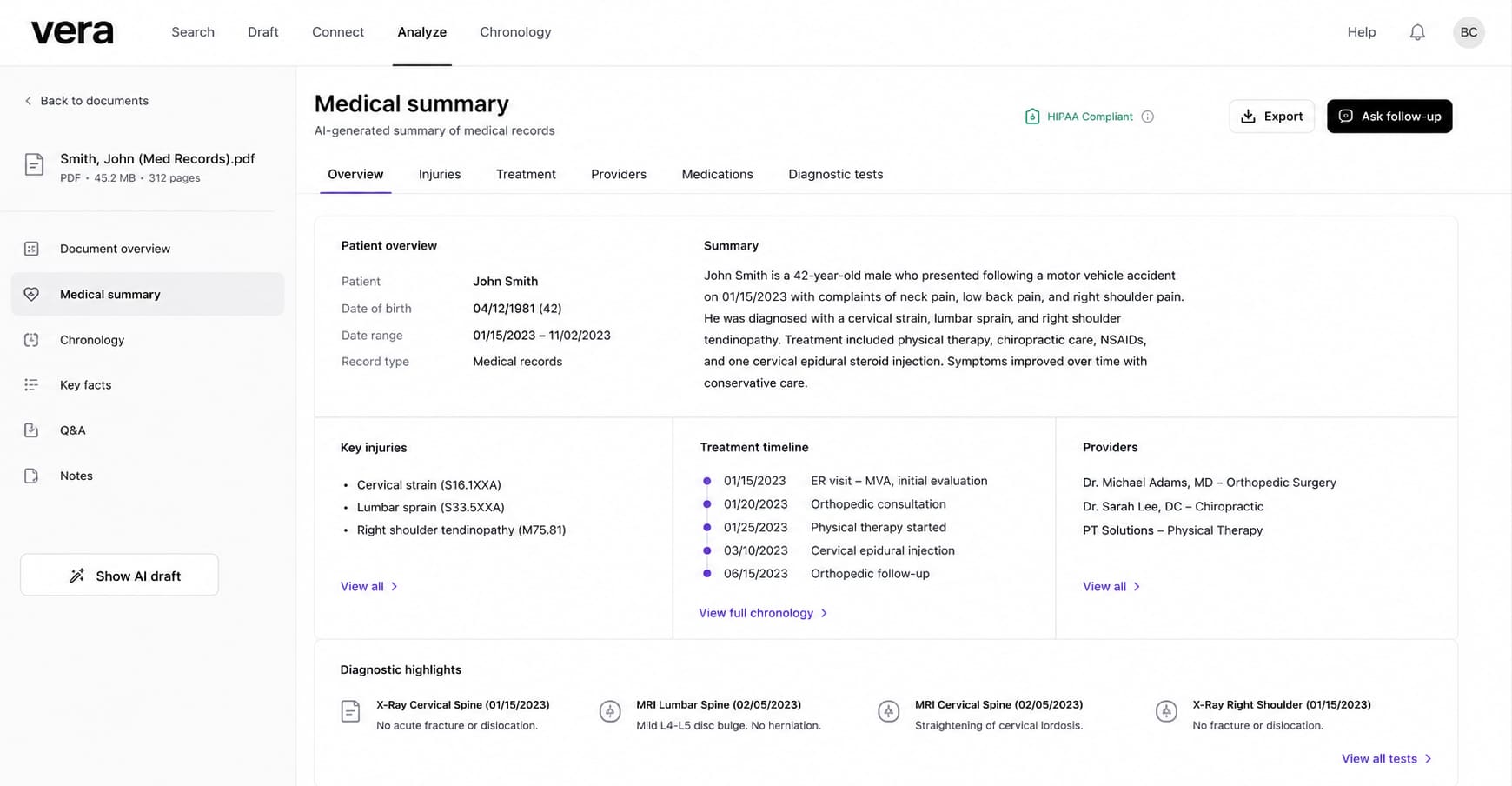
HIPAA-Compliant Medical Analysis: Personal injury and malpractice cases mean reading endless medical records. This is usually the worst part of the job. Vera is specially trained to read medical files. It extracts key injuries, treatment dates, and doctor notes safely and securely. It gives you a clean summary of a messy medical file so you can build your case faster.
-
Automated Schedule Assistant: Missing a court deadline is a disaster. Vera reads your scheduling orders and court filings for you. It pulls out every important date, hearing, and deadline. Then, it pushes those dates directly into your calendar. You never have to manually type a court date again. It keeps your whole team on track.
Pricing
Vera has simple, transparent pricing. The Essential plan starts at $29 per month and is great for solo lawyers. If you need the Medical Summary feature and process larger files, the Professional plan costs $49 per month. They also offer a 7-day free trial.
How to Choose the Right AI Tool for Your Firm
Buying new software can be overwhelming. You do not need to buy all eight tools today. Instead, focus on what your firm needs right now. Here are three things to keep in mind when choosing your next AI tool:
- Security and Privacy: This is the most important rule for lawyers. Your data must stay secret. Make sure the AI tool has a strict "no-training" policy. This means the AI does not use your client files to learn. Look for features like client-side encryption. This keeps your data locked so nobody else can read it. It protects your attorney-client privilege.
- Workflow Integration: Do not buy an AI tool that makes you do more work. If an AI tool lives on a separate dashboard, you will have to copy and paste your text all day. That is annoying. Choose tools that fit into your daily routine. Look for apps that work right inside Microsoft Word, Gmail, or your practice management system. It should feel easy to use.
- Specialization vs. General Use: Some tools do one job really well. For example, Trellis AI is great for state court research. Other tools help you with many daily tasks. For example, Jetwriter AI handles your emails, chat messages, and document summaries all in one place. Balance your needs. Get a specialized tool for heavy research, and a general tool for daily writing.
Conclusion
AI tools are no longer a thing of the future. They are here right now. Successful law firms are using them to save time, reduce mistakes, and increase billable hours. If you keep doing everything manually, you will lag behind your competitors.
You do not have to spend hours typing basic emails or scrolling through massive PDFs anymore. Let AI handle the boring paperwork so you can focus on winning your cases.
Start small. Pick one tool to improve your daily workflow. If you want to automate your writing and summarize documents safely, try Jetwriter AI today. It is a great way to see how much time you can save.
Frequently Asked Questions (FAQ)
Is my client data safe when I use AI tools?
Yes. Good legal AI tools (like Jetwriter AI) have a strict privacy policy that protects user data and ensures total privacy. As a practice, always check the privacy policy before you upload anything to make sure your information is safe.
Does AI ever make mistakes or make up fake laws?
Yes. This is called a "hallucination." AI is not perfect. You must always check the work. Never send an AI document to a judge without reading it first.
Will AI replace lawyers?
No. AI cannot think like a human. It cannot stand in court or give legal advice. It is just a tool to do the boring paperwork faster. You are still the boss.
Do these tools work with software I already have?
Yes, many do. For example, Spellbook works right inside Word. Jetwriter AI works inside your web browser and email. You do not have to learn a totally new system.