You are an operations professional. Your main job is to keep the business running smoothly. You manage teams. You track workflows. You answer the exact same questions from customers over and over. You spend your day chasing people for updates and reports.
Did you know that most professionals lose most part of their day just doing this kind of busy work? That is a lot of wasted time. By Friday afternoon, your inbox is packed, and you are tired of doing the same manual tasks. It feels like a chore.
In this blog, we will look at 8 top AI tools built just for operations professionals. These tools will help you stay organized, talk with your team faster, and automate the manual tasks you hate doing.
Ready to get your time back? Let's look at the tools.
The Top 8 AI Tools for Operations Professionals
Jetwriter AI
Jetwriter AI is a smart writing assistant made for busy operations teams. It lives right inside your browser. This means you do not have to open a new tab or switch between apps all day. It helps you draft quick status updates, reply to client messages, and pull information instantly. It fits right into your daily work to make everything run faster.
Top Features
-
Write Emails Faster: As an operations manager, you write a lot of emails every day. Jetwriter AI helps you write them much faster. It reads your current email thread so you do not have to copy and paste anything. Just tell it how you want to reply, like "follow up." It writes a complete email for you instantly. It helps you save time and keep your inbox completely clean.
-
Seamless Chat Integrations: Operations work happens where your team is. Jetwriter AI works directly inside Slack and WhatsApp Web. You can draft team status updates or reply to urgent client texts without ever leaving your chat app. You do not have to jump back and forth between different tabs. This keeps your focus sharp, saves your energy, and helps you keep your entire team aligned all day long.
-
Instant Summarization: You probably get massive emails and long updates throughout the day. Reading them takes too much time. Jetwriter AI can summarize long email chains, boring operations reports, or heavy blocks of text in seconds. It pulls out the exact facts and key choices you need to know. You get quick, actionable bullet points instantly so you can make fast decisions and move on.
-
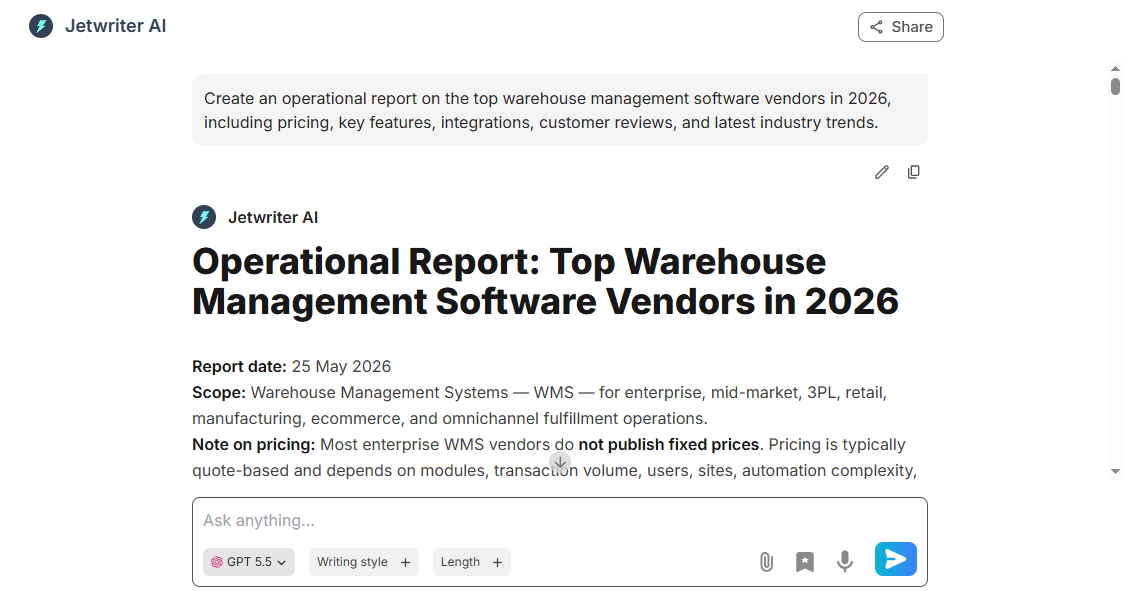
Full Web App: Jetwriter AI also works as a full web app. It helps you build and structure large operational reports much faster, reducing your manual writing work. It can also search the live web, which means it can find up-to-date facts, current guidelines, or vendor details instantly. You get accurate information for your reports without spending hours doing manual research.
-
Chat with Page: Sometimes you just do not have the time or energy to read a twenty-page article or a massive project report. With this feature, you can chat with any webpage directly. Just ask Jetwriter AI to give you a quick summary, list the most important tasks, or find a specific metric. It reads the whole page for you and gives you the exact answer in seconds. You do not have to scroll or search by yourself.
-
Chat with Documents: Operational files like PDFs, vendor spreadsheets, and inventory logs can be hard to read through. Jetwriter AI lets you attach your files right inside the chat window. Once uploaded, you can just ask it direct questions about the data. For example, you can ask it to find a specific price or summarize a new contract. It finds the data instantly so you can keep things moving forward.
-
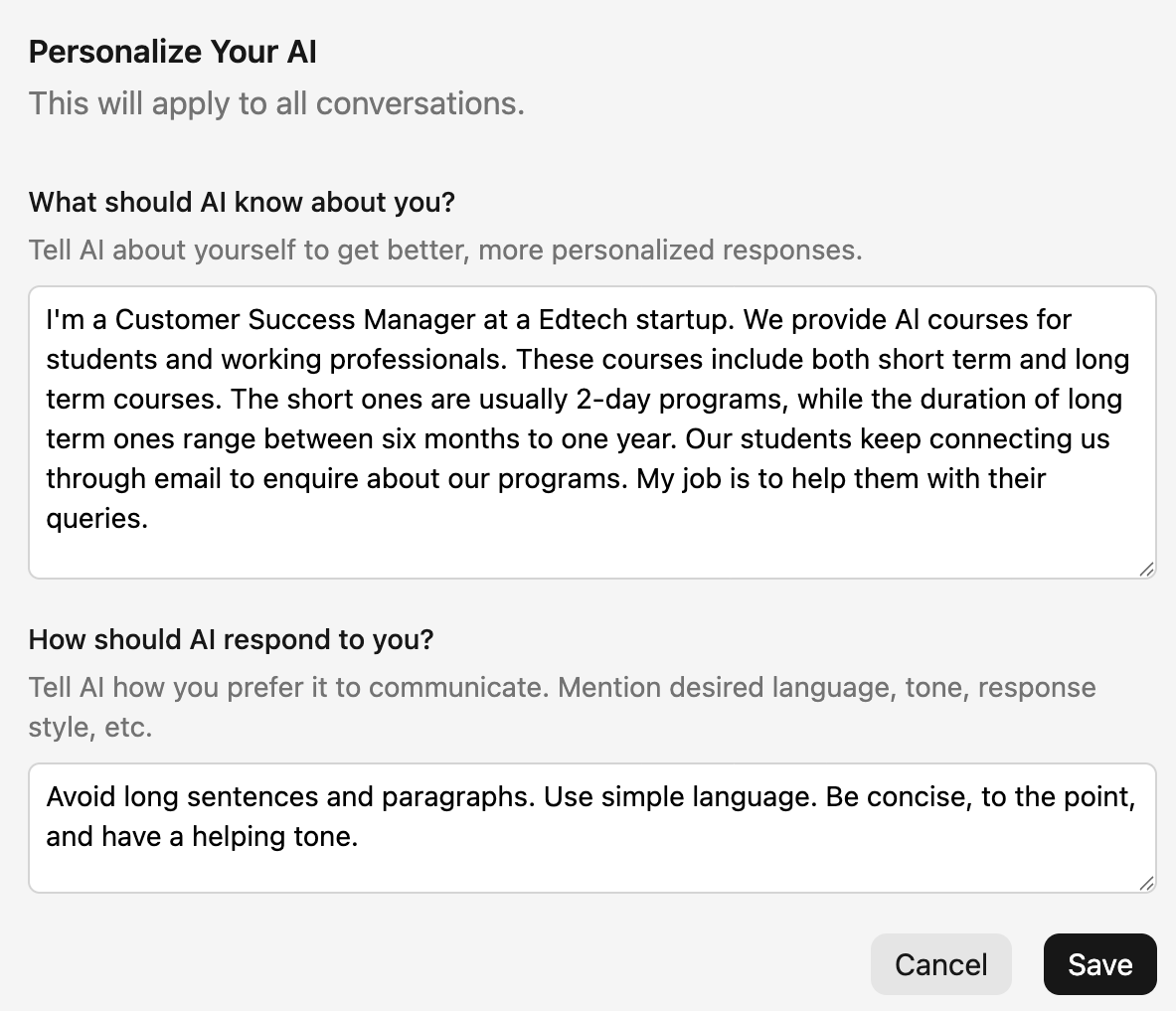
Personalize AI: You can teach Jetwriter AI exactly who you are and what you do. It remembers your job title, your company name, and your specific role. This means it does not sound like a generic robot when it writes. When you ask it to draft a message, it uses your real professional context automatically. Every single email and status update feels like it came directly from you, which keeps your team communication authentic.
-
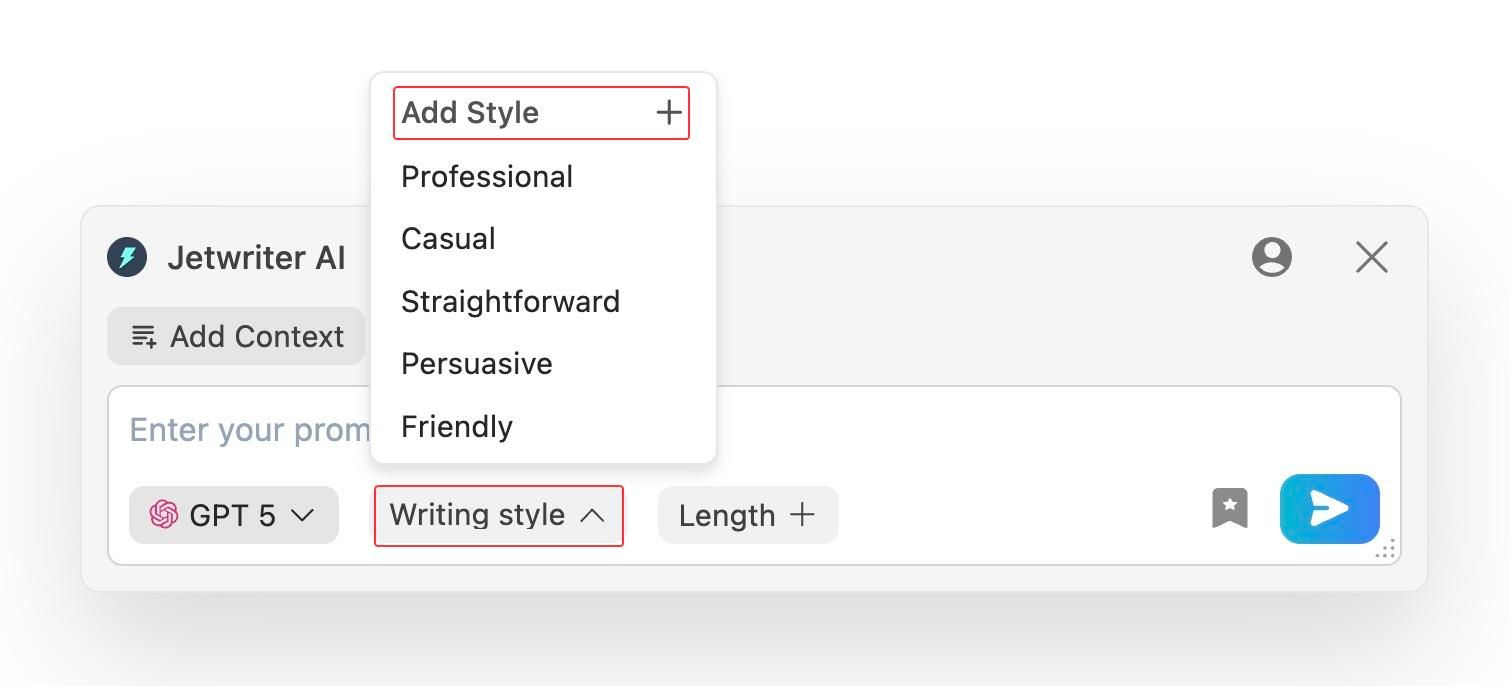
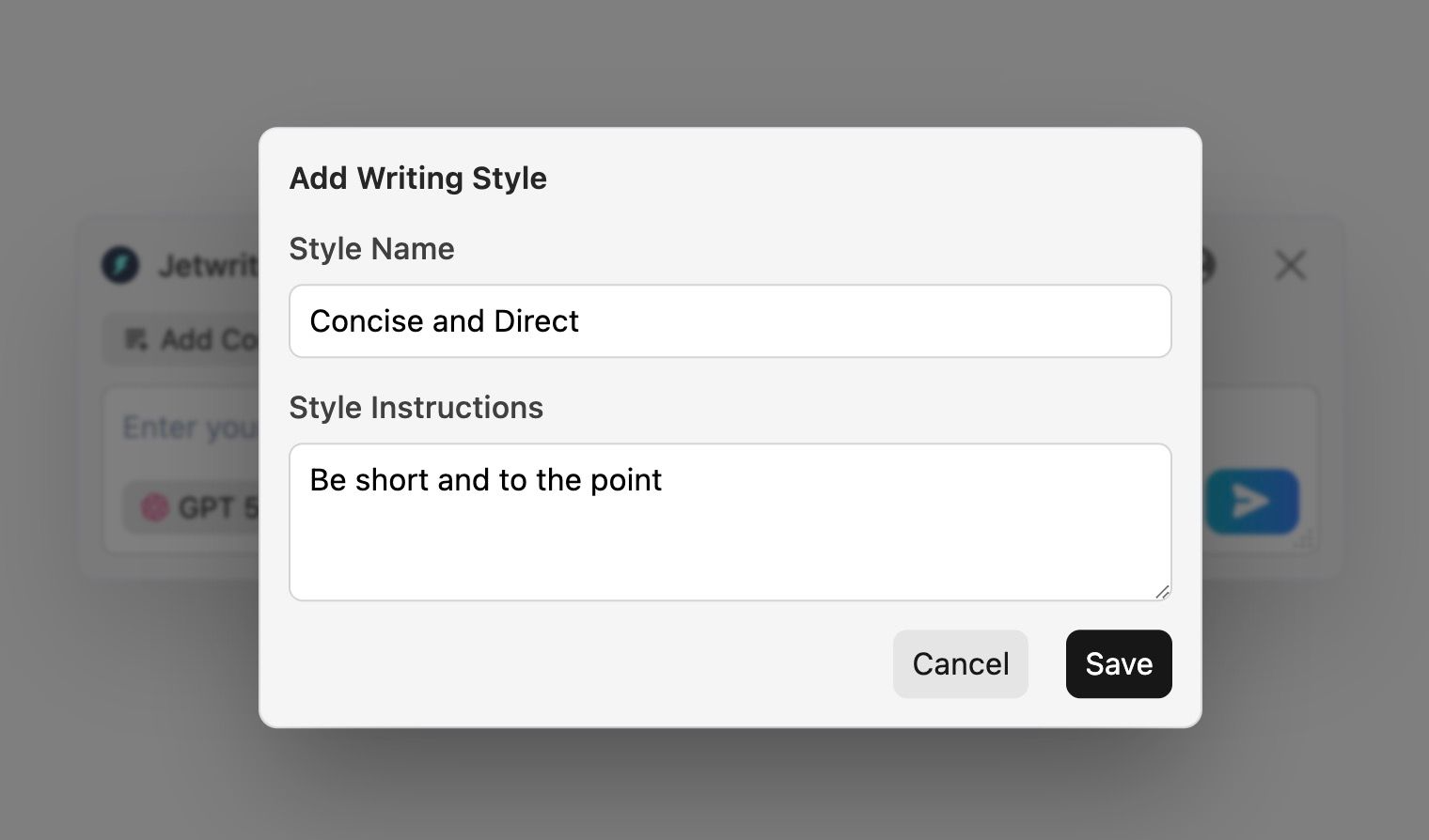
Create Custom Writing Styles: You do not talk to your company boss the same way you talk to your logistics vendor. Jetwriter AI lets you create and save your own special tones. You can build a "Concise and Direct" style for quick executive updates, or a "Friendly and Helpful" style for daily team coordination. You can switch between these saved styles with a single click. You never have to re-type long tone instructions again.
-
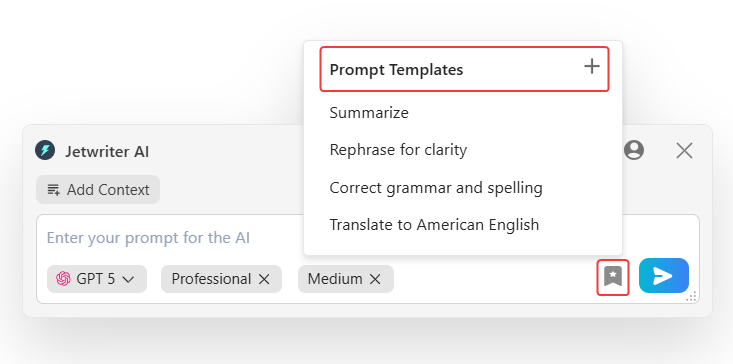
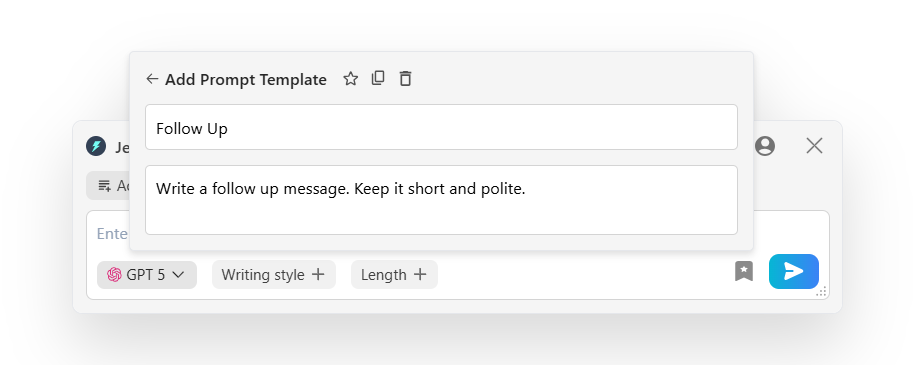
Create Prompt Templates: Do you feel like you type the exact same messages every day? Maybe you send a daily team check-in note or a standard vendor follow-up text five times a week. Jetwriter AI lets you save these common commands as templates. Next time you need to write one, you just click the template button, and the whole prompt is written for you. It saves you hours of typing every single day.
-
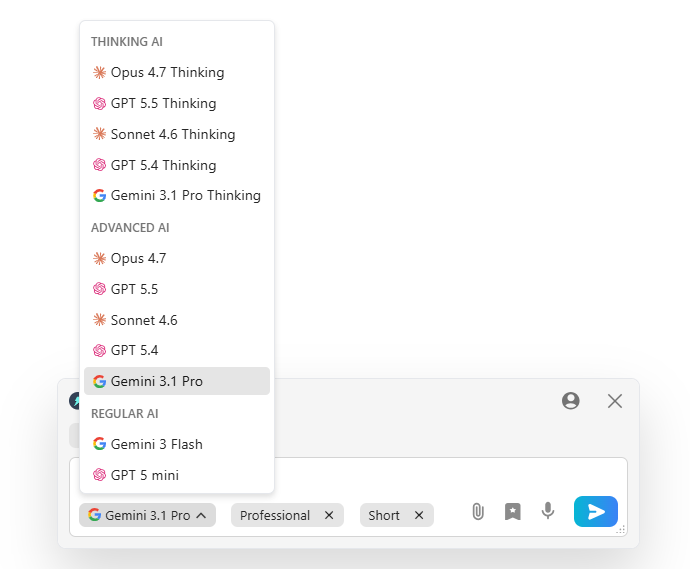
Multi-model, Lightweight and Private: Jetwriter AI lets you choose from different powerful models like ChatGPT, Claude, or Gemini. The tool is super light and stays under one megabyte. It runs smoothly and will not slow down your computer. Most importantly, it keeps your private operational data safe. Your company info stays with you and is never used to teach the AI models. You get total control and complete privacy while you work.
Pricing
You can start using Jetwriter AI completely for free to test it out. If you find yourself using it all day, there are affordable paid plans available. For power users, you can even plug in your own API key to keep your costs incredibly low.
Fathom
Fathom is a smart meeting assistant that records, transcribes, and highlights key moments from your internal syncs and client calls. As an operations manager, you spend hours in meetings. Fathom takes detailed notes for you so you can focus on the conversation instead of typing. It runs quietly in the background.
Top Features
-
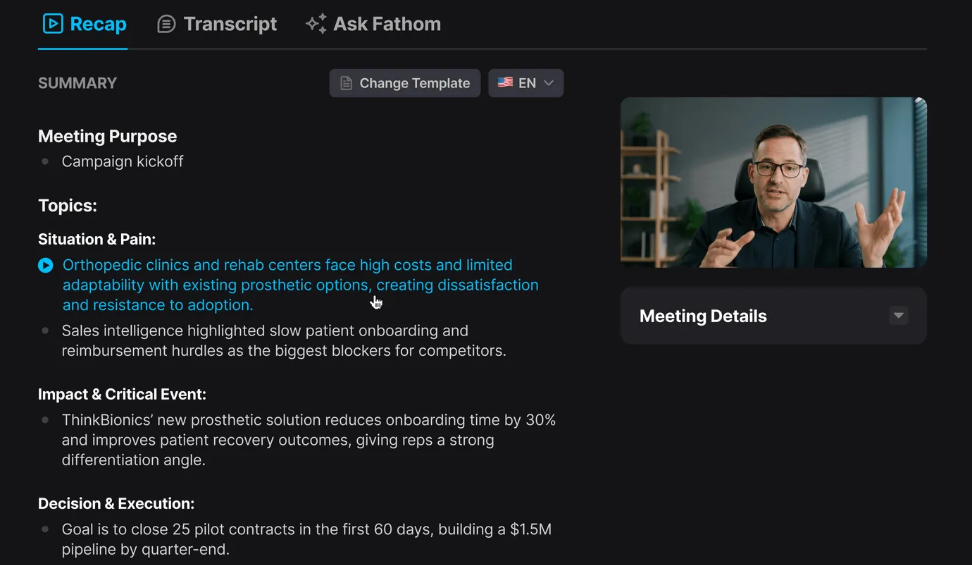
Auto-Transcription and Instant Summaries: The moment your meeting ends, Fathom gives you a clean, word-perfect transcript and a quick summary. You do not have to waste time writing follow-up emails or digging through your messy notes. It even pulls out specific action items and to-dos for your team automatically. It turns a boring thirty-minute status call into a simple one-minute read.
-
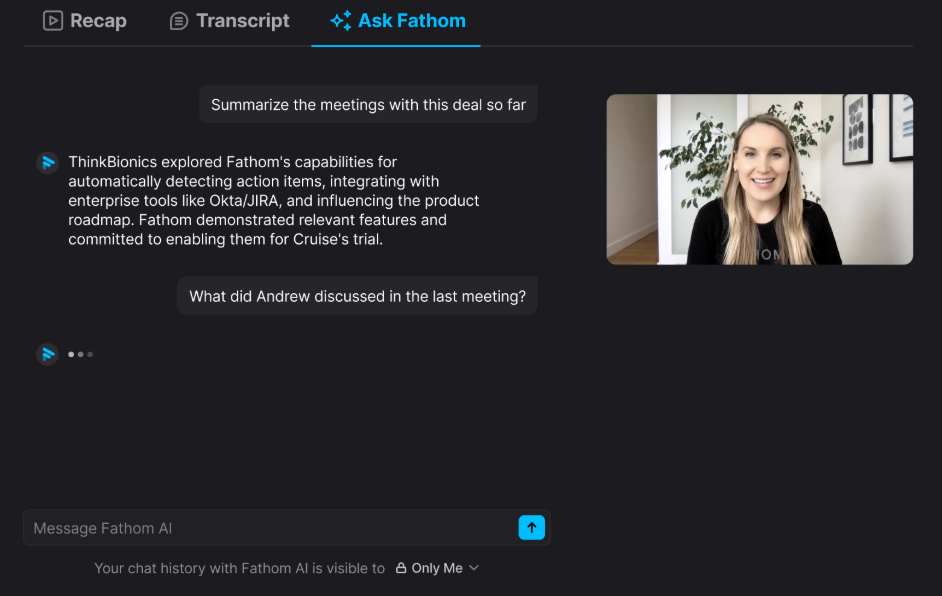
Ask Fathom: You may not have heard about this feature, but it is magic. It is like having a smart assistant just for your past meetings. You can ask Fathom questions about any call. If you forget a detail, just ask, "What did the vendor say about the delay?" Fathom searches your entire meeting history and gives you the exact answer instantly. No more re-watching videos.
-
CRM Integration: Operations teams hate doing manual data entry after a long call. It is so boring. Fathom fixes this completely. It connects directly with tools like HubSpot or Salesforce. After your meeting ends, Fathom automatically logs the call, writes the summary, and updates the correct fields. This keeps your records perfectly up to date without you typing a thing.
Pricing
You can start using Fathom completely for free for basic recording and transcription. If you want the advanced AI features, they have paid plans that start at $15 per user/month.
Reclaim AI
Reclaim AI is a smart calendar app. It uses AI to protect your time. As an operations manager, everyone wants a piece of your day. People book meetings right over your focus time. Reclaim AI stops this. It balances your daily tasks and your meetings automatically, so you can actually get your work done.
Top Features
-
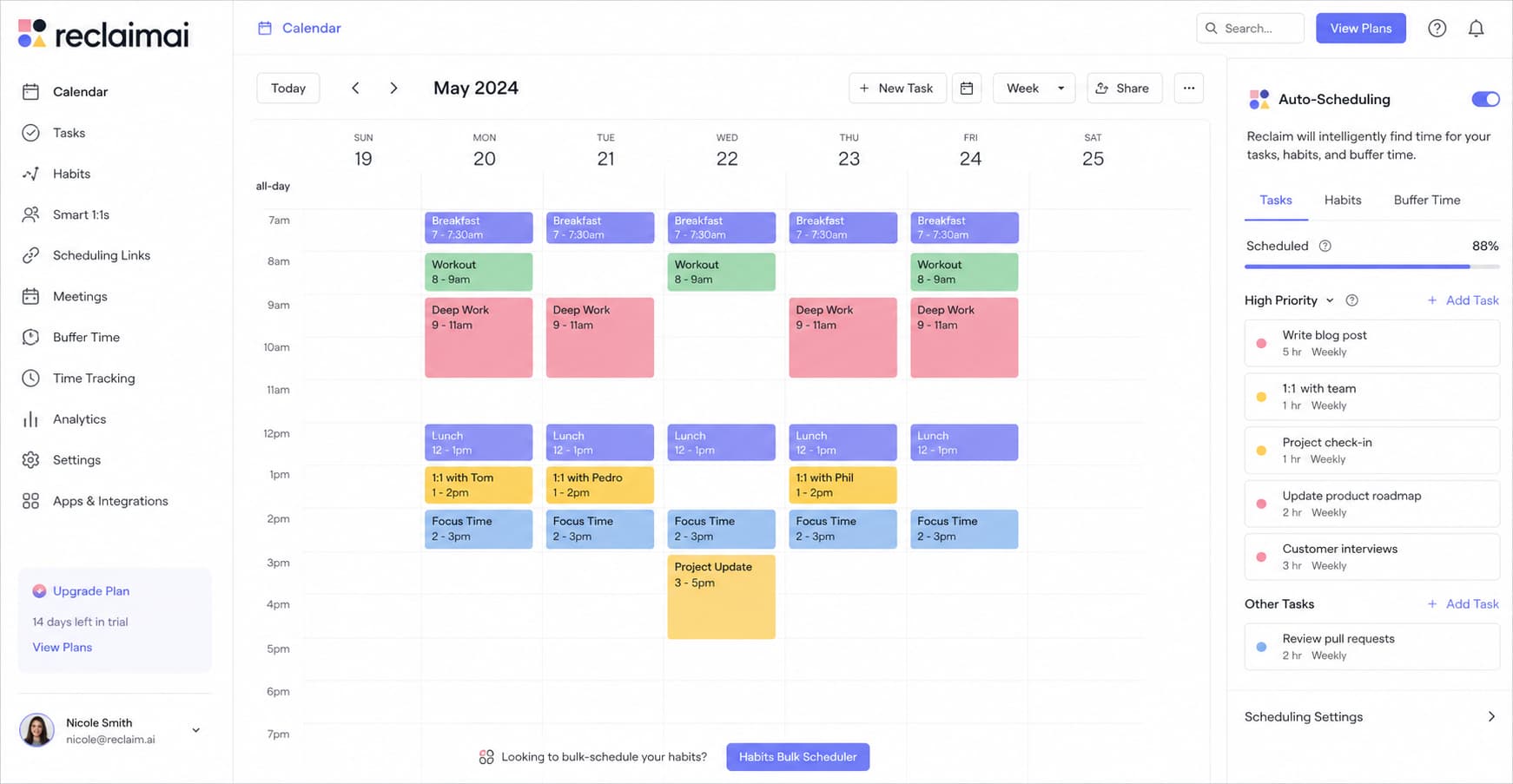
Auto-Scheduling: Let's say you need two hours to review a weekly operations report. You just tell Reclaim AI. It looks at your busy calendar and finds the perfect spot. If an urgent team meeting pops up, it does not panic. Reclaim simply moves your report time to another free spot later in the week. It does all the annoying calendar math for you.
-
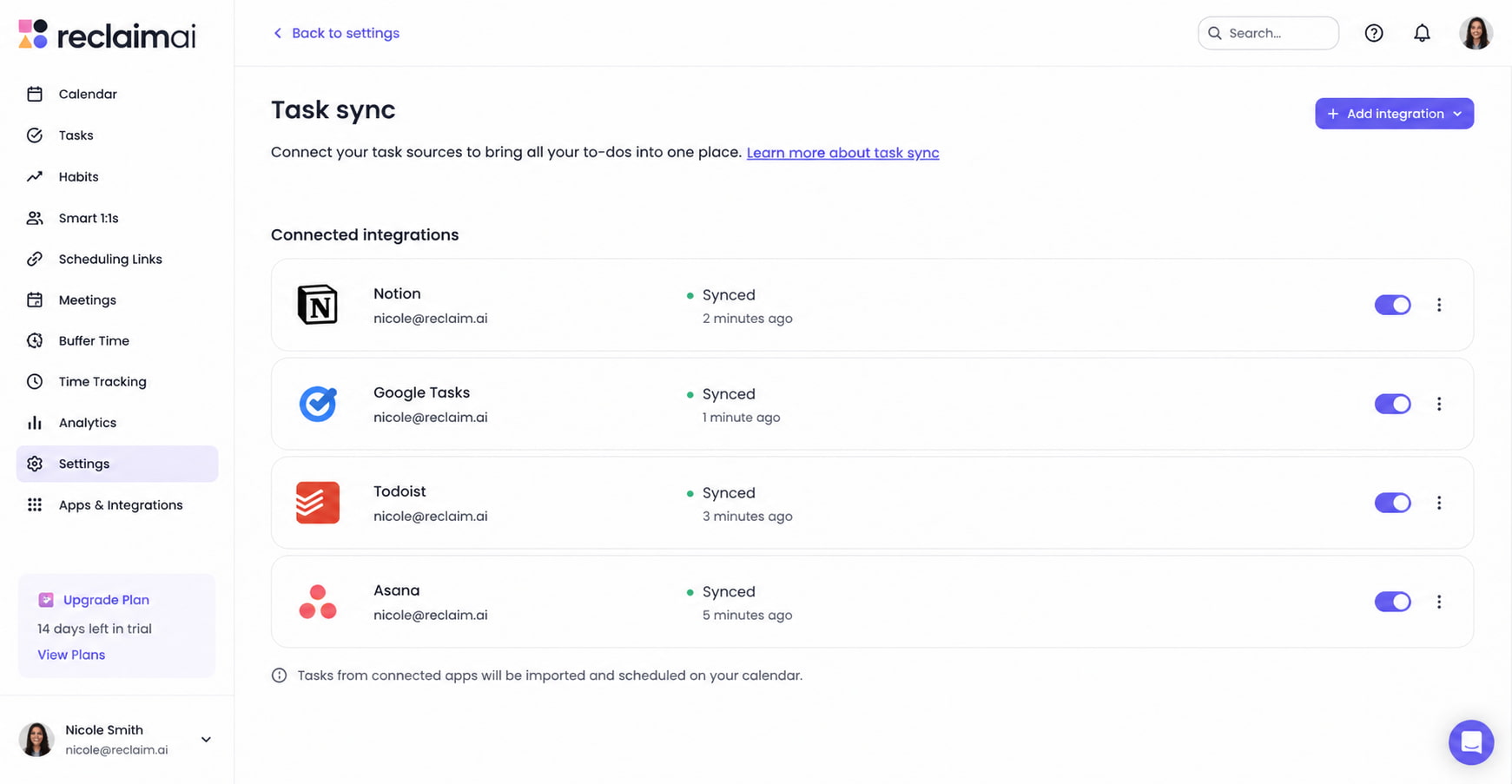
Task Sync: You probably keep your tasks in tools like Asana, Jira, or Todoist. Jumping between your task list and your calendar is a pain. Reclaim AI connects them directly. It pulls your daily tasks and drops them right onto your calendar. Now, your to-do list has actual time blocked out to finish it.
-
Smart Breaks: We all know the feeling of having back-to-back calls for four hours. It is the worst. Reclaim AI adds smart breaks to your day automatically. Once you finish a long meeting, it blocks out a few minutes on your calendar. You get time to grab a snack, stretch, or just stare at the wall for a minute. It keeps you from burning out.
Pricing
You can start using Reclaim AI for free. If you need more advanced syncing or team features, the paid plans start at $10 per month.
Julius AI
Julius AI is a smart data helper. As an operations manager, you probably look at huge spreadsheets every day. Finding answers in all those rows of numbers takes a lot of time. Julius AI changes that completely. It lets you talk to your data. You do not need to be a math genius. You just type questions in plain English, and it finds the exact answers for you.
Top Features
-
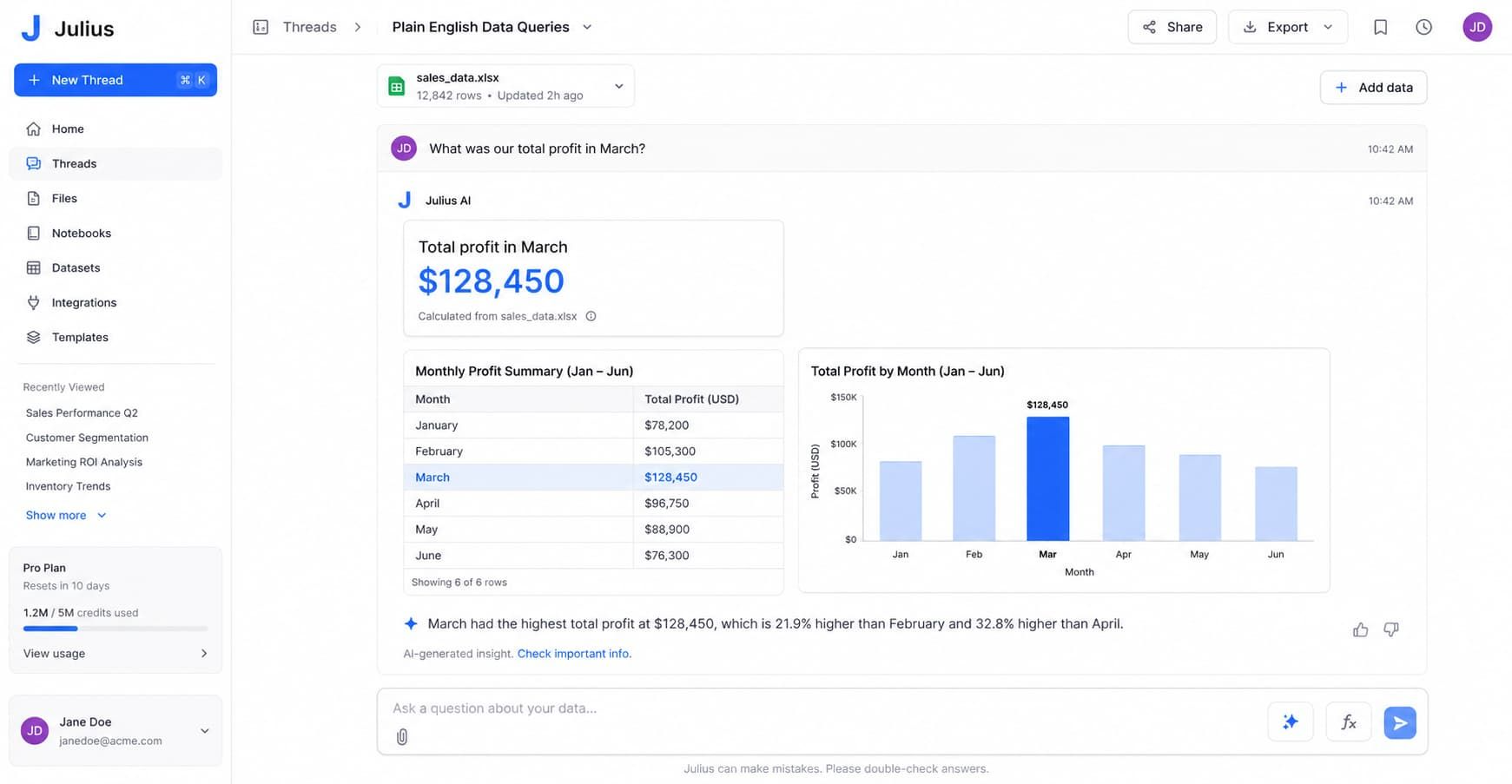
Plain English Data Queries: You do not need to write tricky Excel formulas anymore. Just upload your spreadsheet to Julius AI. Then, ask it a simple question. For example, you can ask, "What was our total shipping cost last month?" It reads the sheet and gives you the exact number right away. You never have to build a confusing formula again.
-
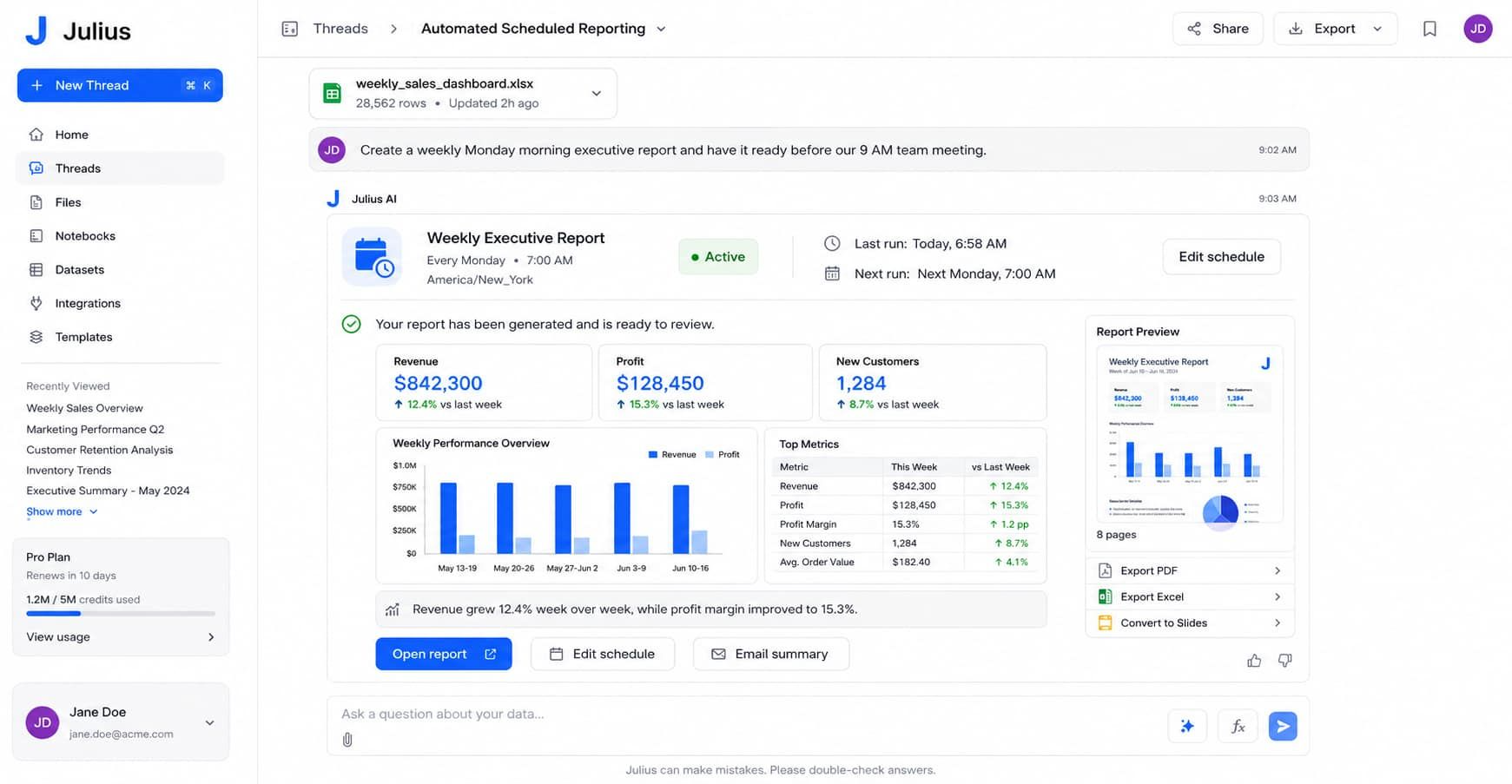
Automated Scheduled Reporting: Operations teams run on weekly reports. Building them by hand is a boring chore. Julius AI can automate this work. You can set it up to run your reports every single week. It pulls the newest data and sends you the numbers automatically. You get your complete Monday morning report while you just sit and drink your coffee.
-
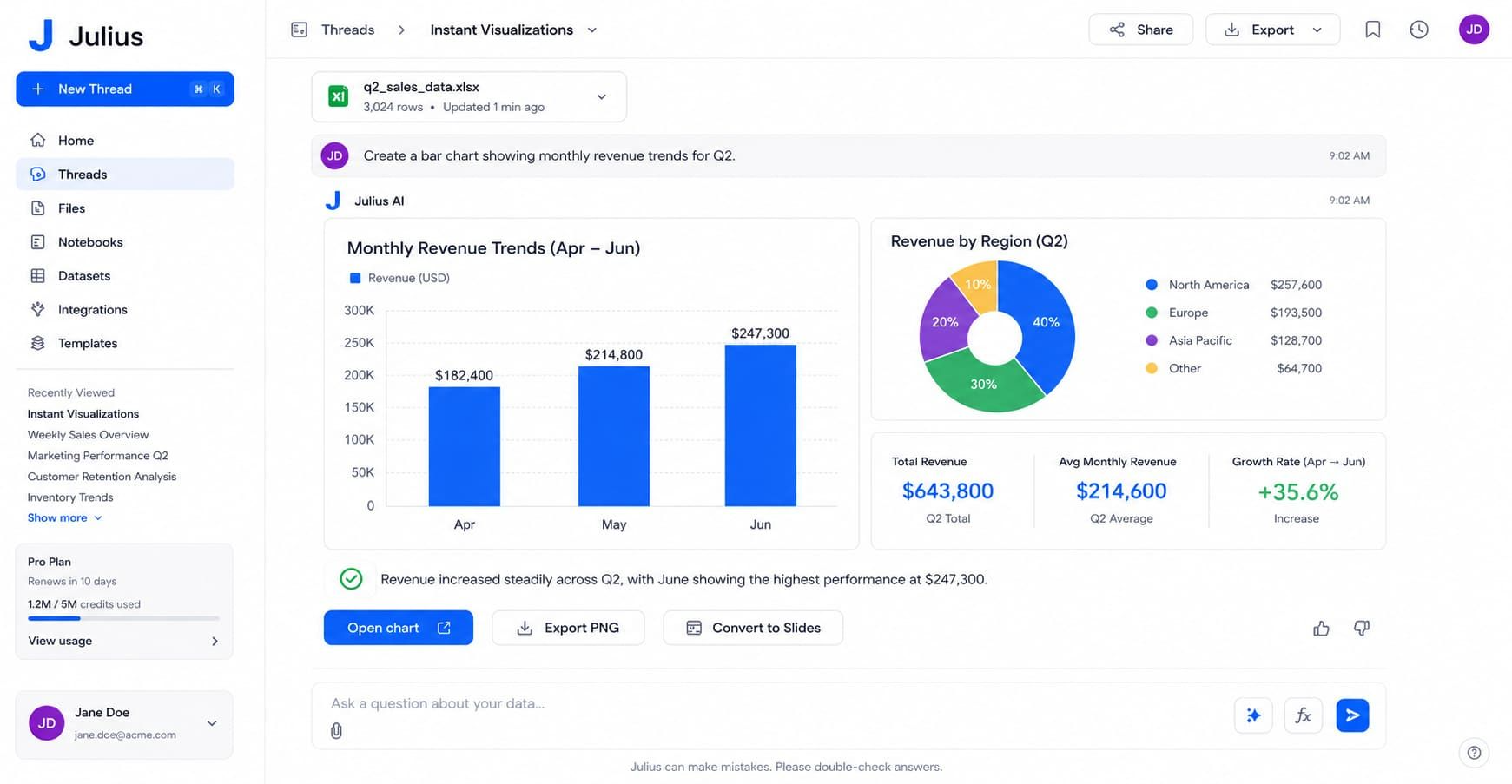
Instant Visualizations: Staring at raw numbers can make your eyes hurt. Sometimes you just need a simple picture to show your team. Julius AI builds charts for you in seconds. Just tell it, "make a pie chart of our top vendor expenses." It creates a clear, beautiful graphic instantly. You can drop it right into your weekly team presentation.
Pricing
You can try Julius AI for free to test it out with a few files. If you need to analyze a lot of data every single day, they have paid plans that start at $16 per month.
Docsumo
Docsumo is a smart document tool made to speed up your back-office work. As an operations manager, you handle piles of paperwork every day. This platform stops you from typing data by hand. It reads your forms and pulls out the info automatically. This makes your daily work much faster. You can finally say goodbye to boring data entry forever.
Top Features
-
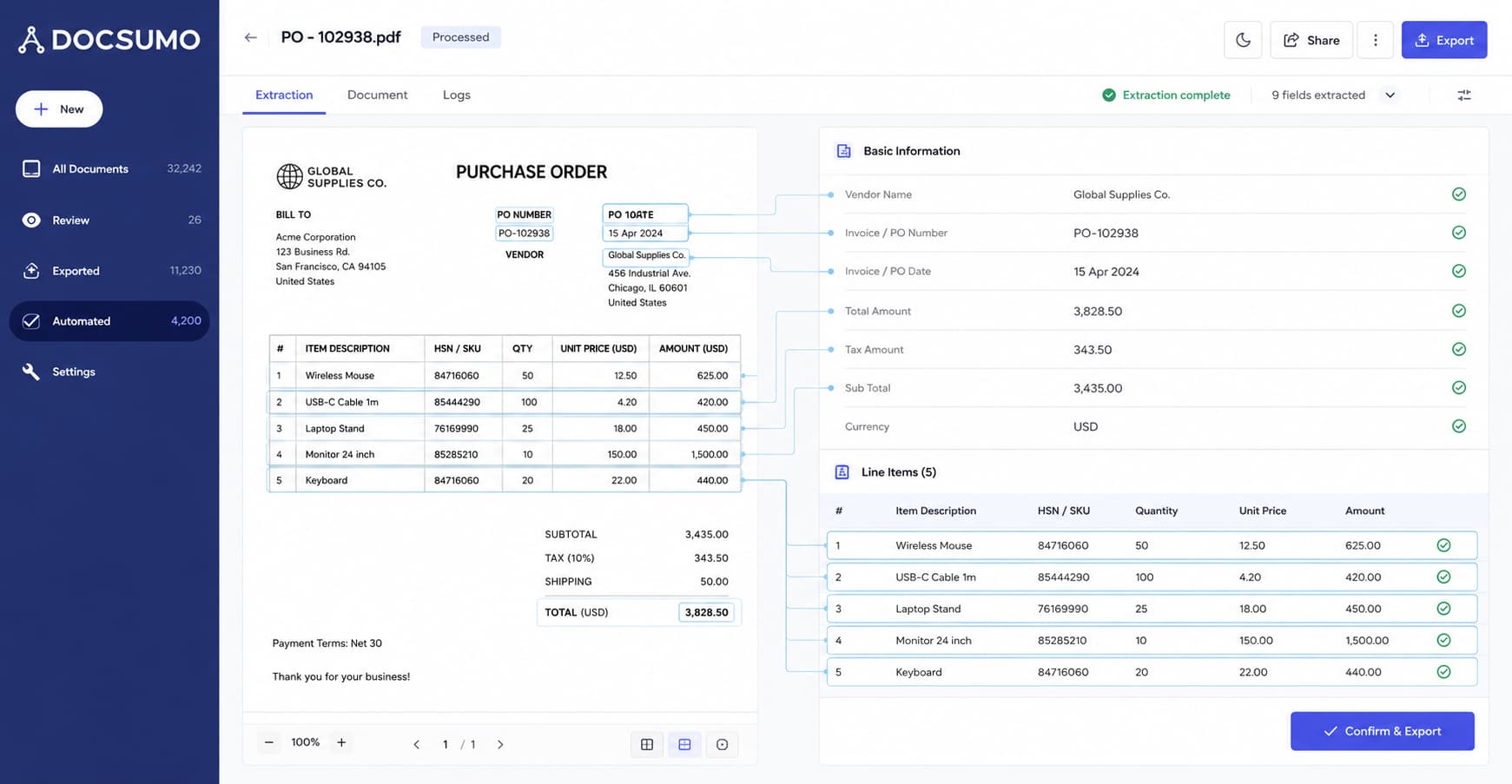
Automated Data Extraction: Do you hate typing numbers from old receipts into your computer? It is the worst. Docsumo does this work for you. You just scan an invoice or a long purchase order. The AI reads the page and pulls out every single line item accurately. For example, it finds the exact total price and the vendor name in seconds. You never have to type boring data by hand again.
-
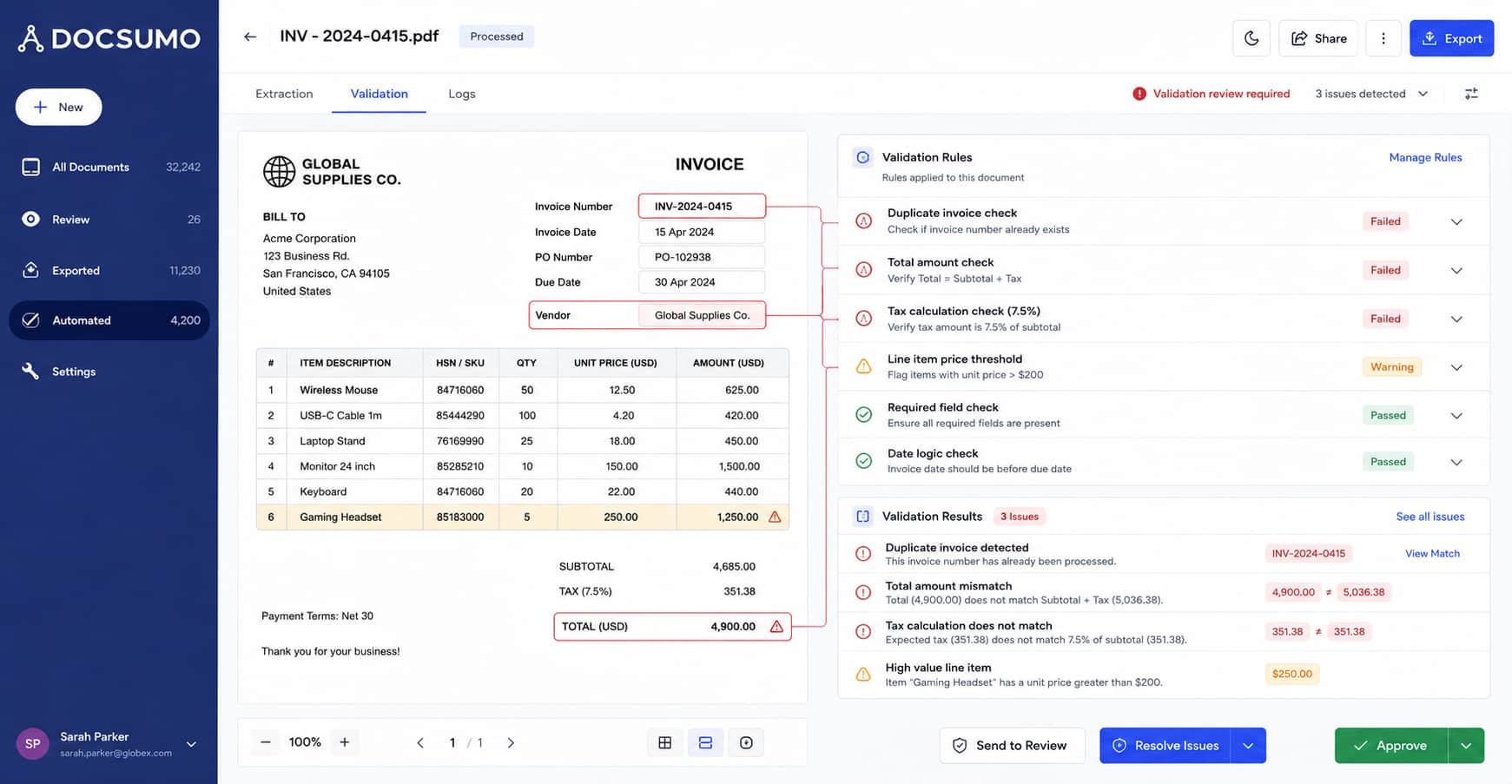
Smart Validation Rules: Mistakes happen when you process a lot of paper. Maybe a vendor charged you twice, or a total does not add up. Docsumo catches these sneaky errors automatically. It checks your forms against your own rules before anyone approves them. If it sees a wrong number, it flags it right away. It keeps your records perfectly clean and stops bad paperwork from moving forward.
-
Pre-Trained Models: Setting up new software can take weeks. You do not have time for that. Docsumo is ready to go on day one. It already knows how to read standard business forms like tax papers and standard invoices. You do not have to teach it what a total box looks like. It just works right out of the box. This saves you weeks of setup time so you can start processing paperwork today.
Pricing
You can try Docsumo for free to see how it works. Because it is built for growing teams, they offer custom pricing plans. You just pay based on the exact number of documents you need to process every month.
Tana
Tana is a smart workspace for your team's knowledge. As an operations manager, your notes are probably a mess. You have fast updates, vendor details, and random tasks scattered everywhere. Tana fixes this. It takes your messy, unstructured notes and turns them into organized data automatically. It acts like a giant, smart brain for your entire operations team.
Top Features
-
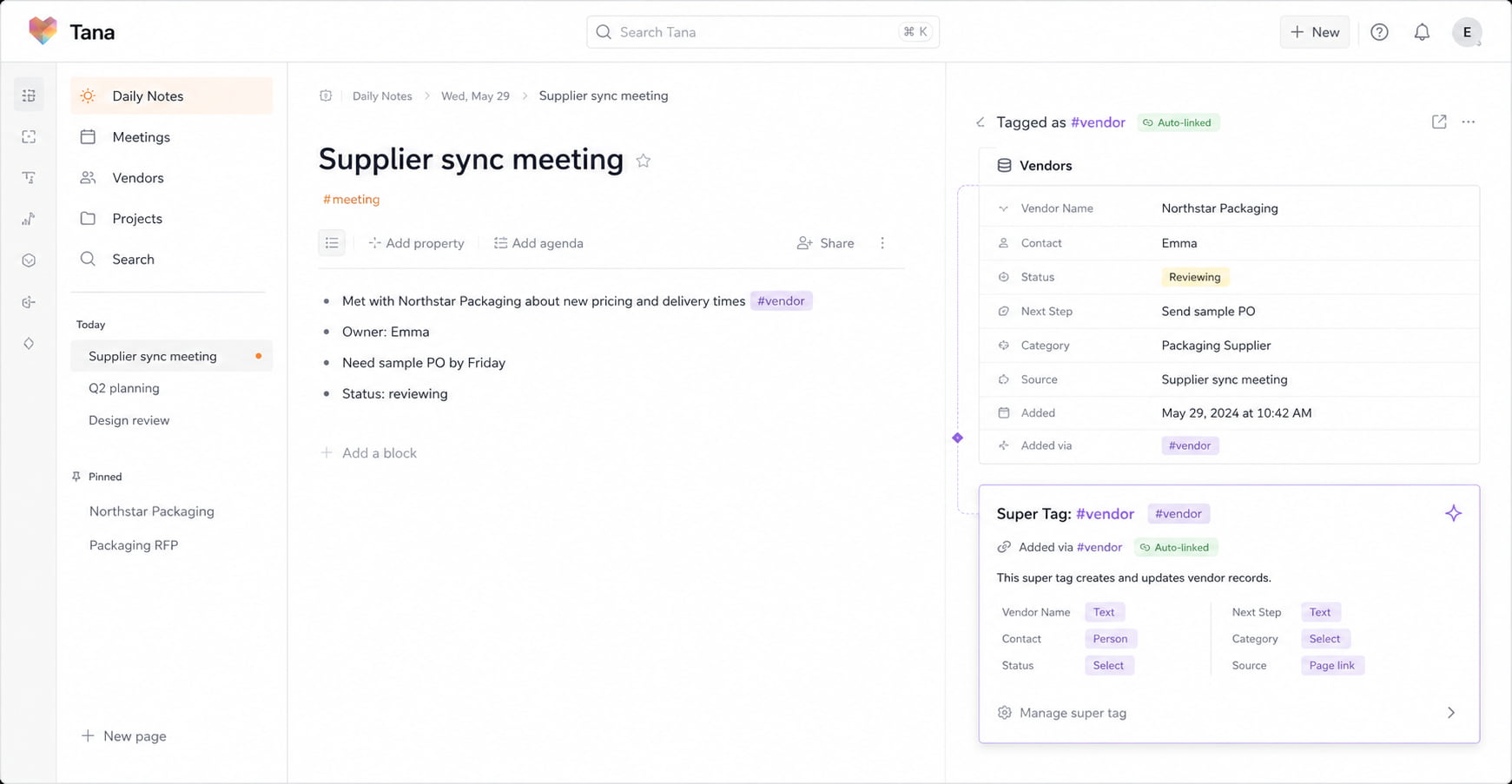
Super Tags for Workflows: Taking notes during a fast meeting is stressful. You write things down, but then you lose them. Tana uses something called "Super Tags." If you type a quick note about a new supplier, you just tag it as "#vendor." Tana instantly grabs that note and puts it into a neat, trackable database. You do not have to move or organize anything by hand.
-
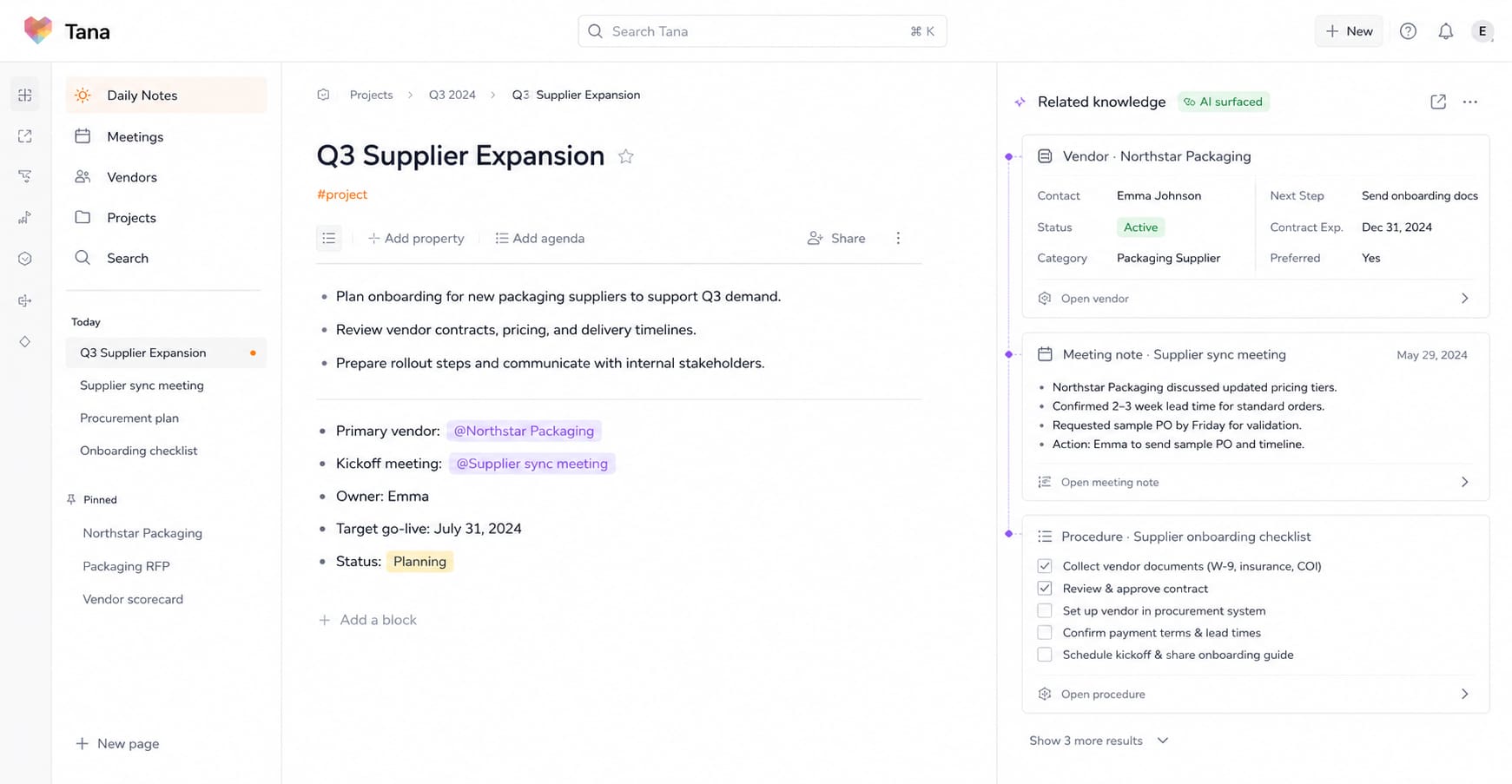
AI Knowledge Retrieval: Finding old information is a huge waste of time. When you plan a new project, you need past procedures and old meeting notes. Tana makes this easy. It connects your ideas seamlessly. When you look at a project, it pulls up all the related vendor details and past notes automatically. It brings the right information straight to you, right when you need it.
-
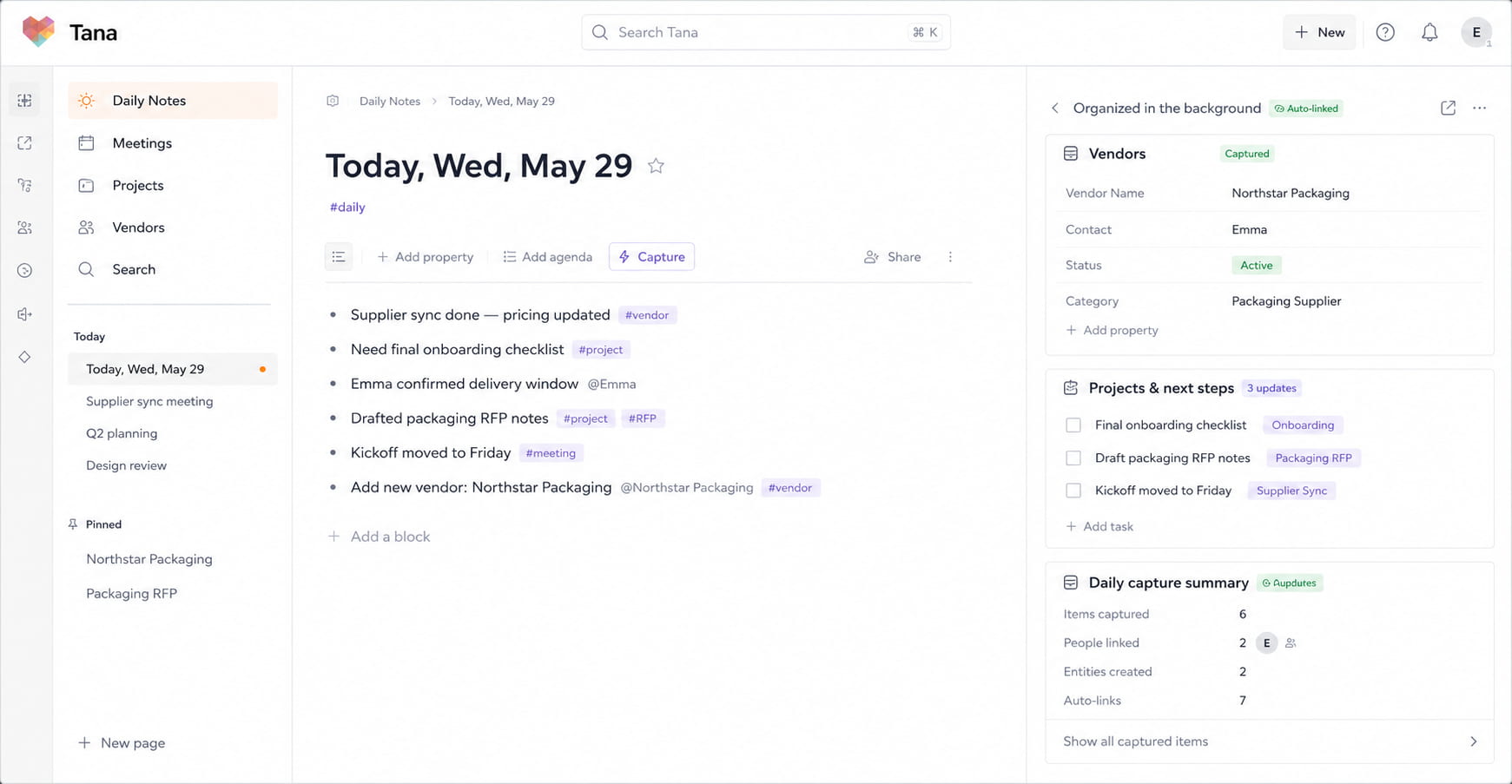
Frictionless Capture: Your team moves fast. They do not have time to fill out long, boring forms for every small update. Tana gives you one simple place to dump your thoughts. Your team can just drop quick updates into a daily hub. Tana sorts and organizes everything in the background. It keeps all your team knowledge perfectly structured without slowing anyone down.
Pricing
You can try Tana for free to see how it works, but the free plan is a bit limited for heavy daily use. If you want the full power to organize all your operational workflows, their paid plans start at $20 a month.
Clay
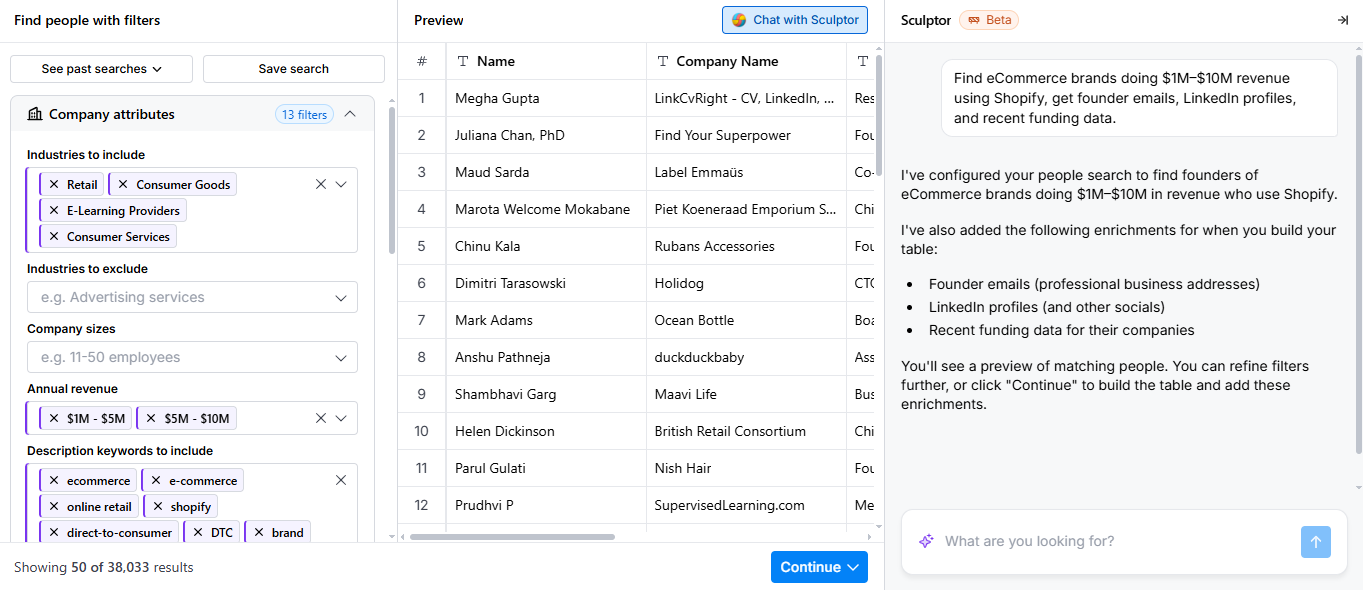
Clay is a smart tool that helps you manage and grow your contacts. As an operations manager, you handle lots of partner and vendor details. Sometimes, that data gets old or messy. Clay acts like a super-smart researcher. It pulls fresh data from all over the web and puts it right into your system automatically.
Top Features
-
Automated Workflow Orchestration: Doing research by hand takes forever. Clay connects different apps together to do it for you. Let's say you need to check ten new vendors. Clay can check their websites, find their best contact person, and pull their company size all at once. It chains these steps together automatically, saving you hours of boring clicking.
-
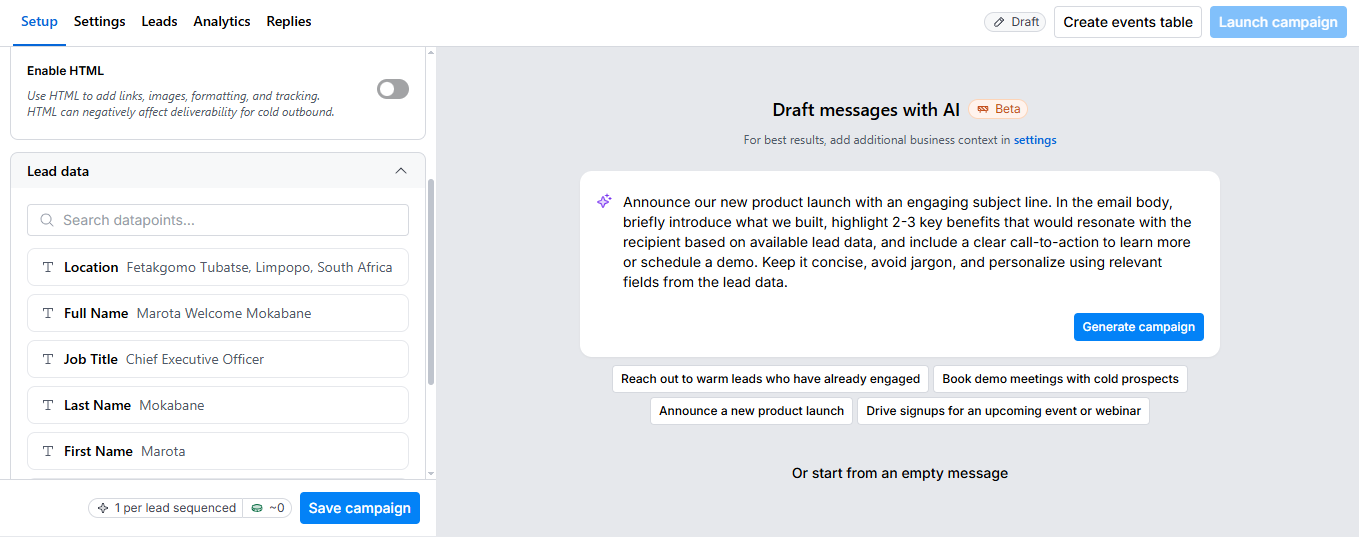
Personalized Scaling: When your company grows, you have to talk to more people. Sending the exact same email to 100 partners feels cheap. Clay helps you send better messages. It uses the fresh data it found to add personal details to your outreach. You can reach out to 100 vendors, and every single message will look like you took the time to write it just for them.
-
Dynamic Database Updating: Having old phone numbers or wrong emails in your system is annoying. Clay fixes this in the background. It constantly checks your contact lists to see if anything changed. If a vendor gets a new email, Clay updates your database instantly. Your records are never stale, so you never send a message to a dead email address again.
Pricing
You can start testing Clay for free with a small amount of data. If you need to run bigger workflows for your team, their paid plans start at $167 a month.
Tidio
Tidio is a smart support platform for busy teams. As an operations manager, you probably answer the same questions all day. This tool uses AI to handle those boring tickets for you. It brings all your customer messages into one simple place. This stops your team from jumping between different apps and keeps your daily work moving fast.
Top Features
-
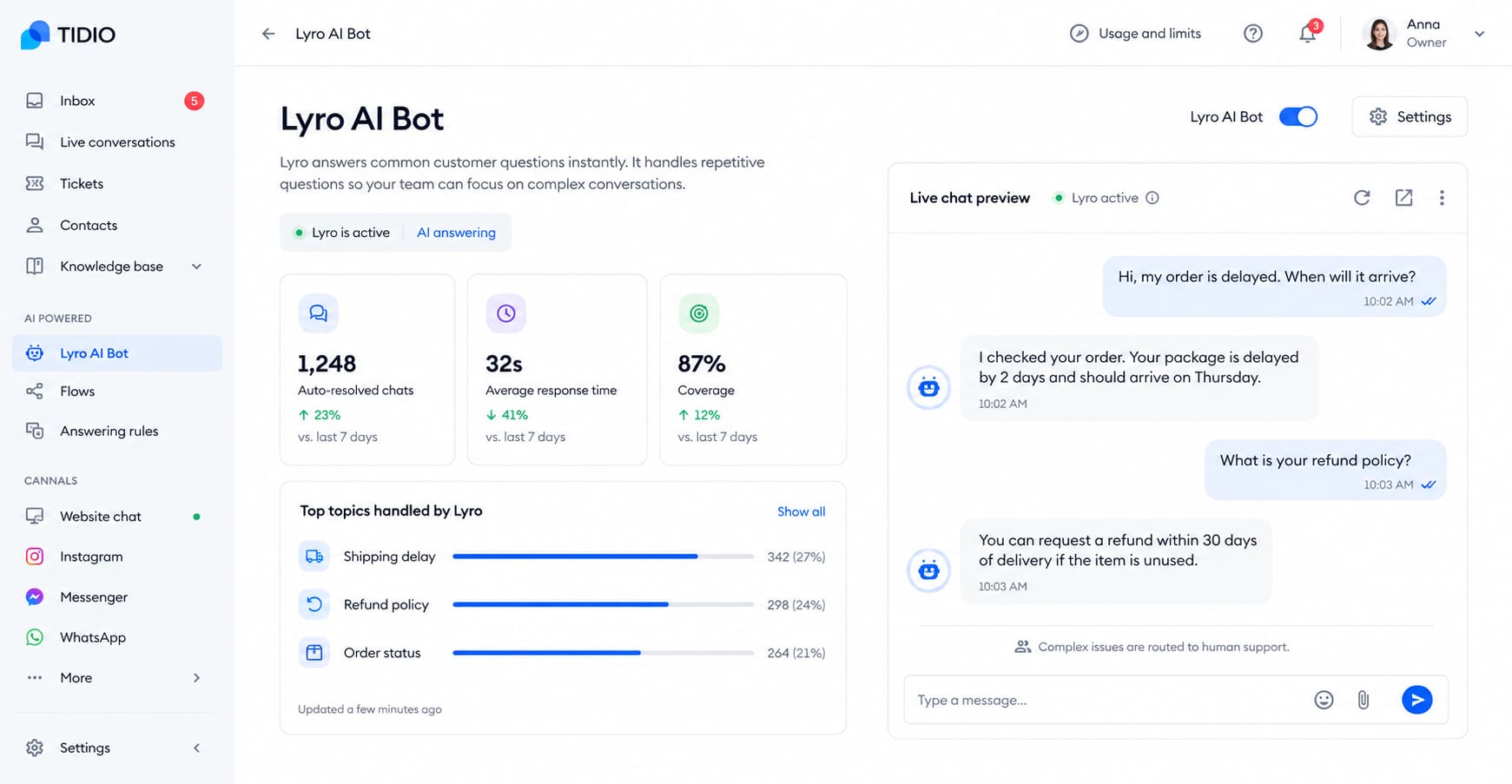
Lyro AI Bot: Your team probably answers the exact same questions fifty times a day. It is super boring. The Lyro AI bot answers these simple repeat questions for you automatically. If a customer asks about a shipping delay or a refund rule, Lyro replies instantly. This frees up your human workers to solve the really big, tricky problems instead.
-
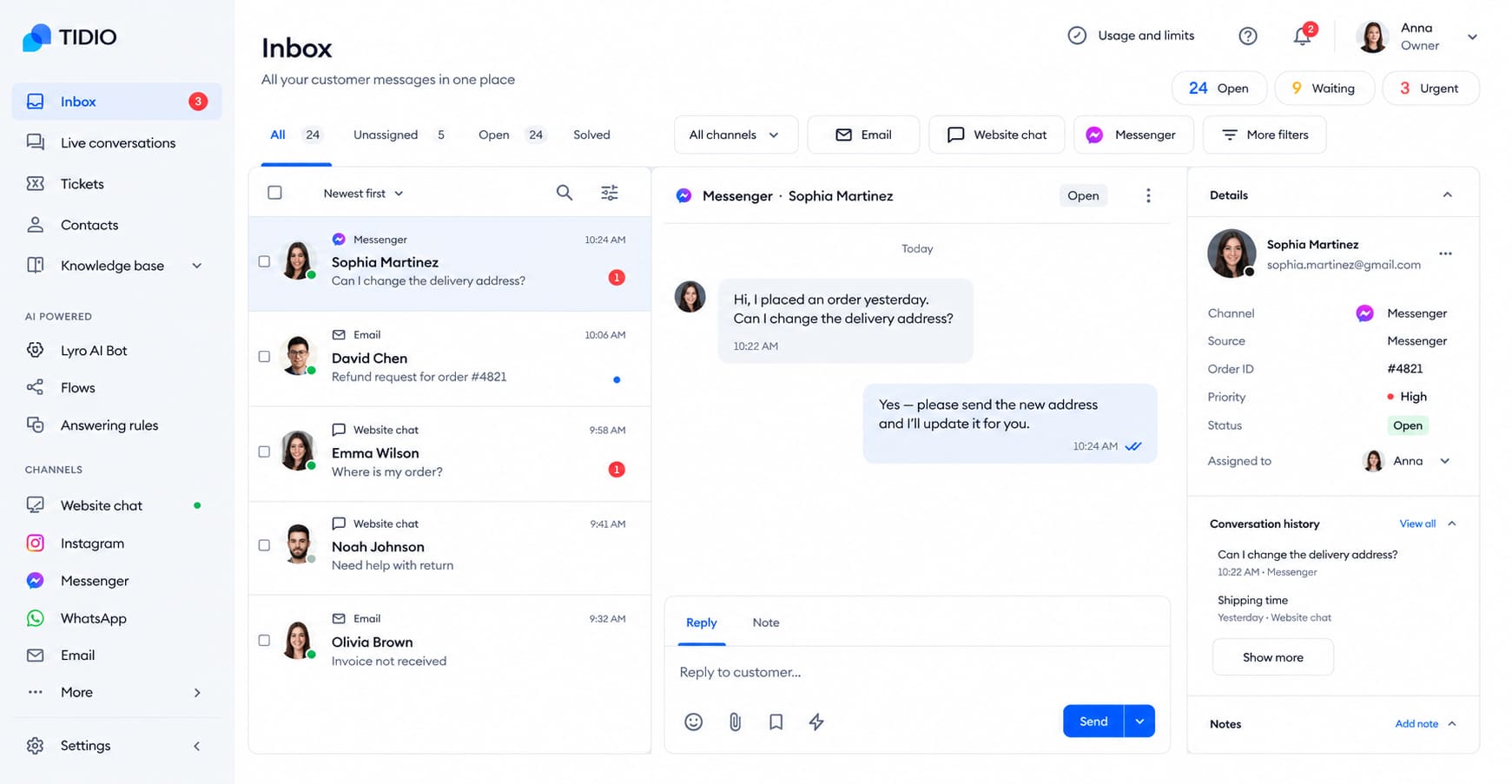
Unified Inbox: Customers message you from everywhere. They use email, live chat, and Facebook. Checking all these different apps is a giant headache for operations. Tidio brings every single message into one clean dashboard. Once you open the main screen, you can see and reply to everything right there. Your team never misses an urgent message again.
-
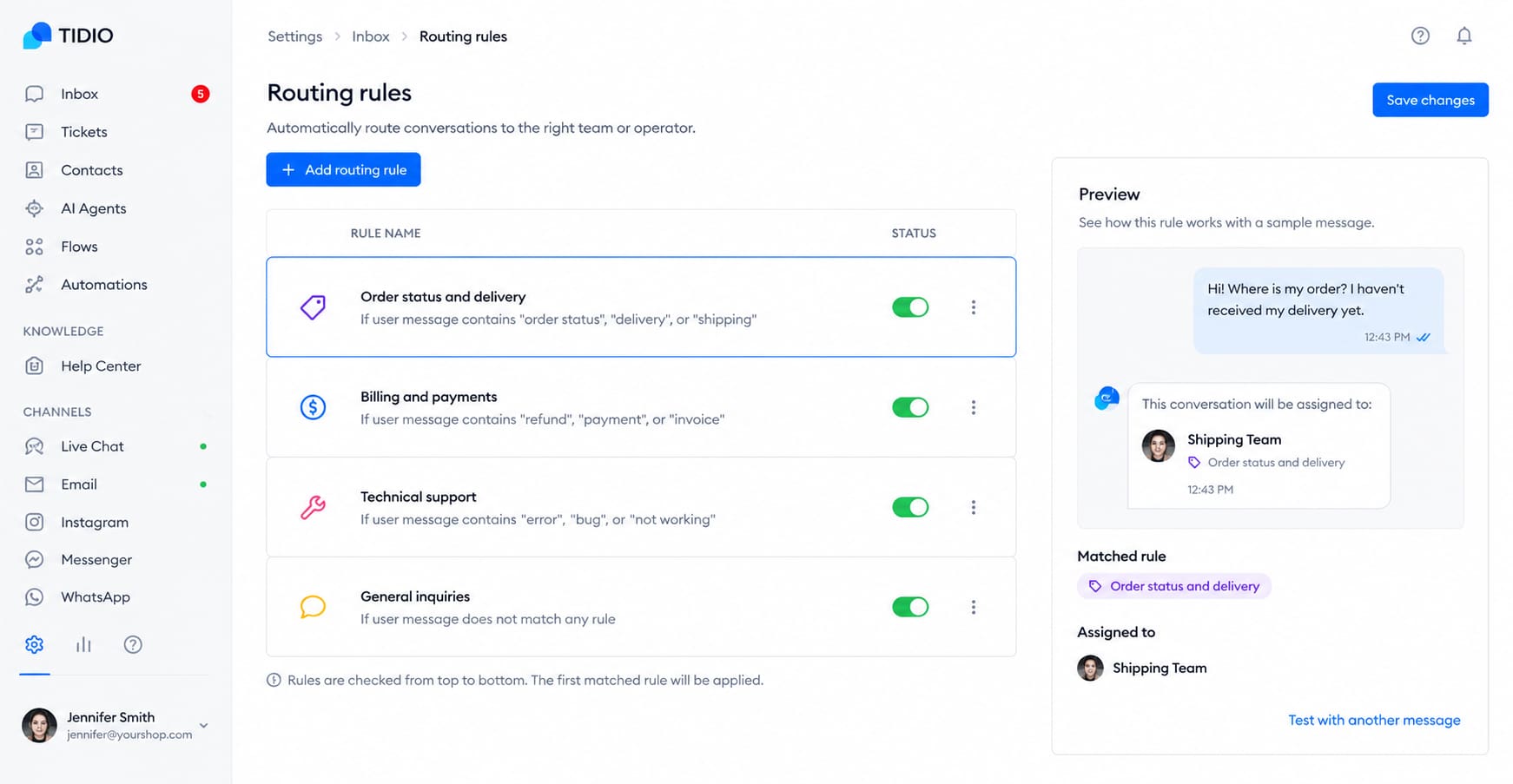
Smart Routing: When a new ticket comes in, someone has to read it and send it to the right person. That takes time. Tidio reads incoming messages and assigns them automatically. If a message is about a broken product, it goes straight to the repair team. If it is about a bill, it goes to finance. It keeps your daily operations perfectly organized.
Pricing
You can start using Tidio for free to handle a small number of chats. If your team gets a lot of daily messages, their paid plans start at around $24 a month.
Conclusion
Let's be honest. Managing daily operations is hard enough. Doing it while typing the same exact emails every single day is just painful.
Here is the simple truth. AI is not a fancy extra anymore. It is a must-have. If you want to grow your team without working 14-hours a day, you need these tools. They handle the boring stuff so you do not burn out.
Now it’s your turn: do not try to use all 8 tools today. That is a terrible idea. You will just get overwhelmed. Instead, pick just one tool from this list. Try it for one week. For example, try Jetwriter AI to finish your daily Slack updates and emails faster. Or set up Reclaim AI so people stop booking meetings over your existing breaks.
Start small. Get just one hour of your Friday back. Once you see how much time you save, you will never want to go back to the old way.
Frequently Asked Questions (FAQ)
Will AI eventually replace my job as an operations manager?
No, AI is much more likely to reshape your job than replace it. It handles the boring, repetitive tasks so you can focus on big-picture strategy and complex problem-solving. The managers who learn to use AI as an assistant will simply outpace those who do not.
Are these AI tools safe for my private company data?
Yes, reputable AI tools are built with strict security to protect your company secrets. For example, tools like Jetwriter AI keep your information secure and never use your private data to train AI models. Always check a tool's privacy policy, but the best ones are designed specifically for enterprise safety.
Can AI make a mistake and send the wrong message to a client or vendor?
Yes, AI can occasionally misunderstand the context of a conversation or make a mistake. That is why these tools are designed to draft messages for you, not send them blindly behind your back. You should always take two seconds to review a message before you click send.
What happens if the AI messes up my schedule or reads a document wrong?
If a tool makes a mistake, like pulling the wrong number from a receipt, you can easily fix it. Smart tools like Docsumo actually flag numbers they are unsure about so a human can double-check them. You always have the final say and can easily override any automated action.
Can AI tools help me write my company rulebook and daily procedures?
Absolutely. You can just dump your messy meeting notes or rough ideas into tools like Tana or Jetwriter AI. The AI will instantly organize those thoughts and draft clean, professional standard operating procedures (SOPs) for your team.