To pick a model, click the model's name at the bottom left of the box where you type, for example Sonnet 5.5 · Balanced. The model picker opens: choose a model under ADVANCED AI or REGULAR AI, and a thinking level (Fast, Balanced or Deep) in the Thinking row at its top. The Free plan has the regular models, also called fast models. Elite adds the advanced models, and Ultra adds Opus 5.5.
The picker works the same in the extension's Jetwriter window and in the web app at jetwriter.ai/app.
Choose a model
- Open Jetwriter, or go to jetwriter.ai/app.
- Click the model's name at the bottom left of the box where you type (1). The picker opens above it.
- Click a model: an advanced model under ADVANCED AI (3) or a regular model under REGULAR AI (4). The picker closes and shows your choice.
- To change how much the model thinks, open the picker again and click Fast, Balanced or Deep in the Thinking row (2).
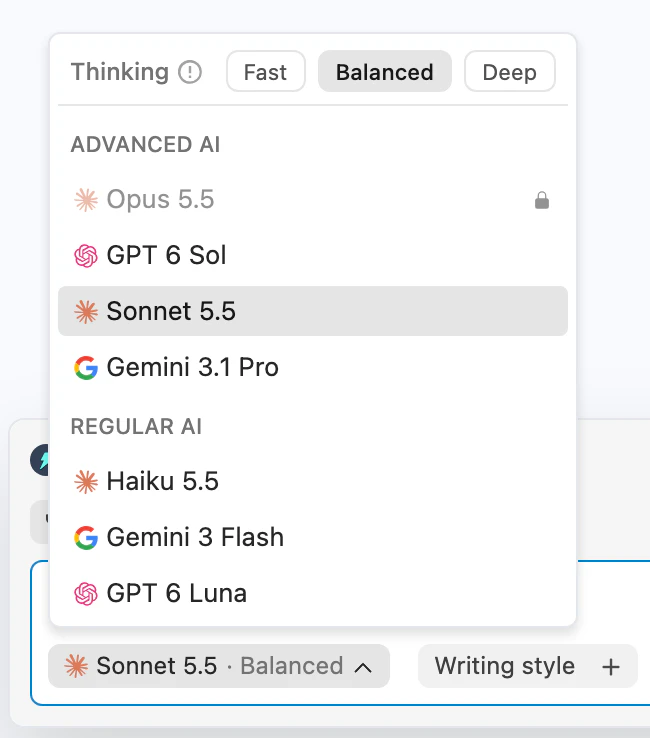
The model picker opens above the model's name: the thinking level at the top, then the advanced and the regular models.
- Model picker
- Thinking level
- Advanced models
- Regular (fast) models
Jetwriter keeps your choice for your next replies. The extension and the web app each keep their own.
Models on each plan
| Model | Made by | Group in the picker | Free | Elite | Ultra |
|---|---|---|---|---|---|
| GPT 6 Luna | OpenAI | REGULAR AI | Yes | Yes | Yes |
| Gemini 3 Flash | REGULAR AI | Yes | Yes | Yes | |
| Haiku 5.5 | Anthropic | REGULAR AI | Yes | Yes | Yes |
| GPT 6 Sol | OpenAI | ADVANCED AI | No | Yes | Yes |
| Gemini 3.1 Pro | ADVANCED AI | No | Yes | Yes | |
| Sonnet 5.5 | Anthropic | ADVANCED AI | No | Yes | Yes |
| Opus 5.5 | Anthropic | ADVANCED AI | No | No | Yes |
- Regular models, in the picker's words: "Great for regular tasks; provides fast responses." Haiku 5.5 is the Free plan's starting model.
- Advanced models, in the picker's words: "Understands complex instructions to generate high quality responses." Sonnet 5.5 is the starting model on Elite and Ultra.
- On Elite and Ultra, the advanced models come with a monthly allowance, and the regular models have no monthly limit, under fair use. See Limits on Elite and Ultra, and "Advanced models paused".
- Pro, kept for existing subscribers, has the same models as Elite.
On the Free plan, the advanced models show a lock (1), and only Fast can be picked as the thinking level (2):
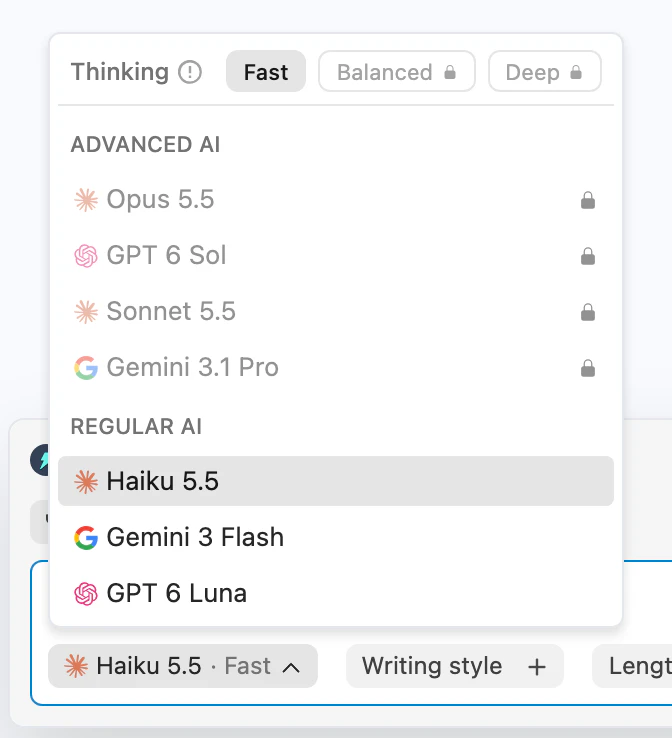
On the Free plan the advanced models are locked; Haiku 5.5, Gemini 3 Flash and GPT 6 Luna are yours to pick.
- Advanced models, locked on Free
- Fast only on regular models
Choose a thinking level
The Thinking row at the top of the picker sets how much the model thinks before it writes:
- Fast is the quickest. It's the only level for the regular models: with one of them, Balanced and Deep show a lock and "Deeper thinking is available on Advanced models".
- Balanced is where the advanced models start.
- Deep thinks the longest.
As the picker's info icon says: "Deeper thinking handles complex tasks better, but usually takes longer and uses your limits faster." Click a level to pick it. The level shows after the model's name, as in Sonnet 5.5 · Balanced; on a narrow screen only the model's name shows.
Why a model is locked
- It isn't on your plan. On Free, the advanced models are locked, and on Elite, Opus 5.5 is. Pointing at one shows "Upgrade to use this model", and clicking it opens the plans.
- Your advanced allowance is used up this month (Elite and Ultra). All the advanced models are locked until your reset date, and pointing at one shows "You've used most of your monthly quota. Only regular models are available until your quota resets on" and the date. See Limits on Elite and Ultra, and "Advanced models paused".
- You use your own API key (Free plan, extension). Only the models of the companies you added a key for can be picked. See Use your own OpenAI, Gemini or Claude key on the Free plan.
Why your model changed by itself
- Your advanced allowance ran out. Jetwriter switches you to Haiku 5.5 and writes with the regular models until your reset date.
- Your plan changed. When you upgrade, downgrade, or start or end the Elite trial, the picker moves to the new plan's starting model: Sonnet 5.5 on Elite, Ultra and the trial, Haiku 5.5 on Free.
- A model was retired. If a model you picked is no longer offered, Jetwriter uses a current one instead.
The built-in actions for selected text, such as fixing spelling and grammar, use Haiku 5.5 whichever model you picked, unless you use your own API key.