
Do you look at your inbox and want to close your computer? We all do. You see a lot of new emails. You have to reply to them all.
Writing emails takes a lot of time. For example, a customer asks for your prices. You type the answer. Then, another customer asks the exact same thing. You type it again. It is very boring work.
Google built Gemini to help you write inside Gmail. You tell it what to say, and it types it out. But Jetwriter AI is another choice. It also works inside Gmail, but it is much smarter.
Gemini just writes standard text when you ask. Jetwriter AI does the hard work for you. It reads your old emails to learn your real voice. You do not have to tell it how to sound. It also remembers your business facts. It can look at your website to find exact answers for your customers. It gives you the power to choose top AI models, like GPT-5 or Claude.
Let us look at exactly how both work inside Gmail.
Personalization: Making the AI Sound Like You
When you use an AI, you want it to sound like you. You do not want to sound like a machine.
Gemini cannot learn about your job. You cannot teach it how you like to write. It will not remember if you like short sentences. It does not know if you prefer a casual tone. You have to start all over every single time you open a new email. You have to tell it what to do, again and again. Even then, you often end up spending a lot of time fixing the text yourself.
Jetwriter AI works differently. It remembers who you are. It does a few simple things to help you write in your real voice.
It Reads Your Inbox
You can connect Jetwriter AI to your Gmail. It securely looks at your old emails. It learns the exact words you like to use. It checks if you say "Hi" or "Dear." It also remembers facts and data from your old emails. If you told a customer your prices last week, it remembers those prices today. It writes drafts in your exact style and uses your real answers automatically.
To learn more, read our detailed blog on How Jetwriter AI Uses Past Conversations to Deliver Smarter, More Personalized Responses.
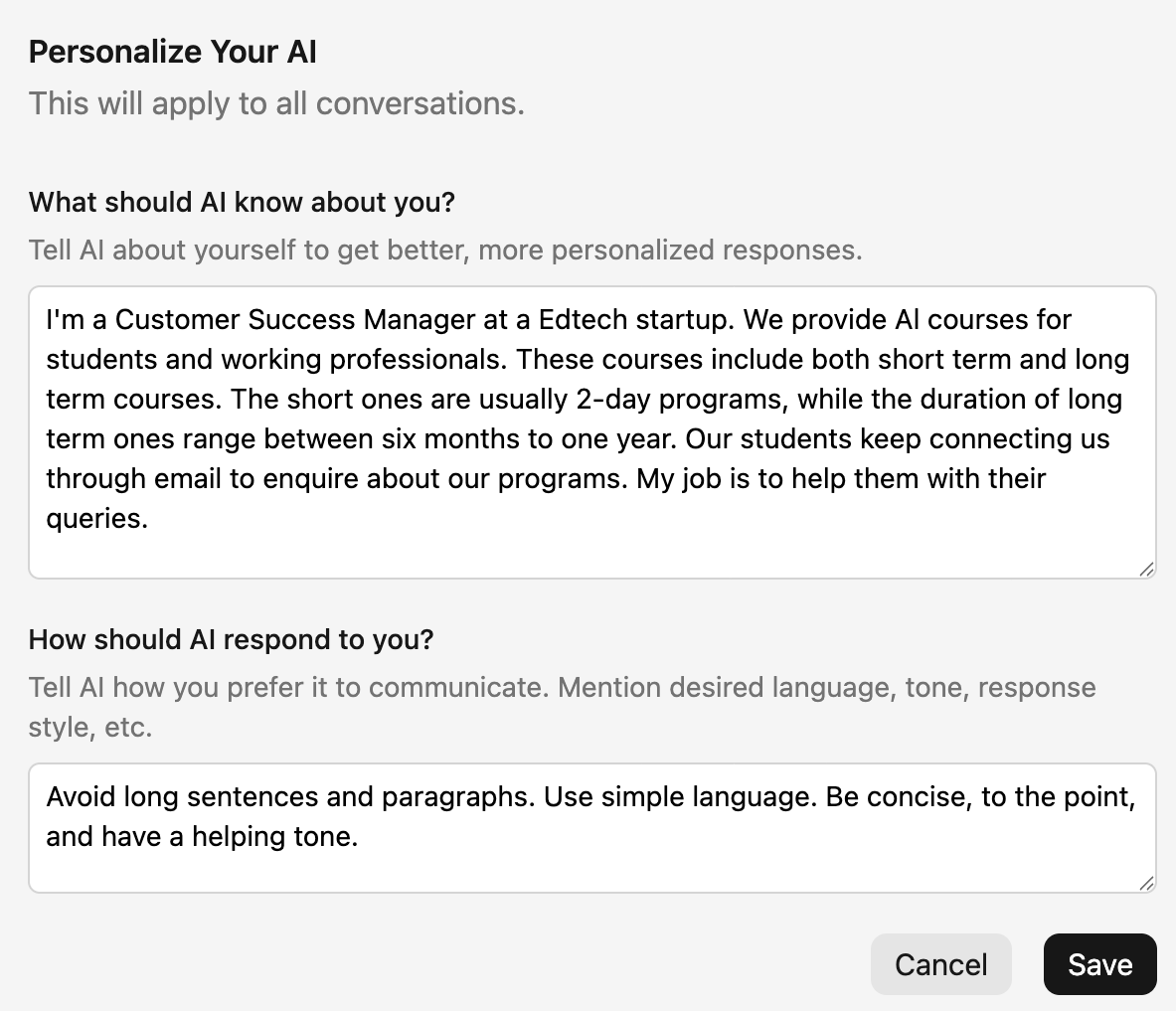
Personalize AI
You can teach the tool about yourself. You can add your job title and what you do. For example, you can tell it, "I am a customer success manager at a EdTech startup and I like to sound helpful." The AI remembers this forever. It uses these facts in every new draft.
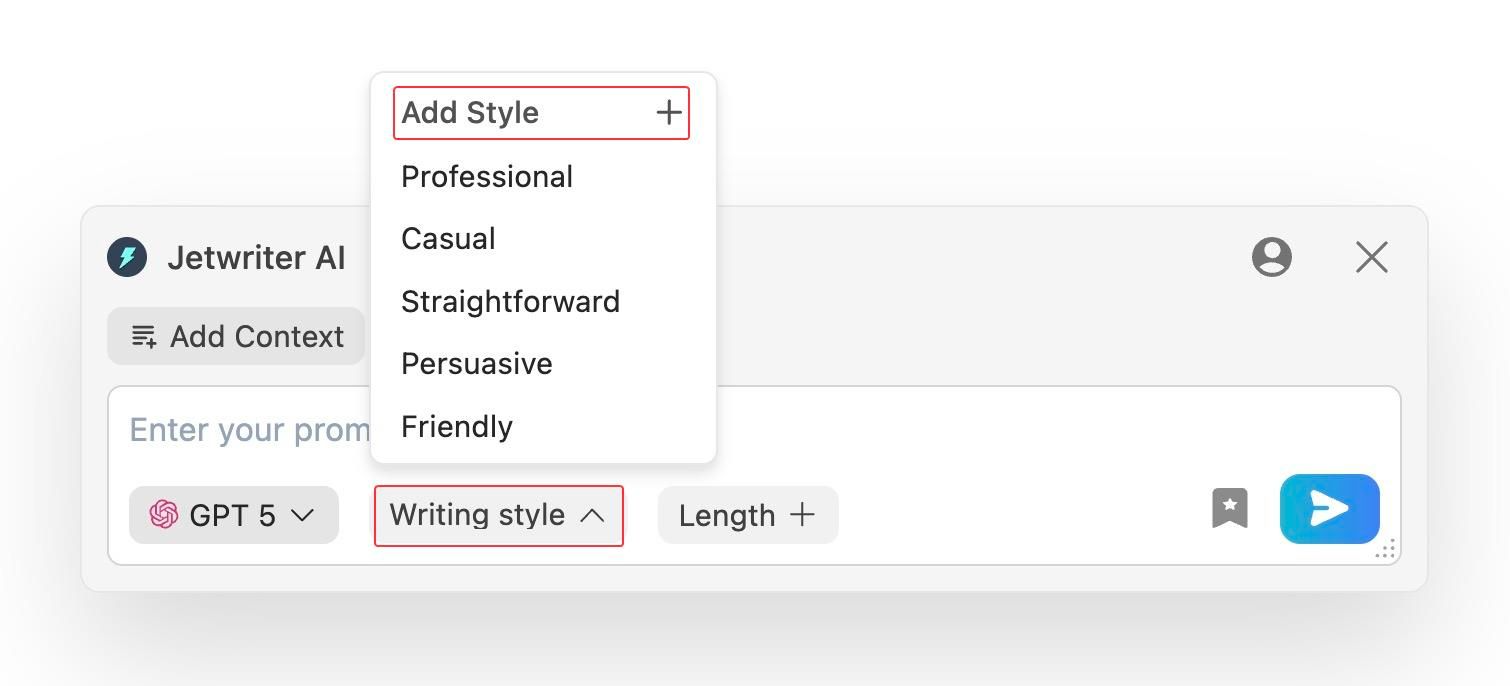
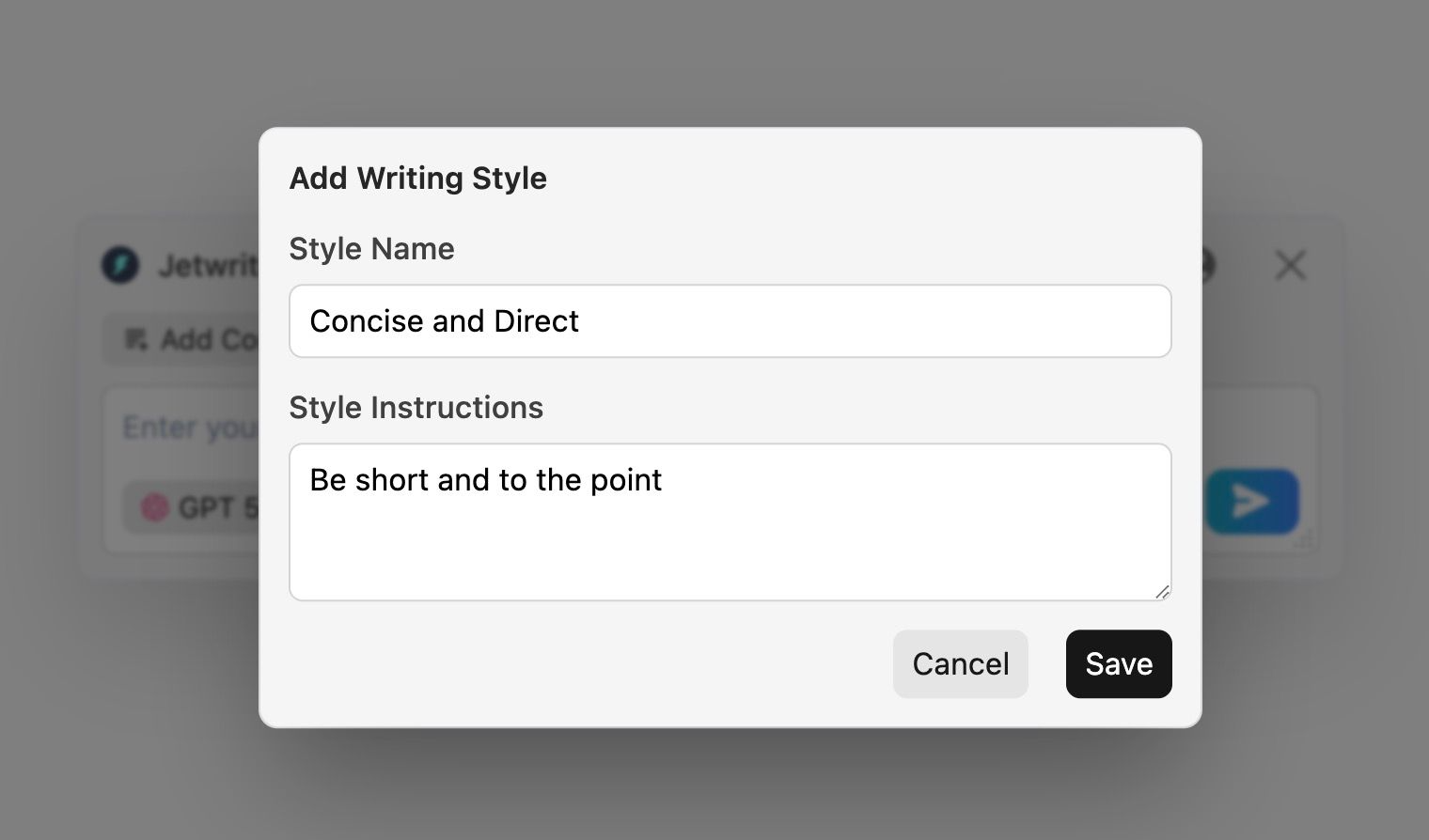
Custom Writing Styles
You talk to your boss differently than your friends. Jetwriter AI lets you save different tones. For example, you can make a "Friendly Team" style for your coworkers. You can make a "Concise and Direct" style for your boss. You just click the style you want. You never have to explain your tone again.
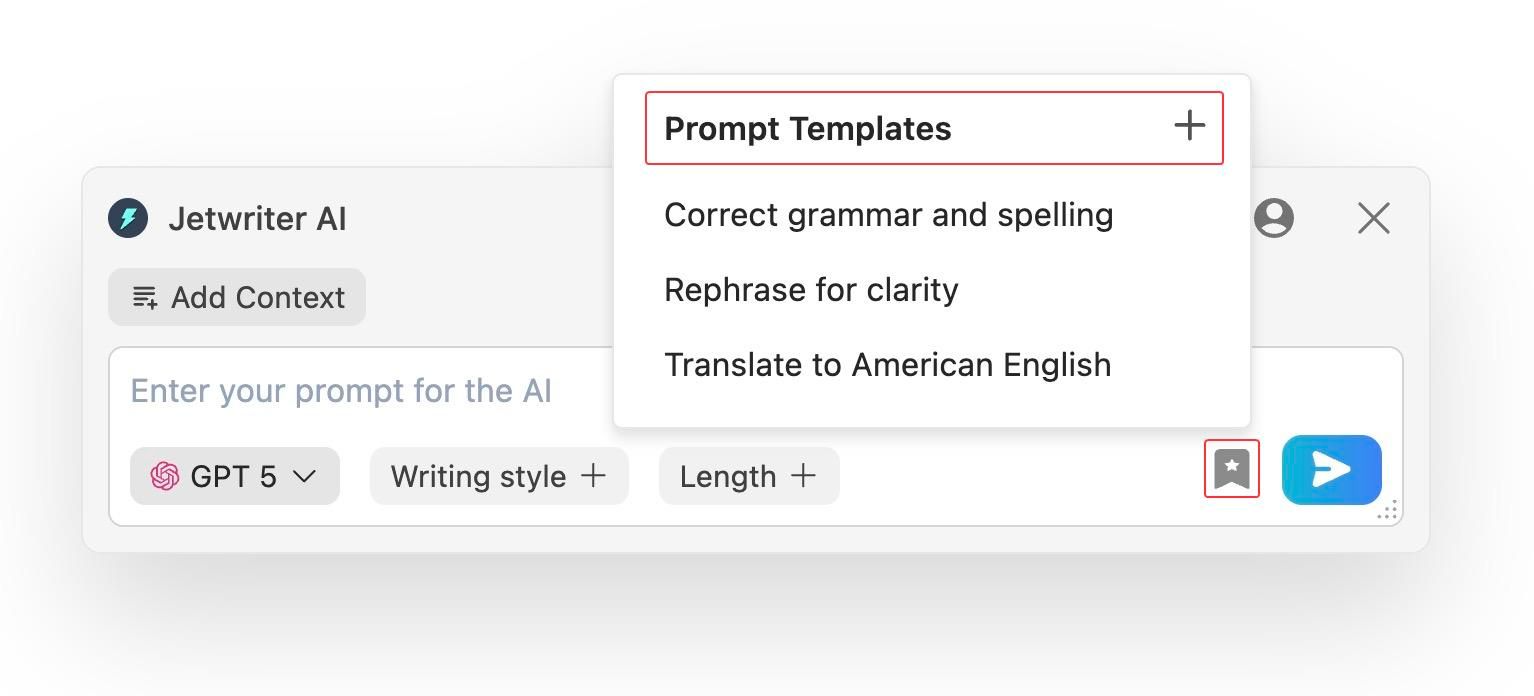
Prompt Templates
Do you often struggle going through long email threads? You can save a template called "Summarize." Next time, just click one button. The AI reads the whole chain of emails and gives you a short list of the main points. You do not have to type "Please summarize this email thread" every day.
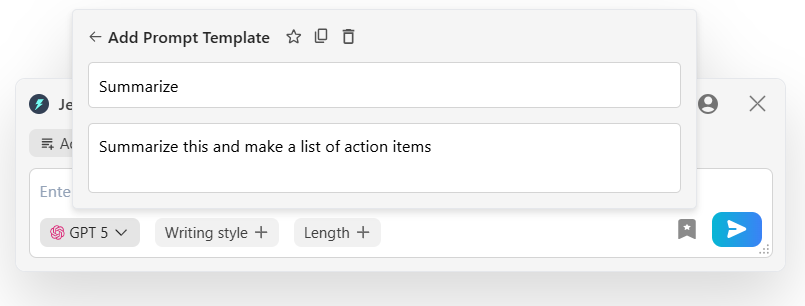
Gemini makes you do the same work every day. Jetwriter AI knows your voice and remembers your rules.
Workflow Automation
When you get a new email, you want to reply fast.
With Gemini, you have to do all the steps. You open the email. You click the Gemini button. You type what you want to say. Then, you wait for the AI to write it. It only helps you after you ask. You still have to stare at a blank screen first.
Jetwriter AI works before you even open the email. It has a feature called Auto-Draft.
When someone sends you an email, and if it requires a reply, Jetwriter AI reads the whole email chain, and drafts a reply for you. When you open the email, the draft is already there waiting for you. You just read it, fix a word or sentence if you want, and click send. You get to skip the hard part.
Will the AI send emails without asking you? No. It only writes the draft. You always click the send button yourself.
To learn more, read our detailed blog on How Jetwriter AI Drafts Perfect Email Replies Even Before You Open Your Inbox.
Business Knowledge and Memory
An AI needs to know facts to write a good email.
Gemini is great at writing polite emails. But it does not know the facts about your business. It does not know your prices or your rules. If a customer asks a specific question, Gemini cannot really help you answer it. You still have to search for the answer yourself. It breaks your focus and takes up a lot of your time.
Jetwriter AI acts like a real person who works at your company. It actually knows your business facts.
Here is how it finds the right answers for you:
- It reads your website: You can give the AI a link to your website or help page. Let us say a customer asks how to return an item. The AI reads your link. It then writes the exact return rules in the email. You do not have to open a new tab or copy and paste anything.
- It searches the live web: What if you need a brand new fact? Jetwriter AI can search the live web for you. You can tell it, "Search the web for today's money exchange rate and put it in this email." It finds the real facts right now and writes them for you.
Gemini makes you do the hard research. Jetwriter AI finds the exact answers for you so you can finish your work faster.
To learn more, read our detailed blog on How Jetwriter AI Learns Your Business to Draft the Perfect Reply.
Picking the Best AI
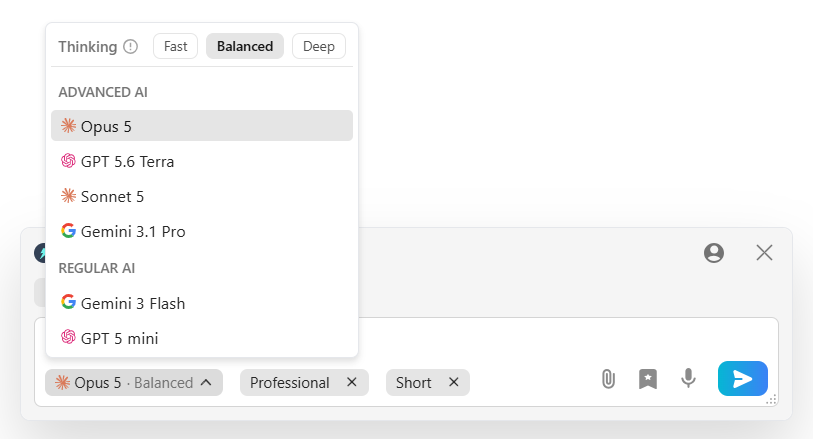
When you use Gemini in Gmail, you get one AI. It is Google's Gemini model. It is very smart. But it is your only choice. Sometimes, one AI is not the best for every single job.
Jetwriter AI gives you choices. You do not just get one AI. You get to use all the top AI models in the world right inside your inbox.
You can choose to use GPT-5.6, Claude Sonnet or Opus, or even Gemini itself.
Why is this good for you? Because different AI models are good at different tasks.
For example, you need to write a very creative email to a new client. You might find that Claude writes the best creative emails. But later, you just need to write a fast, simple reply. You might like GPT-5.6 better for that.
You get to pick the exact AI you want for the job. You always get the best results because you have the best AI model.
Fixing Your Drafts Fast
Getting the first draft is only half the job. You still need to fix it and make it perfect. How you edit changes how fast you can actually finish your work.
Gemini gives you some basic tools. You can tell it to make your email longer or shorter. That is helpful. But if you need to fix a small mistake or change how a sentence sounds, you have to type out new instructions all over again. You have to tell it exactly what to do, every single time.
Jetwriter AI makes editing easy with the Quick Actions feature right inside your email window. You do not have to type out more instructions in a chat box. You can change your draft with just one click.
Do you need to sound more professional? Click a button. Do you need to fix some bad grammar? Click a button. You never have to leave your email or open a new tab. You just click and fix your draft instantly so you can hit send.
To learn more, read our detailed blog on How to use Quick Actions Feature for Maximum Productivity.
Keeping Your Data Safe
When you let an AI read your inbox, you have to trust it. You have private emails, client contracts, and important work notes. You need to know your information is locked down tight.
Gemini might use your conversations to teach and train their future models.
Jetwriter AI works differently. It offers a clear, serious promise to keep your data completely private.
Here is the exact guarantee:
- No AI Training: Jetwriter AI never uses your emails or personal data to train the AI. What you write stays yours.
- Never Sold: Your information is never shared or sold to other companies. Period.
- Strong Encryption: Your data is kept safe using strong encryption while it is in transit.
You can write with confidence. With Jetwriter AI, what happens in your inbox, stays in your inbox.

Conclusion
If you just want a basic chatbot, Gemini is fine. But your inbox is where you do real business. You need a tool built specifically for that job.
Gemini makes you work for it. You have to type out long instructions, fix its robotic tone, and search for your own facts every single time you reply to an email.
Jetwriter AI does the work for you. It writes in your real voice. It finds your business facts. You get to use the best AI models in the world with one click, and it keeps your private data completely safe.
Try Jetwriter AI today and see how fast you can finish your work.
Frequently Asked Questions (FAQ)
Is it really safe to give a third-party AI tool access to my private inbox?
It is safe only if you choose a tool that explicitly guarantees strong data encryption in transit, and zero data storage or model training (like Jetwriter AI). Always verify the privacy policy before allowing the AI access to your inbox.
Will my clients or coworkers be able to tell I am using an AI to write my emails?
They won't be able to tell as long as you review and personalize the AI's draft before hitting send. By adjusting the tone and adding your own specific context, you ensure the final email matches your natural voice.
Do I need separate paid subscriptions for ChatGPT and Claude to use them in Jetwriter AI?
No, you do not need separate subscriptions. Your Jetwriter AI account includes built-in access to premium models like ChatGPT, Claude, and Gemini. This gives you the best AI tools in one place without any extra monthly costs.
Does Jetwriter AI work on my mobile phones?
Yes, you can easily use Jetwriter AI on your mobile device. Android users can download the dedicated app directly from the Google Play Store. For iOS users, the platform is fully accessible by using the direct web app link in your mobile browser.