Jasper is a great tool. But let's be honest. It is not perfect.
If you use Jasper, you probably face a few common problems. It costs way too much. Paying a huge bill just to write a quick post is not fun at all. You also lack control over the text. You want better results and a tool that actually fits how you work. Plus, the writing often sounds generic. You want to write fast, but you still need to sound like a real person and not a boring robot.
In this blog, we will look at 5 tools you can use instead of Jasper. You might be a solo worker, a business owner, or a freelancer. You probably write blogs, ads, or social media posts every single day. They will help you write faster, save money, and keep your voice clear. Let's dive in!
The Top 5 Alternatives to Jasper
Jetwriter AI
Many AI tools make you leave your work. Jetwriter AI is different. It is a seamless assistant that lives right in your browser. You never have to switch tabs or open a new website to write an email or a blog post. It stays with you, right where you work. It feels like a fast writing partner sitting next to you!
Top Features
-
Your All-In-One Writer: Jetwriter AI writes almost anything you need, right where you work. It writes fresh emails or quick replies in Gmail. It also types out polite ticket answers on Freshdesk or Zendesk for your customers. Do you want to reach out to someone on LinkedIn? It writes those messages too. But that is not all. It can even help you create catchy social media posts and full blog posts.
-
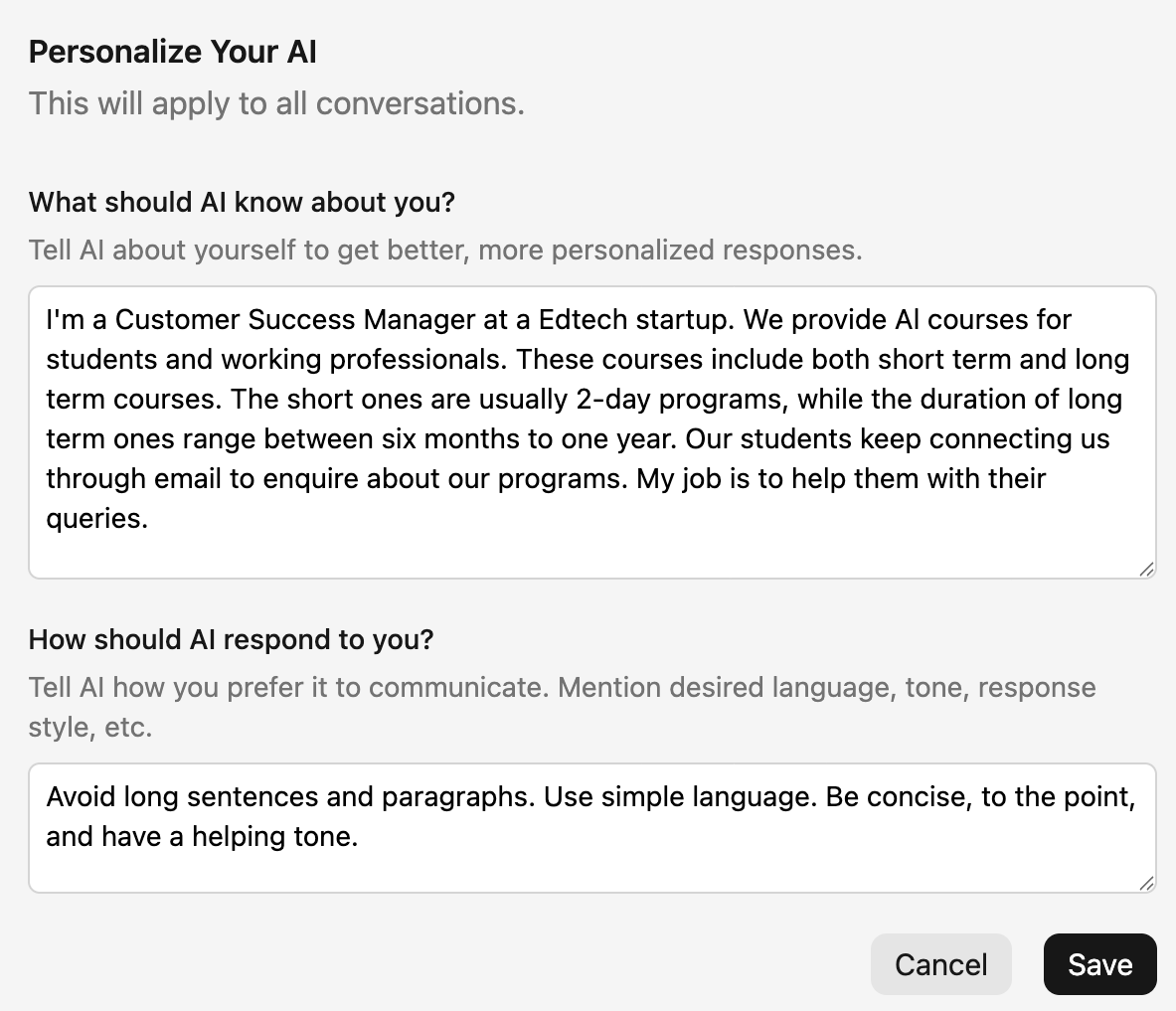
Personalize AI: Any AI is a stranger at first. It does not know your job. The Personalize AI feature fixes this. You teach it exactly who you are. You tell it your job title and what your company does. For example, you can say, "I am a sales manager at a tech company." Once you do this, it stops sounding like a boring robot. It writes smart answers that actually fit your daily work and sounds like the real you!
-
Create Custom Writing Styles: You do not talk to your boss the way you talk to a friend. Your AI should know that! You can create and save your own special tones. You can make a "Concise and Direct" style for serious work emails. You can make a "Friendly" style for quick team chats. Once you save a style, you just click it to use it. It saves time because you never have to explain the exact tone again.
--590492872.png)
-
Create Prompt Templates: Are you tired of typing the exact same directions every single day? Maybe you always ask the AI to "Make this a fun tweet" or "Summarize the email thread." Instead of typing it again, you can save your most used instructions as custom templates. The next time you need it, you just click your saved button and watch it work. It is a giant time saver for your daily chores!
---663666561.png)
-
Quick Actions: Do you hate switching tabs to get writing help? With Quick Actions, you just select any text on your page. And a smart menu appears. You can set up custom buttons to write for you instantly. Highlight a sentence and click a button to "Make this a Twitter post" or simply "Fix Spelling & Grammar". It helps you draft perfect new content right where you work!
-
Any Language: The business world is huge. You might need to email a client in France or write a social post for users in Spain. Jetwriter AI makes this easy. You can write full emails, chat messages, or blog drafts in any language. Just tell it what you want, and it drafts the perfect text in Spanish, French, or Japanese. No more language barriers to worry about!
-
Multi-model, Lightweight and Private: You get total control here. You can pick the best AI brain for your specific job, like ChatGPT, Claude, or Gemini. The tool is super light. It is under 1MB, so it will never slow down your computer while you work. Best of all, it keeps your data totally safe. Your private info stays with you always. It is never used to teach the AI. You can write without worry!
--81557071.png)
Pricing
You can start using Jetwriter AI for free. If you use it often, there are affordable paid plans available. Are you a power user? You can even plug in your very own API key.
GravityWrite
GravityWrite is a very easy tool to use. You do not need to be a tech expert. It is built to help you create content fast. You just log into their website, pick what you want to make, and it does the heavy lifting for you. It is a great choice if you want ready-made text without writing long, hard instructions.
Top Features
-
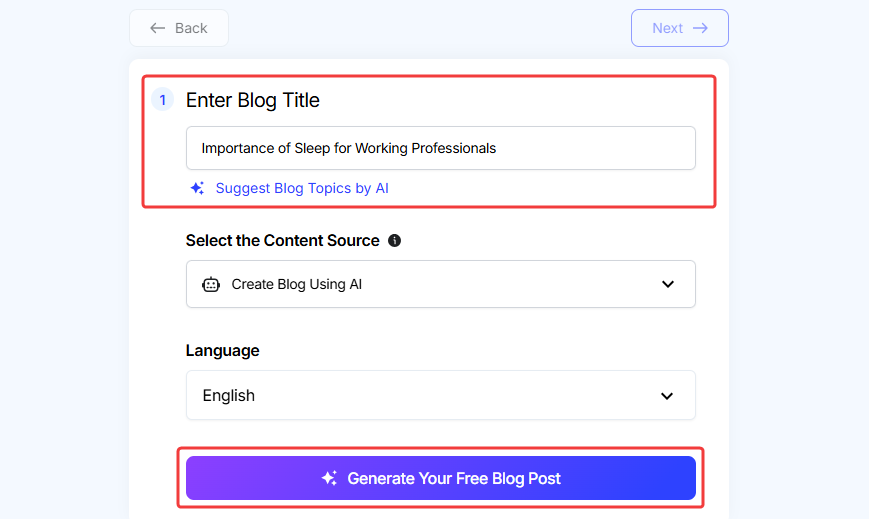
One-Click Blog Posts: Writing a full blog post can take hours of hard work. GravityWrite changes this. It has a special tool that writes a whole post for you in just one click. You only need to type in your main topic, like "how to plant a tree." Then you hit a button, and the tool writes the entire article for you. It is a super fast way to get a good first draft ready for your website!
-
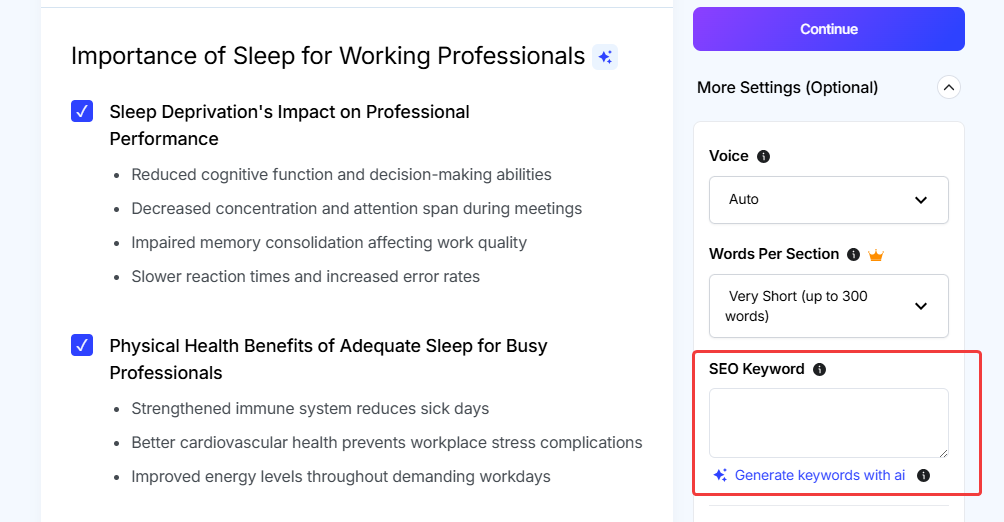
Built-in SEO Smarts: Do you want people to find your blog on Google? You need good SEO. That means using the right words that people search for. GravityWrite does this for you automatically. When it writes your content, it adds the exact keywords your readers are looking for. You do not have to guess or use extra SEO tools. It helps your posts get more clicks right from the start.
-
Creates Great Outlines: Sometimes staring at a blank page is the hardest part. You know what you want to say, but you do not know how to begin. GravityWrite fixes this blank page problem. It can quickly build a very clear outline for your blog or report. It gives you the main headings and a path to follow. This makes it so much easier for you to fill in the blanks and finish your work fast.
Pricing
You can start using GravityWrite for free to see how it works. If you need to write a lot of content every month, there are paid plans starting at $8 per month.
Rytr
Rytr is a very fast and budget-friendly writing tool. It is perfect if you need a quick burst of text for your daily work. You just jump into their simple dashboard, pick what you need, and start creating right away. It is a speedy writing buddy that does not cost a fortune. It gets the job done without any hard setup!
Top Features
-
Easy-to-Use Templates: Do you need to write a sales email or a Facebook ad? Rytr makes this super easy. It comes packed with a ton of ready-made templates. You do not have to stare at a blank screen and wonder what to type. You just pick the template you need, fill in a few small details, and it writes the text for you. It takes all the hard guesswork out of your daily writing tasks!
---370947689.png)
-
A Ton of Tones: Your writing should match your mood. Sometimes you need to be serious for work, and other times you want to be funny for social media. Rytr lets you pick from over 20 different tones. You can sound professional, joyful, or even a little bit cheeky. You just pick the tone from a simple dropdown menu before you write. It helps your text sound exactly the way you want it to!
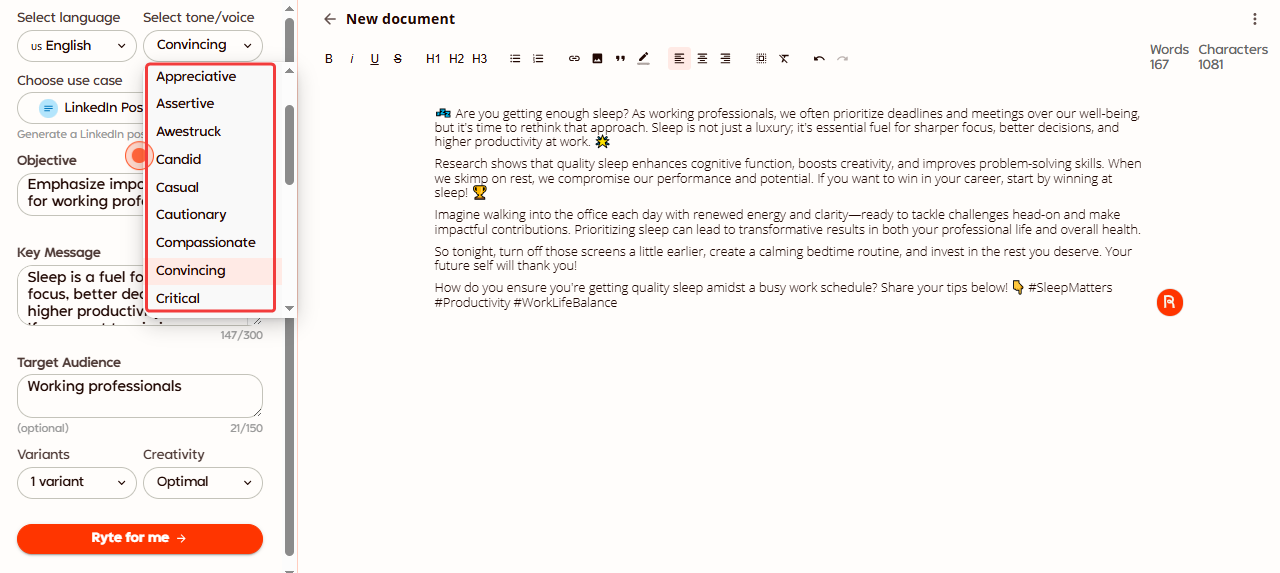
-
Multi-Language Support: Do you need to reach people all over the world? Rytr can help you do that. It lets you write in more than 30 different languages. You can easily create a blog post in English and then write an email in Spanish. You do not need to hire a translator. It helps you talk to your global audience with zero stress!
---1330482143.png)
Pricing
Rytr has a great free plan that lets you test it out every single month. If you love it and need to write a lot more words, the paid plans start at $7.5 per month.
Frase
Frase is not just a writing tool. It is a research tool for people who want to win on Google. If you want your blogs to show up first when people search, Frase is for you. It looks at what is already working online and tells you how to do it better. Think of it like a cheat sheet for getting more visitors to your website!
Top Features
-
Built for SEO: Do you want your blog to be number one on Google? Frase is built exactly for this! It takes the hard guesswork out of SEO. It tells you exactly what words to use so search engines will love your page. It is like having a smart SEO expert sitting right next to you. You just follow its simple advice, and your chances of ranking higher go way up!
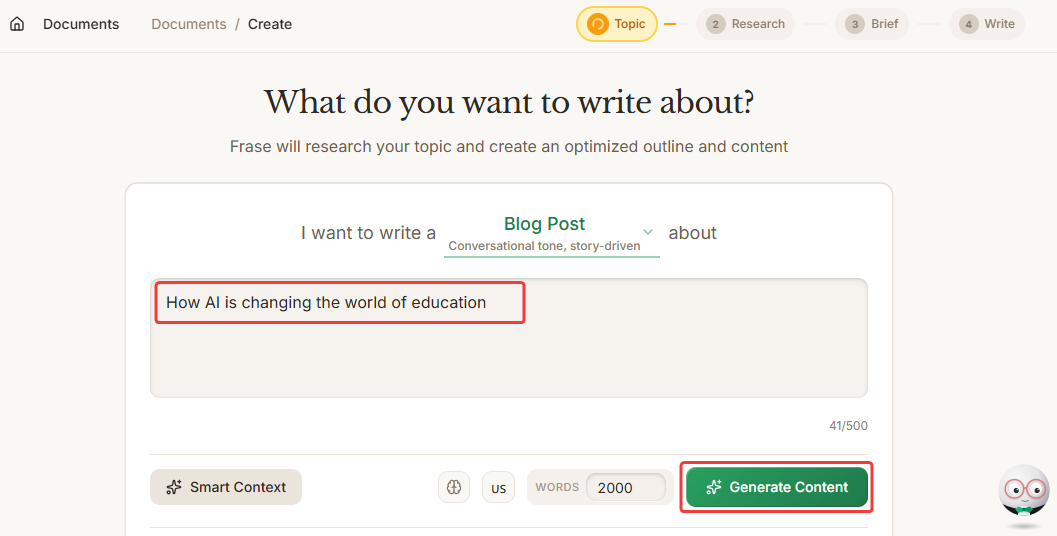
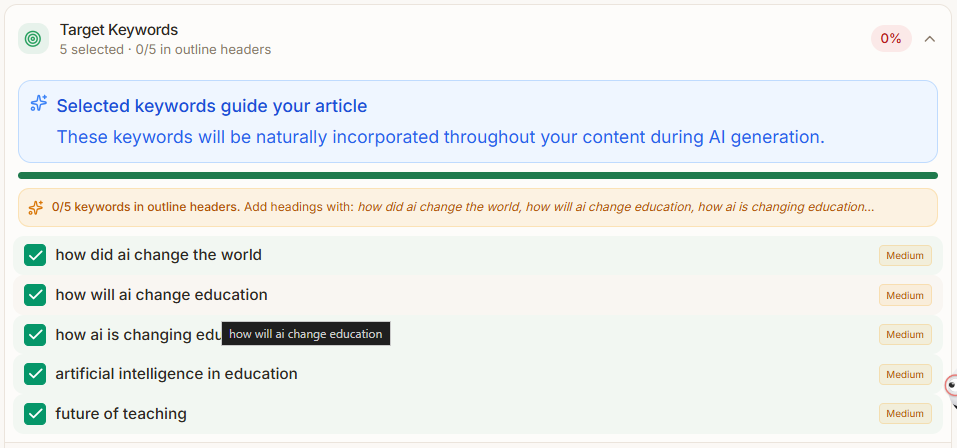
-
Smart Outlines: Writing a good blog starts with a strong plan. Frase is amazing at this. It goes out and reads the top Google results for your topic. Then, it builds a complete brief for you in seconds. It shows you the best headings and questions to answer. You do not have to spend hours researching anymore. It gives you the perfect map to start writing fast!
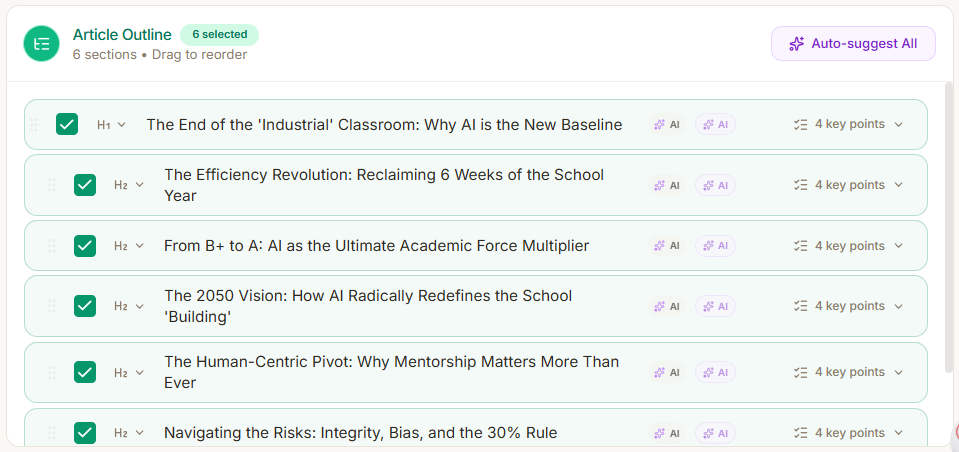
-
Live Content Score: This is the coolest part of Frase. As you type your blog, it gives you a live score. It is like playing a video game where you try to get 100 points! If you use the right words, your score goes up. It tells you exactly what is missing so you can fix it right away. With Jasper, you have to buy extra tools just to do this. Frase has it built right in!
Pricing
Frase has a great trial that lets you test it out. If you love it and need to write a lot more words, the paid plans start at $39 per month.
Anyword
Anyword is not your average writing tool. It is built for one big job: making you money. If you write ads or emails to sell things, this is your perfect match. It does not just write pretty words. It writes words that make people want to click and buy. Think of it as a super smart sales expert that works for you all day long!
Top Features
-
Predicts Sales: Do you ever wonder if your new ad will actually work? Anyword takes the guessing away. Before you even post it, the tool gives your text a special score. It predicts exactly how well your words will sell to your audience. It is like having a crystal ball for your business! You can easily change a few words to get a higher score before you spend any money on ads.


-
Data-Driven: Most AI tools start fresh every time. Anyword is much smarter. It looks at all the ads you have run in the past. It sees what worked and what totally failed. Then, it uses that data to write even better ads for the future. It learns what your specific customers like to read. This means your text gets stronger and smarter every single time you use it!
-
Built for Conversions: Some tools try to do everything. They write stories, poems, and blogs. Anyword does not care about poems. It is laser-focused on getting people to click your links and buy your stuff. Every single word it writes is carefully chosen to grab attention and drive actual sales. If you want to turn casual readers into paying customers, this tool is built exactly for you!
Pricing
Anyword has a great free trial that lets you test it out. If you love it and need to write a lot more words, the paid plans start at $39 per month.
Conclusion
Jasper is a great tool. But you do not have to settle for it. You have so many great choices now which can also help you write amazing content. Which one should you pick? It is very simple.
- Choose Jetwriter AI if you want a fast partner that lives in your browser and sounds exactly like you.
- Choose GravityWrite if you want to write quick full blog posts with just one click.
- Choose Rytr if you are on a tight budget and need quick text.
- Choose Frase if your main goal is to rank high on Google.
- Choose Anyword if you write ads and want to make more sales.
Pick one of these tools and try it out today. See for yourself how much time and money you can save. Happy writing!
Frequently Asked Questions (FAQ)
Is content created by these AI tools considered plagiarism-free?
Yes, most AI tools write brand new words from scratch. But, they can sometimes repeat common phrases if a topic is very popular. It is always a smart idea to run a quick plagiarism check just to be safe!
How can I make sure my AI-generated content still sounds like my unique brand voice?
You must give the AI clear rules about how you talk. Tools like Jetwriter AI let you save custom styles so it learns your exact tone. Always read the text and add your own fun spark before you share it.
Will using AI for my blog posts hurt my website's ranking on Google?
No, Google does not punish you just for using AI. Google only cares if your blog actually helps real people. If your post is useful and easy to read, your website will do great!
Do I need to fact-check the information in articles created by AI writers?
Yes, you absolutely must check the facts! AI tools are smart, but they can still make up fake numbers or dates. Always double-check the hard facts so your readers can trust you.
Is it safe to put private work data into AI?
It depends on the tool you pick. Some big tools use your words to train their AI, which is bad for company secrets. Always look for private tools that promise to never share or use your data!