_c--1315811593.jpg)
Running a small business is hard work. You have many jobs to do every day. You write emails. You post on social media. You update your website. It feels like the work never ends.
But here is the thing. Many owners use the wrong content marketing tools. They use software built for big companies. These tools are expensive. They are hard to learn. They have too many features you do not need.
Imagine this. You want to send a quick email. But you have to open a big program. You have to click five times just to start. It wastes your time. It slows you down when you need to be fast.
You do not need big tools. You need smart ones. You need content marketing tools that are fast and easy. Here is the simple truth. You can run your whole system with just a few apps. Here are 8 tools that will turn you into a content machine.
Content Marketing Tools For Small Business Owners
Jetwriter AI
Best for: Writing emails, blogs, and posts without sounding like a robot.
We all hate robotic and generic AI.
You know exactly what I mean. You ask an AI to write a simple email, and it sounds stiff and awkward. It uses fancy words like "delve" and "tapestry" that nobody actually says in real life. People know it is fake immediately. It feels cold.
Jetwriter AI fixes this problem completely. It is not just another text generator that guesses what you want. It is a smart, always-ready assistant that lives right in your browser.
Top Features
-
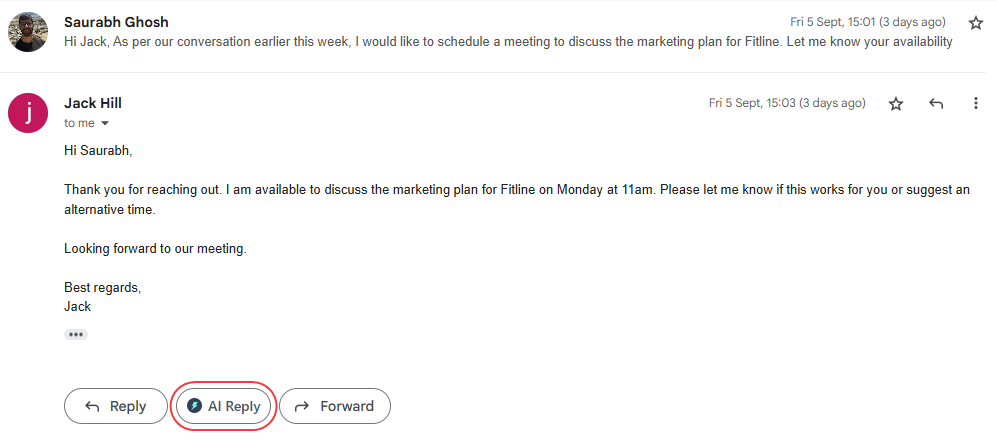
It Writes for You: Jetwriter reads your email or message to understand exactly what is happening. It writes perfect replies to your emails in Gmail and messages on LinkedIn instantly. It even works inside support tools like Freshdesk and Zendesk to answer customer tickets. You do not need to copy and paste anything. It matches your tone so you always sound like a real person.
-
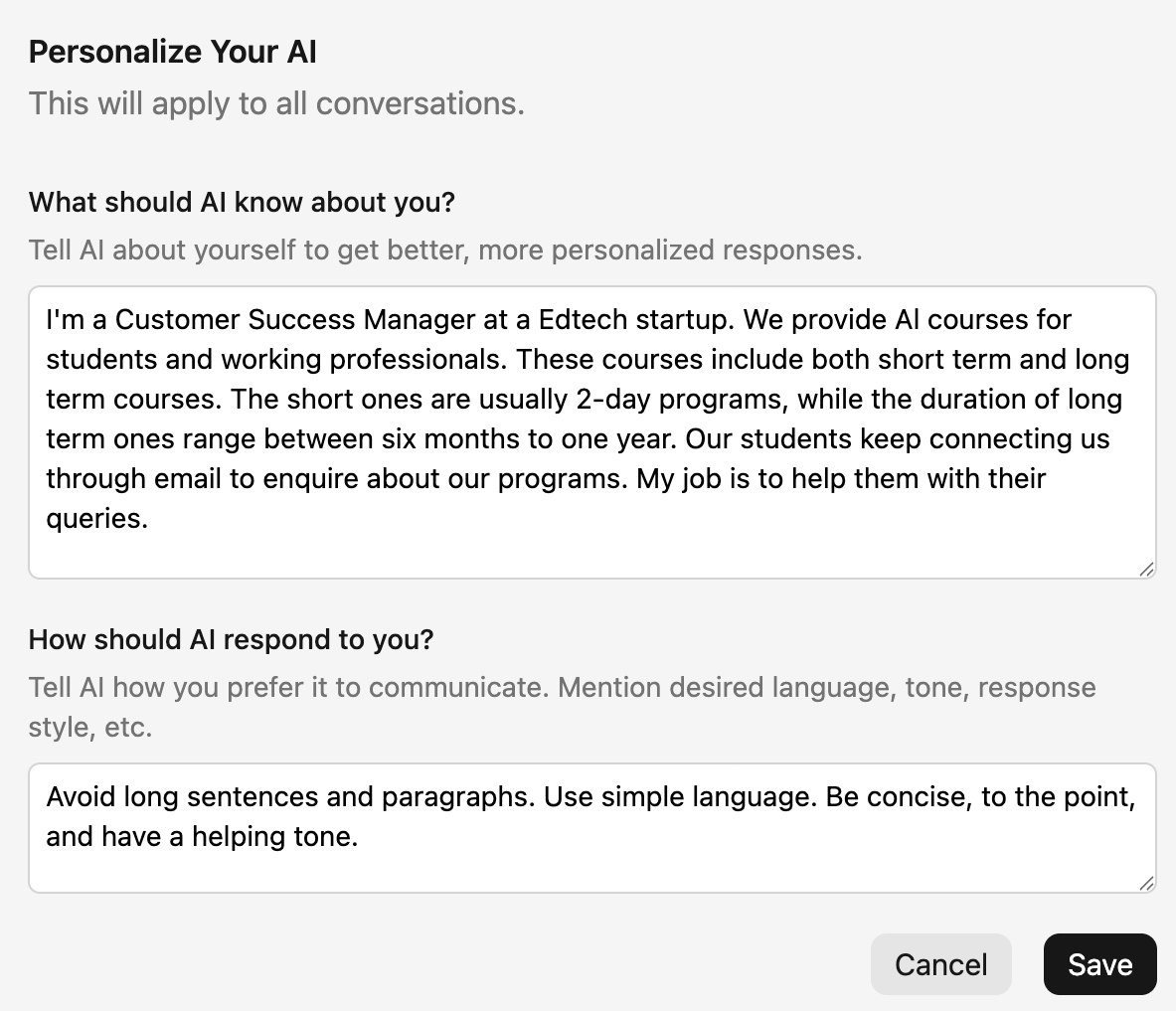
Personalize AI: You can teach Jetwriter exactly who you are. You tell it your job title and what your company does. It learns your specific role and how you like to talk. It stops guessing and starts writing like your best personal assistant.
-
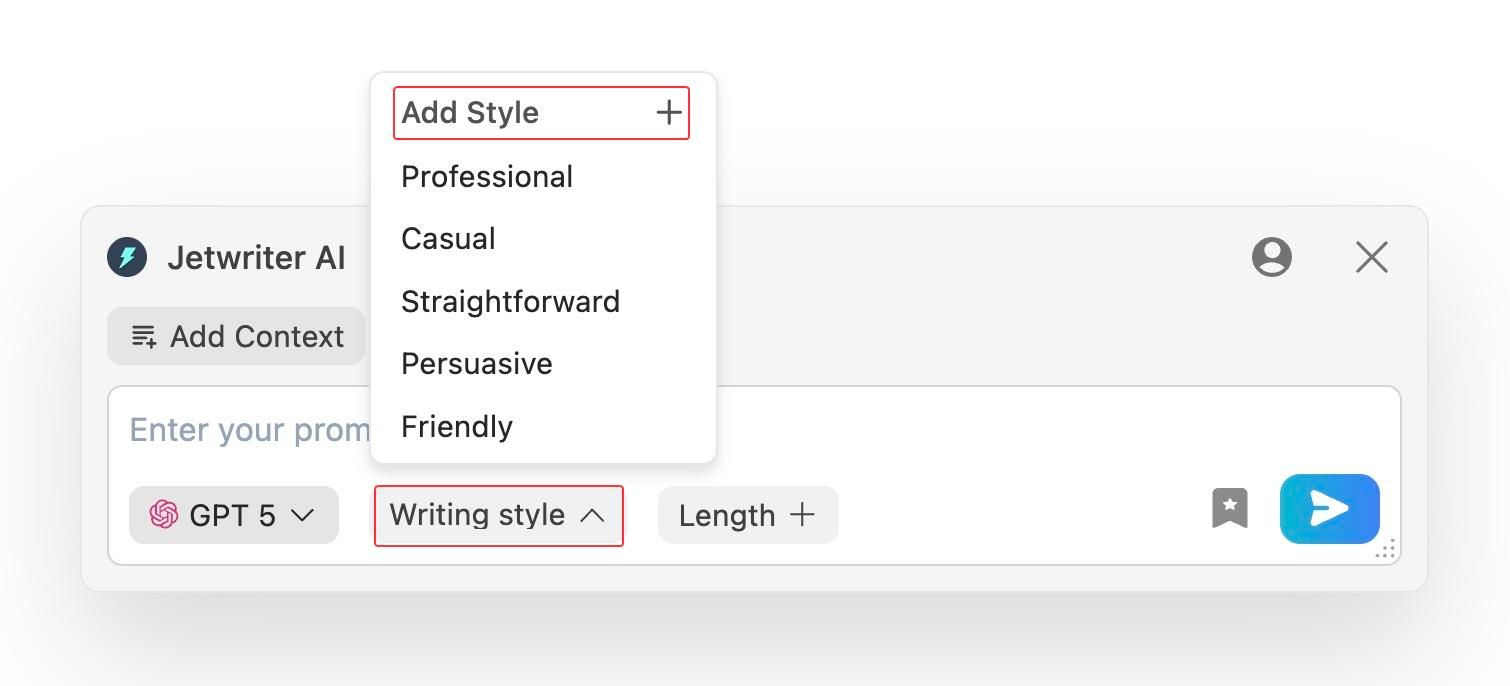
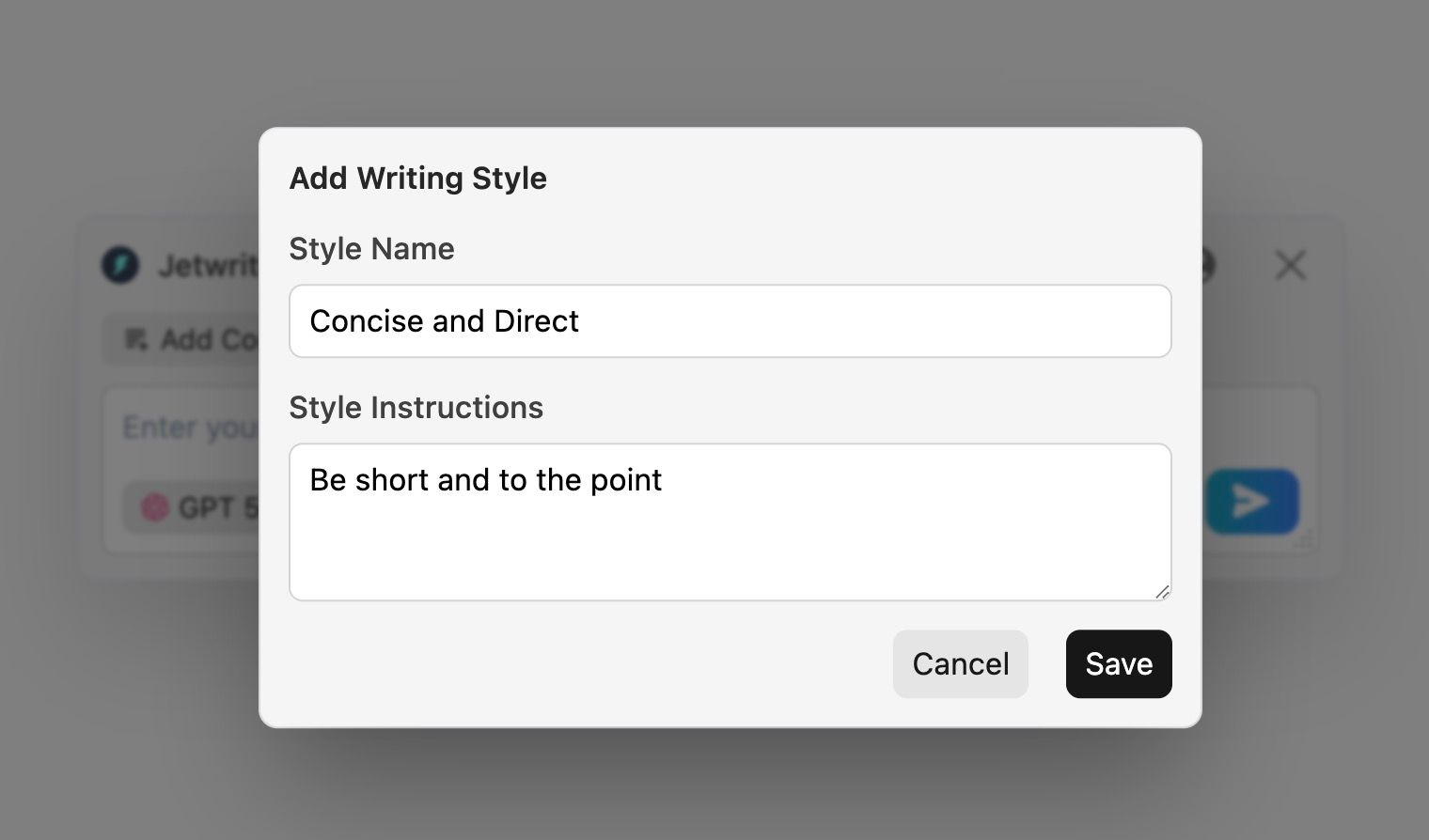
Custom Writing Styles: You do not talk to your boss the same way you talk to your friends. Jetwriter lets you create different "outfits" for your writing voice. You can have a "Concise & Direct" style for clients and a "Friendly Updates" style for your team. You can switch between them with one click.
-
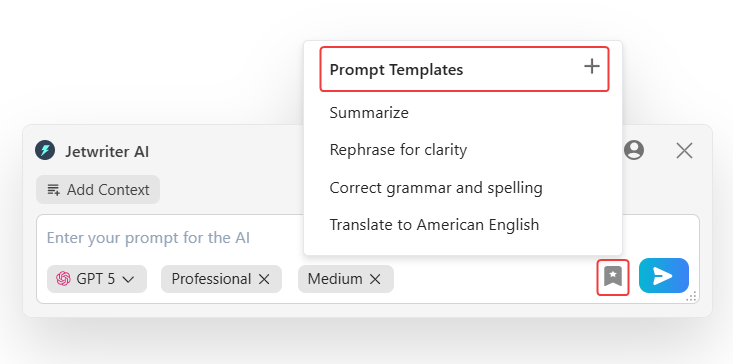
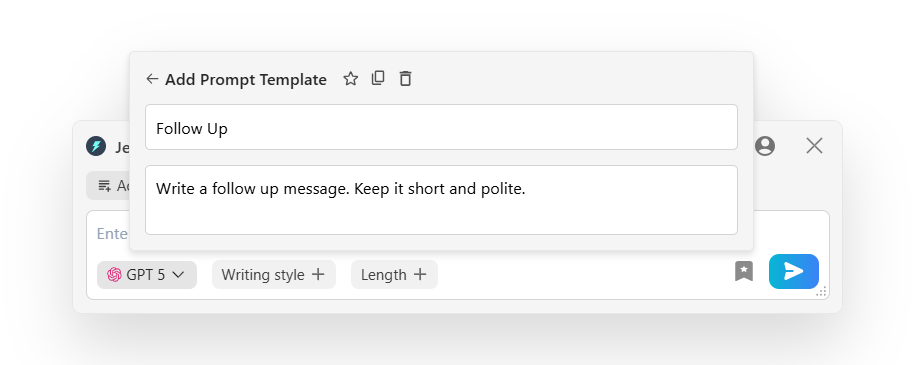
Save Prompt Templates: Do you type the same "Follow Up" or “Summarize” message five times a day? You can save your favorite commands as templates to use later. Next time, you just click a button and the work is done instantly.
-
Quick Actions: Select any text on any website to see a magic menu. You can fix spelling and grammar mistakes in a split second. You can ask it to summarize a long article so you save reading time. You can even translate text into another language. It puts powerful editing tools right at your fingertips.
-
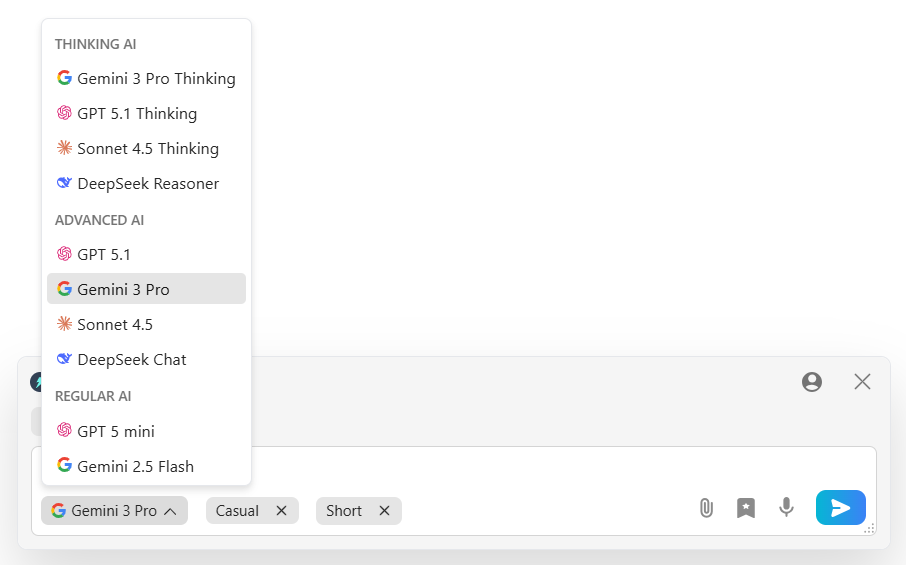
Smart, Fast & Safe: You are not stuck with just one AI brain. You can switch between top models like GPT-5.2, Claude, and Gemini instantly. It is very lightweight (less than 1MB) so it never slows down your computer. Plus, it keeps your data private and never uses it to train AI.
Pricing
You can start using Jetwriter AI for free. If you use it often, there are affordable paid plans available. You can even plug in your own API key.
Get the Tool
Ready to write faster? You can get the Jetwriter AI extension from the Chrome Web Store.
AlsoAsked
Best for: Knowing exactly what questions your customers are asking.
You want to write a helpful blog post. But you do not know what your customers actually want to know.
You guess. You write a long article about "Coffee." But maybe they just wanted to know "How to keep coffee hot?" You miss the point. It is like answering a question nobody asked.
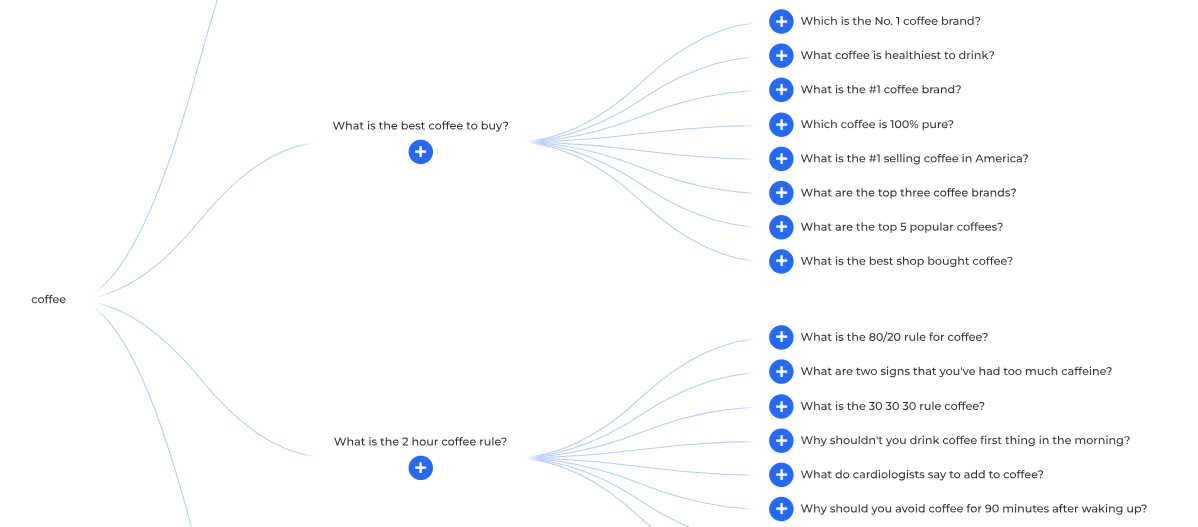
AlsoAsked solves this mystery. It shows you the exact questions people type into Google. It connects them like a family tree. You see the main question, and then all the smaller questions that come after it. It helps you get inside your customer's head.
Top Features
-
Real Google Questions: When you search on Google, you often see a box that says "People Also Ask." This tool takes all those questions and organizes them for you. It tells you exactly what problem your customer is trying to solve right now.
-
Visual Topic Map: Most tools just give you a boring list of words. AlsoAsked draws a map. It shows you how one question leads to another. For example, if you type "Dog Food," it links to "Is dry food bad?" and then "What is the healthiest brand?" You can see the whole conversation at once.
-
Instant Blog Outlines: This is the best part. You do not need to brainstorm. You just look at the map. The big question is your title. The smaller questions are your sub-headers. You can plan a perfect article in two minutes.
Pricing
You get 3 free searches every day. This is enough for most small tasks. If you need more, paid plans start at $12/month.
Get the Tool
See what people are asking at AlsoAsked.com.
Dorik
Best for: Building a website without coding.
Building a website used to be a nightmare. You either required to learn coding, or hire a developer who charges you thousands of dollars.
Dorik changes all of that. It makes building a website as easy as typing a document. You do not need to be a tech wizard. You do not need a big budget. You just need an idea.
Top Features
-
AI Website Builder: This feels like magic. You just type a simple prompt, like "I want a portfolio for my photography business." Dorik’s AI builds the whole site for you in seconds. It creates the layout, writes the text, and even picks the images. It does 90% of the work for you instantly.
-
No-Code Editor: Want to move a picture? Just drag it. Want to change the text? Just click and type. It is a visual editor, which means you see exactly what your site looks like while you build it. You have over 250+ ready-made blocks to choose from, so you never have to design from scratch.
-
Unlimited Storage & Bandwidth: Many website builders charge you more when you get popular. They put limits on how many people can visit your site. Dorik gives you unlimited storage and bandwidth on paid plans. You can grow as big as you want without worrying about extra fees or your site crashing.
Pricing
Dorik has a generous free plan to get you started. Paid plans are very affordable (starting around $20/mo).
Get the Tool
Build your dream website today at Dorik.com.
Metricool
Best for: Managing all your social media in one place.
Posting on social media can feel like a full-time job.
First, you have to post a photo on Instagram. Then, you have to open LinkedIn and write something smart. Then you go to Facebook. Then you jump over to X (Twitter). It is exhausting. You spend hours just switching between apps on your phone. You forget to post. It feels messy and disorganized.
Metricool saves you from this chaos. It connects all your accounts into one simple dashboard. You do the work once, and it goes everywhere. It is like having a social media manager who never sleeps.
Top Features
-
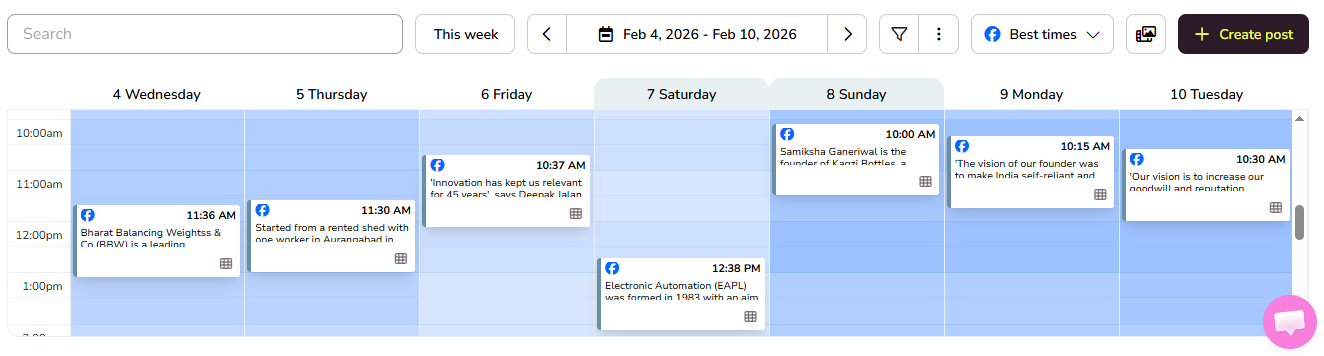
All-in-One Scheduler: Stop posting manually every single day. Metricool gives you a visual calendar that looks just like a diary. You can drag and drop your photos and videos onto the dates you want. You can schedule content for Instagram, TikTok, LinkedIn, YouTube, and Facebook all at once. You plan your whole month in one afternoon and then relax.
-
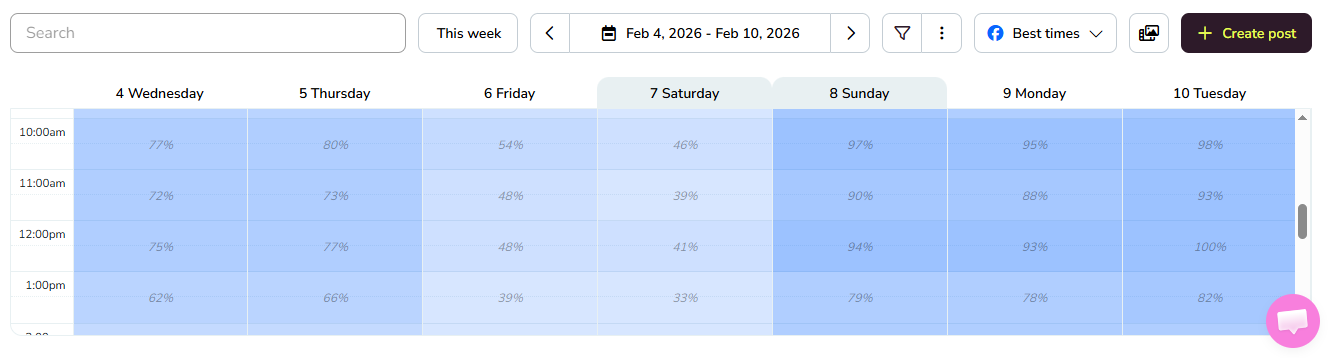
Best Time to Post: Posting at 3 AM is useless if your audience is asleep. Metricool analyzes your specific followers to see when they are online. It highlights the "hot" hours on your calendar with darker colors. You just drop your post on the dark spot, and you get more views and likes automatically.
-
Unified Inbox: It is easy to miss a comment or a message when you have five different apps. Metricool collects every comment, private message, and reply from all your platforms into one single inbox. You can reply to an Instagram DM and a LinkedIn comment from the same screen. You never leave a customer waiting again.
Pricing
Metricool has a "Free Forever" plan that is great for small businesses. If you manage more brands, paid plans start around $18/month.
Get the Tool
Start scheduling your posts at Metricool.com.
Kit (formerly ConvertKit)
Best for: Sending emails and newsletters.
On social media, you spend years building a following on Instagram or LinkedIn. Then, one day, the algorithm changes. Suddenly, nobody sees your posts. Your business disappears overnight because you built your house on rented land.
You do not own your social media followers. But you do own your email list.
Kit helps you move your fans from "rented land" to "owned land." It is not just for sending emails. It is a full engine for selling products and finding sponsors.
Most email tools are clunky. They confuse you with "lists" and "segments" that don't make sense. Kit keeps it clean. It focuses on the one thing that matters: growing your relationship with your readers.
Top Features
-
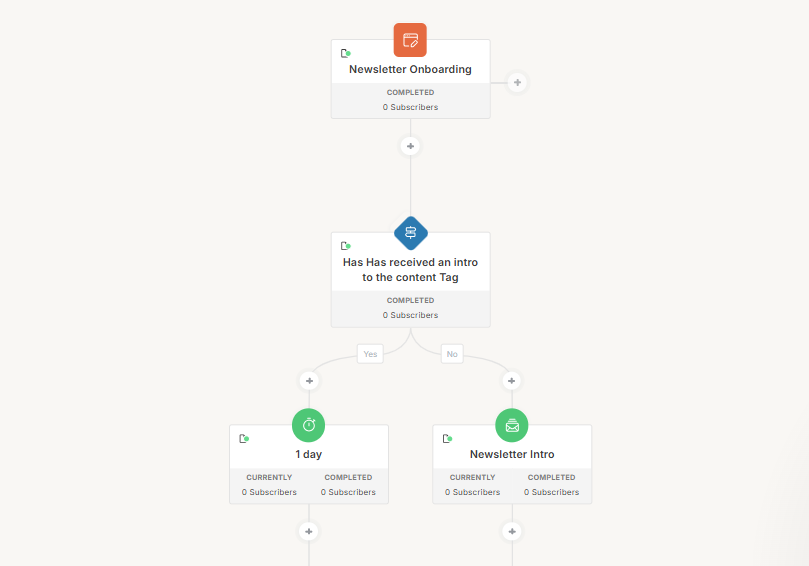
Visual Automations: This allows you to sell while you sleep. You can set up a "Welcome Sequence" once. When a new person joins, Kit sends them email #1 today, email #2 tomorrow, and email #3 next week. You do not touch a button. It happens automatically, turning new subscribers into fans without you lifting a finger.
-
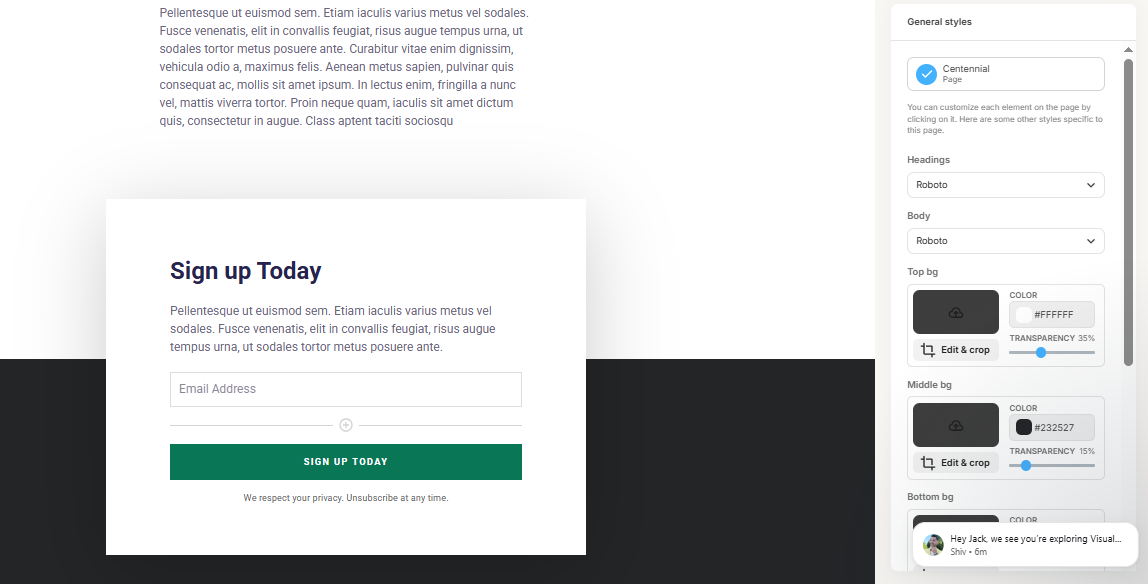
Landing Pages: Do not have a website yet? No problem. You can build a beautiful "Subscribe" page in minutes using Kit. You can host it for free and start collecting emails immediately. You can even deliver a free gift (like a PDF or ebook) automatically when someone signs up.
-
Sponsor Network: Making money with a newsletter used to be hard. You had to cold-call companies and beg for ads. Kit changes this. They have a built-in network that finds sponsors for you. If your list is growing, they connect you with brands who want to pay you. It helps you turn your hobby into a paycheck.
Pricing
The "Newsletter" plan is free for up to 10,000 subscribers. This is incredibly generous and perfect for getting started.
Get the Tool
Start building your email list at Kit.com.
Google Trends
Best for: Knowing what is popular right now.
Content marketing is a guessing game for most people.
You sit at your desk and wonder, "What should I write about today?" You guess that maybe people like "blue shoes." You spend hours writing a blog post.
Google Trends stops the guessing game. It tells you exactly what the world is searching for right now. It uses real data from billions of Google searches to show you what is hot and what is not.
Top Features
-
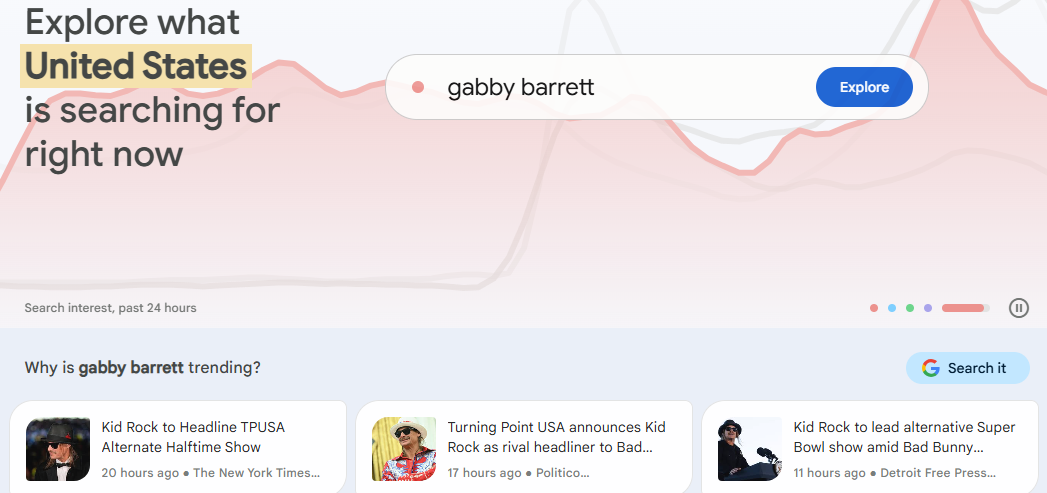
Real-Time Data: The news changes every hour. Google Trends shows you spikes in interest as they happen. If a new topic explodes in popularity this morning, you see it instantly. This lets you be the first person to write about it, which brings huge traffic to your site.
-
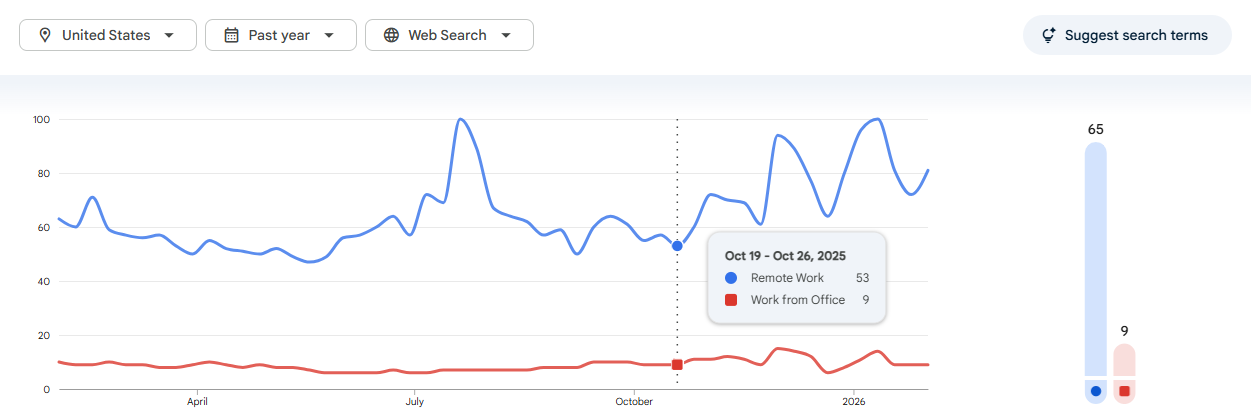
Compare Topics: Not sure which keyword is better? You can type in "Remote Work" vs. "Work from Home." Google draws a simple line chart that shows which one is more popular over time. You can see which term is dying and which one is growing, so you always pick the winner.
-
Regional Interest: The world is not the same everywhere. Maybe "Winter Coats" is trending in New York, but nobody cares in Florida. This map feature shows you exactly where a topic is popular. If you sell products locally, this data is pure gold. It helps you target the right people in the right place.
Pricing
It is 100% Free. You do not even need to log in to use it.
Get the Tool
See what is trending at trends.google.com.
Vidyard
Best for: Sending quick videos to clients.
Sometimes, writing may not be the correct way to communicate. You type a long paragraph to explain a simple idea. Sometimes, it sounds confusing. Other times the tone feels wrong. The client thinks you are being rude when you are just trying to be direct.
Vidyard solves this. It replaces long, boring text with quick, personal videos. It helps you build trust instantly because people can see your face and hear your voice. It makes you feel like a real human.
Top Features
-
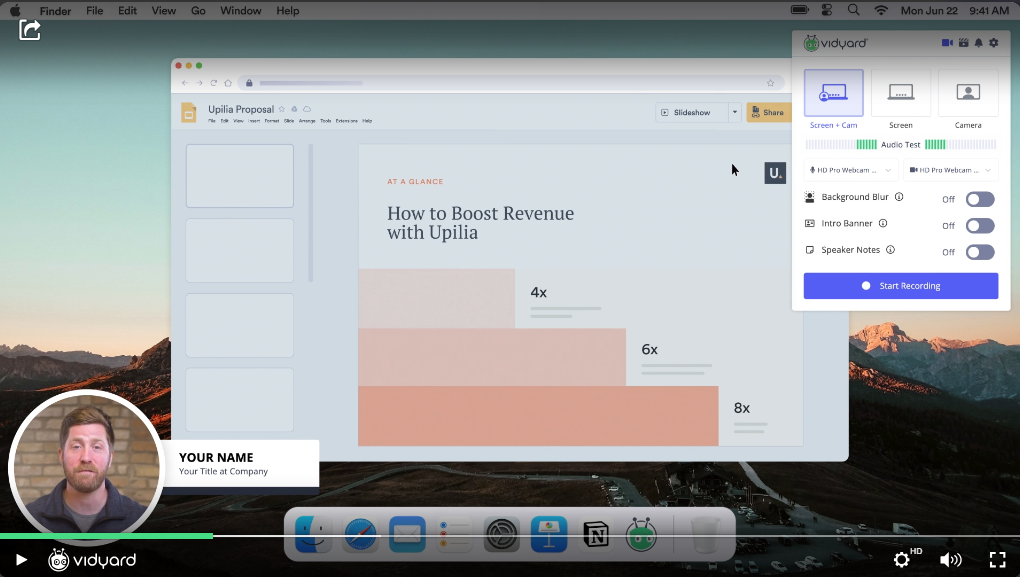
Screen Recording: You can record your computer screen and your face at the same time. It puts a little circle with your video in the corner. This is perfect for tutorials. Instead of typing a ten-step guide on how to fix a problem, you just click record, show them exactly what to do on your screen, and send the link. It takes one minute and explains everything perfectly.
-
Viewer Analytics: When you send an email, you never know if the person actually read it. With Vidyard, you know everything. It tells you exactly who watched your video and for how long. Did they watch the whole thing? Did they stop after ten seconds? This helps you know which clients are actually interested so you can follow up at the perfect time.
-
Ad-Free Hosting: If you put a YouTube video on your business website, your visitors might see an ad for a competitor. Or they might get distracted by a funny cat video and leave your site. Vidyard gives you a clean, professional video player. There are no ads. There are no "Suggested Videos" to steal your customers. It keeps the focus 100% on your brand.
Pricing
Vidyard has a free plan that lets you record and share videos easily. It is perfect for getting started with video messaging. Paid plans start at $59 per month.
Get the Tool
Start recording at Vidyard.com.
Vista Create
Best for: Making your posts look pretty.
We are not all artists. While designing a social media post or a banner, the colors can clash. The text can be in the wrong place. It looks amateur.
You could hire a graphic designer, but that costs a fortune. You could try to learn complex software like Photoshop, but that takes months.
Vista Create is the cheat code. It makes you look like a pro designer instantly. It is a simple drag-and-drop tool that does the hard work for you. You do not need to know about pixels or color theory. You just need to click a mouse.
Top Features
-
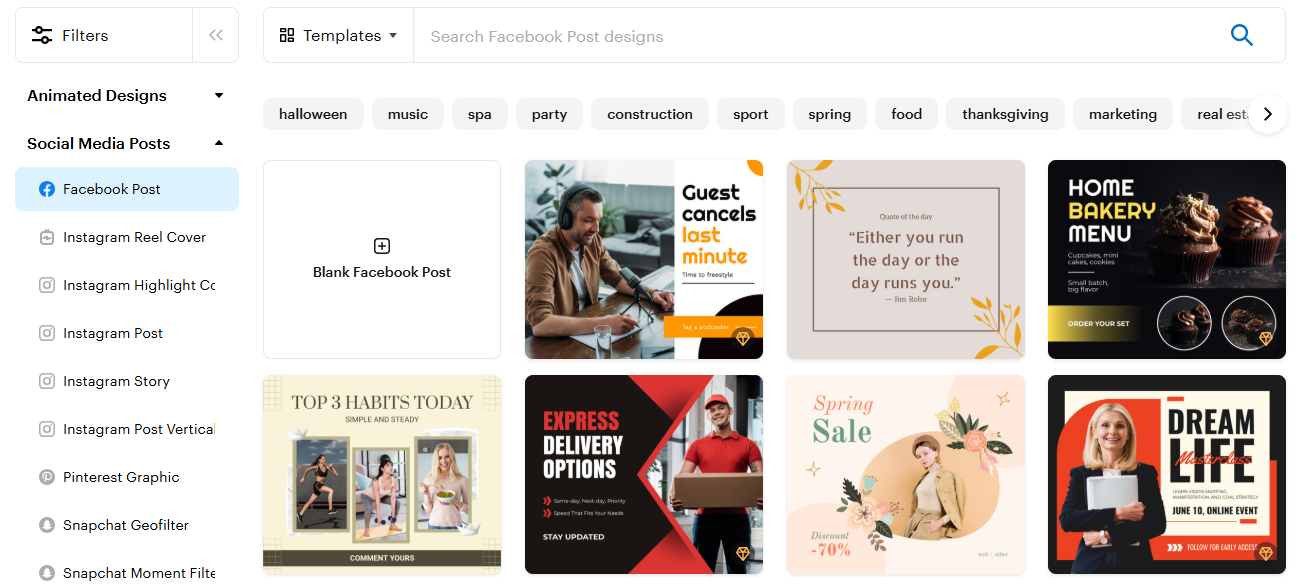
Ready-Made Templates: The hardest part of design is starting with a blank white page. With Vista Create, you never start from scratch. They have thousands of templates for everything - YouTube thumbnails, Instagram Stories, Facebook ads, and even flyers. You just pick a design you like, change the text to match your message, and hit save. It takes five minutes.
-
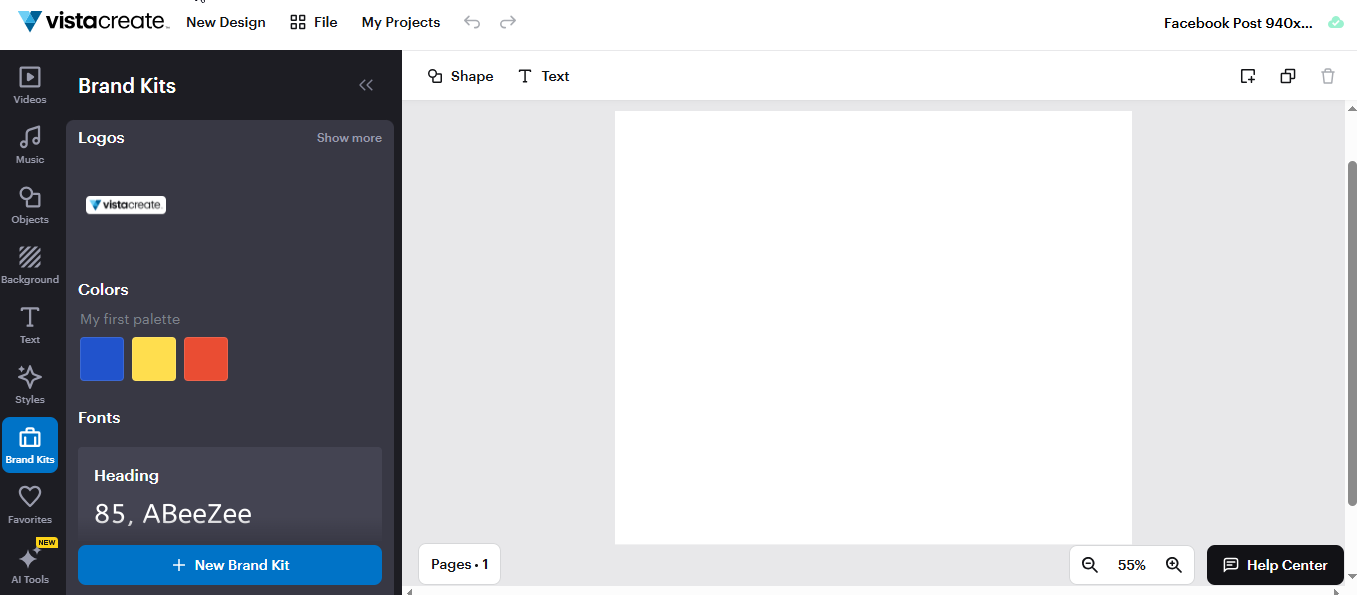
Brand Kits: You want your business to look consistent. You do not want a blue post today and a red post tomorrow. Vista Create lets you save your logo, your specific fonts, and your brand colors. Every time you make a new design, your brand is already there. It ensures everything you publish looks like it came from the same company.
-
Background Remover: This feature feels like magic. Usually, removing a background from a photo takes a long time and a steady hand. Here, you upload a photo of yourself or your product, click one button, and the background disappears. You can then put your image on any color or background you want. It is perfect for making professional product images.
Pricing
They offer a very strong free starter plan that gives you access to thousands of templates. Paid plans start at $10 per month.
Get the Tool
Start designing like a pro at create.vista.com.
Conclusion
Running a small business is tough. But you do not need a big team or a huge budget to win. You just need the right tools to do the heavy lifting for you.
Do not try to do everything at once. That is a recipe for stress. Just pick one tool from this list today. Fix your biggest headache first. If writing takes too long, start with Jetwriter AI. If you need a website, look at Dorik.
These tools are here to save you time. They let you focus on what really matters - your customers. Stop doing everything the hard way. Pick a tool, sign up, and make your life easier.
Frequently Asked Questions (FAQ)
Are free tiers of mentioned content marketing tools actually good enough for business?
Yes. free does not mean bad. Many real businesses use the free versions of these tools every day. The free plans usually give you everything you need to start. You can run your business for a long time without spending any money.
Will using AI tools for writing hurt my ranking on Google?
It depends on how you use them. Google likes helpful content, but it hates lazy, boring text. If you just copy exactly what a robot writes, it looks bad. But if you use AI to fix your mistakes or clear up your ideas, it works great.
When is the right time to start paying for these tools?
Wait until you are making money. Do not pay just because a paid plan looks fancy. Only pay when the free plan becomes too small for you. Let your business earnings pay for the tools.
Is it safe to share my business data with these online tools?
Mostly, yes. Good tools want to keep you safe so they protect your secrets. But always check their rules first. For example, Jetwriter AI promises not to sell your data or read your emails. Be careful with tools that don't say that clearly.