We all have too much to read. Emails, reports, long articles. The list never ends.
Imagine someone handing you a 50-page document right before lunch. Are you going to read every single word? Of course not. You do not have the time.
So, what do you do? You use an AI summarizer.
Think of it like a smart assistant. You give it a giant wall of text. It reads it in one second. Then, it tells you the exact three things you actually need to know. It strips away all the boring fluff and just gives you the facts.
This blog is for anyone who needs to understand written content fast.
- Maybe you are a student reading long, dry chapters.
- Maybe you are a manager checking endless team updates.
- Or maybe you are a professional going through heavy research.
You do not always have time to read everything word by word. If you want tools that quickly turn long documents, emails, or notes into short, clear points, this is for you. Let's save you some time.
The Top 5 AI Summarization Tools
We all use AI tools. But not all of them work similarly. Let's look at five tools that can help you summarize your content.
Jetwriter AI
Let's start with Jetwriter AI. Think of it as a quiet smart assistant. It lives right inside your browser as a handy chrome extension. It stays out of your way until you need it. You never have to switch tabs or leave your current page to summarize the content. This makes it a perfect tool for busy students, busy professionals, and business owners who just want to get the main points fast.
Top Features
-
Works Everywhere: Imagine you are reading a 50 page long online journal or a Google doc file. Usually, you have to highlight the text. Then you copy it. Then you open a brand new tab. Then you find a website. Then you paste the text just to get a summary. That is too many steps. It breaks your focus. Jetwriter AI changes this completely. You do not need to copy anything at all. You do not need to open any new tabs. You just click the Jetwriter AI button right there on your current page. It reads the page for you. Then, it gives you a short, clear summary instantly. It saves you so much clicking and moving around.
-
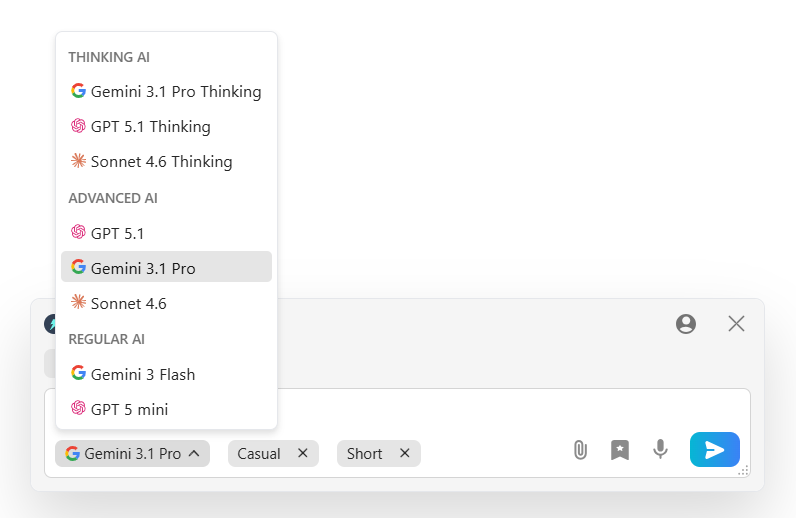
Choose Your AI: Most tools lock you into using just one kind of AI. They make the choice for you. But with Jetwriter AI, you have full control over the engine. You can easily choose to use ChatGPT, Gemini, or Claude. You get to pick the exact AI brain that reads and summarizes your text. If you want one AI to summarize a logic report, you can pick that one. If you want a different AI to summarize a creative story, you can switch to it instantly. You are always the boss of which smart brain is doing the hard work for you.
-
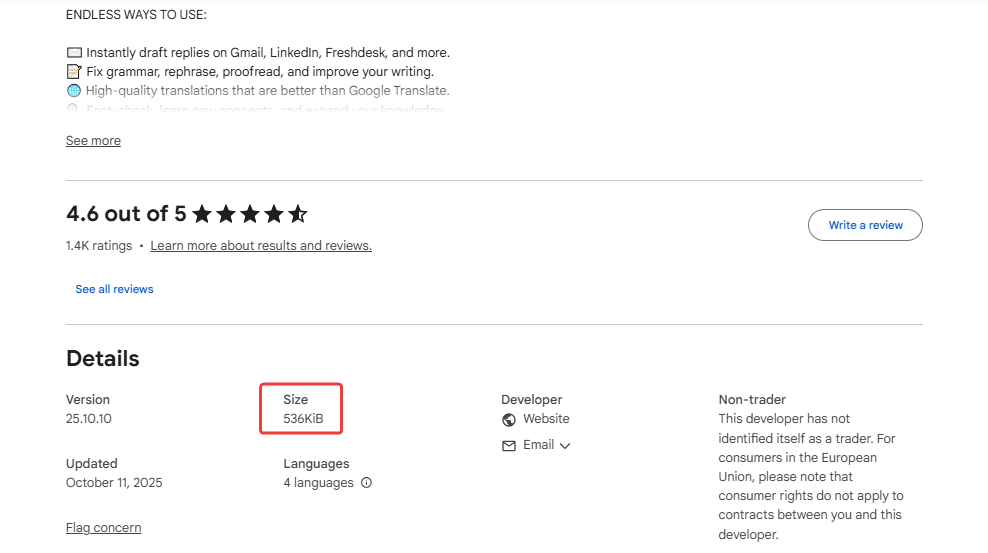
Quick & Secure: Nobody likes a slow computer. Jetwriter AI is incredibly light. It is under 1MB in size. Because it is so small, it will never slow down your laptop while you work. More importantly, it keeps all your data completely safe. Your private emails and work documents stay strictly with you. Your personal information is locked down. It is never, ever used to teach or train the AI models. You can summarize your most private work with total peace of mind.
Pricing
You can start using Jetwriter AI for free. If you use it often, there are affordable paid plans available. You can even plug in your own API key.
Get the Tool
Ready to summarize faster? You can add Jetwriter AI extension to your Chrome or Edge browsers.
Scholarcy
Let's look at Scholarcy next. Think of it as a smart study buddy. It is built specifically for long research papers and heavy books. It takes massive, boring documents and turns them into bite-sized flashcards. You do not have to read pages and pages of heavy text anymore. This makes it a perfect tool for university students, teachers, and researchers who need to go through a lot of academic reading fast.
Top Features
-
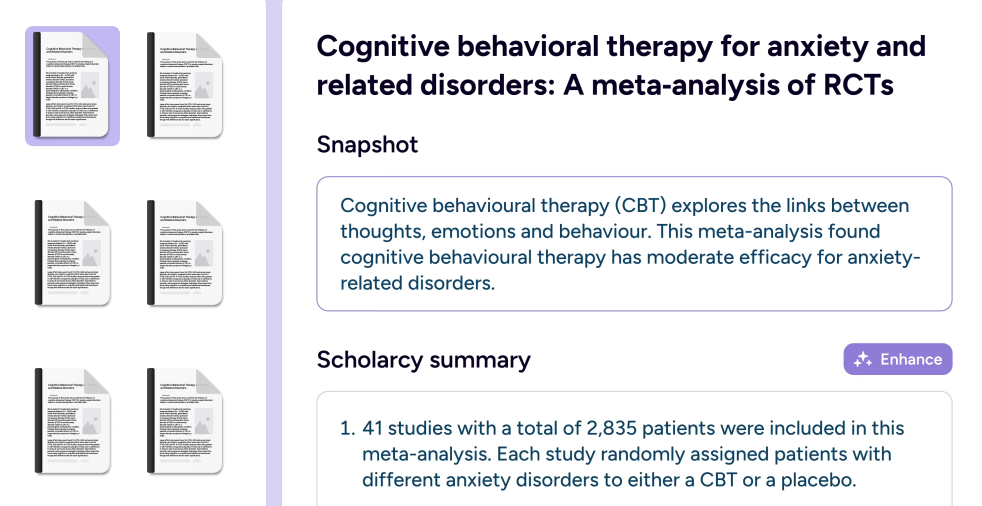
Instant Flashcards: Imagine you are looking at a huge, 40-page science report. Usually, you have to read every single line just to find the main idea. You get tired. Your eyes hurt. You lose focus easily. Scholarcy changes this completely. It reads the whole heavy paper for you in just a few seconds. Then, it breaks the long paper down into small, easy-to-read flashcards. You just click and read the short cards. It gives you the core facts without the big headache. It saves you hours of reading time and keeps your brain fresh.
-
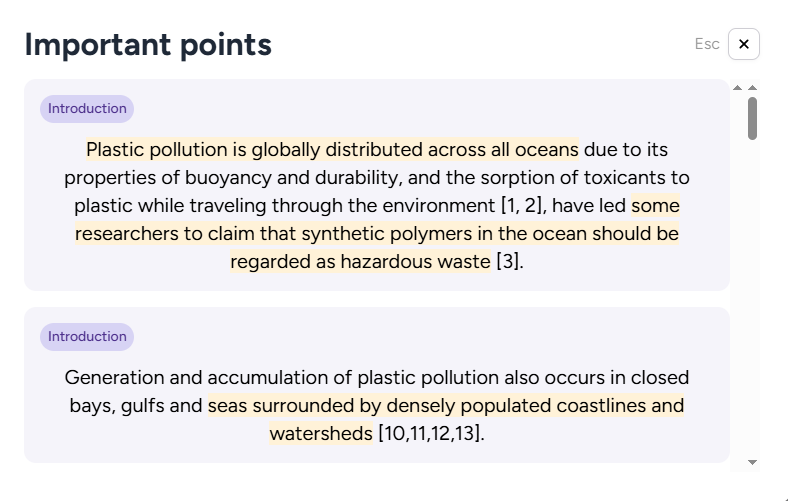
Smart Highlighting: Sometimes you still want to skim the original document. But you do not know where to start looking. Most tools just give you a separate, plain text summary. But with Scholarcy, it actually highlights the most important sentences right inside the text for you. It uses a smart virtual highlighter to show you exactly what matters most. Your eyes go straight to the important parts of the page. You do not have to guess what the writer meant. You never miss a critical detail or a big idea again.
-
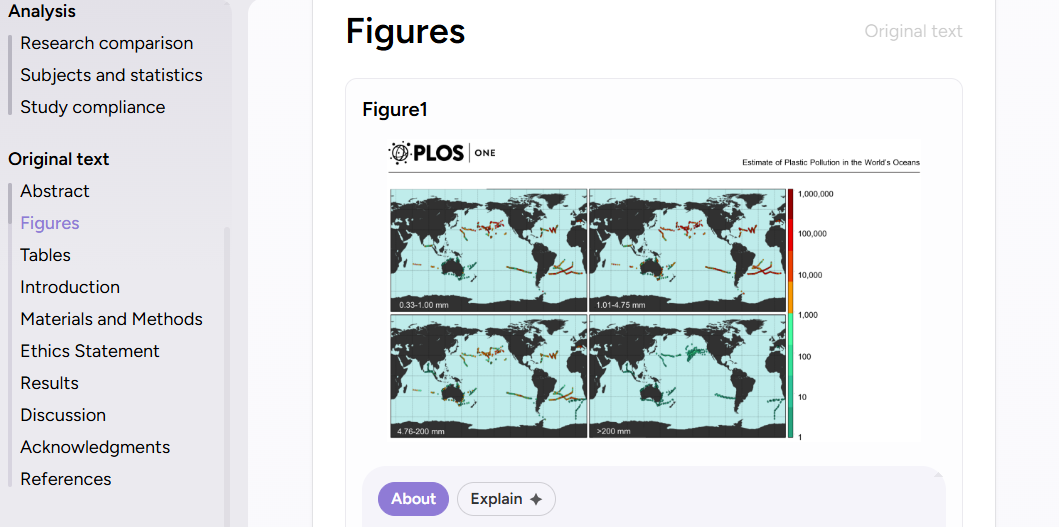
Finds Facts and Tables: Research papers are full of complex charts, important numbers, and long lists of references. It is very easy to lose track of them while reading. Other AI tools often ignore these small details completely. They just look at the simple words. But Scholarcy is different. It acts like a careful detective. It pulls out all the important data, data tables, and book references for you automatically. It puts them all in one neat, clean place. You get all the hard facts you need for your own essay or report instantly.
Pricing
Scholarcy offers a free basic version to help you summarize articles. If you want to save all your flashcards in a personal library and get unlimited summaries, the paid plan is priced at $4.99 per month.
Get the Tool
Ready to read research faster? You can try Scholarcy on their website or add the extension to your Chrome or Edge browser.
Recall
Let's talk about Recall. Think of it as your second brain. It does not just summarize things for you. It actually saves them and organizes them for later. If you are tired of losing track of good articles or forgetting what you read last week, this is for you. This makes it a perfect tool for researchers, creators, and anyone who wants to build a personal library of knowledge.
Top Features
-
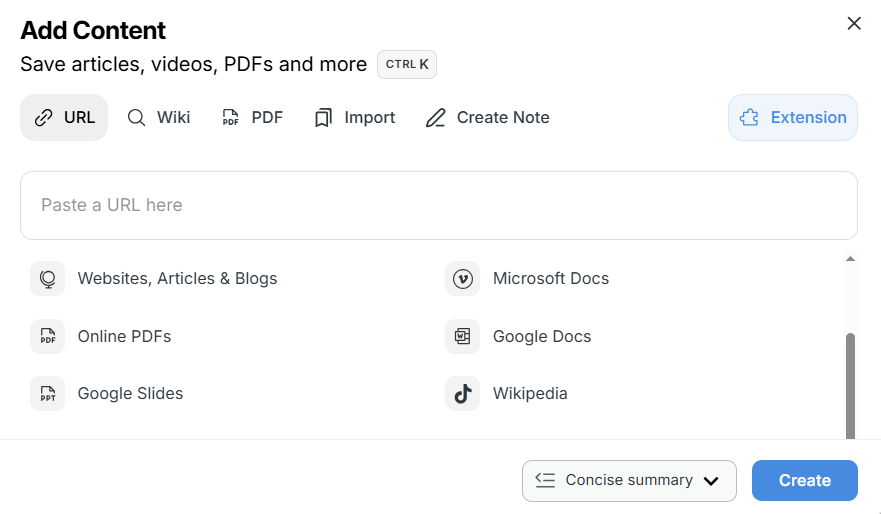
Summarizes Everything: Most tools only read simple text. Recall is much smarter and much more powerful. It can summarize almost anything you find online. Yes, it reads long news articles and heavy PDF documents. But it also watches long YouTube videos and listens to hour-long podcasts for you. Imagine finding a two-hour business podcast. You want the advice, but you have zero time to sit and listen to the whole thing. You just give the link to Recall. It does the hard work. It gives you all the best points, ideas, and timestamps in a few short sentences. It saves you hours of watching, reading, and listening every single week.
-
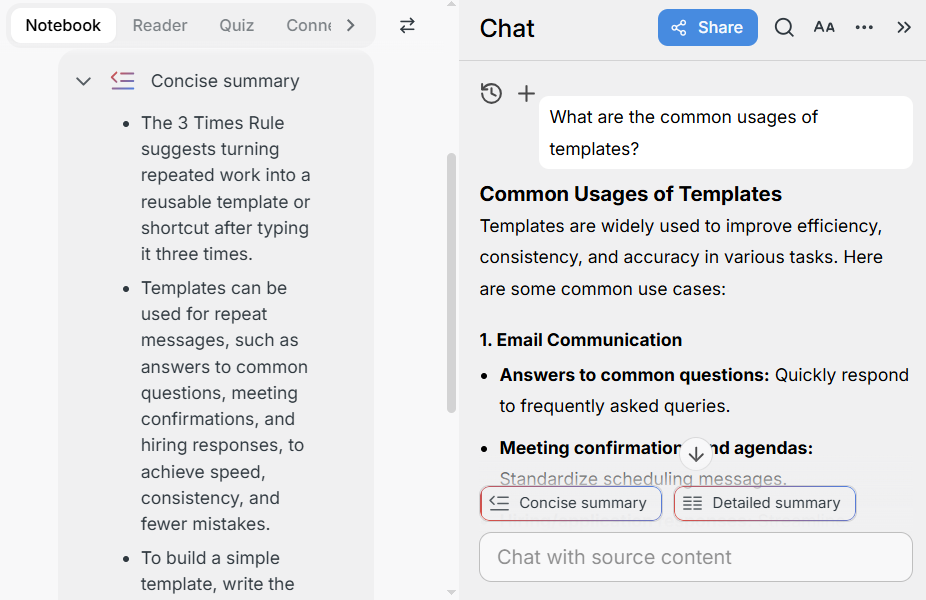
Chat With Your Brain: Have you ever remembered a great fact from an article, but completely forgot where you read it? We all do that. Recall fixes this frustrating problem completely. It lets you chat directly with your entire saved library. You just type a normal question into the chat box. You can ask something like, "What did that YouTube video say about daily habits?" Recall instantly searches through every single summary you have ever saved. It finds the exact answer and gives it to you instantly. It is literally like talking to your own personal, super-smart encyclopedia that remembers everything you have ever seen.
-
Auto-Organizes: When you save a summary, where does it usually go? You have to create messy folders. You have to invent new tags. It takes too much time and you end up forgetting your own system. Recall does all of this organization automatically. It acts like a very smart librarian. It takes your brand new summary and magically connects it to other related things you saved months ago. It builds a beautiful, connected web of your ideas without you lifting a finger. You spend zero time sorting and filing. You never have to create or manage a single folder ever again. Your notes stay perfectly neat.
Pricing
Recall offers a free plan that gives you 10 free summaries to test it out. If you want to save unlimited notes and summaries, their paid plans start at $7 per month.
Get the Tool
Ready to remember everything? You can try Recall on their website or add the extension to your Chrome browser.
NotebookLM
Let's talk about NotebookLM. Think of it as your own private research expert. It is a powerful tool built by Google. But instead of searching the whole public internet, it only searches the exact documents you give it. You never have to worry about fake information. This makes it a perfect tool for serious writers, professional lawyers, and deep researchers who cannot afford any mistakes and need to summarize their own documents accurately.
Top Features
-
Sticks to the Facts: Imagine asking a tool to summarize an important contract or a medical report. Most AI tools just guess. If they do not know the exact answer, they just make something up to sound smart. That is dangerous if you are doing serious professional work. NotebookLM changes this completely. It is completely grounded in your files. You upload your own PDFs, your own Google Docs, or your own text files directly into the notebook. When you ask a question, it only uses the exact information from your specific uploads to give you the summary. It never guesses. It never makes up fake information. You get the pure, hard facts exactly as they were written in your original documents. It gives you complete peace of mind.
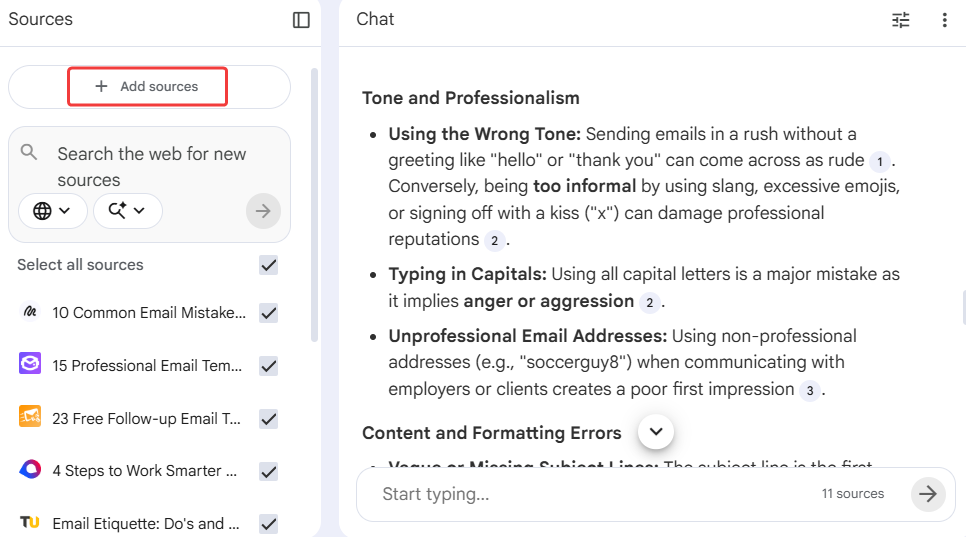
-
Clear Proof: Imagine getting a great summary from an AI, but you do not know if you can actually trust it. You have to go back and read the whole 50-page document anyway just to double-check the AI's work. That totally ruins the point of using a shortcut. NotebookLM fixes this frustrating problem completely. Every single time it writes a summary or answers your question, it includes tiny little numbers next to the sentences. These are instant inline citations. You just click the little number, and it jumps exactly to the original paragraph in your document where it found that fact. You get instant, clear proof for everything it says. You never have to blindly trust the machine again.
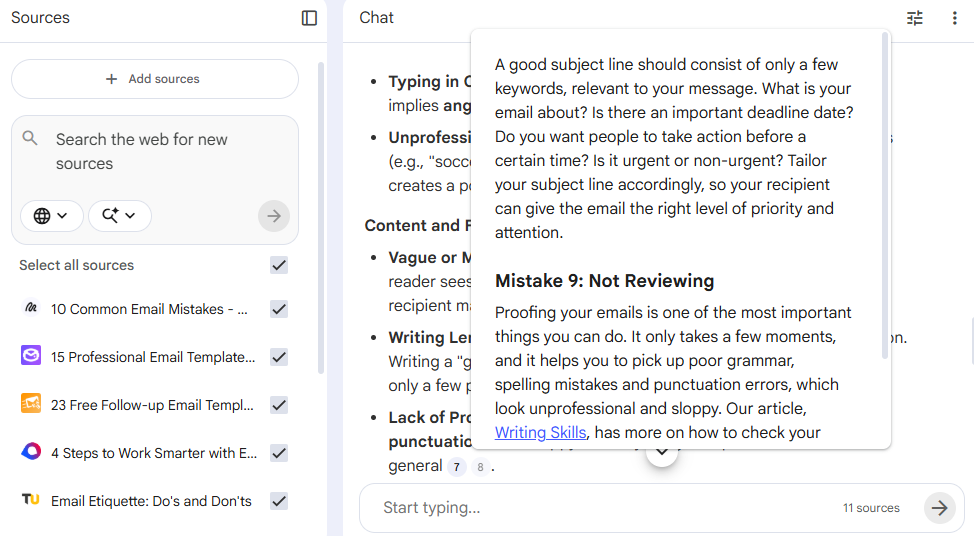
-
Audio Podcasts: Sometimes your eyes are just tired of reading words on a bright screen all day. Most summarization tools only give you plain text summaries back. You still have to read them. But NotebookLM has a brand new feature that feels like magic. It takes all of your boring, heavy text documents and turns them into a high-quality audio podcast. You just click one single button, and two realistic AI hosts will start talking about your research files out loud, like a radio show. You can listen to the full summary of your documents while you drive to work, cook dinner, or walk the dog. It saves your tired eyes and helps you learn the material just by listening.
Pricing
NotebookLM offers a very generous free version that gives you access to its best features for everyday research. If you are a heavy power user and need higher limits, the paid plans start at $19.99 per month.
Get the Tool
Ready to build your private research hub? You can try NotebookLM for free directly on their website.
SMMRY
Let's talk about SMMRY. Think of it as a strict editor with a red pen. It does not try to do a million different things. It does not have flashy, complicated features. It just cuts long text down to its absolute core. This makes it a perfect tool for people who just want the facts fast without any confusing setups or shiny distractions.
Top Features
-
Removes the Fluff: Imagine you are reading a long news article or a big company update. Often, the writer uses way too many words. They add long, boring introductions. They repeat the same point three times. They use fancy filler words just to sound smart. Reading all of that is exhausting. SMMRY changes this completely. It is built to hate fluff. When you give it a long piece of text, it aggressively strips away all the unnecessary junk. It removes the extra examples, the transition phrases, and the repetitive sentences. It only keeps the absolute core sentences that carry the real meaning. You do not have to dig through paragraphs of useless words anymore. You get the raw, hard facts handed to you instantly. It gets straight to the point so you can move on.
-
Custom Length: Imagine you need a summary of a long report to share with your busy boss. But you only have enough space for a quick, short text message. Most AI tools do not give you a choice. They just spit out a standard, medium-sized summary that might still be too long for your needs. SMMRY fixes this frustrating problem completely. It puts you in total control of the output size. Before you click the summarize button, you simply type in the exact number of sentences you want to receive. If you are in a massive rush, you can tell it to shrink a big document down to just three core sentences. If you need a bit more detail, you can ask for a 14-sentence overview. You decide exactly how short or how long the final text will be.
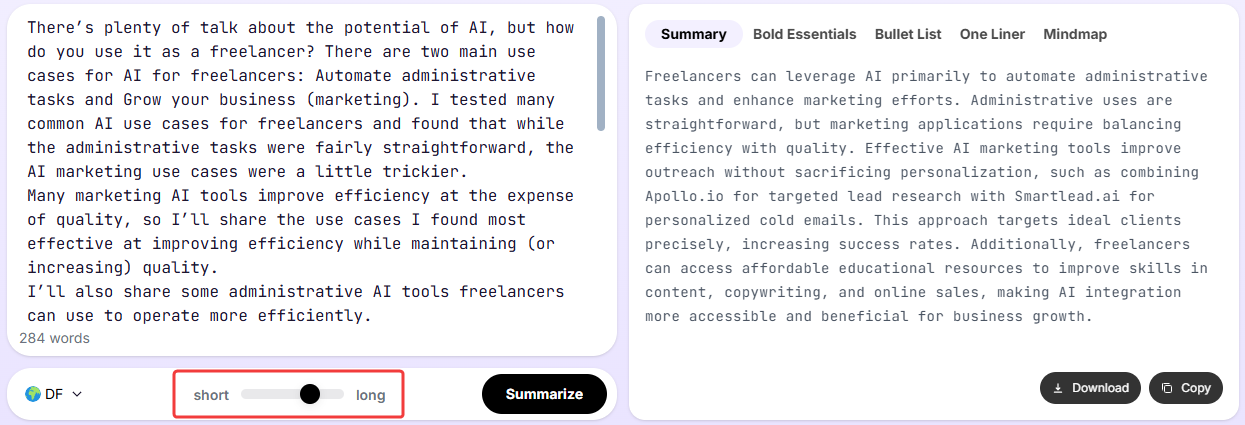
-
Extremely Simple to Use: Imagine you just want to summarize one single article quickly. Usually, new AI tools make you jump through a dozen hoops first. You have to give them your email address. You have to create a password. You have to verify your account. Then you have to learn how to use their complicated dashboard. By the time you do all that, you could have just read the article yourself. SMMRY changes this completely. It is beautifully simple and totally straightforward. It has a very basic design with zero distractions. You do not need to create an account. You do not need to log in. You just open the web page, paste your heavy text or drop your link into the big box, and hit the button. It is incredibly fast and built purely for getting the job done without any headaches.
Pricing
SMMRY is completely free to use for your everyday reading and summarization directly on their website. If you are a student or a heavy user who needs to process unlimited articles every single day, their paid plans start at $13 per month.
Get the Tool
Ready to cut out the fluff? You can try SMMRY for free instantly on their website.
Which Tool Should You Pick?
Let's make this easy. You do not need to use all five tools. You just need the one that fits your daily life.
- Choose Scholarcy if you are a student reading giant, heavy science papers.
- Choose Recall if you want to save all your online summaries in one neat, smart library.
- Choose NotebookLM if you need a safe expert to read only your private uploaded files.
- Choose SMMRY if you are in a massive rush and just want to paste text to cut out the fluff.
- Choose Jetwriter AI if you want a fast, everyday assistant. It lives right in your browser. It summarizes your emails and web pages instantly, without ever making you switch tabs.
Conclusion
We all have way too much to read every single day. But you do not have to spend hours staring at long screens anymore.
AI tools give you your time back. They do the hard work for you. They read the boring stuff. They find the main points. They let you finish your work faster so you can close your laptop and actually enjoy your evening.
You finally have a choice. You can keep reading every single word and stay late at the office. Or, you can let a smart tool read it for you. Pick the one that fits your day best. Give it a try and you will be amazed at how much time you save. You will never want to read the old way again.
Frequently Asked Questions (FAQ)
Are AI summaries actually accurate?
Yes, they are usually very accurate. But they are not perfect. Think of AI like a smart intern who does a great job but still needs a quick check on big projects. Always double-check the facts if you are reading a serious legal contract or medical report.
Do AI summarizers copy the exact text or write brand new sentences?
It depends on the tool you use. Older tools just copied sentences and pasted them together. But modern tools like Jetwriter AI read the whole text and write brand new sentences for you. It feels exactly like a real person read the article and is telling you the main ideas.
Is it safe to put my private documents into an AI tool?
It really depends on the tool you pick. Many free websites save your text to teach their smart brains, which is bad for work emails. But secure tools, like Jetwriter AI, lock your data down completely. Your private files are never saved or used to train the machine.
Do these AI reading tools work in different languages?
Yes, they absolutely do! You might get a long email or report from a client in Spanish or French. You can just feed the foreign text directly into your tool and ask for an English summary. It breaks down language barriers with one simple click.