Ever spend way too much time staring at a sentence? You write it. You erase it. You write it again. But it still feels clunky.
Have you ever read your own email and thought, "Wow, I sound like a robot?" You are not alone. We have all been there. It is not a good look.
If you write emails, blog posts, or messages every day, you know exactly how this feels. This blog is for you. It is for content writers, marketers, students, and business owners. It is for anyone who wants to make their writing clearer and easier to read.
Maybe you want to improve your tone. Maybe you want to avoid repeating the same words over and over. Or maybe you just want to say the same idea in a better way without losing the meaning.
In this blog, we will look at the top 5 tools. They will help you rewrite faster and sound more natural.
Why Use an AI Paraphrasing Tool?
Let's keep it simple. Why do you need one of these tools?
- It saves time. You do not have to spend hours editing a rough draft.
- It fixes awkward sentences. You know those clunky sentences that make no sense? It fixes them instantly.
- It finds the perfect word. We all get stuck. These tools suggest the right word when your brain goes completely blank.
Think of it like having a smart friend sit next to you to check your work before you hit "send."
The Top 5 AI Paraphrasing Tools
We all use AI tools now. But not all of them are built for the same job. Let's look at five tools that try to fix your writing problems.
Jetwriter AI
Jetwriter AI is a seamless assistant. It is a powerful browser extension that sits quietly where you work. You never have to leave your page to use it. It is perfect for content writers, copywriters, marketers, and students. It is also great for professionals and business owners. Basically, if you rewrite emails, social media posts, articles, or quick messages every single day, this tool is for you. You want fast, high-quality help right where you work. Jetwriter gives you exactly that.
Key Features
-
Fix Bad Sentences Fast: This tool is very smart. Sometimes you type something and it just feels wrong. Maybe it sounds odd when you read it out loud. Jetwriter AI is there to help. You just select a single sentence or a whole paragraph. Then, you click one button to rewrite it. Your writing is clear and easy to read right away.
-
Works Where You Work: It lives right inside your browser. Think about how annoying it is to open a new tab just to fix a word. You do not have to copy your text. You do not have to paste it somewhere else. It is right there inside Gmail or Outlook when you write an email. It works smoothly when you message people on LinkedIn. It even works perfectly inside Freshdesk to help you reply to customer support tickets in seconds.
-
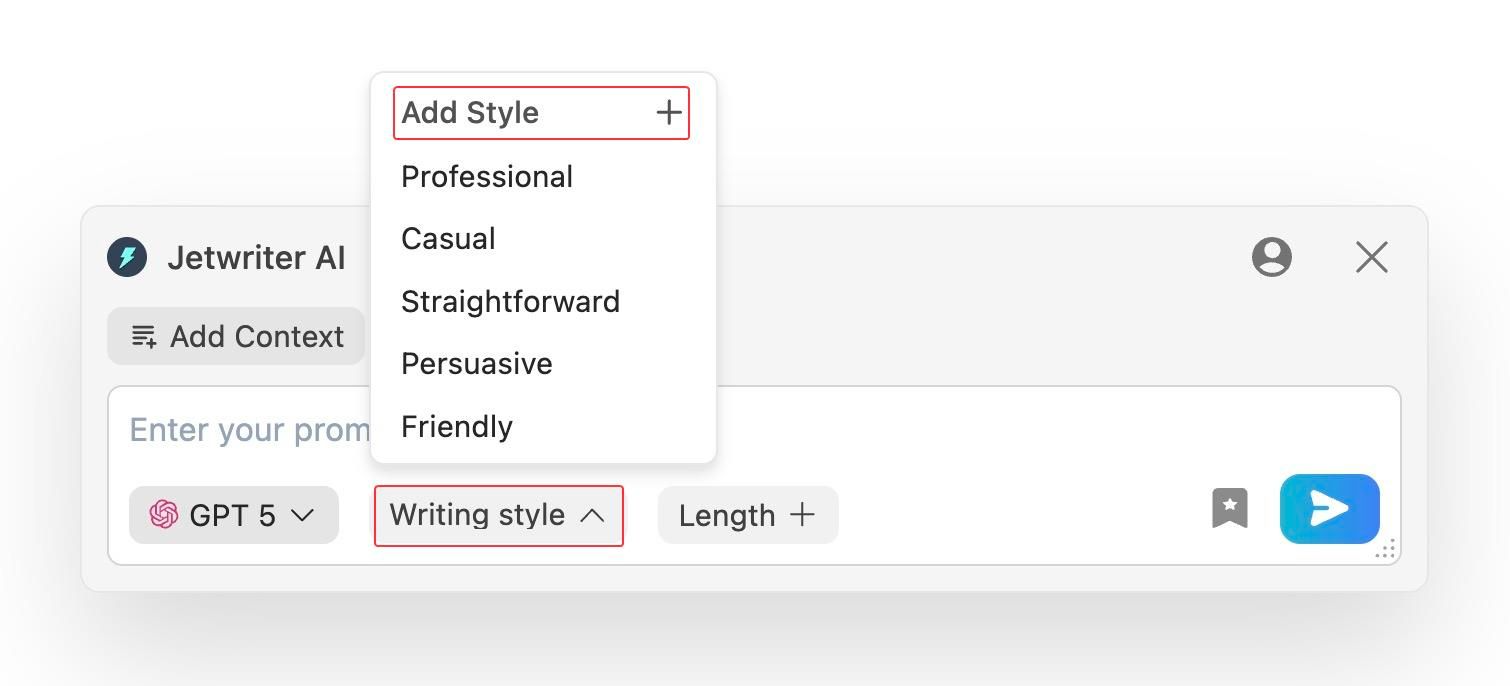
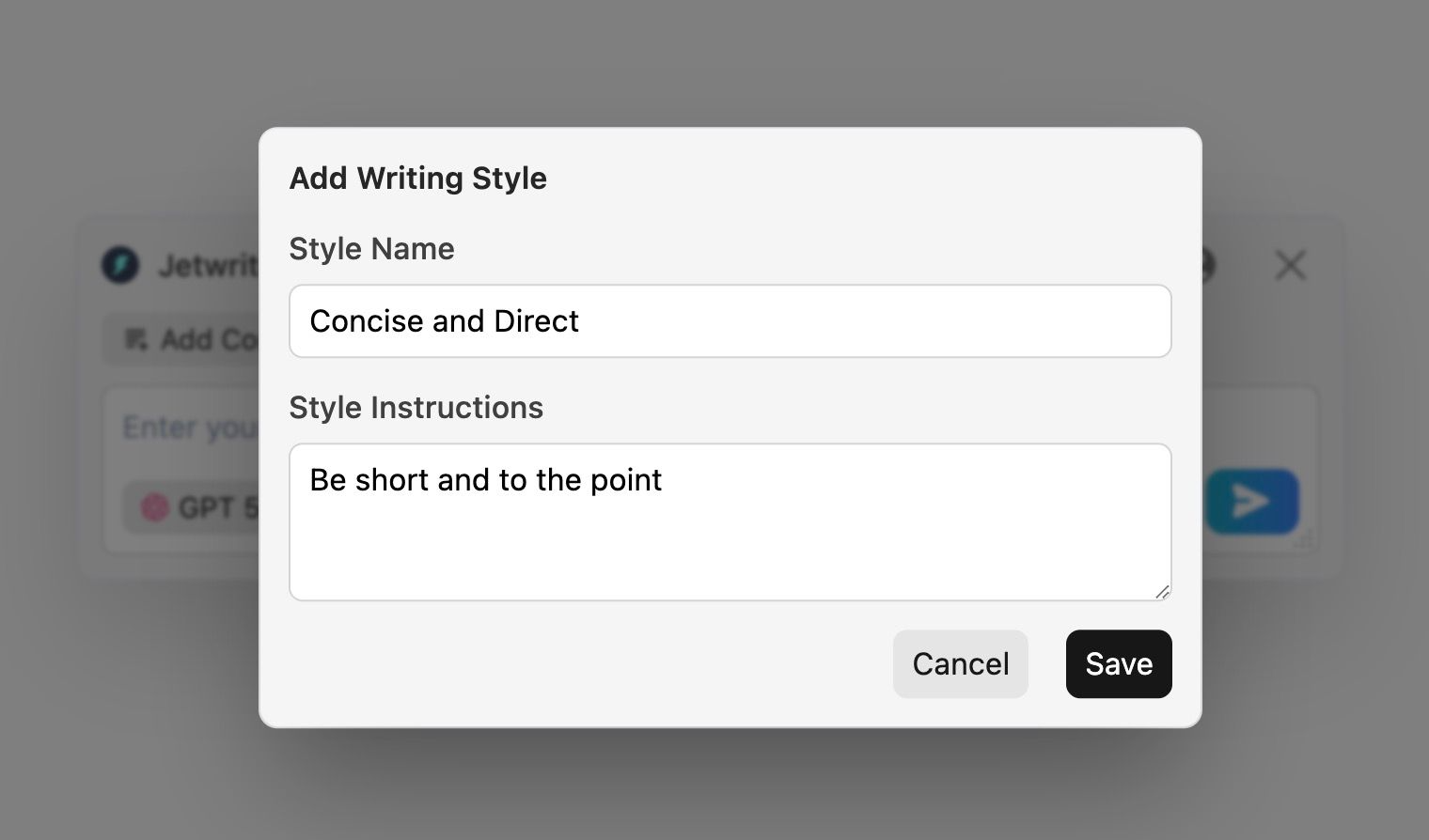
Personalized Styles: Most AI tools sound like a boring robot. You can spot them a mile away. Jetwriter AI is different. It actually learns how you talk in real life. You can set up custom tones for different people. For example, you can create a "Concise & Direct" style for emailing your boss. Then, you can switch to a "Fun Marketer" style for your social media posts.
-
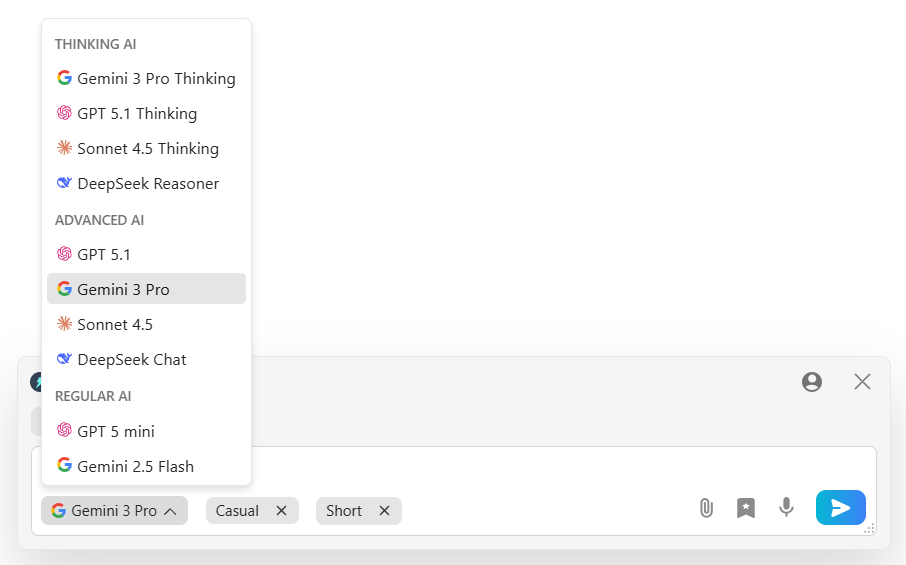
Smart, Quick & Secure: You are not stuck with just one AI. You can easily switch between top AI models like GPT-5.1, Gemini 3 Pro, or Claude to get the perfect rewrite. The tool is super light. (under 1MB). It will not slow down your computer. It keeps your data safe. Your private info stays with you. It is never used to teach the AI.
Pricing
You can start using Jetwriter AI for free. If you use it often, there are affordable paid plans available. You can even plug in your own API key.
Get the Tool
Ready to write better? You can add Jetwriter AI extension to your Chrome or Edge browsers.
Quillbot
Quillbot is a classic tool. It is a very popular app and browser extension that helps you fix your text fast. You can paste your words on their website. Or, you can use the extension right where you type. It is perfect for everyday writers, students, and bloggers. It is also great for people who want to change their writing tone. Basically, if you want a fast and easy way to change how your sentence sounds, this tool is for you. You want quick help to fix your draft. Quillbot gives you exactly that.
Key Features
-
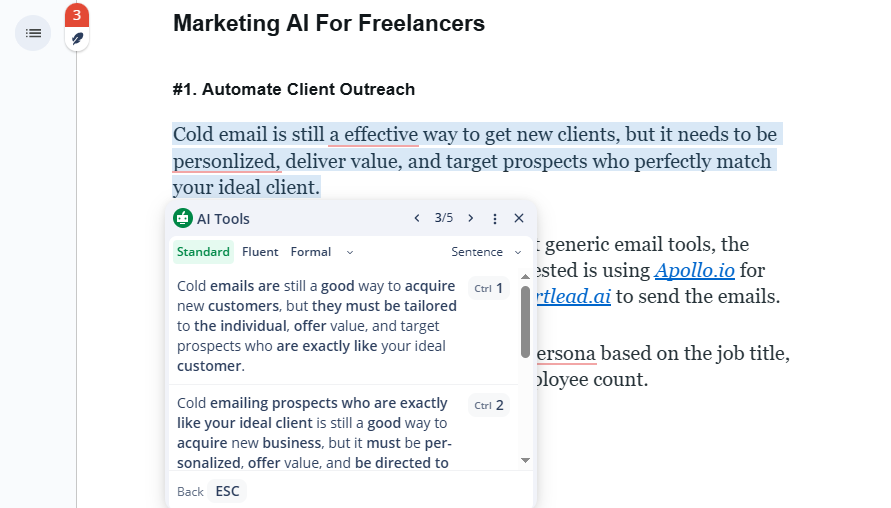
Click to Change: You are not stuck with the words it picks. If you do not like a paragraph or a sentence, just click on it. Multiple ways to say the same will pop up. You just pick the best one from the list. It is very easy to use. It helps you find the perfect sentence every single time.
-
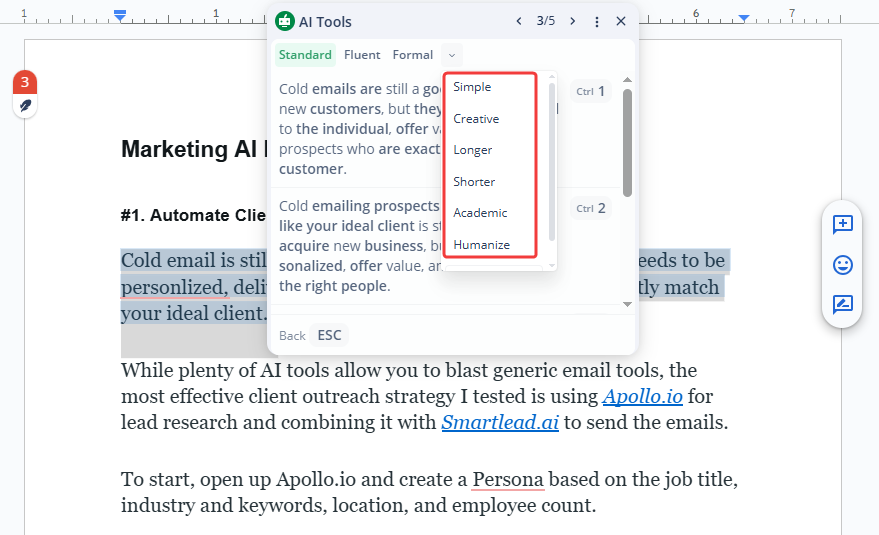
Multiple Rewrite Modes: This tool gives you choices. You can click a button to change your tone. You can make it sound "Formal" for work. You can make it "Creative" for a story. It changes the words with just one click. Your writing fits any situation right away.
-
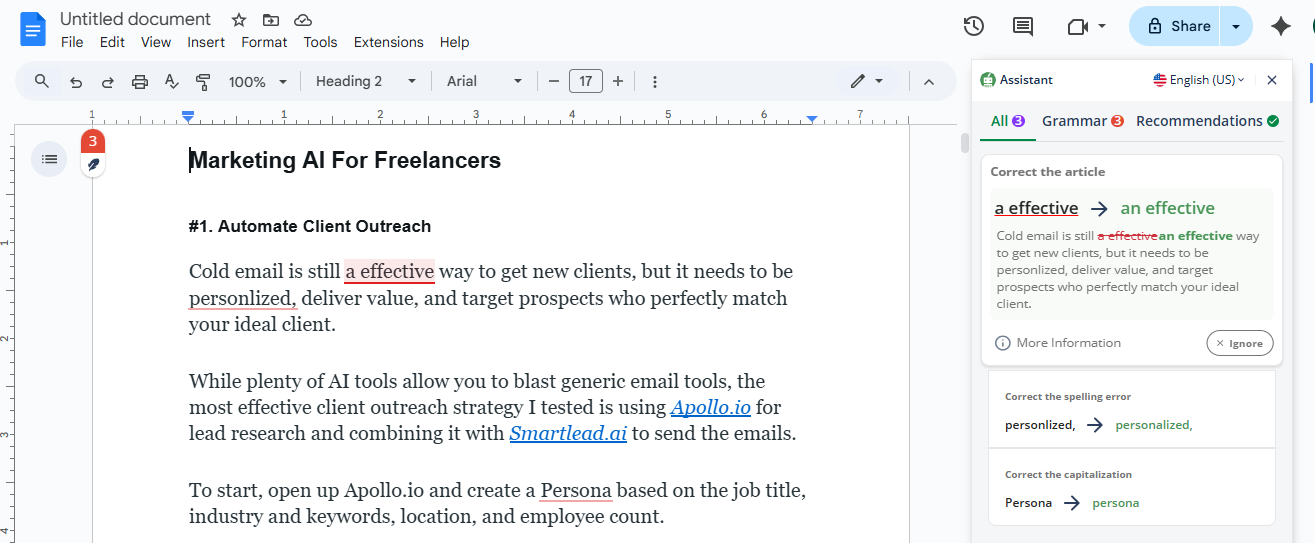
All-in-One Editor: It does more than just rewrite. It has a built-in grammar checker. It fixes spelling mistakes for you. It also has a tool to make long articles shorter. Think about how annoying it is to read a long report. You do not have to read the whole thing. It gives you a quick summary. It also checks your text to make sure it is not copied from anywhere else.
Pricing
Quillbot offers a free basic plan to get you started. For unlimited words, paid plans start at around $4 per month.
Get the Tool
You can use Quillbot on their main website. You can also add their extension to your Chrome, Edge, or Safari browser.
Smodin
Smodin is a smart helper. It has a powerful website and a Chrome extension that writes and rewrites text for you. You can use it on their web page or right in your browser. It is perfect for global writers, students, and content creators. It is also great for people who write in different languages. Basically, if you want your AI text to sound like a real person wrote it, this tool is for you. You want human-like text in many languages. Smodin gives you exactly that.
Key Features
-
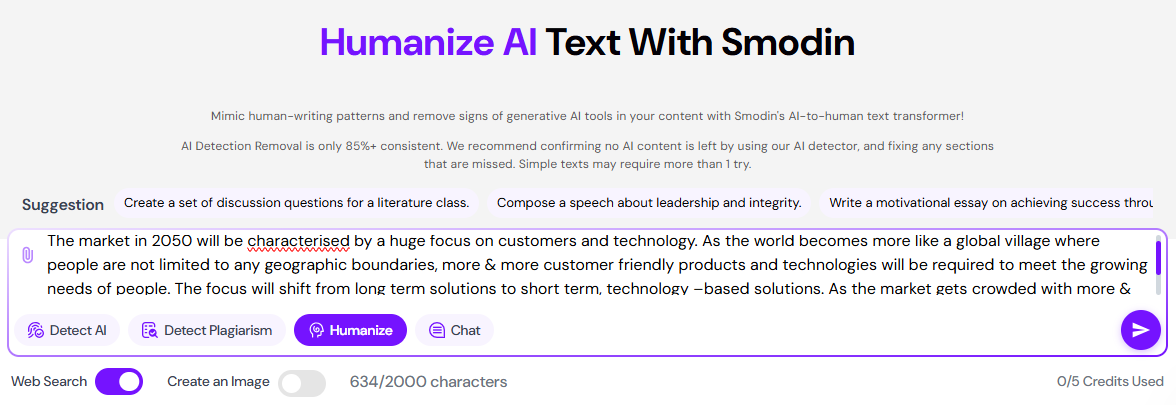
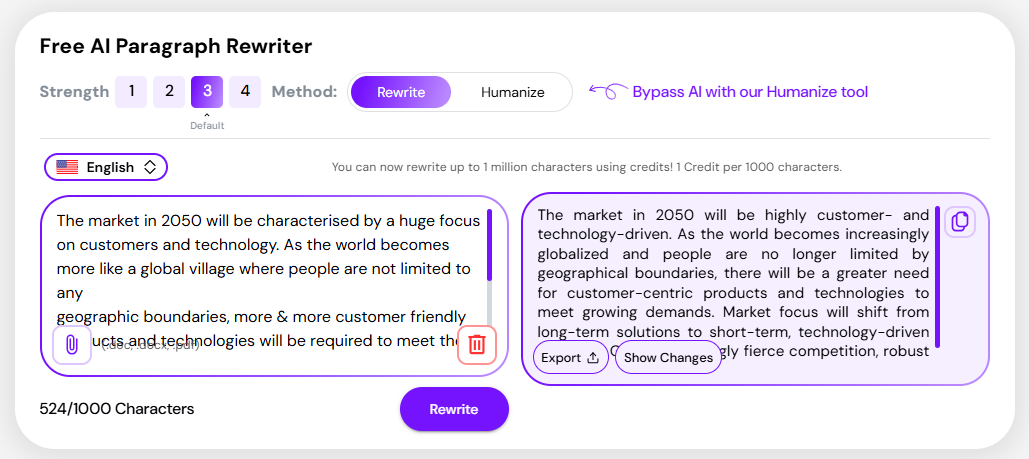
Makes Text Human: This tool fixes robotic text. Sometimes AI text sounds very boring and fake. Maybe it uses weird words. Smodin is there to help. You just put your text in. Then, you click a button to make it sound human. Your writing sounds real and natural right away.
-
Supports Many Languages: It is built for the whole world. Think about how hard it is to write in a new language. You do not have to struggle anymore. You can rewrite your text in over 100 languages. It is right there to help you translate and fix grammar. It works smoothly for Spanish, French, and many more. It even checks for copied text in all those languages to keep your work safe.
-
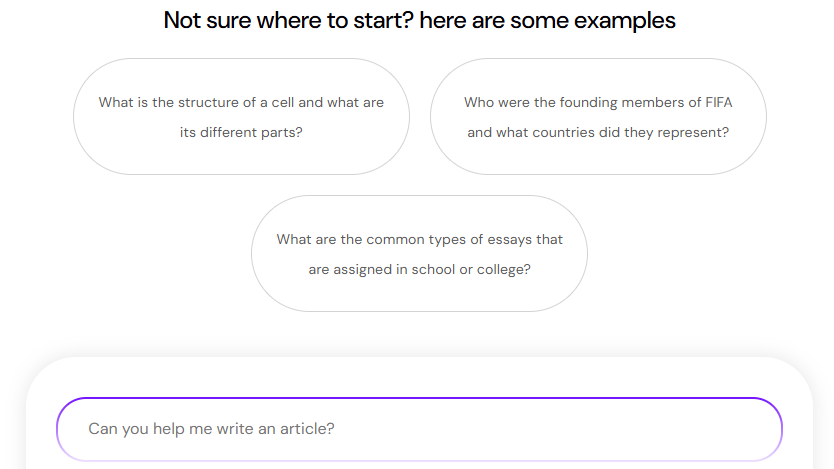
Built-in Chat: You are not just rewriting text. You can actually talk to the AI. Do you need help with research? Just ask it a question. Do you need a new idea for a blog post? Just type it in. The chat gives you quick answers. It helps you brainstorm and get more work done fast.
Pricing
Smodin offers a free plan with limited daily credits to get you started. For more power, paid plans start at $12.99 per month.
Get the Tool
You can try Smodin AI on their main website. You can also add their extension to your Chrome browser.
Paperpal
Paperpal is a strict specialist. It is an editing tool made just for serious writing. You can use it on the web, in Microsoft Word, or add its Chrome extension to your browser. It is perfect for students, researchers, and teachers. It is also great for scientists and book authors. Basically, if you write formal essays, school reports, or heavy academic papers, this tool is for you. You want your work to look smart and professional. Paperpal gives you exactly that.
Key Features
-
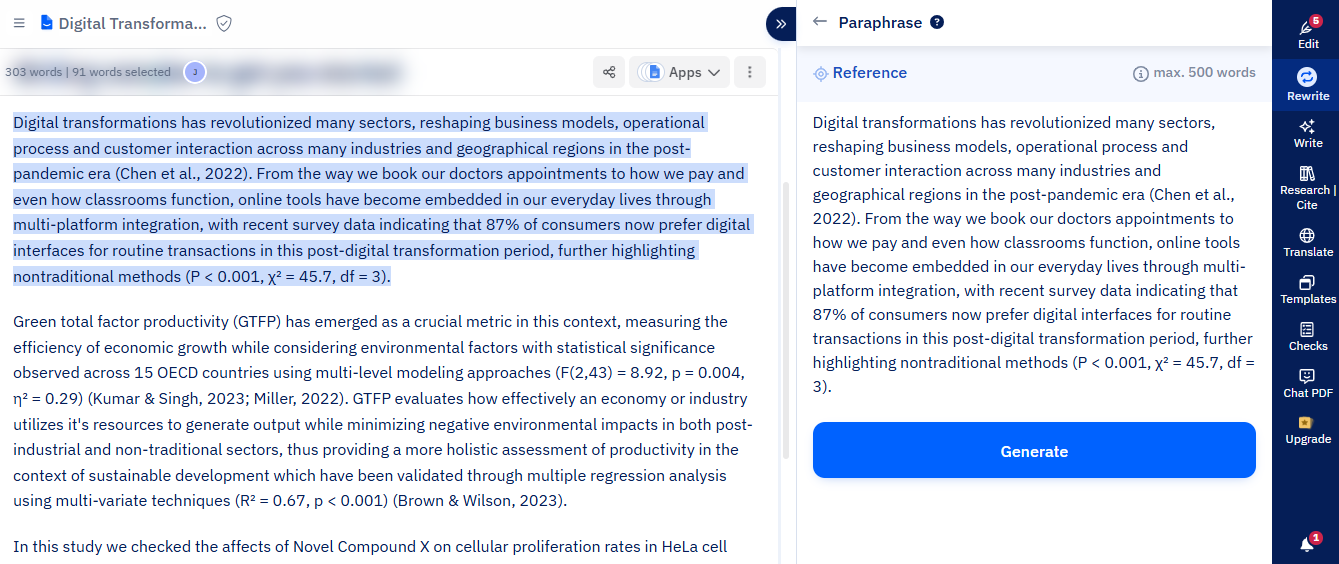
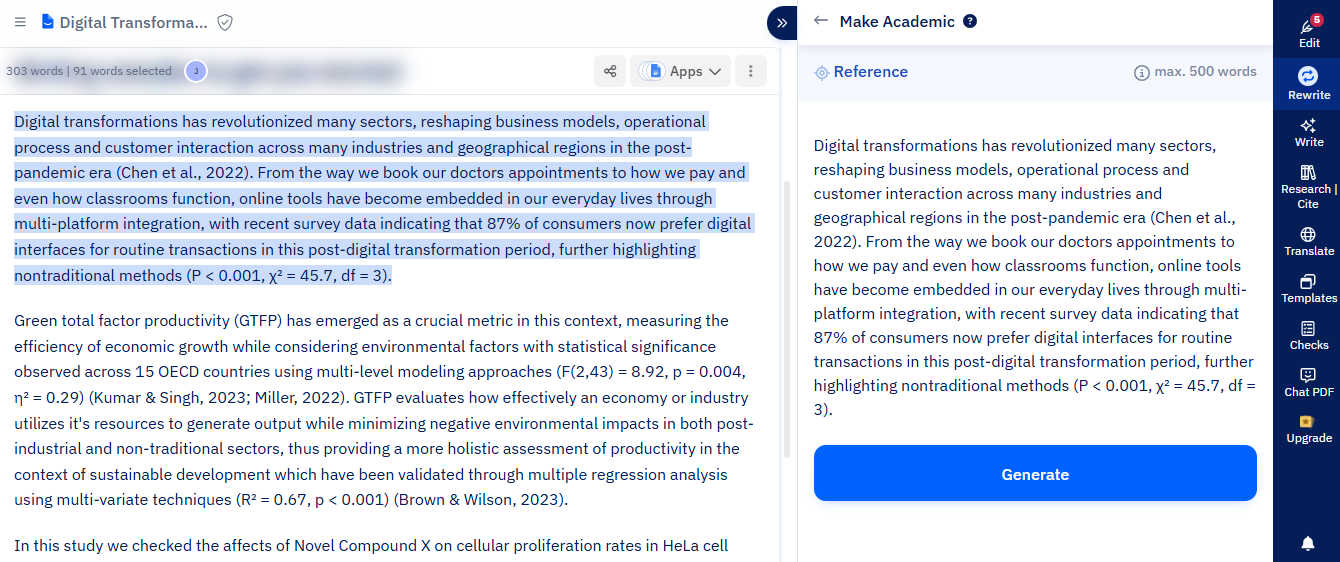
Safe for Science: This tool is very careful. Sometimes you use big science words or important math numbers. A normal AI might delete them. Paperpal is there to help. It rewrites your text but leaves the important facts alone. It keeps your citations safe. Your formal writing stays accurate and clear right away.
-
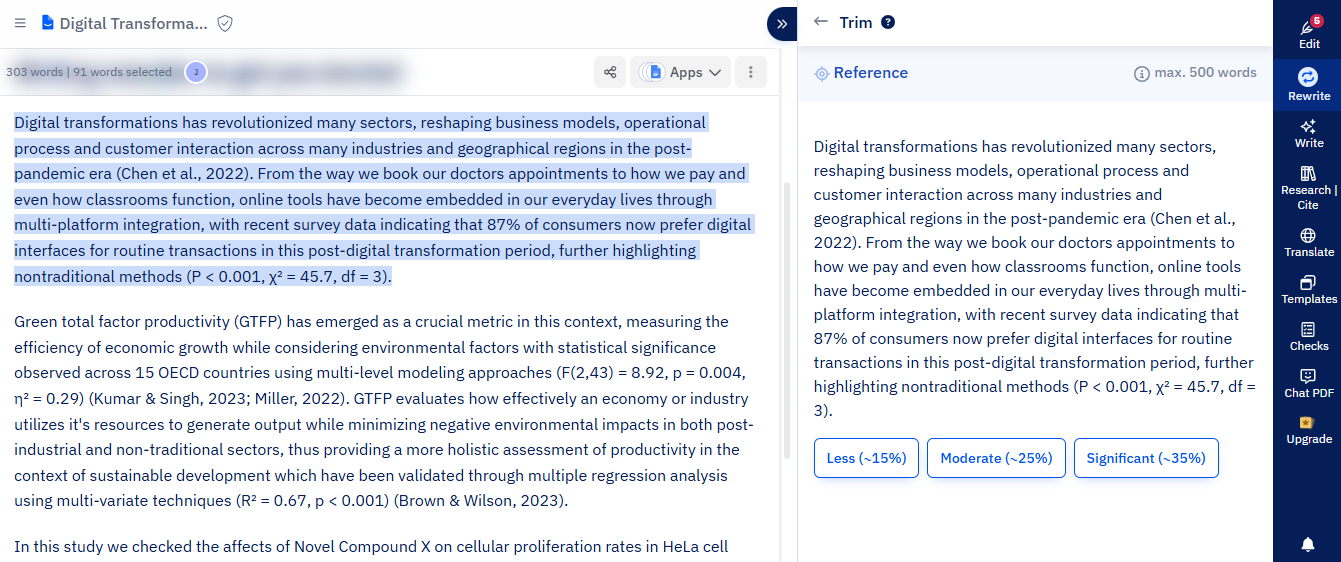
Smart Word Cutting: It helps you meet word limits. Think about how hard it is to make a long essay shorter. You do not have to delete your good ideas. You do not have to ruin your story. Paperpal trims the extra words for you. It cuts down the word count by up to 25 percent. It works smoothly to keep your main point strong. It is always there to help you save space.
-
Academic Tone Check: You are not going to sound too casual. It checks your words to make sure they fit in a school paper. Do you have a weak sentence? It fixes it. Does it sound too friendly? It makes it formal. It suggests the exact words that professors like to read. It makes your paper look great.
Pricing
Paperpal offers a free basic plan with limited monthly credits. For full access, the paid premium plan starts at $25 per month.
Get the Tool
You can use Paperpal on their website, add it to Word, or get their Chrome extension.
ParaphrasingTool AI
ParaphrasingTool AI is a flexible creator. It is a web tool packed with many different writing features. You just visit their site to use it. It is perfect for content creators, bloggers, and marketers. It is also great for people who work with audio or images. Basically, if you need to rewrite text from a picture or a voice note, this tool is for you. You want lots of ways to fix your content. ParaphrasingTool gives you exactly that.
Key Features
-
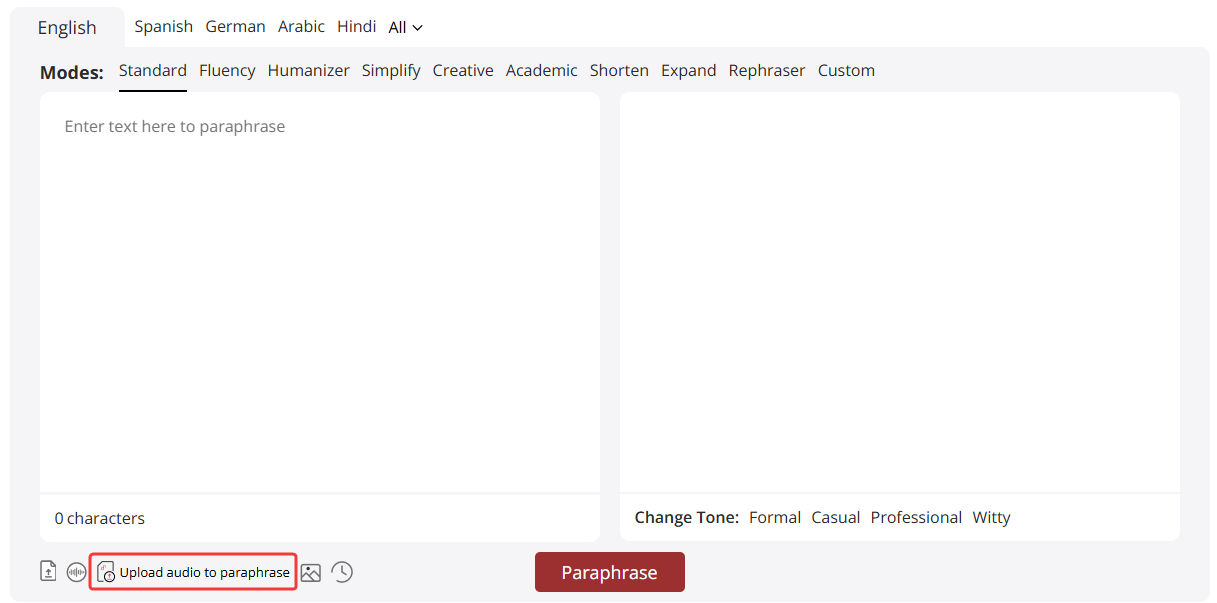
Audio and Image Text: This tool is very unique. Sometimes you have text trapped in a picture. Maybe you have a quick voice note. ParaphrasingTool AI is there to help. You just upload your image or audio file. Then, it reads it and rewrites it for you. Your new text is ready to use right away.
-
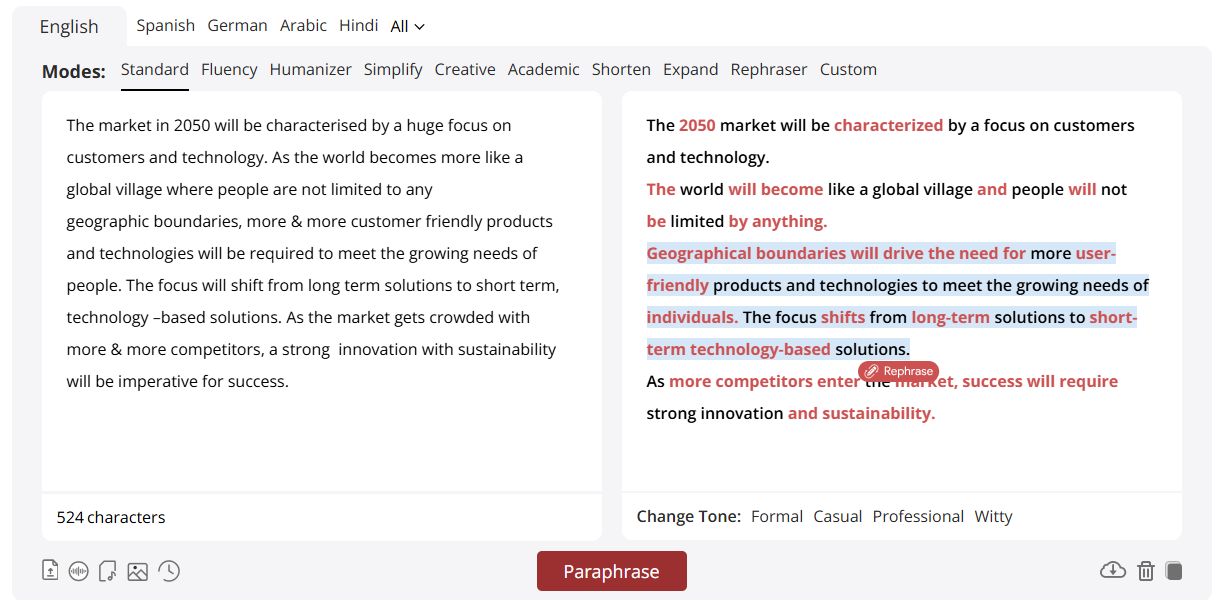
Sentence by Sentence: It gives you full control. Think about how annoying it is to rewrite a whole page when only one line is bad. You do not have to change everything. You do not have to lose your good work. You just tap on one single sentence. It gives you five new ways to say it. It works smoothly to let you pick the best version. It is always there to help you edit fast.
-
Web Search Inside: You do not need to leave the page to check facts. It has a built-in search tool. Do you need a quick fact for your blog? Just search for it right there. It finds the answer and helps you write it down. It keeps your focus on one single page.
Pricing
ParaphrasingTool AI offers a free version with three writing styles. For all styles and longer text, paid plans start at $5 per month.
Get the Tool
You can find ParaphrasingTool AI on their main website.
Conclusion
So, let's decide. Which tool is the best? It really depends on your daily job.
Do you write academic essays? Try Paperpal. Do you just need to change a few words in a paragraph? Use Quillbot.
But what if your job is writing endless emails, messages, and reports every single day? You need a specialist tool. Jetwriter AI gives you the best daily experience.
It saves you time. It stops you from playing hide-and-seek with your browser tabs. It makes sure you always sound exactly like yourself.
Frequently Asked Questions (FAQ)
Is using an AI paraphrasing tool considered plagiarism?
It is fine if you use the tool to fix your own messy drafts. But if you copy someone else's work and rewrite it with AI, that is stealing. Always give credit if the original idea is not yours.
Will Google punish my website if I use AI to rewrite my blog posts?
Google does not punish websites for using AI, but it does punish bad writing. If you use AI to polish your own great ideas, you are completely safe. Google rewards helpful content no matter what tools you used to edit it.
How is an AI paraphraser different from a basic grammar checker?
A basic grammar checker just looks for spelling mistakes and missed commas. An AI paraphraser acts like a smart co-writer that actually changes the words and sentence order. It makes your writing flow better and helps you find the perfect tone.
Is it safe to put private work emails into an AI rewriting tool?
Many free web tools save your private text and use it to teach their AI. You should always use a safe tool like Jetwriter AI to lock down your data. This keeps your company secrets safe because your text is never used to train the machine.